
Most people who buy a tokenized stock leave it on the exchange where they bought it. That is a reasonable default, and it is also a choice, whether or not anyone made it deliberately.
To withdraw GOOGLX to your own wallet on BloFin, log in, open your spot account, select GOOGLX and choose Withdraw, then enter your external wallet address, pick the matching blockchain network, set the amount, complete two-factor authentication, and wait for on-chain confirmation. For BloFin users who hold GOOGLX and want self-custody, whether active retail traders or institutional users comfortable with tokenized stocks and blockchain asset management, the mechanics take about two minutes.
What changes when you do it is more interesting than the mechanics, and less widely explained. Moving GOOGLX off the exchange gives you direct control and reduces exchange custody risk, but it also makes wallet compatibility, backups, destination-address checks, issuer controls, fees, timing, supported token standards, and irreversible blockchain mistakes your responsibility.
The short version
Log in to BloFin, open your spot account, find GOOGLX and select Withdraw. Paste your external wallet address, choose the blockchain network that matches it, enter an amount, confirm with two-factor authentication, and complete the withdrawal process by waiting for the transaction to confirm on-chain.
This is a crypto withdrawal to a blockchain address. It sends a token rather than money, and the far end of it is a blockchain address. Moving value to a bank means selling GOOGLX for USDT or another asset first and then using a fiat off-ramp, which is a separate process; using a crypto exchange to sell first is how users transfer money or withdraw money to a bank account, and it comes with its own verification requirements.
Two facts are worth fixing in mind before you start. A single wrong character in a destination address loses the tokens permanently, with no recovery path and no support ticket capable of undoing it. And withdrawal timing varies from a few minutes to considerably longer, depending on network conditions, confirmation times, and the exchange's own processing queue.
What self-custody changes about what you hold
While GOOGLX sits on BloFin, the exchange holds the token in its own address and credits your account internally as one of your digital assets on its internal ledger. Withdrawing moves it to an address whose private key you hold, so no intermediary stands between you and the token.
That removes one layer of risk and leaves two others in place.
GOOGLX is a Swiss-law tracker certificate issued by Backed Assets (JE) Limited under ISIN CH1436219237, and it is issued as both a Solana SPL token and an ERC-20 token (source: Backed Assets). Holding it makes you a creditor of the issuer, with voting and information rights staying with the registered shareholder. Self-custody leaves that exactly as it was. The shares behind the tokens sit with the issuer's custodian either way, and the current coverage figure is covered in is GOOGLX backed by proof of reserves.
The second layer is the one most withdrawal guides leave out, and it is covered in its own section below: the token contract itself carries issuer controls that reach into any wallet, including yours.
What self-custody genuinely gives you is independence from exchange-level risk when withdrawing crypto to your own wallet. Downtime, internal transfer delays and withdrawal pauses stop being your problem once the token is in your own address. In exchange, key management becomes entirely your responsibility, and a lost seed phrase locks the tokens permanently.
Choosing a compatible wallet
Your destination wallet has to support the exact chain and token standard you withdraw on. GOOGLX exists as an SPL token on Solana and as an ERC-20 token on EVM networks, so you need a Solana wallet for the first and a wallet compatible with the Ethereum Virtual Machine (EVM), the execution environment Ethereum and networks like it share, for the second.
The issuer describes xStocks as available natively on Ethereum, Solana, Arbitrum, Mantle, TON, Ink and other EVM-compatible networks (source: xStocks documentation). Which of those BloFin actually offers as a withdrawal route is a narrower list, and the withdrawal screen is the authority on it. Pick your wallet after you have seen which networks the dropdown gives you, rather than before.
Common options:
Hardware wallets such as Ledger or Trezor, driven through a browser interface. They keep private keys on a device that never touches the internet, which is the strongest protection against remote attacks, and they cost roughly $50 to $100.
Software wallets installed as browser extensions or mobile apps. They make DeFi access easy and they store keys on an internet-connected device, which is the trade-off.
Multisig or institutional wallets where several approvals are required to move funds, which suits larger balances and is often chosen for larger amounts because approval authority is spread across multiple parties.
Many people run both: a hardware wallet for long-term holdings and a software wallet for active on-chain use. A self-custody setup generally offers maximum security when a hardware wallet is used for long-term storage. Sending GOOGLX to an account on another exchange merely changes custodians, which defeats the purpose. For a fuller comparison, see how to choose a crypto wallet.
Step 1: Set up and back up the destination wallet
Finish wallet setup and test the backup before you withdraw anything. Blockchain transfers have no undo if you realize that you've sent your funds to the wrong address.
Install the wallet from its official source, and verify the software is authentic before you run it. Fake wallet extensions are a standing problem, and they exist to capture seed phrases.
Create the wallet and write the seed phrase on paper. Keep it out of cloud notes, screenshots, email and chat, all of which are readable by anyone who gets into the account holding them.
Store the paper backup in two separate physical locations, so that one fire or one burglary does not end the matter.
Set a strong password or PIN on the app itself, ideally generated and held in a password manager. Before moving funds, enable two factor authentication on the wallet account or any connected exchange account.
Then test the backup properly, which most people skip. Send a small amount of a cheap token to the new wallet, then wipe the wallet and restore it from the seed phrase on a second device. A backup you have restored from is a backup, and one you have only written down is a hypothesis.
Step 2: Find and verify the receiving wallet address
Open the wallet and find the receiving address for the network you intend to use. An Ethereum or other EVM address begins with "0x" and can receive any ERC-20 token including GOOGLX. A Solana address is a longer base58 string with no prefix.
Use the wallet's copy button rather than typing anything by hand. Once the address is pasted into BloFin's withdrawal form, double check the recipient's address by comparing the first four and last four characters against what the wallet displays. Clipboard-hijacking malware exists specifically to swap an address after you copy it, and that visual check is what catches it.
Address and network have to match each other. An ERC-20 token sent to a Solana address, or the reverse, is gone. GOOGLX uses a plain address with no destination tag or memo, so the only two variables are the address and the network dropdown. Address matching is walked through in more detail in how to send and receive crypto.
If you expect to withdraw repeatedly, save the address to BloFin's withdrawal whitelist. It removes the copy-paste step from every future withdrawal, helps with legitimate withdrawals, and reduces common mistakes on repeat transfers, which is where the risk actually lives.
Step 3: Start the withdrawal on BloFin
Log in to your BloFin account and hover your cursor over the Assets tab. Then, click Withdraw.
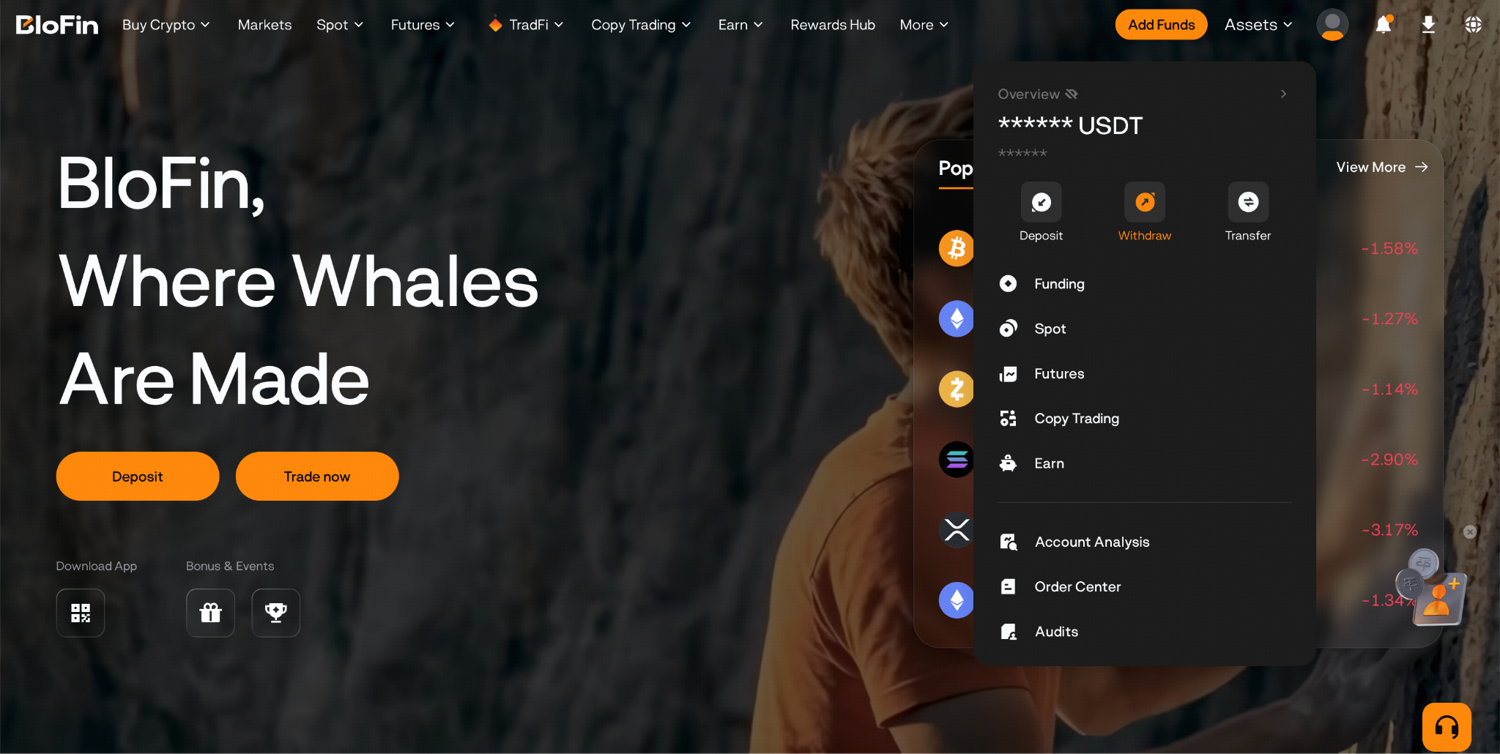
Search for GOOGLX in the search field and paste the address of your destination wallet. Choose the correct network and indicate the amount you would like to withdraw.
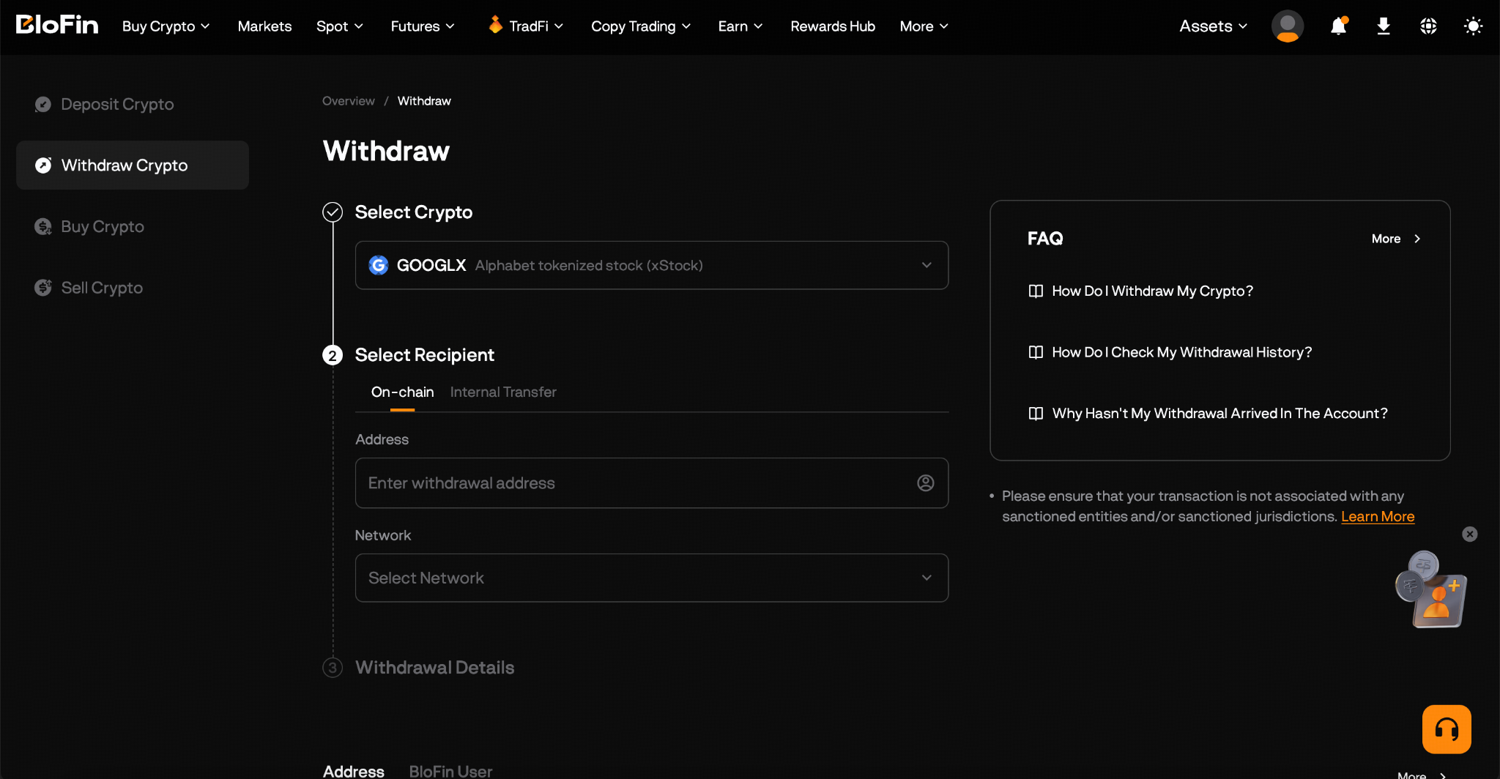
Please note that a minimum withdrawal amount applies, and a balance below it will not process. Check the fee and the minimum on the screen itself rather than relying on any figure published elsewhere, including this page, since both change with network conditions and platform policy. Some assets can exist on multiple blockchains, so the selected network must match the destination wallet exactly.
For a first transfer, send a small test amount, confirm it arrives, and only then move the rest. That costs one extra network fee and it is the single most effective habit in this entire process. The platform-level walkthrough is in BloFin's withdrawal guide.
Step 4: Security checks and confirmation
BloFin requires two-factor authentication for withdrawals as part of its security best practices, so expect a code from your authenticator app plus an email or SMS confirmation, particularly when the destination address is new.
Once confirmed, the withdrawal enters processing. When the transaction is broadcast, a transaction ID appears in your withdrawal history, and pasting that hash into a block explorer lets you check the transaction status independently of anything the exchange tells you.
Confirmation times depend on both the network and the exchange's internal queue. Ethereum produces blocks in seconds, so the on-chain portion is usually quick, while the internal processing step is the variable one and can extend the total considerably.
The withdrawal is finished when the transaction shows as confirmed on-chain and the balance appears in your wallet, so the safest approach is to confirm receipt in the wallet and on-chain before treating it as complete. If the tokens arrive but stay invisible, the wallet simply has no entry for GOOGLX yet, and adding it as a custom token with the verified contract address fixes the display.
If two-factor authentication issues block access, contact support for more help before retrying withdrawals.
How to verify the real GOOGLX contract
Before using GOOGLX anywhere on-chain, confirm you hold the genuine token. Lookalike tokens with matching names and symbols are cheap to deploy and exist to catch exactly this moment.
As read on September 10, 2026, the official addresses are:
Solana: XsCPL9dNWBMvFtTmwcCA5v3xWPSMEBCszbQdiLLq6aN, a Token-2022 mint carrying the name "Alphabet xStock" and the symbol GOOGLx, with 8 decimals.
Ethereum: 0xe92f673ca36c5e2efd2de7628f815f84807e803f.
Verify rather than trust, including this page. The procedure has three steps:
Read the contract address from the issuer's own product page for the Alphabet xStock, which is the authoritative source.
Cross-check it against BloFin's asset information page for GOOGLX.
Paste it into a block explorer and confirm the token name, symbol and decimals match, and that the deployer is the issuer.
When all three agree, add the token to your wallet manually using that address. A GOOGLX balance that appeared in your wallet on its own, before you added the verified contract, deserves suspicion rather than a transaction. Lookalike deployments are a recognized category of crypto scam, and unsolicited token balances are a common opening move.
Issuer controls that follow the token into your wallet
This is the part that shapes what self-custody of GOOGLX actually means, and it can be read directly from the blockchain by anyone.
GOOGLX on Solana is a Token-2022 mint, a standard that supports configurable authorities. Reading its live configuration on September 10, 2026 shows several that stay active whichever wallet holds the token:
A permanent delegate. A designated address can transfer or burn GOOGLX from any account holding it, without the holder's signature. This is the strongest control on the list, and it reaches into a self-custody wallet exactly as it reaches into an exchange's.
A freeze authority. Individual token accounts can be frozen, which leaves the balance visible and immovable.
A global pause. The mint carries a pausable configuration that can halt transfers of the token across the network. As read, it was set to unpaused.
A multiplier. The mint uses a scaled balance whose multiplier steps up on a schedule, which is the mechanism that delivers corporate actions such as dividends and splits. The most recent step took effect on September 4, 2026, and it matches Alphabet's dividend cycle.
A transfer hook authority, which allows custom logic to be attached to transfers. No hook program was attached at the time of reading.
Controls of this kind are standard among regulated tokenized securities, where they are typically a condition of the legal structure rather than an afterthought. They do make one common assumption wrong. Withdrawing GOOGLX to your own wallet gives you blockchain custody and control of the key. It stops short of the unilateral control that self-custody implies for a token like ether, and anyone choosing self-custody specifically to escape issuer discretion should understand that it survives the withdrawal.
These controls sit at the token level and are separate from exchange-level measures. Redemption windows, minimum redemption sizes and eligibility by region are set by the issuer as well, and are worth reading before you rely on being able to redeem. What GOOGLX represents in legal terms is set out in what is tokenized Alphabet.
What you can do with GOOGLX on-chain
Once GOOGLX is in a wallet you control, protocols that support it become available. Typical uses:
Supplying GOOGLX as collateral in a lending protocol to borrow stablecoins against it.
Providing liquidity in a GOOGLX pair on a decentralized exchange that lists one.
Simply holding it in a portfolio alongside other tokenized equities.
All of it depends on third-party protocols, on integrations that exist for some tokens and not others, and on what is permitted where you live. Those protocols sit outside BloFin's control entirely.
The risks stack rather than replace each other. On-chain use adds smart contract risk and, for liquidity provision, impermanent loss, on top of the issuer and market risk you already hold. Liquidity in tokenized equity pairs is often thin, so slippage on a moderate order can be larger than the same order would face on the exchange. Read a protocol's documentation and audits before depositing.
Plenty of holders want none of this. If you hold GOOGLX for exposure to Alphabet, keeping it in your own wallet and doing nothing else with it is a complete strategy. Traders who want leverage instead of on-chain utility are generally better served by the perpetual, compared directly in GOOGLX versus the GOOGL perpetual.
Withdrawal fees, limits and timing
A GOOGLX withdrawal process has two costs: a platform withdrawal fee set by BloFin, and a network fee paid to the blockchain. Both move, and the withdrawal screen shows the current figures for the network you selected.
Network cost is the one that varies most. On the Ethereum network, fees rise sharply when the network is busy and fall when it is quiet, which is why the same withdrawal can cost very different amounts on two consecutive days. Solana transfers are consistently inexpensive by comparison. If you have a choice of networks, that difference is usually the deciding factor for a routine transfer, alongside where you actually intend to use the token.
Total time is the exchange's internal processing plus on-chain confirmation, and the on-chain part depends on blockchain confirmation times.
For a large balance, consider splitting the withdrawal into tranches. It caps your exposure to a single mistake, confirms the destination works before the bulk moves, and gives you a second chance to notice a network fee spike.
What to check before you confirm
Withdrawals are irreversible. Once a transaction confirms on-chain it stands permanently, which puts all the value in checking beforehand.
Worth doing every time:
Keep two-factor authentication enabled on the exchange account.
Use the withdrawal address whitelist, so only pre-approved addresses can receive funds even if someone reaches your account.
Approve withdrawals on a trusted network rather than public Wi-Fi.
Check the anti-phishing code in BloFin emails, which is how you tell a real notification from a convincing fake.
The mistakes that recur with tokenized stocks specifically:
Sending to a wallet that shows only native coins. The tokens arrive safely and stay invisible until you add the contract address manually, which causes a great deal of avoidable panic.
Choosing the wrong network. Pasting a Solana address while the dropdown says Ethereum sends the tokens somewhere unrecoverable.
Confusing testnet and mainnet addresses, which sends real tokens into a network where they have no value.
Expecting a bank account or payment app to receive GOOGLX. You cannot withdraw funds there directly, because only a blockchain address can receive GOOGLX.
Confirm arrival in the wallet app and on a block explorer rather than trusting a "completed" status in your exchange history, since that status reflects what the exchange has done and not what arrived. The same habit applies whether you withdraw bitcoin, stablecoins, or GOOGLX. When anything is unclear, send a small amount first, and ask support before moving a full balance. A few minutes of checking prevents the category of loss that no support team can reverse.
Frequently asked questions
Can I withdraw GOOGLX to any crypto wallet?
Only to a wallet that supports the network you withdraw on. GOOGLX exists as a Solana SPL token and as an ERC-20 token, so a Solana wallet works for the first and any EVM-compatible wallet works for the second. The wallet also needs to display custom tokens, which most do once you add the contract address. What it cannot be is a bank account, a payment app or an address on an unrelated chain such as Bitcoin. For example, a linked bank account is not a valid destination for this kind of withdrawal.
Does withdrawing GOOGLX make me an Alphabet shareholder?
No. GOOGLX is a tracker certificate, and holding it makes you a creditor of the issuer whether it sits on an exchange or in your own wallet. Voting rights and information rights stay with the registered holder of the underlying shares. Withdrawing changes who controls the token, and it changes nothing about what the token legally represents.
Can the issuer still freeze my GOOGLX after I withdraw it?
Yes, and this is the part worth knowing before you withdraw. The Solana mint is a Token-2022 token whose live configuration includes a freeze authority, a global transfer pause and a permanent delegate that can move or burn tokens from any account without the holder's signature. Those controls apply to a self-custody wallet exactly as they apply to an exchange. Self-custody protects you from exchange risk, and it does not put the token beyond the issuer's reach.
What happens if I send GOOGLX on the wrong network?
In almost every case the tokens are unrecoverable. Sending an ERC-20 token to a Solana address, or the reverse, puts them somewhere no key you hold can reach. A confirmed blockchain transaction stands, whatever the exchange or the issuer would prefer. The defenses are matching the address type to the network dropdown, checking the first and last four characters after pasting, and sending a small test amount before the full balance.
Why does my wallet show no GOOGLX after a successful withdrawal?
Almost always because the wallet has no entry for the token yet, rather than because the transfer failed. Wallets display a default list and hide everything else until you add it. Add GOOGLX as a custom token using the verified contract address and the balance appears. Confirm the transaction on a block explorer first, so you know the tokens arrived before you start troubleshooting the display.
Is it safer to keep GOOGLX on BloFin or in my own wallet?
They are different risks rather than more and less of one, and the choice mostly depends on whether you prioritize self-custody or want an exchange to handle some account recovery and support. Leaving it on the exchange means trusting the exchange's security and availability, and it means someone else can help if you make a mistake. Holding it yourself removes that dependency and makes key management your responsibility, where a lost seed phrase is permanent. Neither choice touches issuer risk or the token-level controls described above. The right answer depends on the size of the balance, what you intend to do with it, and how confident you are in your own backups. If your goal is to withdraw cash later, you would first need to send the token to a crypto exchange, sell it for cash, and use one of that platform's withdrawal methods such as a bank transfer or wire transfer.
Researched and written by the BloFin Academy editorial team with AI-assisted drafting. All facts independently verified. Primary sources include the Backed Assets product page for the Alphabet xStock certificate structure and ISIN, the xStocks documentation for supported networks, and a direct read of the GOOGLx Solana mint at address XsCPL9dNWBMvFtTmwcCA5v3xWPSMEBCszbQdiLLq6aN on September 10, 2026 for the token's live authorities and multiplier, current as of September 2026.
Nothing in this article constitutes financial advice, and nothing in it is a recommendation to hold Alphabet in any form. Blockchain withdrawals are irreversible, and an address or network error causes permanent loss. Contract addresses, network support, fees, minimums and issuer controls change; verify every address against the issuer's own documentation and a block explorer, and check current withdrawal conditions on the platform you use before relying on them.