
On November 6, 2026, South Korean exchange GOPAX stopped trading, deposits and standard withdrawals after it received an email threatening a hack, even though no theft had happened at that point (source: Cointelegraph, November 6, 2026). Customers could still ask for withdrawals through support, but GOPAX warned that manual checks could slow them down.
Days earlier, Binance had been reopening withdrawals in stages after a theft of about $6.3 billion, starting with Bitcoin, Ether and some stablecoins (source: Al Jazeera, November 1, 2026). Episodes like these make a withdrawal feel urgent, and a rushed withdrawal is when a mismatched network or a mistyped address is easiest to miss.
Most of what decides whether your coins arrive is in your hands, though: the network, the address, the tag and the amount are all settings you choose on BloFin's withdrawal page before you confirm anything.
What is a crypto withdrawal on BloFin?
A crypto withdrawal on BloFin is a blockchain transfer from your BloFin balance to an address outside BloFin, such as your own wallet or another exchange. You choose the coin, the network and the destination address, BloFin runs its security checks, and the network fee comes out of the amount you send.
Once the transfer is confirmed on the blockchain, it can't be pulled back. Bitcoin's own documentation puts it plainly: a transaction can only be refunded by whoever receives it (source: Bitcoin.org, Some things you need to know). That is why the checks you make before you click Withdraw matter more than anything you can do afterward.
Where can you withdraw crypto from BloFin?
You can withdraw crypto from BloFin to any address on a network BloFin supports for that coin. The usual destinations are a personal wallet app such as MetaMask or Trust Wallet, a Ledger, Trezor or other hardware wallet, or another exchange's deposit address.
A personal or hardware wallet means you hold the private keys yourself, so no exchange can pause your withdrawals, but nobody can recover your coins if you lose the keys. Keeping coins on an exchange means the exchange holds the keys for you. The trade-offs between the two are set out in the guide to custodial wallets and self-custody. To use a decentralized finance app, withdraw to your own wallet first, then connect that wallet to the app.
Whichever you choose, open the receiving side first. Its deposit page tells you which networks it accepts for the coin, and whether it needs a memo or tag as well as an address.
What you need before you withdraw from BloFin
Before you withdraw from BloFin, put four things in place. Your coins must sit in an account the withdrawal page can draw from, and you need the receiving address and network from the destination, two-factor authentication turned on, and an amount inside your daily limit. Sorting these out first stops a withdrawal from failing halfway through the steps.
The account your coins sit in. The withdrawal page lets you choose which balance to send from, and that list covers your Funding Account, your Spot Account and flexible Earn balances. Coins in a futures account have to come out first, through Assets, then Overview and Transfer.
The receiving details. Copy the address, network and any memo or tag from the receiving platform's deposit page, not from an old message, a screenshot or your transaction history.
Security verification. BloFin asks for verification codes when you submit, so set up Google Authenticator or a passkey in your account's security settings beforehand. The BloFin account security guide walks through both.
Your limit. How much you can withdraw in 24 hours depends on your identity verification level, and the withdrawal page shows your limit before you send.
How to withdraw crypto from BloFin
To withdraw crypto from BloFin on the web, you open the withdrawal page from the Assets menu, pick the coin and network, enter the destination address and amount, then confirm with your security codes. In the app, the same page sits under Wallet, then Withdraw.
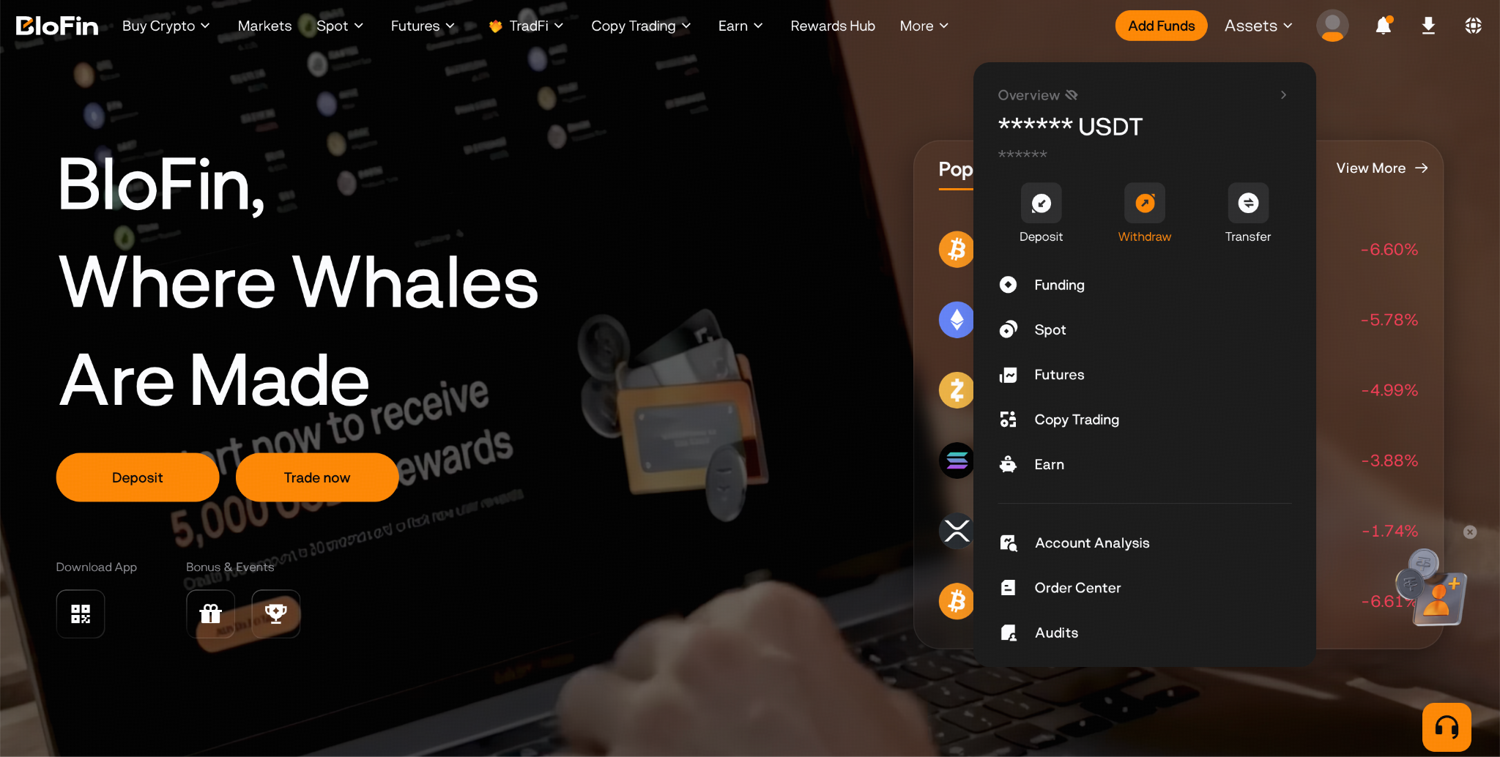
Step 1: Log in to your BloFin account and move your cursor onto Assets in the page's top right corner. Then, select Withdraw.
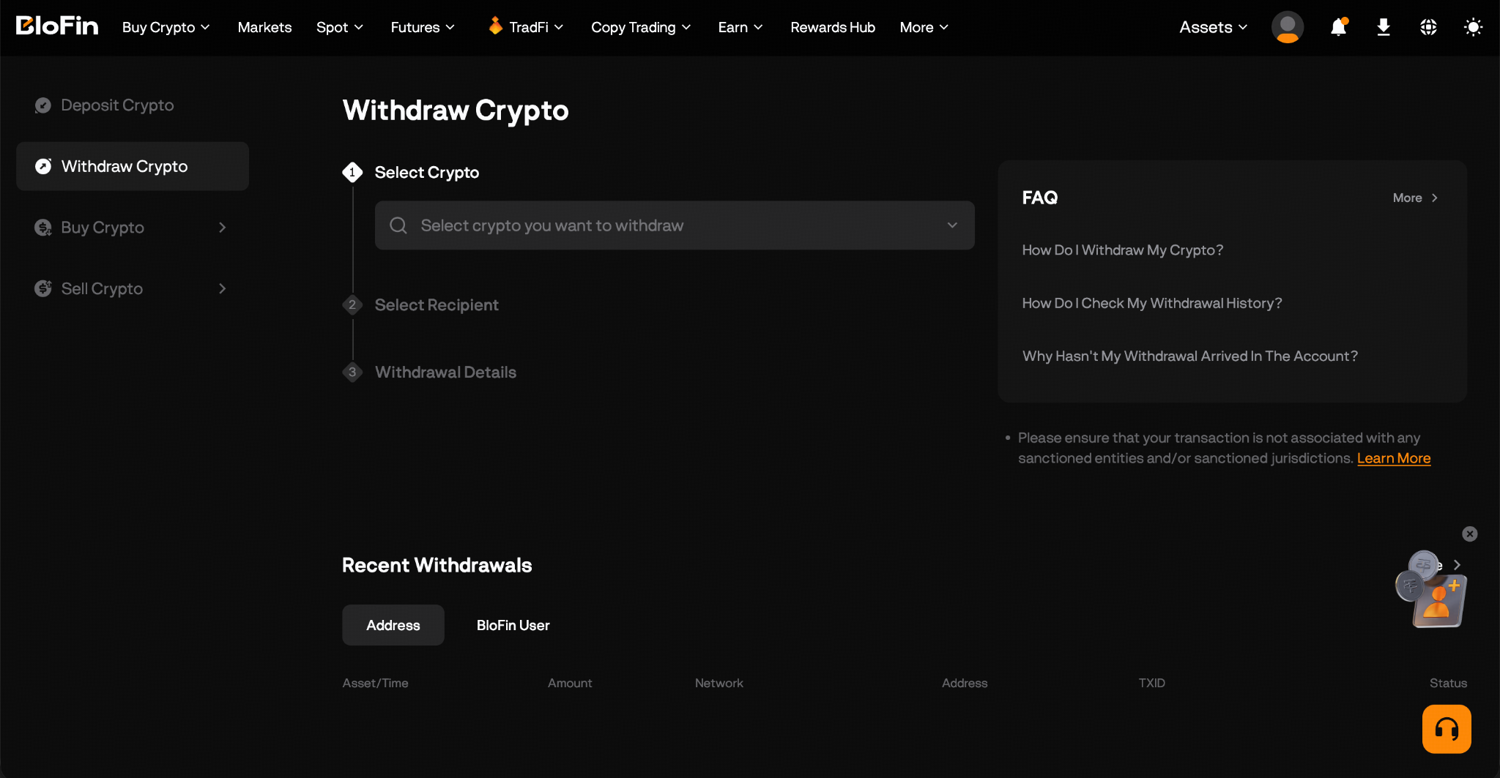
Step 2: Search for and select the cryptocurrency you want to withdraw.
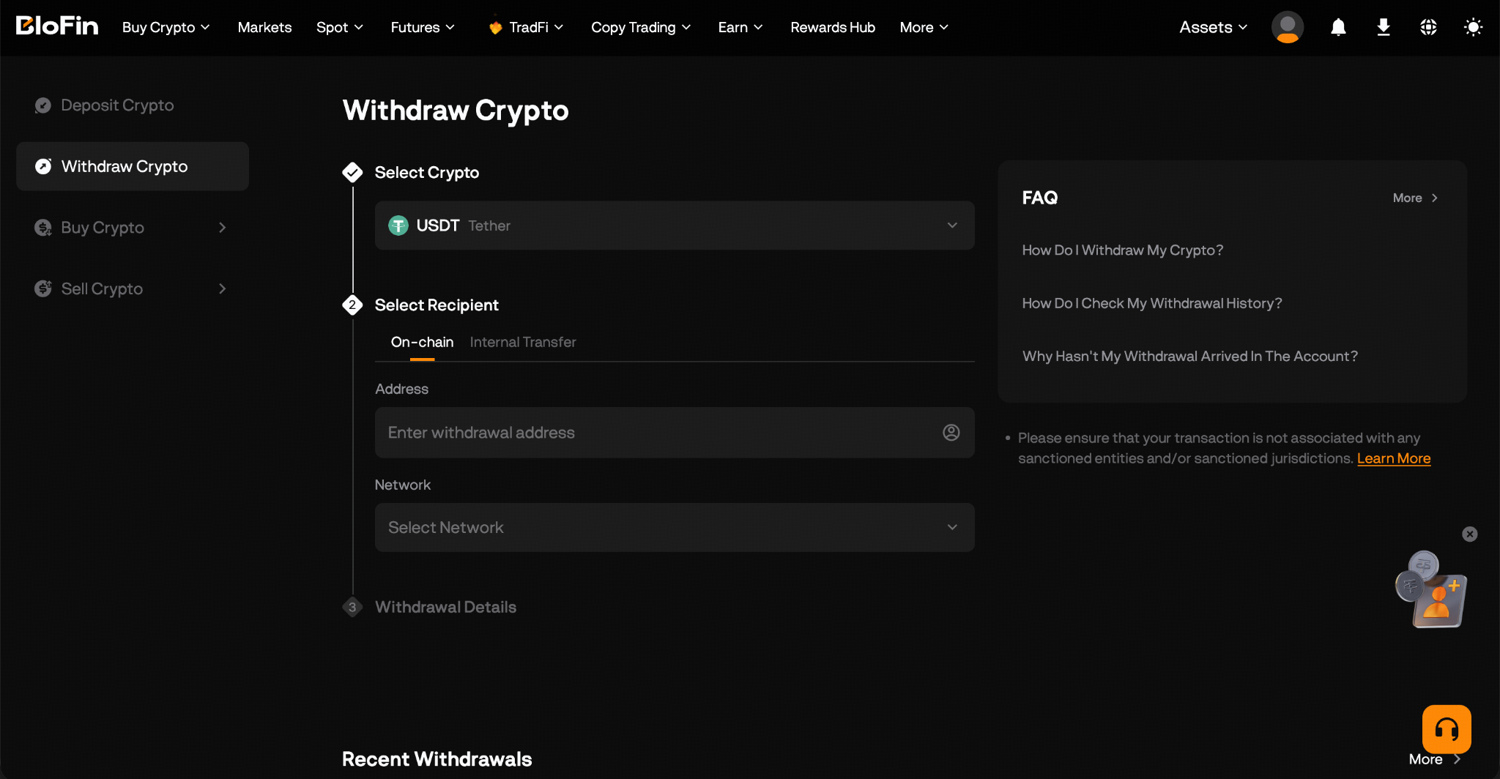
Step 3: Enter the recipient wallet address. For certain assets like XRP, XLM, and TON, you'll also need to enter a Memo or Tag.
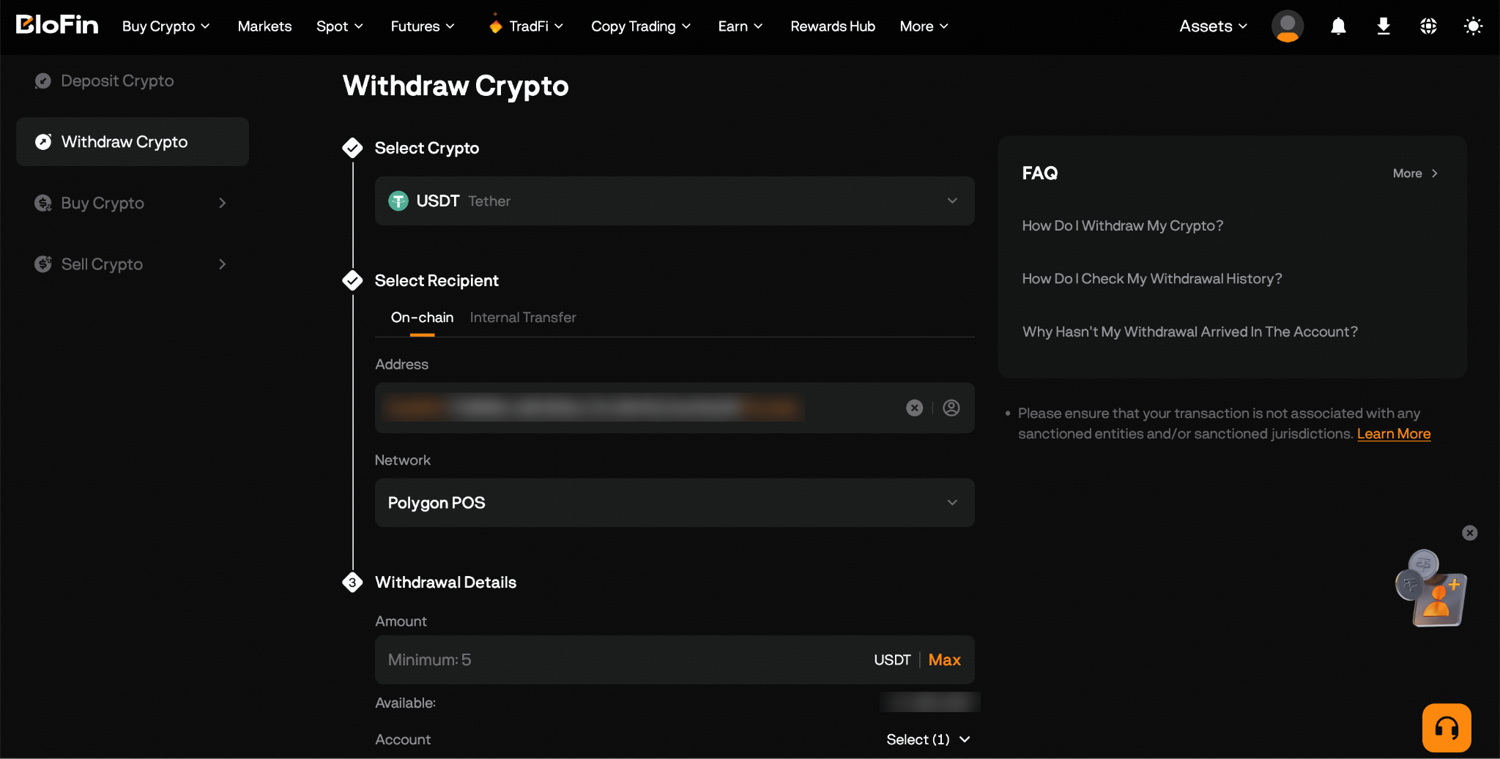
Step 4: Choose your withdrawal network. This needs to match the network your receiving wallet or exchange is set up for. Check the deposit page of your destination platform if you're not sure which one to pick.
Step 5: Enter the withdrawal amount. The network fee will be shown on screen before you confirm, so you'll know exactly what you're paying before committing.
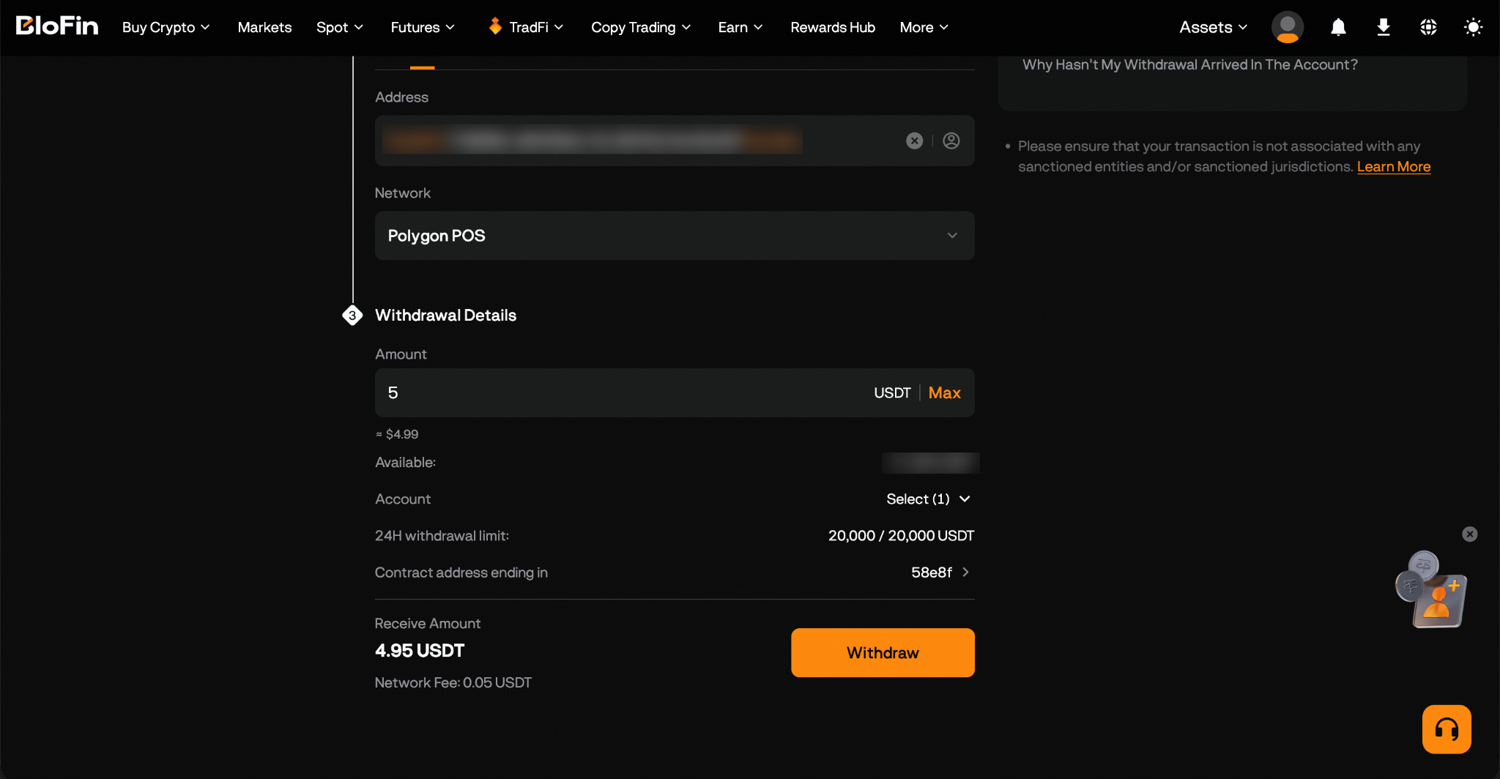
Step 6: Click Withdraw and a withdrawal confirmation pop-up will appear. Check the details and click Confirm, then finish the security verification by entering the code BloFin emails you and the code from Google Authenticator. The email code stays valid for five minutes, while each Google Authenticator code lasts 30 seconds, so type the authenticator code last.
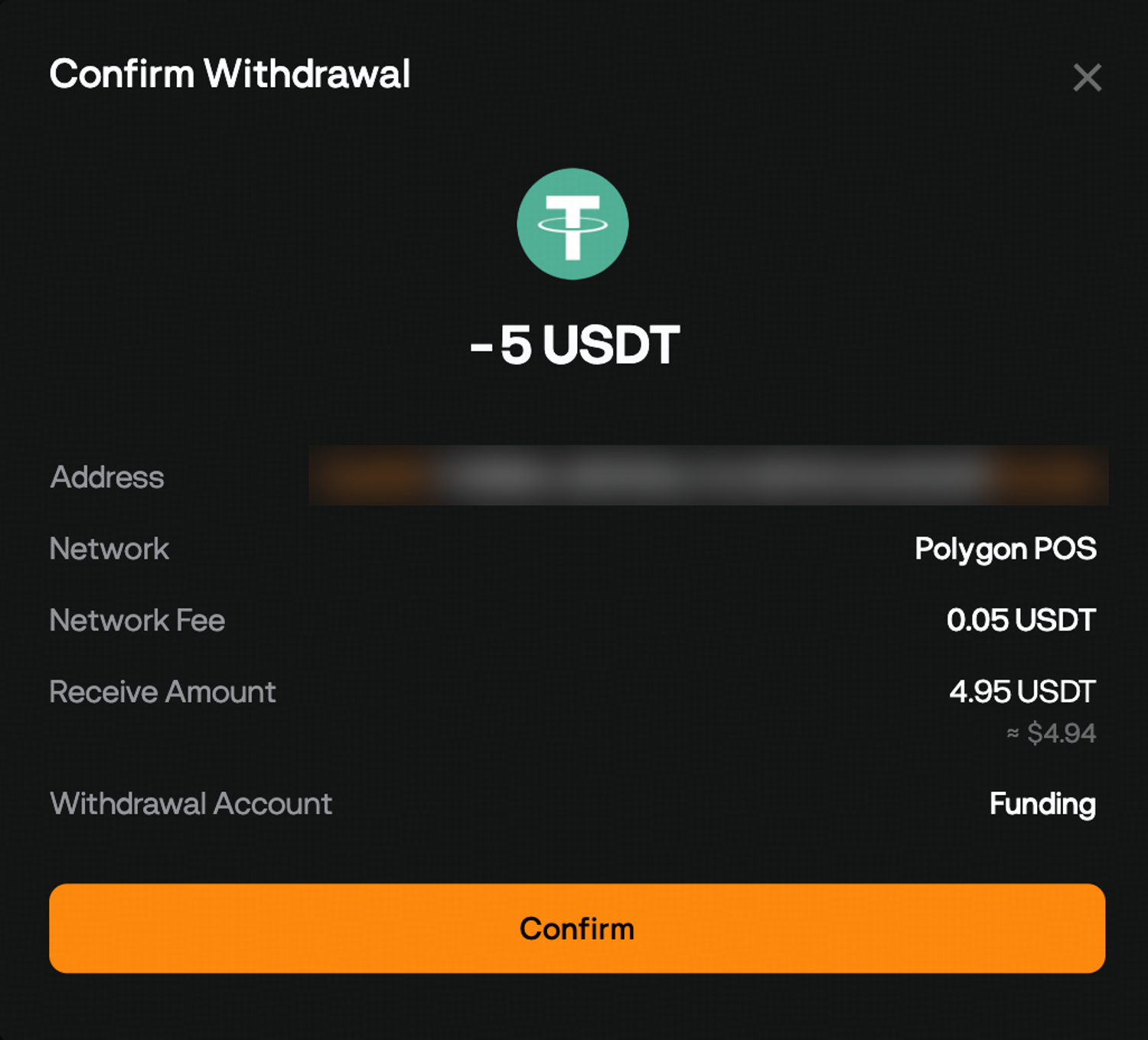
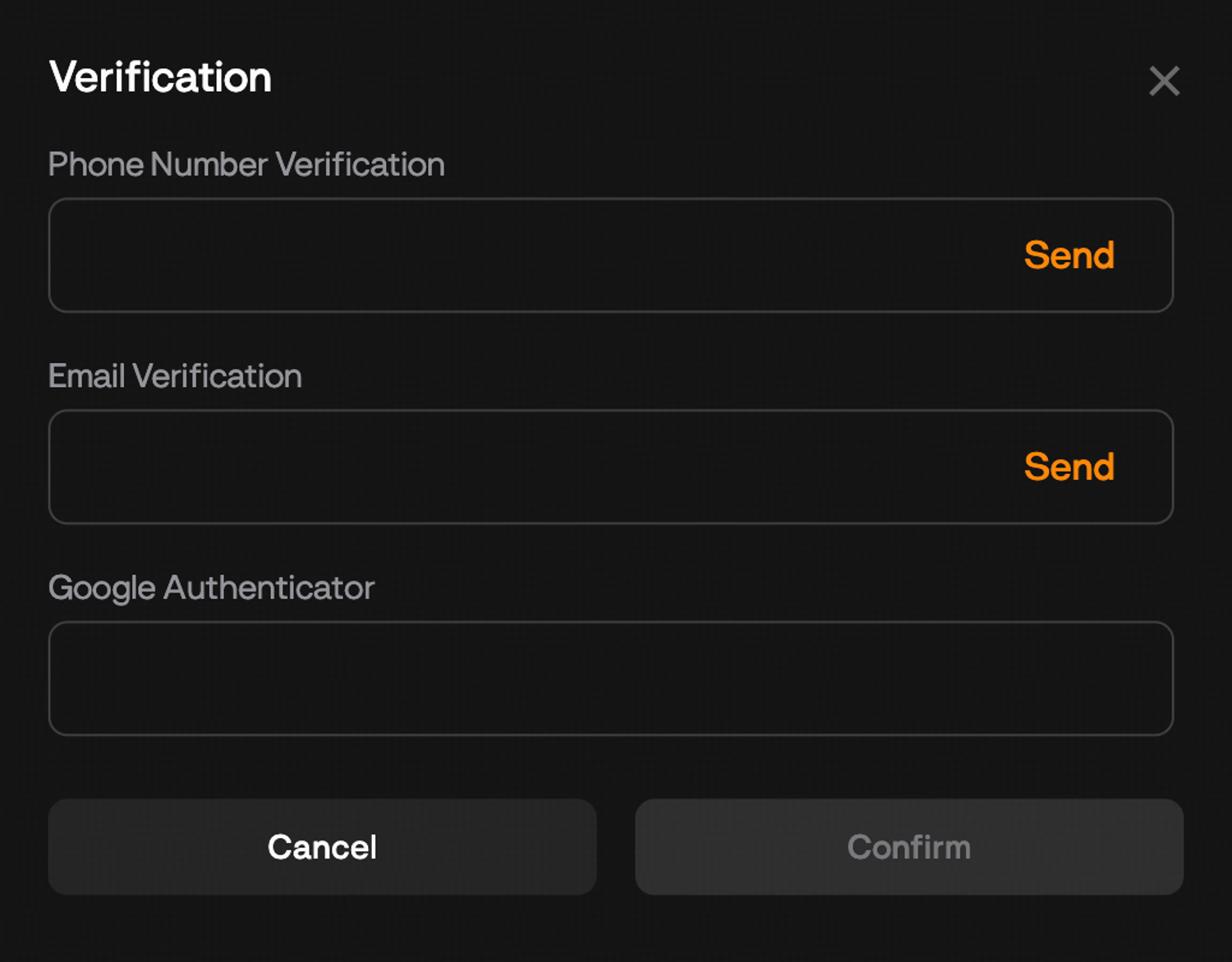
Step 7: Review the details on the confirmation screen and confirm. Your withdrawal is now submitted.
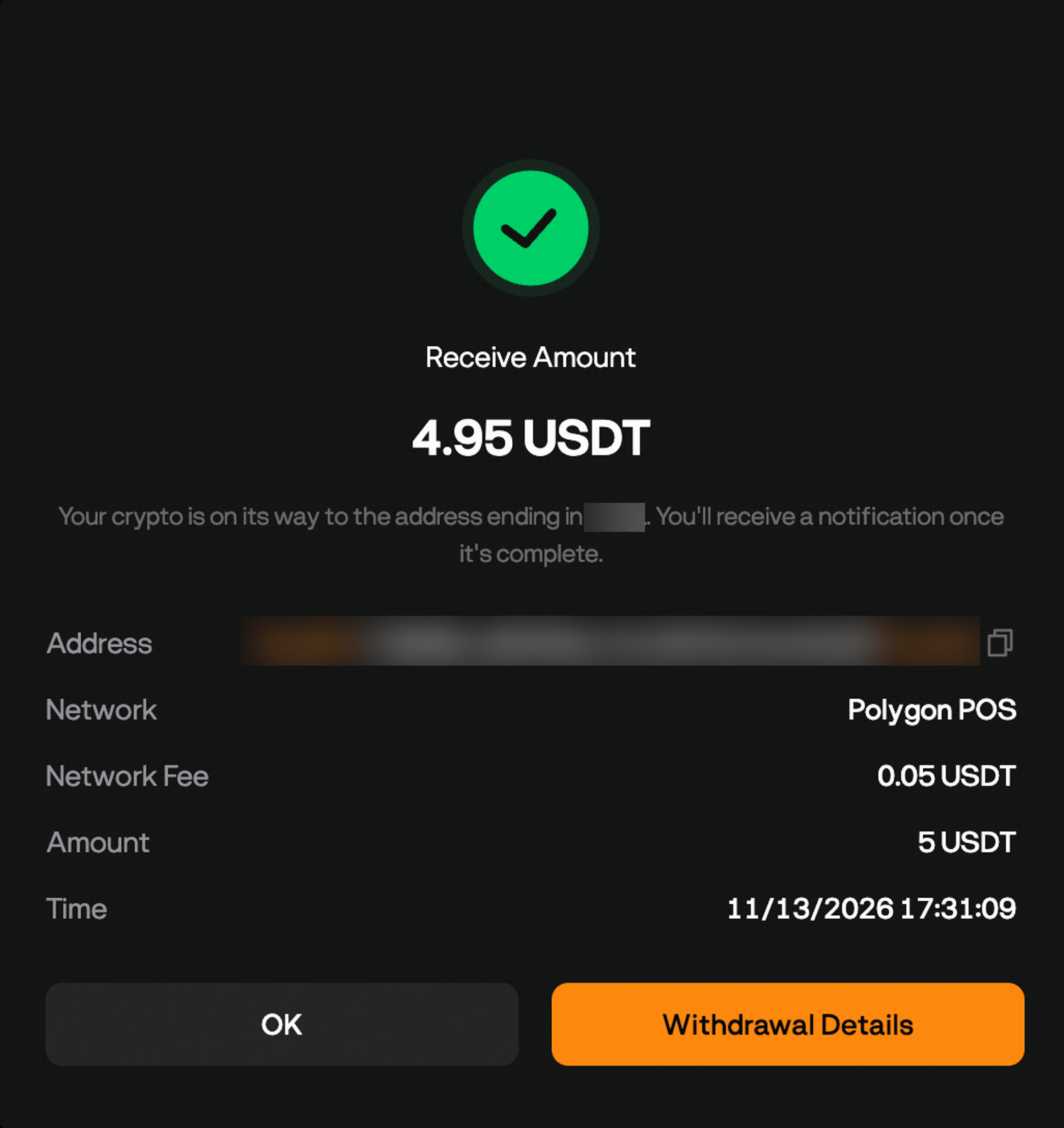
If your email code hasn't arrived, look in your spam folder first, and don't press Resend the moment its 60-second timer runs out, because the first code may still be on its way.
How to choose the right withdrawal network
The right withdrawal network is the one the receiving platform lists on its deposit page for that coin. The same coin often travels on several blockchains, and an address on one isn't watched on another, so a mismatch can leave the coins somewhere the receiver never credits and you can't reach.
USDT shows why this matters. It runs on Tron, where the network is labeled TRC20, and on Ethereum, labeled ERC20, among other blockchains. If the receiving exchange only accepts USDT on TRC20, you pick TRC20 on BloFin too, even when ERC20 appears first in the list.
Address formats give you a quick sense check, though they aren't proof. Tron addresses begin with the letter T, whereas Ethereum and BNB Smart Chain addresses both begin with 0x and look the same, so only the network label tells those two apart. The BloFin guide to Ethereum deposits and withdrawals covers the 0x case in more detail.
The network also sets your fee. Ethereum charges more when it's busy, because users bid higher tips to get their transactions in first (source: ethereum.org, Gas and fees). Tron prices transfers in bandwidth and energy, which an account gets by staking TRX, and burns TRX to cover any shortfall (source: TRON Developer Hub, Resource Model). TRC20 transfers usually cost less than ERC20 ones, so pick TRC20 when the receiving side accepts both.
Which coins need a memo or tag to withdraw?
Coins that need a memo or tag to withdraw include XRP, XLM (Stellar), TON and EOS. On these networks, an exchange often gives many customers the same deposit address, and the memo or tag tells it which customer to credit. A missing or wrong one can stop the coins from reaching your account.
The XRP Ledger's documentation describes the destination tag as the way an exchange identifies which customer a payment belongs to (source: XRPL, Source and Destination Tags). The tag is a separate field, so copy it from the receiving platform's deposit page into the Memo or Tag box rather than adding it to the end of the address.
A personal wallet that you control usually doesn't use tags at all, because the address is yours alone. If the receiving side shows no tag, leave the field empty rather than typing a guess.
BloFin withdrawal fees, minimums and limits
BloFin withdrawal fees are network fees paid to the blockchain's miners or validators, and they change with the coin, the network and how busy the chain is. The withdrawal page shows the fee, the minimum amount for the coin and network, and your withdrawal limit once you've picked a coin and network.
Fees. The fee comes out of the amount you enter, so the receiving side gets slightly less than you typed. If an exact amount has to arrive, add the fee on top. Because each withdrawal pays its own fee, sending one larger amount usually costs less than several small ones.
Minimums. Each coin and network has a minimum withdrawal, and BloFin won't accept a withdrawal below it. The minimum appears after you select the coin and network.
Limits. Your 24-hour withdrawal limit depends on your identity verification level:
Basic: 20,000 USDT
Personal Verification: up to 1,000,000 USDT
Address Verification: up to 2,000,000 USDT
If you plan to move more than the basic limit, finish verification first, using the identity verification steps in the create a BloFin account guide.
On BloFin, a network fee is charged only when coins leave the exchange. Trades you place with coins you keep on BloFin, for example on the BTCUSDT Perpetual, pay the maker and taker rates in BloFin's fee schedule whenever a position is opened or closed.
How to send a test withdrawal first
A test withdrawal is a small transfer you send before the full amount, to prove that the address, network and tag all work. It costs one extra network fee, so it's worth doing whenever you send a large amount or send to a new address or platform, because the test can only lose a little.
Say you plan to move 1,500 USDT to a new wallet on TRC20. You first withdraw 25 USDT, as long as that's above the minimum the withdrawal page shows, and wait for it to reach the wallet. The wallet receives less than 25 USDT, because the network fee comes out of the amount you send. Once the test arrives, send the remaining 1,475 USDT to the same address on the same network.
The test also limits the damage from address poisoning, where a scammer sends a tiny payment from a look-alike address so that it sits in your transaction history, ready to be copied by mistake. If you paste the look-alike, only the test amount goes astray, because it never reaches your wallet and you stop before sending the rest. The address poisoning guide explains how the trick works and how malware can swap an address you've copied.
So copy the address fresh from the receiving platform each time, and check the whole pasted address, not only its opening and closing characters.
Why is my BloFin withdrawal restricted?
A BloFin withdrawal is restricted for one hour after BloFin detects a login from a new device or a new login environment. The pause gives you time to secure your account if that login wasn't you, and withdrawals come back on their own once the hour is over, with nothing you need to do.
A new login environment covers more than a new phone or laptop. Using a different browser or updating it, clearing your cookies, logging in through a private window, or connecting from a new IP address, for example over a VPN or mobile data, can all trigger it. If you plan a withdrawal while traveling, log in an hour ahead.
If you don't recognize the login, change your password at once, reset your verification methods and contact BloFin support through live chat.
A restriction on your account is different from a pause across a whole exchange, like GOPAX's in November. GOPAX said it would move all its customers' crypto to offline wallets, and South Korean exchanges must already keep at least 80% of customer assets in cold storage (source: Cointelegraph, November 6, 2026). Coins in cold storage are kept offline, which makes them harder to steal.
How long does a BloFin withdrawal take?
A BloFin withdrawal takes as long as BloFin's security checks plus the blockchain confirmations the receiver waits for. Tron transfers often arrive within minutes, and Ethereum transfers take longer when the network is busy. Bitcoin often takes 30 minutes to an hour, because many receivers wait for several confirmations.
Bitcoin.org puts the average at about one new block every 10 minutes, though any single block can come much sooner or later (source: Bitcoin.org, Some things you need to know), so a receiver that waits for three confirmations needs about half an hour on average. The receiving platform sets how many confirmations it needs, not BloFin.
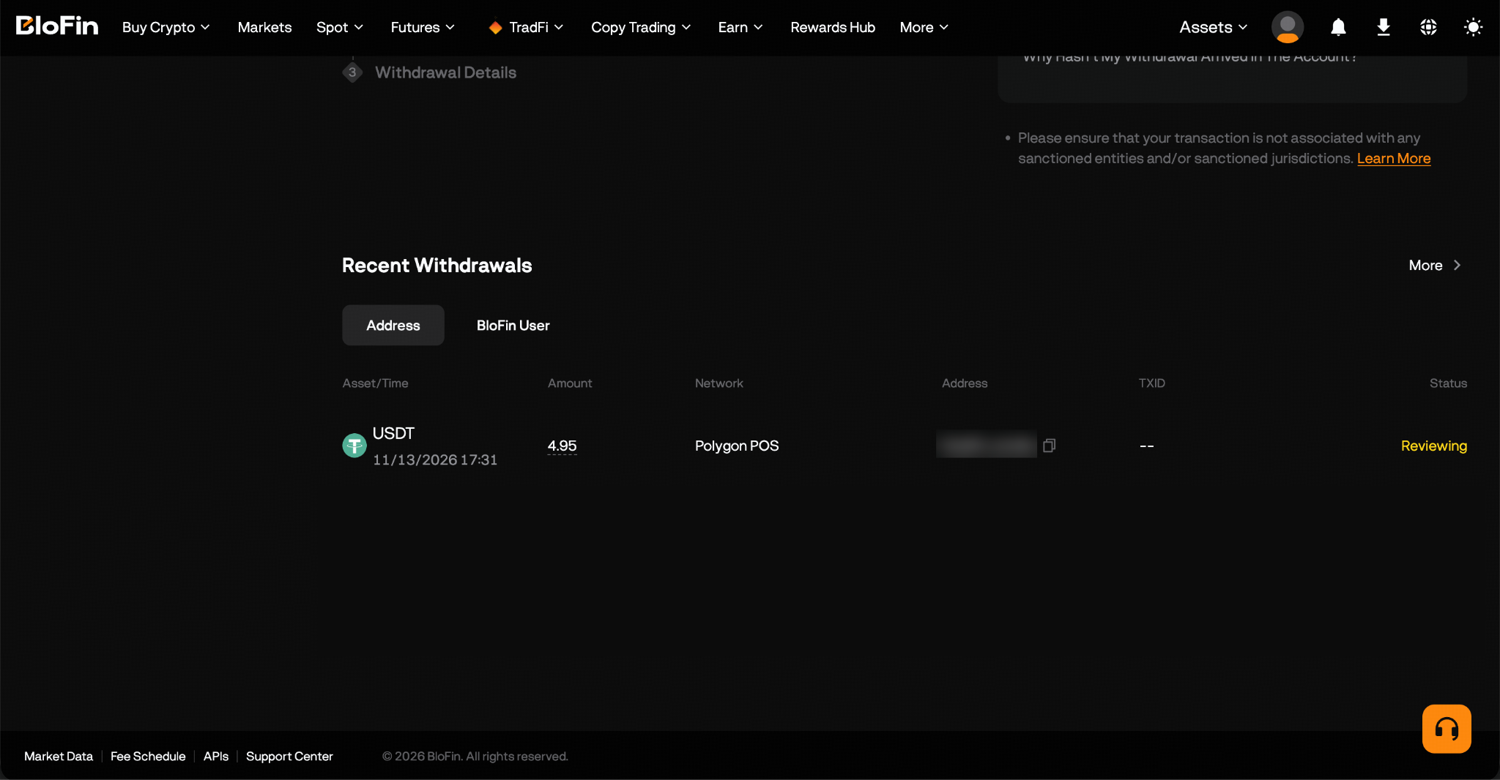
To follow a withdrawal, go to Assets, then Order Center, and filter by Withdraw. Each entry lists the network, the destination address, the network fee, the time and the transaction ID, or TXID, for withdrawals from the last 90 days. In the app, the same list is under Wallet, then History and Withdraw. Paste the TXID into a block explorer for that network to see how many confirmations the transfer has.
What to do if your withdrawal hasn't arrived
If your withdrawal hasn't arrived, start with its status and TXID in BloFin's Order Center. No TXID yet means it's still with BloFin's checks. A TXID means the transfer is on the blockchain, so look it up on a block explorer for the network you chose and work through the checklist from there.
Confirmed on-chain but not credited: check that the network, address and any memo or tag match the receiver's deposit page, then contact the receiving platform's support with the TXID.
Waiting for confirmations: a busy network can hold a transfer for a while, and the BloFin guide to slow Bitcoin withdrawals explains how fee rates and the mempool decide how long it waits.
No TXID after a long wait: contact BloFin support with the coin, network, amount and time of the withdrawal.
Wrong network or address: the BloFin guide to crypto sent to the wrong address or network explains which mistakes can be recovered and which can't.
How to check BloFin's proof of reserves before you withdraw
You can confirm your balance appears in BloFin's proof of reserves while your coins stay on BloFin. You copy your account's audit data under Assets, then Audits and Details, paste it into BloFin's open-source verification tool and click Verify. The tool then checks whether your balance is in the Merkle tree, a structure that combines every customer's balance into one cryptographic fingerprint.
That check answers a different question from a withdrawal. Proof of reserves shows that assets exist at the time of the snapshot, and BloFin keeps customer assets in accounts separate from its own. It doesn't cover liabilities, which the BloFin proof of reserves guide explains along with how the Merkle tree check works.
Want an exchange that publishes proof of reserves you can check against your own balance? To get started, you'll need to first create a BloFin account, fund your account with cryptocurrency, and go to the BTCUSDT Perpetual page.

Frequently asked questions
Can you cancel a BloFin withdrawal after you submit it?
Once a withdrawal has been broadcast to the blockchain, it can't be canceled. If it still shows as processing in BloFin's Order Center with no TXID, contact BloFin support through live chat straight away, since there may be a short window before it goes out.
Can you withdraw after resetting your 2FA on BloFin?
Not right away. To protect your funds, BloFin generally pauses withdrawals for 24 hours once you reset a verification method such as Google Authenticator. If you reset it because you could no longer use it, for example after losing the phone it was on, the suspension lasts 48 hours. Plan any large withdrawal around that wait.
Can you withdraw crypto you just bought with a card?
Not immediately. After any purchase on BloFin, a 24-hour security hold applies before you can withdraw the coins you bought, whichever payment method you used. You can still trade those coins on BloFin during the hold. The guide to buying crypto on BloFin covers the payment methods and their steps.
Does BloFin ever ask for your withdrawal verification codes?
BloFin staff never ask for your verification codes, whether they arrive by email or SMS or come from Google Authenticator. Anyone who asks for one isn't BloFin, so keep every code to yourself, and if you've already shared one, change your password and reset your verification methods straight away.
Is it free to move funds between BloFin accounts before a withdrawal?
Yes. Transfers between your own BloFin accounts, such as from a futures account to your Funding Account, are free and usually arrive at once. In the Transfer window, you choose the account to move from, the account to move to, the coin and the amount, then confirm.
Written by the BloFin Academy editorial team. Nothing in this article constitutes financial advice. Blockchain transfers can't be reversed, so a withdrawal sent on the wrong network, without a required tag or to the wrong address may be lost. Crypto prices can fall quickly, and leveraged futures can lose your whole margin. BloFin services are not available in restricted locations, including the United States. Do your own research and consider your risk tolerance before you trade on BloFin.