
One of the hardest parts of trading isn't knowing what you want to buy. It's knowing when to buy it. Try to time a perfect entry and you'll often find yourself watching the price drop further after you've committed, wondering whether to hold, add, or cut. Dollar-cost averaging exists precisely because of that problem. Instead of trying to nail one perfect entry, you spread your position across multiple price levels, which lowers your average cost when the market dips and reduces the emotional weight of any single entry decision.
The BloFin Futures DCA Bot takes that logic and automates it on the futures market, letting you build leveraged positions gradually without having to sit at your screen and manually execute every order. Here's how it works and what you need to understand before running one.
What is the BloFin Futures DCA Bot?
The BloFin Futures DCA Bot is an automated trading tool that builds a futures position across multiple orders at different price levels. It starts with an initial entry order, then places additional orders called safety orders if the price moves against you, gradually averaging down your entry cost with each one. When the market eventually moves in your favor and hits your take profit target, the bot closes the position, books the profit, and starts a new trading cycle automatically.
Because it operates on futures contracts, the bot uses leverage, which means you're working with margin rather than the full notional value of your position. The bot currently supports USDT-margined contracts only.
How the BloFin Futures DCA Bot works
The bot runs in trading cycles, and understanding how a cycle works is the foundation for everything else.
A cycle starts when the bot places its initial order. This is your first entry into the position, placed at market price when the bot launches. From there, the bot monitors the price and waits.
If the price moves in your favor and hits your take profit level, the cycle ends there. The entire position is closed, profit is realized, and the bot immediately begins a new cycle with a fresh initial order. That's the best case: a clean, quick cycle that captures a profit and resets.
If the price moves against you instead, the bot doesn't just sit and wait. Once the price drops by your configured price step percentage, the bot places a safety order, adding to your position at a lower price and bringing your average entry cost down. If the price keeps dropping, another safety order fires at the next price step below that, and so on. Each safety order is sized at a multiple of the previous one, so the later orders carry more weight and pull the average cost down more meaningfully.
This continues until one of three things happens. The price reverses and hits your take profit target, closing the position profitably. The position reaches your maximum safety order count, at which point no more safety orders are placed and the bot holds the position as-is. Or the price hits your stop loss level, triggering an exit at a loss to prevent further drawdown.
When a take profit is hit, the cycle resets and starts again from the top.
Understanding the trading cycle
It helps to walk through a concrete example. Say you're running a long DCA bot on BTCUSDT with these parameters:
Initial order: 50 USDT
Safety order: 100 USDT
Price step: 2%
Take profit per cycle: 1.5%
Max safety orders: 3
Leverage: 5x
The bot opens a long position at the current market price, say $60,000, using your initial order. If BTC climbs to $60,900 (a 1.5% gain from your entry), the cycle closes in profit and a new one starts immediately.
But if BTC drops by 2% to $58,800, the first safety order fires, adding 100 USDT to the position at that lower price. Your average entry cost is now somewhere between $60,000 and $58,800. If the price keeps falling by another 2% to $57,624, the second safety order fires, again pulling the average down. The bot keeps doing this until your max safety order count is reached or the price reverses.
Once the average entry cost has been pulled down through safety orders, a smaller price recovery is enough to hit your take profit target. That's the core of why DCA averaging works: it changes the math of what you need to recover, making profitable exits more achievable even without a full price reversal.
Key parameters explained
When you set up the bot manually, each parameter directly affects how aggressively the bot adds to your position and how quickly it targets a profit. Here's what each one does.
Price step (%) is the percentage price move that triggers each safety order. A smaller price step means safety orders fire more frequently, averaging down sooner but running through your order count faster. A larger price step spaces safety orders further apart, giving the market more room before each addition.
Take profit per cycle (%) is the percentage gain on your average position cost that closes the cycle. This is calculated from your blended average entry, not your initial entry, so safety orders that have averaged down your cost make this target easier to reach.
Initial order amount is the USDT size of your first entry when the cycle starts.
Safety order amount is the base size of your first safety order. Subsequent safety orders are multiples of this amount, so the later ones in the sequence add more weight to the average and pull the blended entry down more aggressively.
Maximum safety orders caps how many times the bot can add to the position. Once this count is reached, no further safety orders are placed regardless of where the price goes. Choosing this number is one of the more consequential decisions in the setup because it determines the maximum total capital the bot can deploy in a single cycle.
Leverage amplifies the position size relative to your committed margin, the same as any futures position. Higher leverage means larger notional exposure per cycle but a lower margin buffer before liquidation becomes a risk.
Stop loss sets the price level at which the bot exits the entire position at a loss. This is your safety net if the market moves far enough against you that continuing to average down no longer makes sense.
What’s better: AI Strategy or manual setup?
Like the Futures Grid Bot, the DCA Bot offers two ways to get started. The AI Strategy option selects parameters based on backtested data and the historical behavior of the asset you've chosen, including its volatility profile. You pick a risk level from the available presets, enter your investment amount, and the bot runs with parameters calibrated to that asset and risk appetite.
The manual route gives you direct control over every parameter. It's the better choice once you understand how each setting affects the bot's behavior, since you can tailor the configuration to your specific view on the asset, the current market environment, and how much capital you want at risk per cycle.
For traders who are new to DCA bots, the AI Strategy is a reasonable way to see the bot in action before committing to a fully manual setup.
What markets suit the Futures DCA Bot?
The DCA Bot is more flexible across market conditions than the grid bot. Because it's designed to average into a position as the price drops and close when the market recovers, it works in volatile markets, sideways markets with regular dips and recoveries, and even moderate bear markets, as long as the price eventually rebounds enough to hit the take profit target.
Where it struggles is in a sustained, deep downtrend with no meaningful recoveries. If the price falls steadily past your safety orders and your stop loss level, the bot exits at a loss and the safety order averaging doesn't help. The DCA approach is built on the expectation that the price will oscillate rather than fall in a straight line. When it doesn't, the strategy's core assumption breaks down.
For that reason, choosing the asset and market conditions carefully matters as much as the parameter settings. The DCA Bot works best on assets you have a longer-term constructive view on, where short-term dips are part of the normal price behavior rather than the beginning of a structural decline.
Futures DCA Bot strategies
Since this bot operates on futures, leverage is part of every decision, and that opens up approaches that simply aren't available with a spot DCA strategy.
Leveraged trend entry with timing insurance
The most direct use case: you have a strong directional view on an asset but you don't want to commit your full position at a single price, because you know timing one entry is harder than it looks. The Futures DCA Bot handles the timing problem by spreading the entry across multiple prices while leverage amplifies the return on each cycle.
Leverage changes the take profit math in a material way. At 5x, a 2% move above your average entry earns 10% on your deployed margin. That means the bot can close cycles on smaller price recoveries than a spot approach would require, which matters in choppy markets where large bounces are rare but small ones happen frequently. A practical configuration for this: size the initial order at 30 to 40% of your intended total, space safety orders at the asset's typical genuine dip depth (not intraday noise), and set a take profit calibrated to what the asset realistically recovers in one move, not what you'd need for a home run. Running this at 3 to 5x on a liquid major perpetual keeps the liquidation price far enough from the action that normal volatility doesn't threaten the position.
Short-side DCA for hedging or directional conviction
This is a strategy the Spot DCA Bot cannot execute at all. Running the Futures DCA Bot in sell mode builds a short position as the price rises, with safety orders that add to the short at progressively higher prices as the market moves against you.
There are two practical applications:
For hedging: if you hold a large spot position and a significant event is approaching (a major token unlock, a macro data release, a protocol decision), opening a short Futures DCA before the event caps your downside without requiring you to sell spot. The bot builds the hedge gradually and closes it when the reversal hits your take profit.
For directional plays: if you're bearish on an asset but expect it to continue rising before reversing, the bot accumulates the short at higher and higher prices and closes when the breakdown reaches your target. Neither of these approaches is available through the Spot DCA Bot.
Funding rate timing
Every hour a leveraged futures position is open, funding fees accrue. In a strongly bullish market where longs are paying shorts, that cost compounds against your position while you wait for the take profit. At 0.05% per 8-hour period, that is approximately 4.5% per month, a real drag on a long DCA strategy's net return. Before launching, check the current funding rate for your pair on BloFin. If funding is elevated, either factor the ongoing cost into your take profit target (set it higher to account for the fees that accumulate before the cycle closes) or wait for a period when funding normalizes. When funding is near zero or negative, a long DCA bot earns while it holds, turning a waiting period into a revenue-generating one. The same logic applies in reverse for short-side strategies: elevated positive funding is a tailwind for short positions, not a cost.
The leverage dimension
What distinguishes the Futures DCA Bot from a standard spot DCA approach is the use of leverage. With leverage, your initial order and safety orders control a larger notional position than the margin you've committed. That means the gains when your take profit fires are larger relative to your deployed capital, but the losses if your stop loss triggers are also larger, and the risk of liquidation is a real consideration.
As the bot adds safety orders and your total margin in the position grows, it's important to monitor how your liquidation price is evolving. A position that has absorbed several safety orders is a larger, more leveraged position than when the cycle started, and the distance between your average entry and your liquidation price may be smaller than it looks.
The bot displays your position details on the Details page, where you can track the current state of the cycle, including open orders, average entry, and unrealized PnL. Keeping an eye on this, especially after multiple safety orders have fired, is part of running the strategy responsibly.
Who is the Futures DCA Bot for?
The Futures DCA Bot suits traders who want to build leveraged futures positions in an asset they're bullish on, but who don't want to commit everything at a single price. Instead of trying to pick an exact bottom, you let the bot add to the position as the price dips, with the expectation that a recovery will eventually come and hit your take profit.
It's particularly useful for traders who find themselves paralyzed by entry decisions, second-guessing every price move before pulling the trigger. The bot removes that friction by systematically adding at each configured step, regardless of how you're feeling about the market at that moment.
It's also a reasonable choice for traders who want to stay active in a sideways or mildly choppy market without deploying a large lump sum at one price level. Running multiple short DCA cycles in a choppy market can accumulate meaningful profits over time from relatively modest individual take profit targets.
That said, the futures element means this isn't a low-risk tool. Leverage, safety orders, and potential drawdown before the take profit fires can all compound. Setting your stop loss thoughtfully and sizing your initial and safety orders within what you're genuinely comfortable losing in a worst-case cycle are non-negotiable steps before going live.
Before you get started
Looking to get started? You’ll need to first make sure you have USDT in your BloFin Futures Account before you begin. The bot draws its margin from there, so if your funds are in your Funding Account, you'll need to transfer them over first.
Beyond that, spend a few minutes thinking about the asset you want to run the bot on and whether the current market environment suits the DCA approach. The strategy works best when you expect an asset to dip and recover rather than trend steadily in one direction. Going in with a view on the asset, even a rough one, will help you set more sensible parameters than starting from scratch with no context at all.
How to access the Futures DCA Bot
You can choose to access the Futures DCA Bot through the Trading Bots page or Futures trading interface.
From the Trading Bots page:
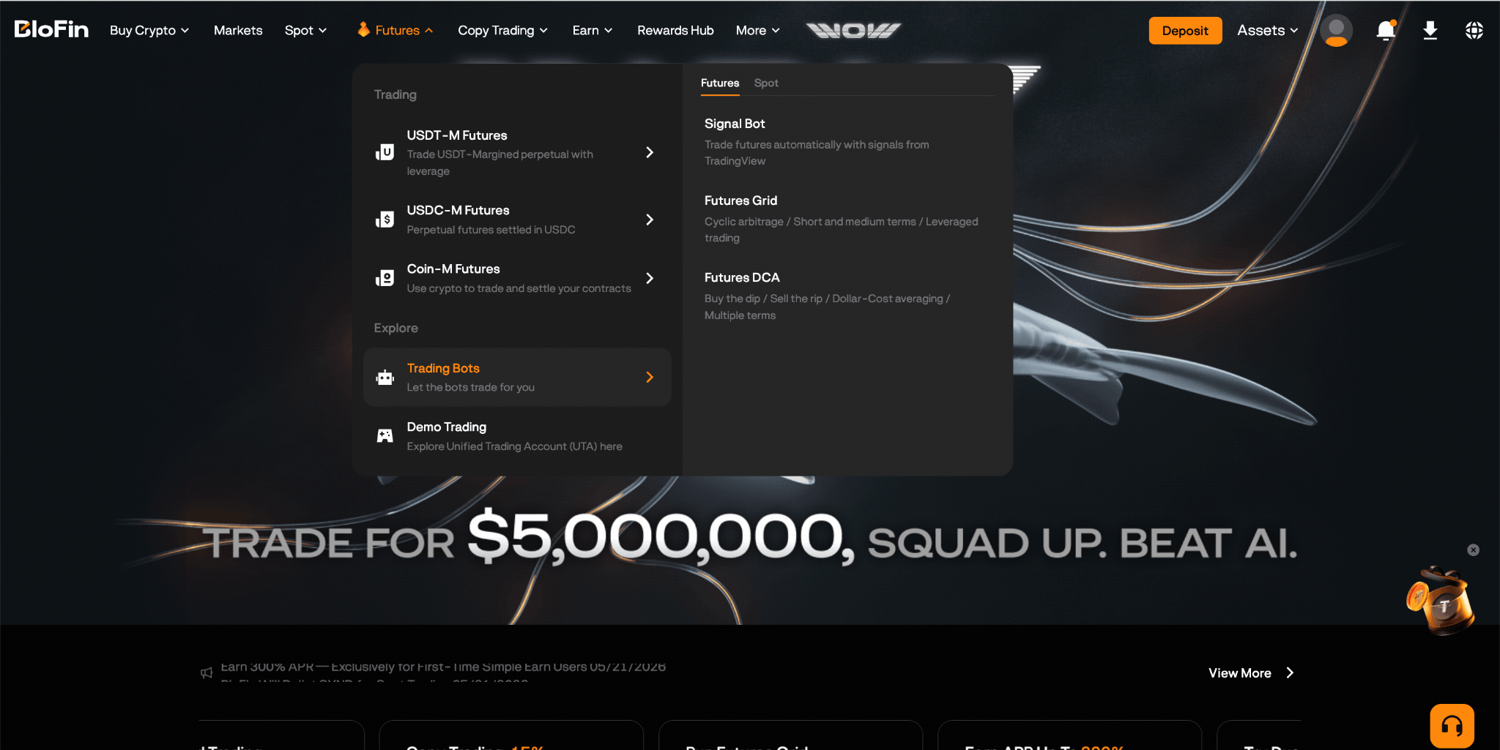
Step 1: Log in to your BloFin account and hover your cursor over the Futures tab in the navigation bar. Then, select Trading Bots.
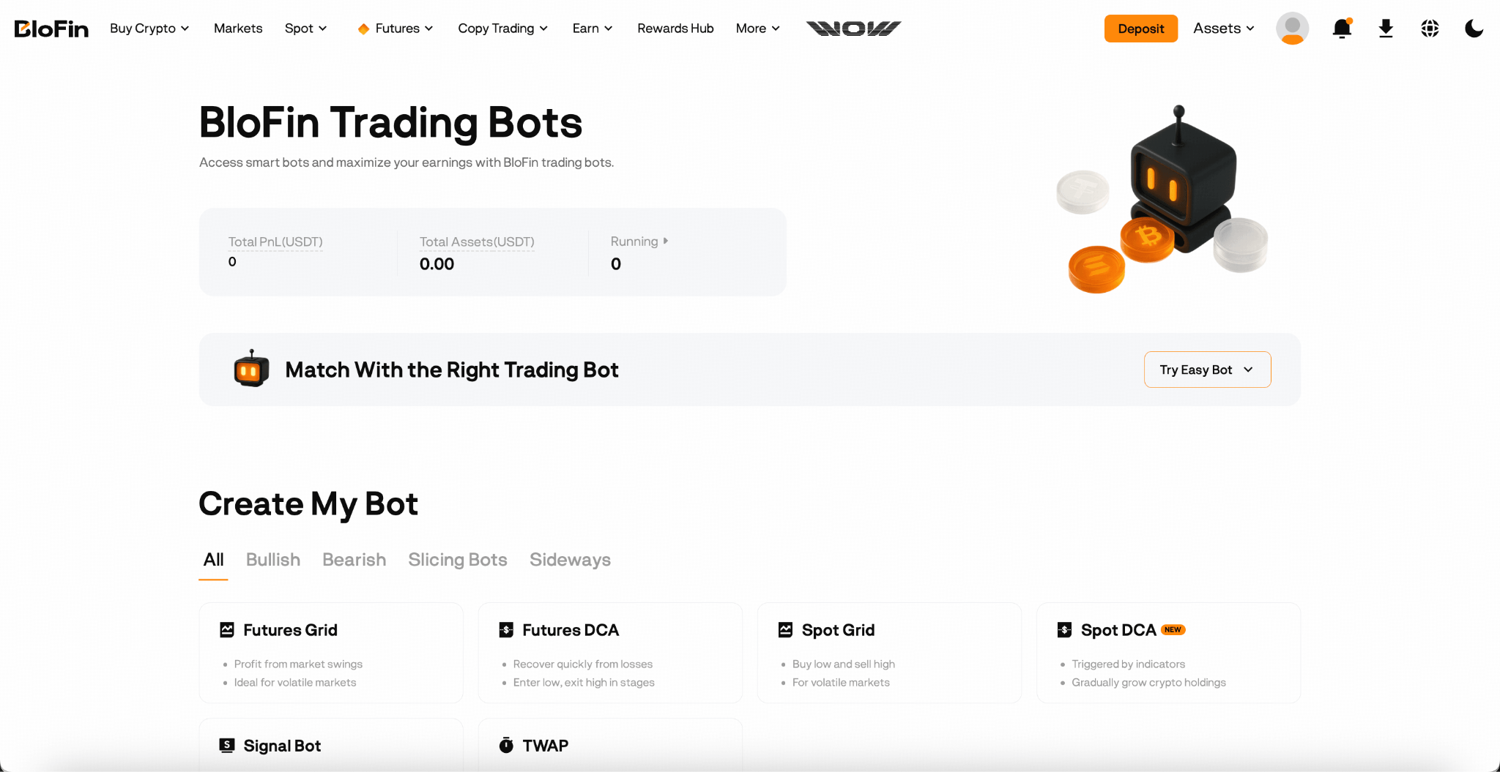
Step 2: On the BloFin Trading Bots page, you’ll be able to see all available bots. Click Futures DCA to open the creation page.
From the Futures trading interface:
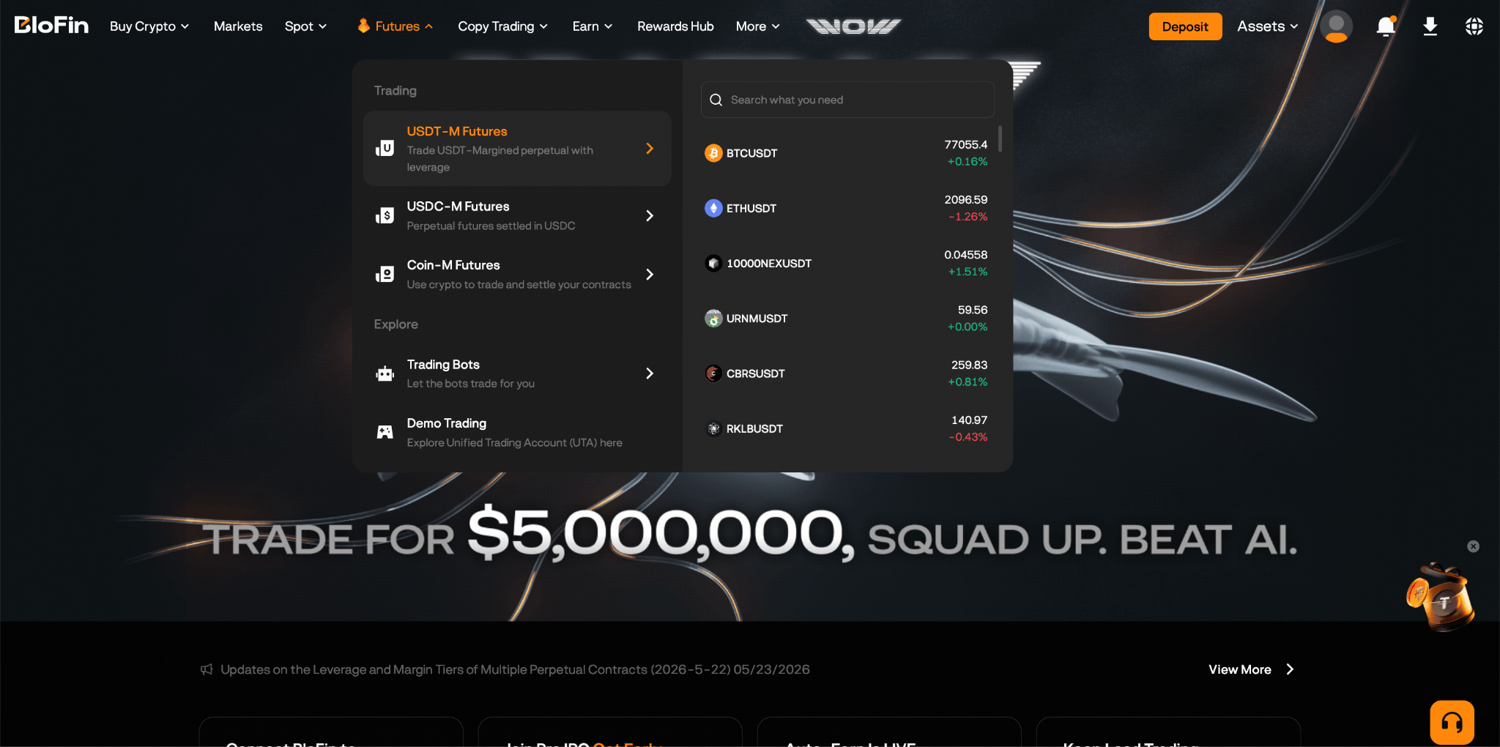
Step 1: Log in to your BloFin account and hover your cursor over the Futures tab in the navigation bar. Then, select USDT-M Futures to open the trading page.
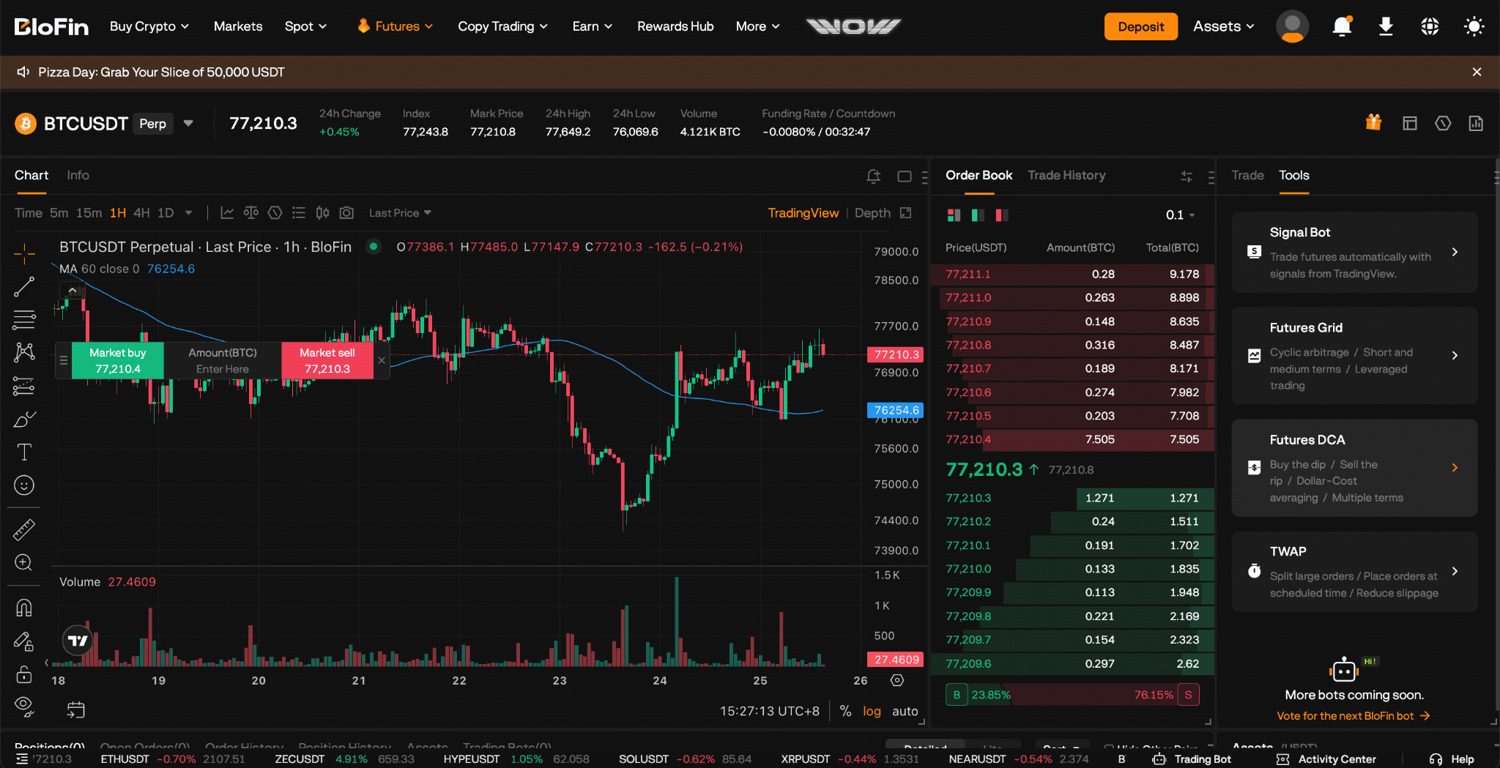
Step 2: On the order panel on the right, click the Tools tab and select Futures DCA.
Creating your bot: AI Strategy or manual setup?
Once you're on the creation page, you'll choose your trading pair and then decide how to configure the bot. As mentioned, the two options are AI Strategy and Manual, and which one you choose will depend largely on how comfortable you are with the parameters.
Using the AI Strategy
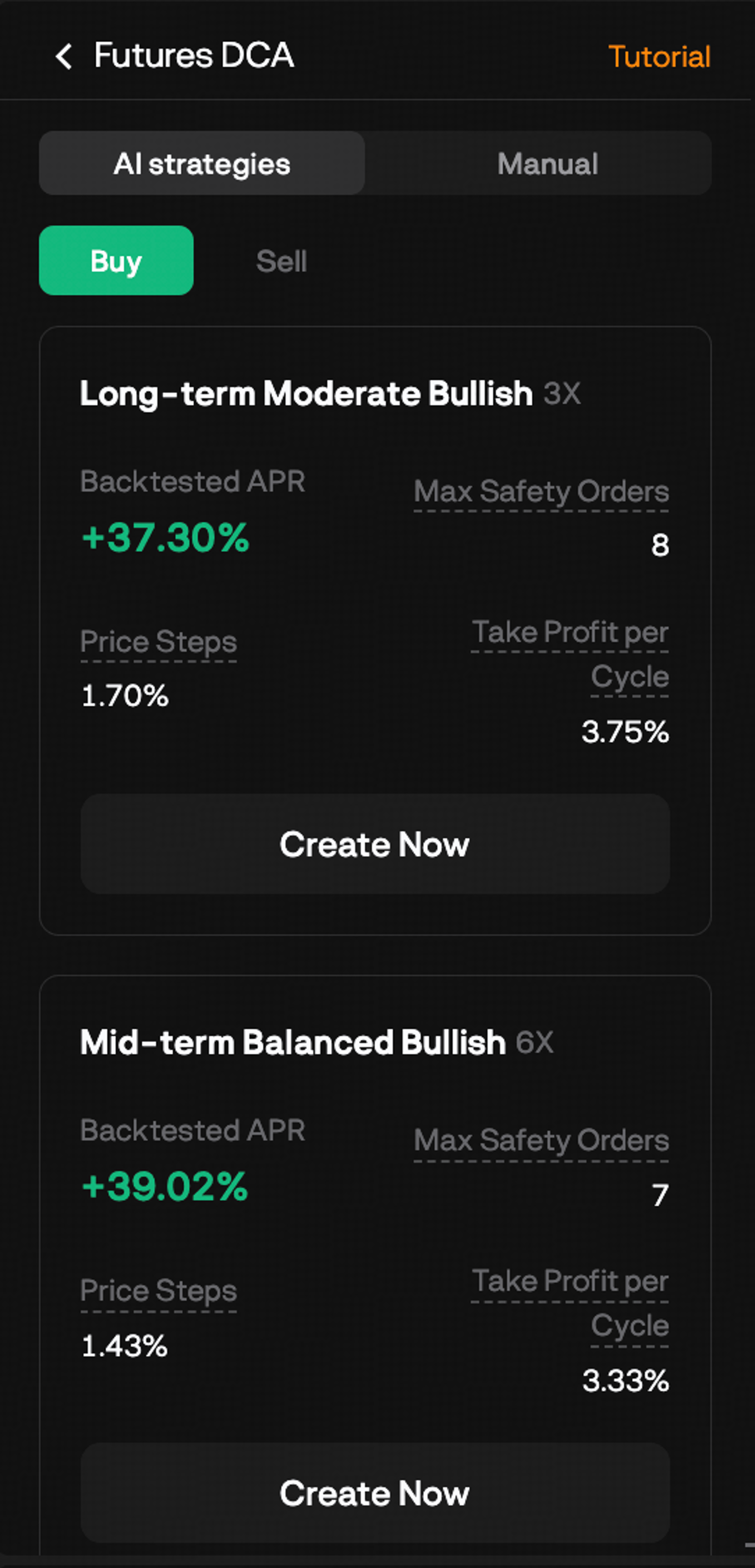
The AI Strategy option builds a parameter set for you based on backtested data and the asset's historical behavior. You select your trading pair, choose a risk profile that reflects your appetite, enter the amount you want to invest, and click Create Now.
This is worth using if you're new to DCA bots and want to see a properly configured setup in action before tuning things yourself. The parameters are calibrated to the asset rather than pulled from thin air, which is a better starting point than guessing at price steps and safety order sizes without much reference.
That said, it's still a starting point. Review the parameters before confirming so you have a clear picture of what the bot will actually do, particularly the maximum capital it could deploy across all safety orders.
Setting up manually
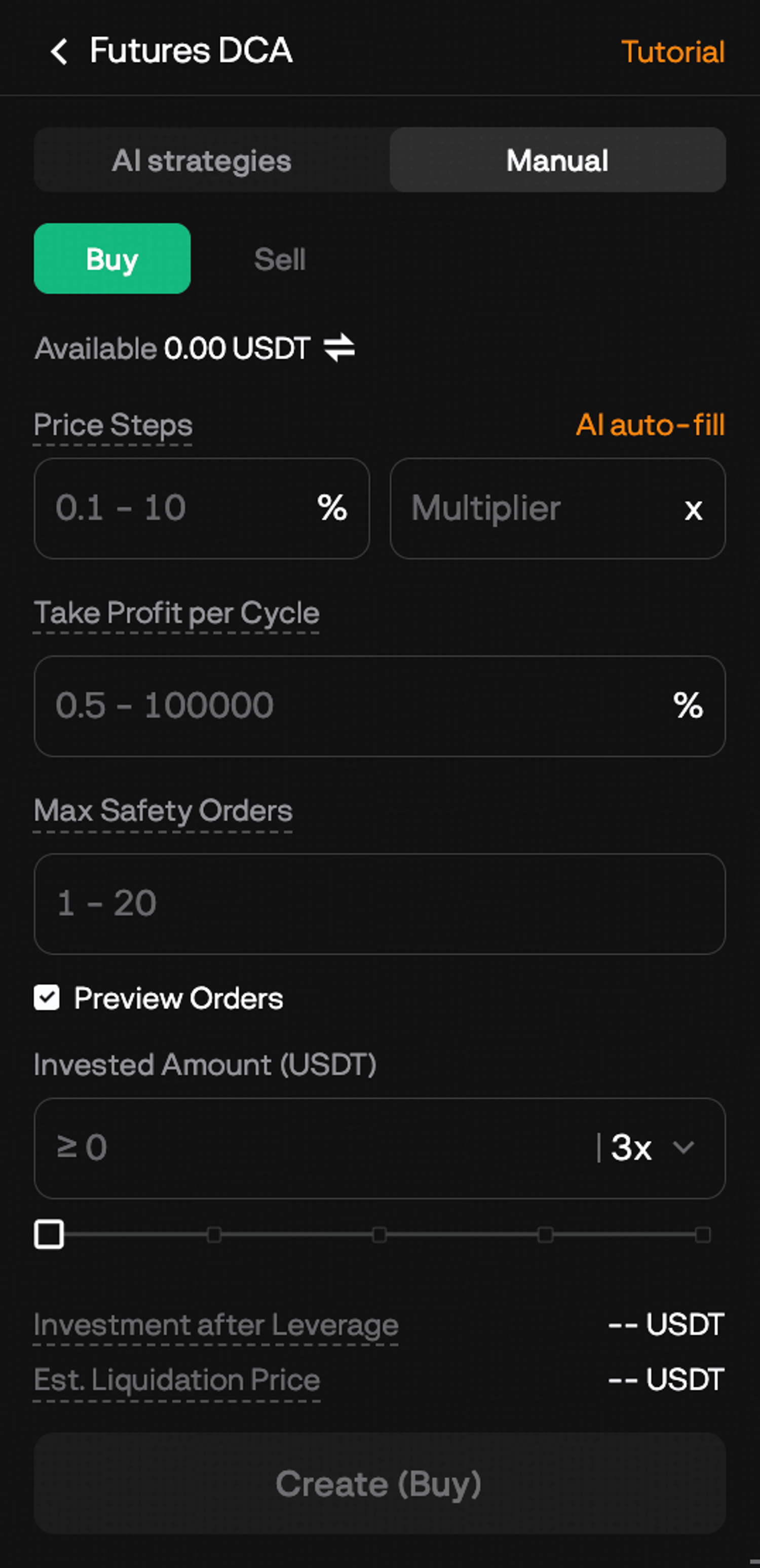
Manual setup lets you define every parameter yourself. Here's how to think through each decision rather than just entering numbers.
Step 1: Select your trading pair. Pick the futures contract you want to run the strategy on. Choose an asset you have a view on, because the DCA bot works by adding to a position on dips. Running it on an asset you're indifferent about or actively uncertain on takes away the strategic logic behind the approach.
Step 2: Set your price step percentage. This controls how far the price needs to drop from the previous order before the next safety order fires. A smaller percentage means the bot adds more frequently on smaller dips. A larger percentage spaces the orders further apart and requires a bigger move before adding. Think about the asset's typical daily volatility when deciding. For a volatile asset that regularly swings 3–5% in a session, a price step under 1% will burn through your safety orders quickly. For a less volatile asset, a tighter step makes more sense.
Step 3: Set your take profit per cycle. This is the percentage gain on your blended average entry that closes the cycle. Keep in mind that safety orders lower your average entry, so your take profit target is measured from that averaged cost, not your initial order. Setting a realistic target relative to the asset's typical price behavior matters here. A 5% take profit on an asset that rarely recovers more than 2% between dips means your cycles will rarely close.
Step 4: Set your initial order amount. This is the USDT size of your first entry when a new cycle starts. Size it as a proportion of your total intended deployment, keeping room for your safety orders to add in behind it.
Step 5: Set your safety order amount and multiplier. Your base safety order amount is the size of your first safety order. Subsequent safety orders are multiples of this, so they grow as the sequence progresses. Before confirming, work out the total capital that would be deployed if all safety orders fill. That figure represents your maximum exposure in a single cycle, and it should be an amount you're genuinely prepared to have at risk.
Step 6: Set your maximum safety orders. This caps how many times the bot can add to the position. More safety orders gives the bot more room to average down through a deeper drawdown, but it also means more capital deployed per cycle. It's a direct trade-off between resilience and exposure.
Step 7: Set your leverage and stop loss. The default leverage applies unless you change it. Before confirming, check where your estimated liquidation price sits relative to your stop loss. Your stop loss should trigger well before liquidation, giving you a controlled exit rather than a forced one.
Once you're satisfied with everything, click Create (Buy), review the order confirmation, and click Confirm to launch the bot.
What happens right after launch
As soon as the bot is confirmed, it places the initial order at the current market price, opening the first position of the first cycle. You'll see a confirmation pop-up with a Details button. Click through to the Details page straight away so you have a clear baseline reading of the bot's starting state before you step away.
Managing your bot once it's live
The Details page is where you monitor everything. You can get there from the Trading Bots tab below the chart on the Futures trading page by selecting DCA and clicking Details next to the running bot.
From here you can see the bot's current cycle status, the orders that have been placed, the current average entry price, unrealized PnL, and your order history. The most important things to track are how many safety orders have fired and where your average entry currently sits relative to the current market price.
Reading the cycle in real time
When no safety orders have fired, the bot is sitting with just the initial position open, waiting either for the price to hit take profit or drop enough to trigger the first safety order. That's the most straightforward state.
As safety orders start firing, your average entry shifts lower and your total position size grows. The further into the safety order sequence you go, the larger the position becomes and the closer your liquidation price gets. This is when the Details page is most worth watching, because the risk profile of the position at safety order 4 or 5 is meaningfully different from what it was at launch.
Stopping the bot
You can stop the bot at any time by clicking Stop and confirming. When you stop it, all pending orders are canceled and the open position is closed at the current market price. Your remaining margin and any realized profits from completed cycles will remain in your Futures Account. If you stop mid-cycle while open positions are in drawdown, those losses are realized at the point of stopping.
There's no pause function, so if you want to exit temporarily, stopping and restarting is the only option.
How to evaluate your bot's performance
After a few cycles have completed, it's worth stepping back and asking whether the setup is working as intended before leaving it to run indefinitely.
A well-performing bot completes cycles regularly, meaning the take profit level gets hit at a reasonable frequency relative to the asset's volatility and your price step settings. If cycles are taking weeks to close, your take profit target may be set too high for the current market, or the asset simply isn't bouncing enough for the DCA approach to work efficiently right now.
Check how deeply the safety orders are being triggered. If most cycles are closing after just the initial order, the safety orders are rarely needed, which may mean your price step is set wider than the asset's typical dip. Conversely, if every cycle is burning through the full safety order count before the take profit fires, the market may be trending more strongly than you anticipated, and the parameters may need recalibrating.
Pay attention to funding fees too. Because the bot holds open futures positions throughout each cycle, funding fees accumulate at each settlement interval. Over many cycles and extended holding periods, these fees are a real cost that affects net profitability. They're visible on the Details page and worth factoring into your overall read on whether the strategy is performing.
Knowing when to stop and reset
The stop loss has triggered more than twice consecutively
A single stop loss is a normal outcome in a volatile market. Two or three in a row with the same parameters signals the asset is trending more strongly against your direction than the DCA cycle can handle before recovery. Relaunching with identical settings is unlikely to produce a different result. Before the next run, widen the price step so safety orders are spaced further apart, or reduce leverage to give the position more room before the stop loss fires.
Your fundamental view on the asset has changed
The bot adds to a position every time the price drops by your configured step. If new information has genuinely shifted your conviction that the asset will recover, there is no longer a basis for continuing to average in. Stopping and managing the accumulated position manually puts you back in control of that decision.
What's next
Running a Futures DCA Bot is a good way to develop intuition for how DCA parameters interact with real market behavior. Once you have a few cycles behind you, you'll start to notice patterns: which price step settings close cycles cleanly on this asset, how deeply the market typically dips before recovering, and whether leverage is adding meaningful value relative to the risk it introduces.
From there, most traders either refine their Futures DCA setup or start exploring how the strategy compares to the Spot DCA Bot, which uses the same averaging logic on the spot market without leverage.
And if you're also curious about how the DCA approach differs from the grid trading approach you may have read about in the Futures Grid Bot article, the short answer is this: the grid bot profits by buying and selling at every level within a range, capturing spreads in both directions. The DCA bot builds a position in one direction, averages down as the price moves against you, and closes when the market reverses to your target. Different tools, different logic, suited to different conditions.
The BloFin Trading Bots overview covers all bots side by side if you want a broader comparison before deciding where to start.
Frequently asked questions
What is the BloFin Futures DCA Bot?
The BloFin Futures DCA Bot is an automated trading tool that builds a leveraged futures position across multiple price levels. It places an initial order, then adds safety orders as the price moves against you, averaging down your entry cost. When the market recovers to your take profit target, the cycle closes and a new one begins automatically.
How is the Futures DCA Bot different from the Futures Grid Bot?
The Futures Grid Bot places buy and sell orders at every grid level within a price range, profiting from oscillations in both directions. The Futures DCA Bot builds a position in one direction, averaging into it as the price drops, and closes the full position when a take profit is hit. The grid bot is built for range-bound volatility; the DCA bot is built for assets you expect to dip and recover.
What is a trading cycle?
A trading cycle begins when the bot places its initial order and ends when either the take profit target is hit, the stop loss is triggered, or you manually stop the bot. Each completed cycle can be followed immediately by a new one, allowing the bot to run continuously through multiple market movements.
What happens when the maximum safety order count is reached?
Once the bot has placed the maximum number of safety orders you've configured, it stops adding to the position. The bot holds whatever position has been built up and waits for the price to reach either the take profit or stop loss level. No further averaging occurs.
What happens if the take profit is hit?
The entire position is closed at the take profit price and the profit from the cycle is realized. The bot then immediately starts a new trading cycle with a fresh initial order.
Can I run the Futures DCA Bot in a bear market?
The bot can run in a bear market as long as the price experiences recoveries that reach your take profit target between dips. In a sustained downtrend with no meaningful bounces, safety orders will fill without the price recovering enough to close profitably, and the stop loss may eventually trigger. The DCA strategy relies on the expectation that the price will oscillate rather than decline in a straight line.
How does leverage affect the DCA Bot?
Leverage amplifies both the potential gains from each cycle and the risk of loss if the stop loss triggers. As the bot adds safety orders and the total position size grows, the margin buffer before liquidation narrows. Monitoring your position on the Details page, especially after multiple safety orders have fired, is important for managing this risk.
What is the price step percentage?
The price step is the percentage drop from the previous order that triggers the next safety order. For example, a 2% price step means each safety order fires when the price drops 2% below the level of the previous order. A smaller price step leads to more frequent safety orders; a larger one spaces them further apart.
How are safety order sizes determined?
You set a base safety order amount when configuring the bot. Each subsequent safety order is a multiple of that base amount, so later safety orders in the sequence are larger. This means the later additions pull your average entry cost down more meaningfully than the earlier ones.
How many Futures DCA Bots can I run at the same time?
You can run up to 20 trading bots simultaneously on BloFin, and multiple DCA bots can be created for the same trading pair.
What tokens are supported for the Futures DCA Bot?
Currently, only USDT-margined contracts are supported.
Is the Futures DCA Bot suitable for beginners?
The strategy itself is accessible to understand, but the use of leverage and the potential for multiple safety orders to accumulate into a significant position means it carries meaningful risk. A solid understanding of futures trading and leverage is recommended before running it. For traders newer to automation, the AI Strategy preset is a lower-friction starting point than building a manual configuration from scratch.
Where can I view my bot's order history and performance?
Click on Details next to your running bot in the Trading Bots section. From there you can see the bot's current status, open orders, order history, parameters, and unrealized PnL for the active cycle.
How do I access the Futures DCA Bot on BloFin?
From the navigation bar, go to Futures > Trading Bots, then select DCA Bots and click Futures DCA to open the creation page.
What's the difference between the AI Strategy and manual setup?
The AI Strategy generates parameters based on the asset's historical behavior and a risk level you choose. Manual setup gives you control over every parameter individually. AI Strategy is a good starting point for traders new to DCA bots; manual setup is more appropriate once you understand how each parameter affects the bot's behavior.
How much capital can the bot deploy in a single cycle?
That depends on your initial order, safety order sizes, the multiplier applied to each subsequent safety order, and the maximum number of safety orders you've set. Before launching, calculate the total capital that would be deployed if all safety orders fill. That figure is your maximum exposure per cycle.
Can I stop the bot mid-cycle?
Yes. Stopping the bot cancels all pending orders and closes the open position at the current market price. If you stop mid-cycle while the position is in drawdown, those losses are realized at the point of closing. Your remaining margin and any realized profits from completed cycles are returned to your Funding Account.
What happens when a cycle completes?
When the take profit target is reached, the entire position closes, the profit is realized, and the bot immediately opens a new initial order to begin the next cycle. The process is fully automatic.
What happens if the stop loss triggers?
The position is closed at the stop loss price and the loss is realized. Whether the bot then begins a new cycle depends on how it's configured. Reviewing the bot's performance after a stop loss and deciding whether to adjust your parameters before restarting is a good habit.
How do I know if my parameters are well-calibrated?
A well-calibrated setup completes cycles regularly without consistently burning through all safety orders. If cycles almost never close, your take profit may be too high or the asset isn't rebounding enough. If every cycle uses all safety orders before the take profit fires, the price moves are larger than your configuration anticipated. A few completed cycles give you enough data to start assessing this.
What should I watch for as safety orders fire?
As safety orders fill, your total position size grows and your liquidation price moves closer to the current market price. Keeping an eye on the margin buffer between the current price and your liquidation price is important, especially after multiple safety orders have fired. If the buffer is getting uncomfortably thin, stopping the bot to reassess is a reasonable option.
Do funding fees apply to the Futures DCA Bot?
Yes. Because the bot holds open futures positions throughout each cycle, funding fees are charged at each settlement interval, just like any other open futures position. These accumulate over time and are visible on the Details page. In extended cycles or periods of unfavorable funding rates, they can meaningfully affect overall profitability.
Can I adjust my parameters while the bot is running?
You cannot edit the bot's parameters once it's live. If you want to change your configuration, you'll need to stop the bot and create a new one with the updated settings. Any profits from completed cycles are retained when you stop.
Disclaimer: This content is for educational purposes only and does not constitute financial, investment, legal, or tax advice. Crypto assets are highly volatile and carry significant risk of loss. Always verify local regulations and consult a qualified professional before making financial decisions.