
Crypto prices rarely move in a straight line. Even during quiet periods, most assets oscillate; bouncing between support and resistance, retracing after a push higher, recovering after a dip. For most traders, that back-and-forth feels like noise to sit through while waiting for a clear directional move. But there's a strategy built entirely around capturing that noise: grid trading. And the BloFin Spot Grid Bot lets you run it automatically, on the actual cryptocurrency, without any leverage involved.
What is the BloFin Spot Grid Bot?
The BloFin Spot Grid Bot is an automated trading tool that places buy and sell orders at evenly spaced price levels within a price range you define, on the spot market. As the price moves up and down within that range, the bot buys at lower levels and sells at higher ones, capturing the spread between each completed pair as profit.
Because this is a spot bot, you're trading the underlying cryptocurrency directly, not a contract. There's no leverage, no margin, no liquidation risk, and no funding fees. You put in your investment in USDT, the bot handles the trading, and your returns come purely from the price differences between completed buy-sell pairs within your range.
How the BloFin Spot Grid Bot works
You define a price range and divide it into a set number of intervals, called grid levels. The bot then places buy orders at the levels below the current price and sell orders at the levels above it. When the market drops to a buy level, the bot buys. A sell order is immediately placed at the next grid level above. When the price rises to that sell level, the bot sells and locks in the profit from the round trip. The buy order resets below, and the process starts again.
This loop repeats for as long as the bot is running. Every time the price completes a round trip between two grid levels, the bot captures the spread as realized profit. The more the price oscillates within your range, the more round trips complete, and the more the bot earns.
To make this easier to understand, here's a worked example.
Example setup:
Parameter | Value |
Spot pair | BTC/USDT |
Market price | $54,000 |
Upper price | $65,000 |
Lower price | $45,000 |
Number of grids | 5 |
Grid interval | $4,000 (arithmetic) |
Total investment | 23,610 USDT |
When the bot activates, it calculates the BTC needed to fund the sell orders above the current price and automatically purchases it at market. The buy orders below are funded by the remaining USDT. Once that's done, orders are placed as follows:
Price (USDT) | Order type |
65,000 | Sell |
61,000 | Sell |
57,000 | No initial orders placed |
Market price: 54,000 | |
53,000 | Buy |
49,000 | Buy |
45,000 | Buy |
Scenario one: In a volatile market
When BTC drops to $53,000, the buy order there fills and a sell order is immediately placed at $57,000. If the price then recovers to $57,000, the sell fires and a new buy is placed back at $53,000. That round trip is one completed grid trade, and the profit from the $4,000 spread is realized. The bot resets and the process starts again. This oscillating back-and-forth between levels is exactly what the bot is built to profit from.
Scenario two: In a one-sided market
If BTC rises from $54,000 without dipping first, none of the buy orders trigger. The price moves straight up through the sell levels. When it reaches $61,000, the sell order there fires and a buy order is placed at $57,000 below. If BTC keeps climbing to $65,000, the next sell fires and a buy is placed at $61,000. In this scenario the bot is selling into the rally and building a growing USDT balance, with buy orders stacked below waiting for a pullback.
In both scenarios, the bot only operates within the $45,000 to $65,000 range you've set. If BTC breaks above $65,000 or falls below $45,000, the bot pauses and no new orders are placed until the price returns inside the range.
What you actually hold as the bot trades
When you fund the Spot Grid Bot, your investment is split between the base asset (BTC in this example) and the quote currency (USDT). The base asset covers the sell orders sitting above the current price, and the USDT covers the buy orders below it.
As the bot trades, that balance shifts constantly. When the price rises and sell orders fill, the bot is converting BTC into USDT. When the price falls and buy orders fill, it's converting USDT back into BTC. At any given moment, your holding is a mix of both, with the split depending on where the price sits within your grid.
This matters practically. If the price rises steadily to your upper bound and stays there, you'll end up holding mostly USDT, having sold most of your BTC into the rally. If the price falls to your lower bound, you'll hold mostly BTC, having accumulated it on the way down. Neither outcome is necessarily bad, but it's worth being aware of how the bot is managing your assets rather than just watching the profit figure.
Key parameters explained
Lowest price is the floor of your grid. Below this level, the bot pauses and stops placing new orders. Any BTC the bot has accumulated stays in your account, but no new trades fire until the price returns inside the range.
Highest price is the ceiling. Above this level, the same pause applies. Any USDT from completed sell orders stays in your account.
Grid quantity is the number of intervals your price range is divided into. More grids means more trades at smaller spreads per completed round trip. Fewer grids means a larger profit per individual trade, but fewer opportunities to capture them. As a general rule, the more volatile the asset, the more you benefit from tighter grids that complete frequently. For a less volatile asset, wider intervals tend to work better.
Total investment is the USDT amount you commit to the bot. When the bot activates, it automatically uses part of this to purchase the base token needed for the sell orders above the current price. The rest stays as USDT to fund the buy orders below. The bot calculates the exact split based on your price range, grid quantity, and current market price.
How the Spot Grid Bot compares to a leveraged alternative
Grid trading on the spot market is one approach. BloFin also offers a Futures Grid Bot, which uses the same buy-low-sell-high grid logic but on the futures market with leverage. Leverage amplifies potential returns per completed trade, but it also introduces margin requirements, liquidation risk, and funding fees.
The Spot Grid Bot has none of those. Because you're trading the actual asset rather than a contract, your downside in any single bot run is limited to the price movement of the asset itself. There's no margin to manage and no liquidation price to watch. For traders who want to run a grid strategy without those added complexities, the spot version is the more straightforward choice. For traders who want amplified returns and are comfortable managing a leveraged position, the Futures Grid Bot is worth exploring separately.
What happens when price leaves your range
When the market price moves outside your configured range, the bot pauses. No new orders are placed, but the assets the bot currently holds (a mix of BTC and USDT) remain in your Spot Account. They're not locked; they're just sitting there until the price returns to the range or you stop the bot.
You have two options at this point. You can wait for the price to return, at which point the bot resumes automatically. Or you can stop the bot and free up your funds, either to redeploy with an adjusted range or to use elsewhere. When you stop the bot, all pending orders are canceled and your current holdings stay in your account as-is.
Who is the Spot Grid Bot for?
The Spot Grid Bot suits traders who want to profit from a crypto asset's natural price oscillations without taking on the complexity of leverage. Because there's no margin and no liquidation risk, the worst case in a single bot run is ending up holding an asset that has declined in value, which is the same outcome you'd face from simply buying and holding it.
It works particularly well for traders who are already constructive on an asset and want to generate returns on it during sideways or choppy market conditions, rather than just waiting for a directional move. Instead of sitting idle, the bot is actively capturing small profits from every price swing within the range.
It's also one of the more accessible bots on BloFin for traders who are new to automated strategies. There's no leverage to configure, no margin to monitor, and no liquidation price to worry about. The setup is straightforward, and the risk profile is far easier to reason about than any of the futures bots.
The one condition it's less suited to is a strongly trending market. When the price moves steadily in one direction without bouncing, the bot fills orders on one side of the grid but those positions don't get the return leg they need to complete. The strategy is fundamentally built on oscillation, so matching it to a market that's actually oscillating is as important as the parameters themselves.
Spot Grid Bot strategies
Since there's no leverage and no liquidation risk, the Spot Grid Bot lends itself to strategies that treat the underlying asset as something worth owning regardless of what the bot does, not just a vehicle for capturing spread.
Generating yield on crypto you already hold
One of the most practical uses of the Spot Grid Bot is running it on an asset you already own rather than deploying fresh capital. Because the bot funds its sell orders using the base token you provide, you can direct existing BTC or ETH holdings directly into the bot. Instead of holding a static position and waiting for price appreciation, the grid earns from every oscillation that happens in the meantime.
The setup here is centered on the asset's current price rather than any directional prediction. Set the range symmetrically around where the asset is trading, fund the bot with a portion of your holdings, and let it capture spread from the back-and-forth movement that exists even in flat markets. If the asset eventually appreciates, you participate in the upside. If it oscillates sideways for months, the grid turns that sideways period into a return rather than dead time. The risk is that the price trends outside the range, pausing the bot, or falls significantly, leaving you holding more of the asset at a lower price. For long-term holders who intended to keep the asset anyway, that downside is the same risk as holding outright.
Using the downside scenario as deliberate accumulation
When the price falls through grid levels toward your lower boundary, the bot is buying. If the price falls below the lower boundary entirely, the bot pauses holding a larger quantity of the asset than when it launched. Most users treat this as a problem to solve. An alternative way to frame it: if you are genuinely bullish on an asset long-term and you'd be happy to own more of it at a lower price, the grid's lower boundary is an accumulation floor rather than a failure state.
To use this deliberately, set your lower boundary at a price where you're comfortable holding the resulting position for an extended period if the price doesn't recover quickly. The bot earns from oscillations above that floor, and if the floor gets hit, you hold more of an asset you wanted anyway. This reframes the stop-and-reset decision: rather than immediately relaunching when price breaks below the range, you can choose to hold the accumulated position and wait for conditions that make relaunching the grid worthwhile.
Running grids across multiple uncorrelated pairs
Different assets don't oscillate on the same schedule. BTC may be trending while ETH is consolidating, or SOL is ranging while BTC is quiet. Running Spot Grid Bots on two or three pairs simultaneously means some part of the portfolio is usually capturing oscillation profit, even when one pair is in a low-activity phase. Because all positions are spot with no leverage or liquidation risk, the total portfolio exposure is simply the capital allocated to each bot and there is no compounding risk between them.
Choosing pairs with low correlation to each other matters here. Running three grids on BTC, ETH, and SOL gives less diversification than running one on BTC, one on a stablecoin pair with a narrow range, and one on an asset with different sector exposure. The goal is that when one grid is paused or trading slowly, another is active.
Before you get started
You'll need USDT in your BloFin Spot Account before you can run the bot. If your funds are sitting in your Funding Account, transfer them to your Spot Account first.
It's also worth thinking briefly about the asset you want to run the bot on and whether conditions suit a grid strategy. The Spot Grid Bot earns from price oscillation within a range, so an asset that's been moving sideways or bouncing between two levels is a better candidate than one that's been trending steadily in one direction. You don't need a detailed analysis, but a quick look at recent price behavior helps you set a more realistic range.
How to access the Spot Grid Bot
You can get to the setup page in two ways.
The first is through the Trading Bots hub.
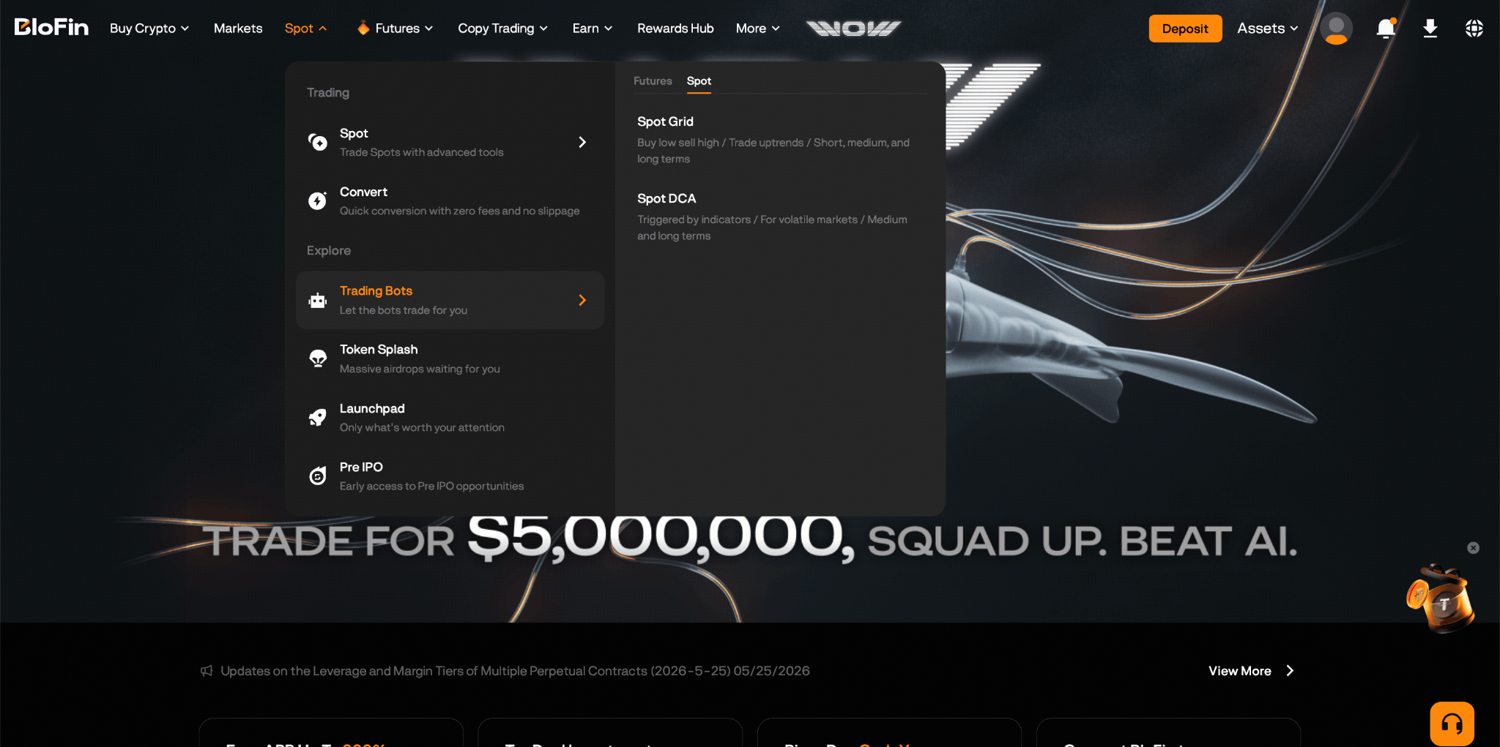
Step 1: Log in to your BloFin account and hover your cursor over the Spot tab in the navigation bar. Then, select Trading Bots.
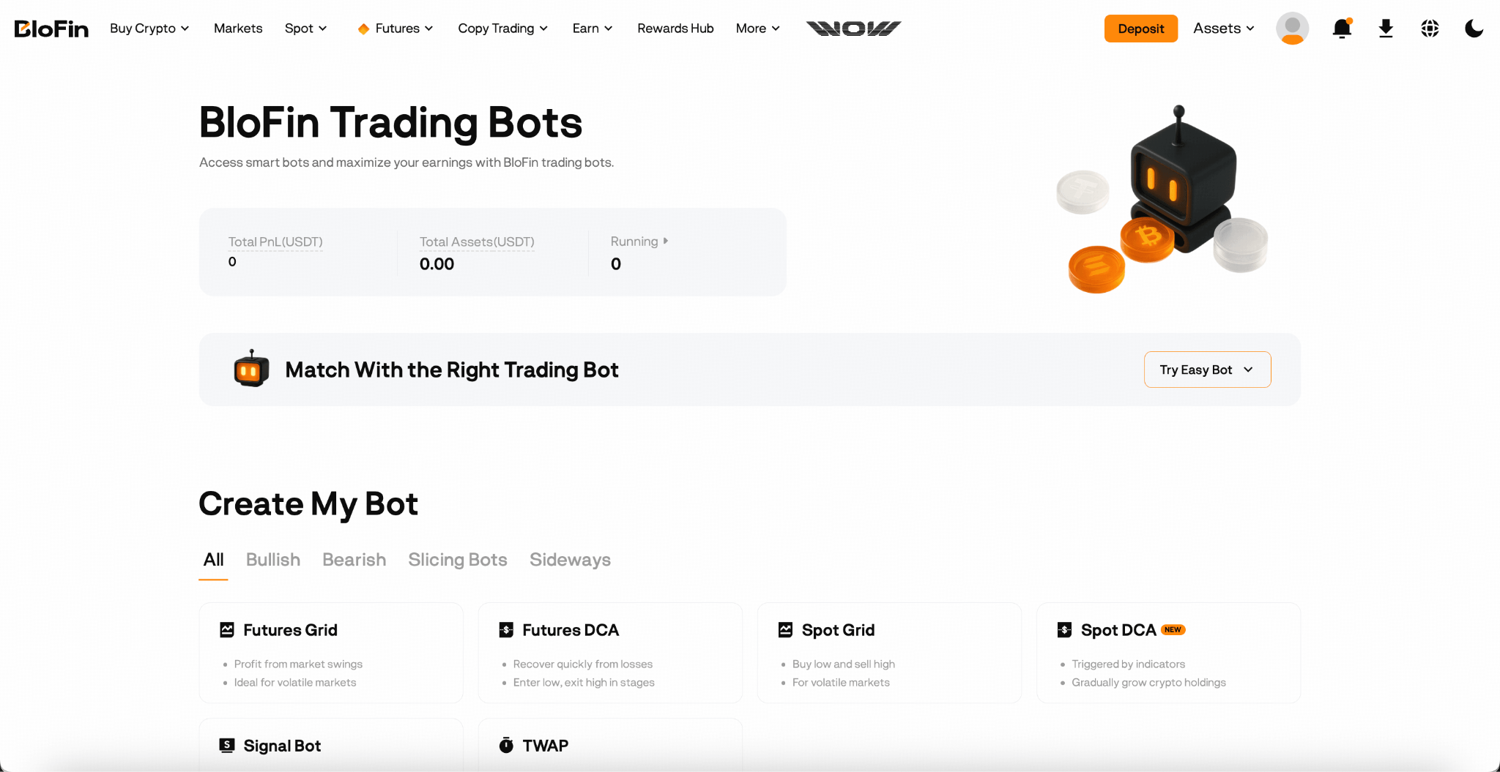
Step 2: On the BloFin Trading Bots page, you’ll be able to see all available bots. Click Spot Grid to open the creation page.
The second is from the Spot trading page directly.
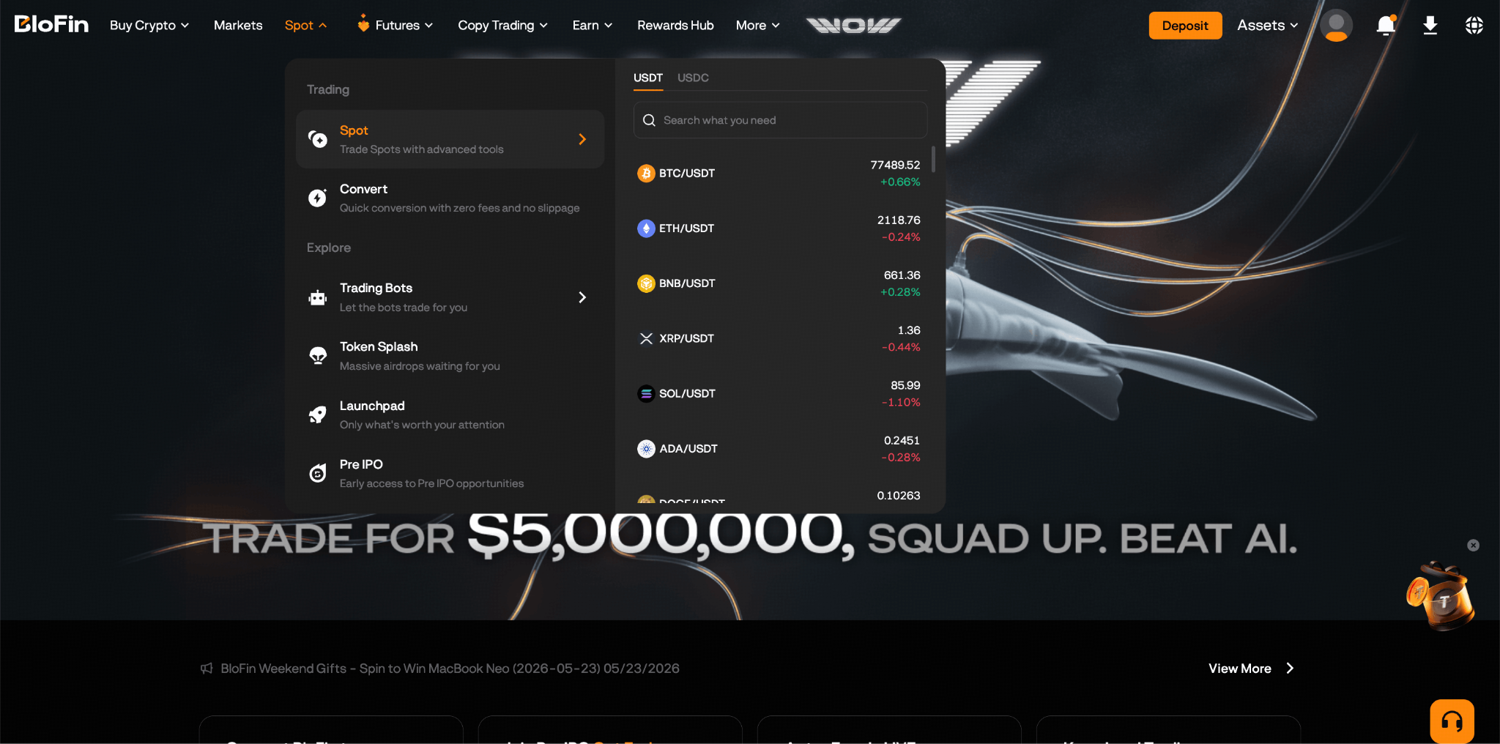
Step 1: Log in to your BloFin account and click on the Spot tab in the navigation bar.
Step 2: On the order panel on the right, click the Tools tab and select Spot Grid.
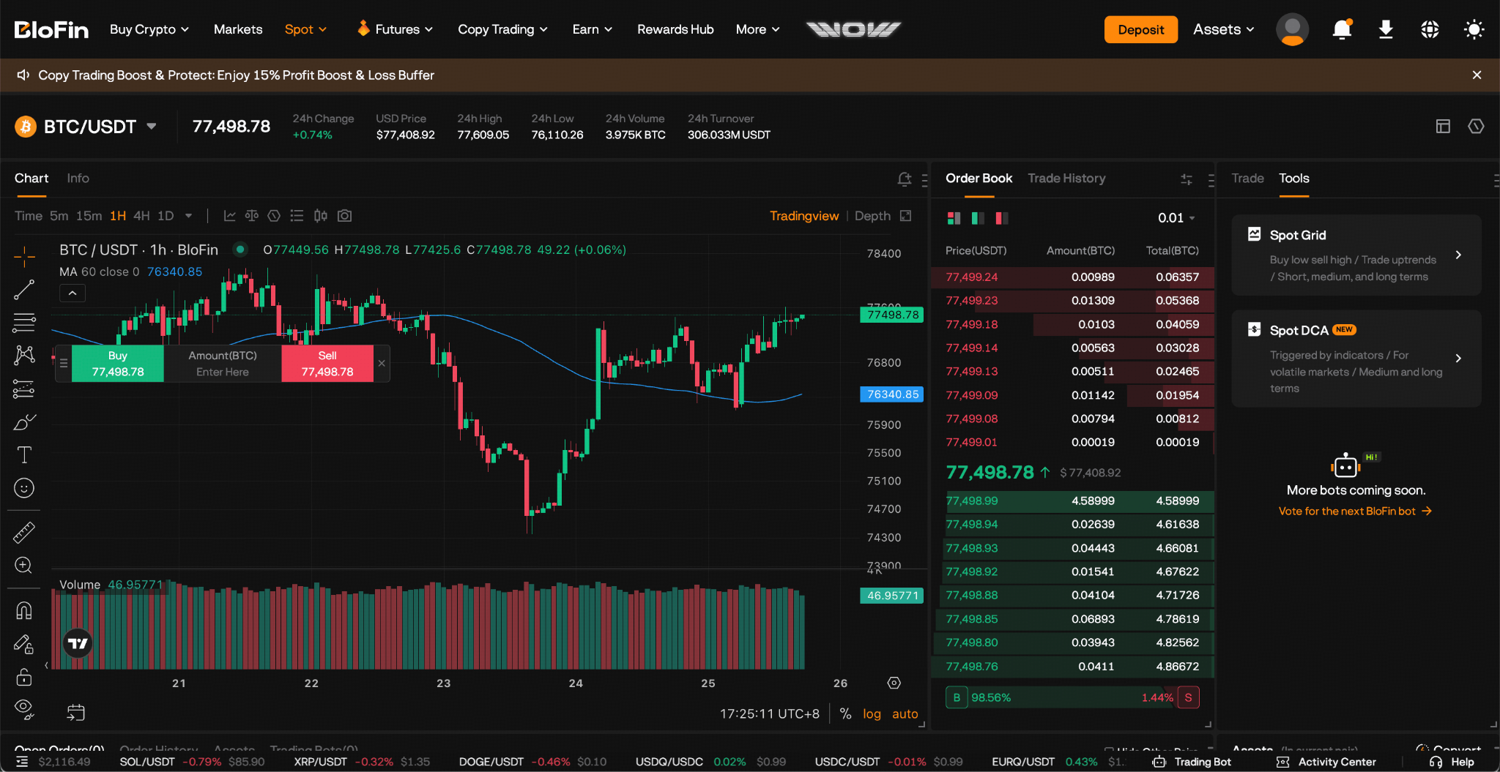
This gives you access to the Spot Grid setup from within the trading view, which is useful if you're already watching a chart and want to configure the bot based on what you're seeing.
You can run up to 20 Spot Grid Bots simultaneously across different trading pairs.
Creating your bot: AI Strategy or manual setup?
Once on the creation page, you'll choose your trading pair and then decide how to configure the parameters. BloFin gives you two options: AI Strategy and Manual.
Using the AI Strategy
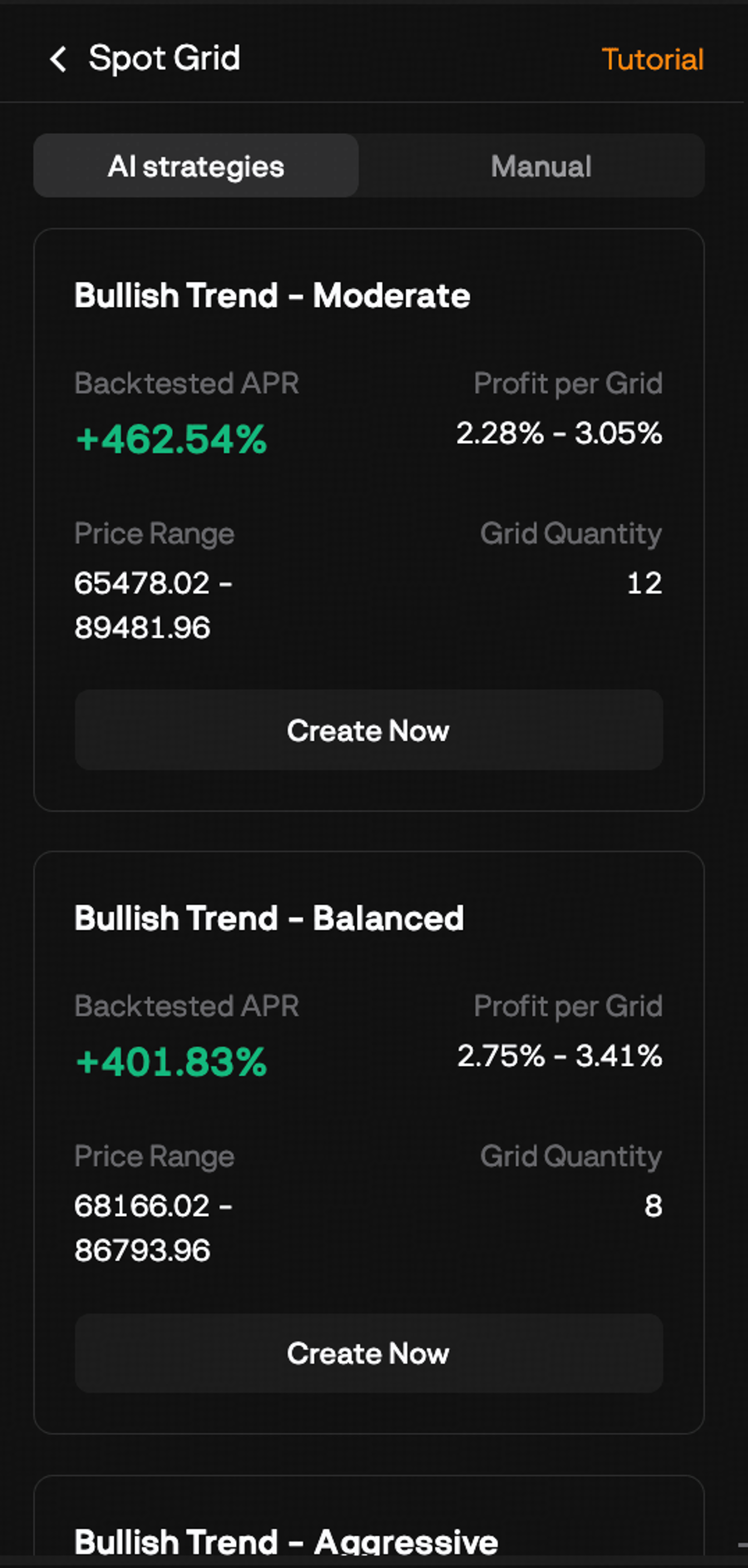
The hardest part of setting up a grid bot manually is choosing the price range. Get it wrong and the bot either breaks out of bounds immediately or barely trades at all. The AI Strategy takes that decision off your hands by generating a range and grid spacing based on the asset's recent price behavior. You pick the trading pair, select an AI strategy type, enter your investment amount, and click Create Now.
Before confirming, scroll through the parameters it's generated. The range and grid levels it suggests will tell you a lot about how the bot expects the asset to behave, and reviewing them upfront means you're not flying blind if conditions shift after it launches.
Setting up manually
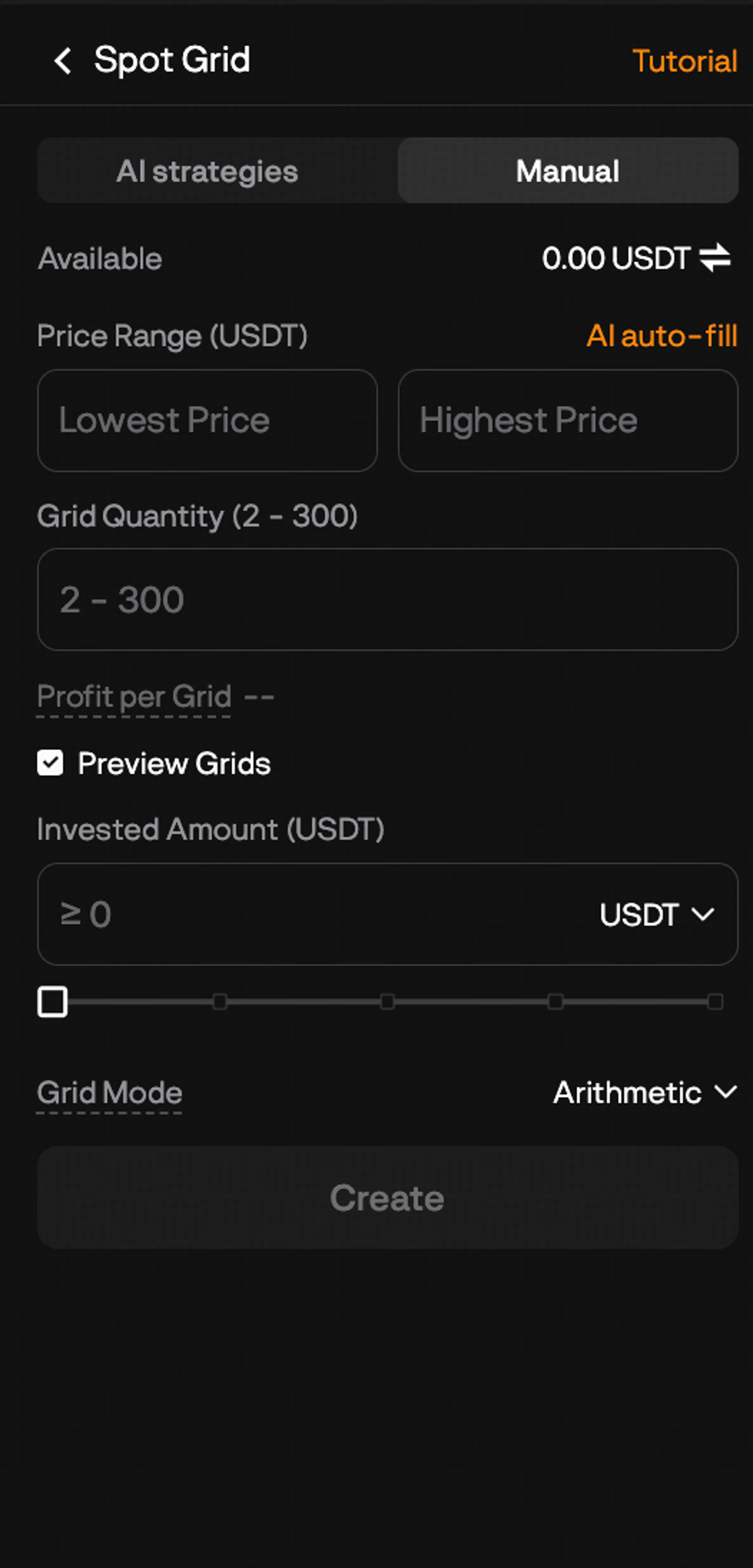
Because this is a spot bot with no leverage or directional modes, the parameter list is shorter than you might expect. You're really making three key calls: where to set the range, how many grids to use, and how much to invest. Here's how to approach each one.
Step 1: Select your trading pair. Choose the crypto asset you want the bot to trade. Pick something you have at least a basic view on. Since the bot will be holding a mix of that asset and USDT throughout its run, you want to be comfortable with that exposure.
Step 2: Set your price range. Your lowest and highest price define the boundaries the bot works within. Set the range around where you realistically expect the price to stay during the period you plan to run the bot. A useful reference point is the asset's recent trading range: look at the support levels that have held on the way down and the resistance levels that have capped the upside, and use those as your anchors.
Too narrow a range means the price will break out quickly and the bot will pause, sitting idle with open orders that aren't being triggered. Too wide a range spreads your investment across too many levels, and the individual grid gaps become so large that completed trades are rare. Somewhere in between, where the range captures the realistic chop without being so tight it breaks out on every small move, is the target.
Step 3: Set your grid quantity. This is the number of intervals your range gets divided into. More grids means more trades at smaller per-trade profits. Fewer grids means larger profits per trade but fewer of them. A good starting point is to think about the asset's typical daily price swing. If it routinely moves 3 to 5% in a day, and your range is 20% wide, you could reasonably have several grid levels triggered in a single session. More grids in that scenario means the bot is capturing more of those swings.
Step 4: Enter your investment amount. This is the USDT you're putting into the bot. When the bot activates, it uses part of this to automatically purchase the base token needed to fund the sell orders above the current price. The rest stays as USDT to fund the buy orders. The bot calculates the split for you, so you just need to enter the total you want to invest. The minimum and maximum amounts are displayed based on your other parameters.
Once everything looks right, click Create, review the confirmation screen, and click Confirm to launch the bot.
What happens right after launch
As soon as the bot is confirmed, it purchases the base token it needs for the sell orders above the current price and places all orders across the grid immediately. You'll see a confirmation pop-up with a Details button. Click through to familiarize yourself with the bot's starting state before stepping away.
Managing your bot once it's live
The Details page is your central view of the bot's activity. To get there, go to the Trading Bots tab on the Spot trading page, select Spot Grid, and click Details next to your running bot.
From here you can see the bot's current status, running time, the parameters it was launched with, all open orders, your order history, and realized profit. The key figure to watch is the Grid Profit, which shows the cumulative profit from all completed buy-sell pairs. This number only goes up as trades complete, giving you a clear read on how much the bot has actually earned since launch.
You'll also see your current holdings split between base token and USDT, which reflects where the price is sitting relative to your grid. If most of your value is in USDT, the price has been trading toward the upper end of your range. If most is in the base token, the price has been sitting toward the lower end.
Stopping the bot
When you're ready to close the bot out, click Stop and confirm. All pending orders are canceled and your current holdings, whatever mix of base token and USDT the bot is holding at that point, remain in your Spot Account. There's no forced conversion. You keep what the bot has accumulated.
How to evaluate your bot's performance
After the bot has been running for a few days, it's worth checking a few things beyond the profit figure.
Look at the order history and count how many grid trades have been completed. A bot running for several days with very few completed trades suggests one of a few things: the range is too wide and prices aren't crossing levels frequently enough, the asset isn't moving much, or the price has drifted toward one boundary and is sitting there. Completed trade frequency relative to running time tells you whether the grid is actually doing what you set it up to do.
Check where the price is sitting relative to your range boundaries. If it's been pinned near the top or bottom for an extended period, the bot is effectively paused at that extreme and not generating any profit. At that point you can either wait for the market to move back toward the center of your range, or stop the bot and restart with a range better centered on the current price.
There's no equivalent of a liquidation risk or funding fee to account for here, which keeps performance evaluation simpler than the futures bots. Your main variables are completed grid trades, the current asset mix, and whether the price is still inside the range.
Knowing when to stop and reset
The price has been outside your range for more than five to seven consecutive days
A temporary overshoot that reverses the next session is expected. A price that has settled beyond your boundary and is building new structure at that level is not returning near-term. A new grid centered on the current price will be more active than the existing one waiting for a return.
A significant catalyst has shifted the asset's behavior
The strategy is built for oscillation, and strongly trending markets are already noted as a poor fit. The decision point is recognizing when a trend is no longer temporary. If a macro event, a project-specific development, or a broader market move has initiated a clear directional shift, stopping and redeploying capital into a pair that is actually ranging is the more productive response.
If you stop and want to relaunch with similar parameters, the Details page has a Replicate parameters option that pre-fills a new creation form with your previous settings. Adjusting only the range bounds from there is faster than rebuilding the configuration from scratch.
What's next
Once you've run a few bot cycles and developed a feel for how the Spot Grid Bot behaves, a natural next question is how to get more out of the strategy. That might mean running multiple bots across different assets simultaneously, experimenting with tighter or wider grids on the same asset, or looking at how the strategy performs differently during high-volatility versus low-volatility periods.
If you want to try a spot automation approach that focuses on accumulating an asset gradually rather than capturing range oscillations, the BloFin Spot DCA Bot works on a different logic and is worth exploring.
For traders who want to apply grid trading with the amplified returns that come from leverage, the BloFin Futures Grid Bot runs the same core strategy on the futures market. That comes with more risk and more complexity, but the underlying mechanic is the same.
Frequently asked questions
What is the BloFin Spot Grid Bot?
The BloFin Spot Grid Bot is an automated trading tool that places buy and sell orders at evenly spaced price intervals within a price range you define, on the spot market. It buys when the price drops to a grid level and sells when the price rises to the next level above, capturing the spread between each completed pair as profit. No leverage is involved.
Does the Spot Grid Bot use leverage?
No. The Spot Grid Bot operates entirely on the spot market with no leverage. You're trading the actual cryptocurrency, not a contract. There's no margin, no liquidation risk, and no funding fees.
What happens to my assets when the bot is trading?
Your investment is split between the base asset and the quote currency (USDT). As the bot sells at higher grid levels, it accumulates USDT. As it buys at lower levels, it accumulates base token. The balance between the two shifts constantly as the bot trades, depending on where the price sits within the range.
Do I need to already own the base asset before running the bot?
No. When you activate the bot, it automatically purchases the base token needed to fund the sell orders above the current price, using part of your total USDT investment. You just need to have the full investment amount in USDT in your Spot Account.
What market conditions work best for the Spot Grid Bot?
The bot performs best in volatile or sideways markets where the price oscillates within a defined range. Strongly trending markets in either direction are less ideal because the strategy earns from completed buy-sell round trips, which only happen when the price moves back and forth across grid levels.
What happens if the price moves outside my grid range?
The bot pauses and stops placing new orders. Your current holdings remain in your Spot Account. You can wait for the price to return to your range, at which point the bot resumes automatically, or stop the bot to free up your funds.
Is there a limit on how many Spot Grid Bots I can run?
Yes, you can run up to 20 Spot Grid Bots simultaneously on BloFin.
Are there funding fees with the Spot Grid Bot?
No. Funding fees apply to futures positions, not spot trades. Because the Spot Grid Bot trades the underlying asset rather than a contract, no funding fees are charged.
Is the Spot Grid Bot suitable for beginners?
Yes, it's one of the more accessible bots on BloFin. There's no leverage, no margin to manage, and no liquidation risk. The main risk is that the asset declines in value and the price moves outside your range, leaving you holding the base token at a lower price. For traders new to automated strategies, it's a practical and lower-risk starting point.
What's the difference between the Spot Grid Bot and the Spot DCA Bot?
The Spot Grid Bot captures profit from price oscillations by systematically buying and selling within a defined range. The Spot DCA Bot gradually accumulates a crypto asset across multiple price levels, averaging your entry cost over time. The grid bot earns from the back-and-forth of price movement. The DCA bot is focused on building a position at a lower average cost.
What's the difference between the Spot Grid Bot and the Futures Grid Bot?
Both use the same grid trading logic of placing buy and sell orders at regular intervals within a price range. The Spot Grid Bot trades the underlying asset with no leverage, while the Futures Grid Bot trades futures contracts with leverage. The Spot version is simpler and lower risk. The Futures version can amplify returns but introduces margin requirements, liquidation risk, and funding fees.
How do I access the Spot Grid Bot on BloFin?
There are two ways. From the navigation bar, go to Spot > Trading Bots and click Spot Grid. Alternatively, open the Spot trading page and select Tools in the order placement area on the right side.
What's the difference between the AI Strategy and manual setup?
The AI Strategy generates grid parameters based on the asset's recent market behavior. You pick the trading pair, a strategy type, and your investment amount, and the bot handles the configuration. Manual setup lets you control every parameter yourself. AI Strategy is a good starting point for newer users; manual setup is better once you're familiar with how each parameter affects the bot's behavior.
What happens when I stop the bot?
All pending orders are canceled. Your current holdings, whatever mix of base token and USDT the bot has accumulated, stay in your Spot Account as-is. There's no forced sale or conversion.
Can I adjust my parameters while the bot is running?
No. Parameters can't be edited once the bot is live. If you want to change your price range, grid quantity, or investment amount, you'll need to stop the bot and create a new one.
How do I know if my bot is performing well?
The most useful signal is the frequency of completed grid trades relative to how long the bot has been running. A high frequency means the price is oscillating within your range and the bot is capturing it well. A low frequency suggests the range may be poorly calibrated for current market conditions, or the asset simply isn't moving enough. The order history on the Details page shows you exactly which levels have been triggered and how often.
Are there any fees specific to the Spot Grid Bot?
The Spot Grid Bot itself doesn't carry additional fees beyond BloFin's standard spot trading fees, which apply to each buy and sell order the bot places. There are no funding fees since this is a spot strategy with no open futures positions. You can check BloFin's fee schedule for the specific trading fee rates.
Is the Spot Grid Bot better than the Futures Grid Bot?
Neither is objectively better. They suit different situations. The Spot Grid Bot is simpler and lower risk since there's no leverage, no liquidation price, and no funding fees. The Futures Grid Bot can generate larger returns from the same price movements because of leverage, but it requires more active monitoring and carries the risk of liquidation. Which one is right depends on your risk tolerance and whether you want exposure to leverage.
Disclaimer: This content is for educational purposes only and does not constitute financial, investment, legal, or tax advice. Crypto assets are highly volatile and carry significant risk of loss. Always verify local regulations and consult a qualified professional before making financial decisions.