
Owning an asset through an account and holding it yourself are two different arrangements. In an account, a company keeps the asset and records how much of it is yours. You rely on that company whenever you want to trade it, move it or cash it out. In your own wallet, the asset sits at an address that only your private key can move, and nobody else has to approve what you do with it.
That control comes with two catches. A transfer on a blockchain is final once the network confirms it, so a wrong address or the wrong network can cost you the whole amount. A tokenized share adds a second catch, because the company that issued the token keeps some powers over it wherever it goes.
Tokenized shares are built to move. Each one is a token on a public blockchain, so an exchange can send it to an outside wallet much as it sends a coin. The token carries its issuer's rules along with it.
Tokenized Amazon (AMZNX) is one of these tokens. It follows the price of one Amazon share, and BloFin lists it as the AMZNX/USDT Spot pair. Once you have bought AMZNX on BloFin, you can withdraw it to a wallet you control. Most of the care goes into the network, the address and what the issuer can still do afterward.
What is withdrawing AMZNX to your own wallet?
Withdrawing AMZNX to your own wallet means sending the token from your BloFin account to a blockchain address whose private key you hold. You choose AMZNX, pick a network your wallet supports, paste the address, enter an amount and confirm with your security codes.
Holding a token this way is called self-custody. Your wallet stores a private key, the secret that signs transactions, and whoever holds that key controls the tokens at its address. BloFin's guide to what self-custody means covers the idea for any coin. With AMZNX there is one twist: the token's issuer keeps some powers over it that reach every wallet, yours included.
Three things need to be ready before your first withdrawal:
A wallet on a network AMZNX uses, such as a Solana wallet or a wallet for Ethereum and networks built like it.
Security codes set up on your BloFin account. BloFin's withdrawal guide asks for an email code and a two-factor authentication (2FA) code, such as Google Authenticator, when you submit a withdrawal.
Your AMZNX balance moved to your Funding account.
Say you bought 10 AMZNX and want them in a phone wallet you already use for Solana tokens. Before you start, check that the wallet can show tokens you add yourself and that your BloFin security codes work. Then open the withdrawal page and see whether it offers a Solana network for AMZNX. If it lists only Ethereum-style networks, you need an Ethereum-compatible wallet instead.
What changes when AMZNX leaves BloFin
When AMZNX leaves BloFin, control of the tokens moves from the exchange to whoever holds your private key. The token stays the same tracker certificate from Backed Assets (JE) Limited, following the price of Amazon's shares (source: Backed Assets, Amazon xStock). Holding it gives you exposure to that price but no shareholder votes (source: xStocks FAQ).
While AMZNX stays on BloFin, the exchange keeps the tokens and your account shows how many of them are yours, which BloFin's explainer on how exchange custody works describes. After a withdrawal, the tokens sit at your own address. Keeping the seed phrase safe, checking each transfer and protecting the device all become your job, and BloFin's order book is one deposit away rather than one click away.
The legal side travels with the token. The issuer says ownership of an xStock is recorded on the blockchain and that holding the token is holding the instrument (source: xStocks product legal overview). BloFin's xStocks risk disclosure asks each buyer to confirm, among other things, that they are not a US person (source: BloFin xStocks risk disclosure). It also says you must not transfer xStocks tokens when the transfer would break an applicable law (source: BloFin xStocks risk disclosure). BloFin's guide to the safety of tokenized Amazon explains who may hold AMZNX at all.
Say you hold 10 AMZNX on BloFin and withdraw all of them. Your BloFin balance drops to zero, your wallet shows 10 tokens, and your claim on the issuer is exactly what it was: 10 certificates, each following one Amazon share. The one thing that moved is control of the key.
Which blockchains AMZNX can move on
AMZNX is issued on several blockchains, so the network you pick decides which wallet can receive it. Backed's product page names Ethereum, where AMZNX is an ERC-20 token, and Solana, where it is an SPL (Solana Program Library) token (source: Backed Assets, Amazon xStock). The issuer's docs add Ethereum-compatible Arbitrum, Mantle and Ink, plus TON (source: xStocks developer docs).
ERC-20 is the token standard most Ethereum tokens follow. Ethereum-compatible networks such as Arbitrum and Optimism use the same format. On Solana, AMZNX uses Token-2022, Solana's newer token standard, with an extension that scales the balance a wallet displays (source: xStocks developer docs). The two families use different address formats, which is why the network choice matters so much. Every deployment is the same product on a different network, so AMZNX on Solana and AMZNX on Ethereum are the same certificate (source: xStocks, how xStocks work).
Backed's Amazon xStock page links a block explorer for each version of the token. Those links show one Ethereum-style contract address used on eight networks, plus one address each on Solana, TON and TRON (source: Backed Assets, Amazon xStock).
Network | Token format | AMZNX contract address |
|---|---|---|
Solana | SPL token (Token-2022) | Xs3eBt7uRfJX8QUs4suhyU8p2M6DoUDrJyWBa8LLZsg |
Ethereum, Arbitrum, BNB Smart Chain, Mantle, Ink, Optimism, X Layer, Monad | ERC-20 | 0x3557ba345b01efa20a1bddc61f573bfd87195081 |
TON | TON token | EQCtD2-7qxHhQoNhxri2JSzH-dlmWqKYCDtlEZqRi3-56gd9 |
TRON | TRC-20 token | TKbZf7Ni93pAB6ZHQLR2BxbnukRsB3WNvh |
Backed's legal page lists the same eleven networks for xStocks as a whole (source: Backed legal documents). An exchange picks its own networks from that set. Each token also has its own minimum withdrawal, which BloFin's withdrawal page shows once you have chosen both the coin and the network.
So the list that counts is the one BloFin's withdrawal page shows when you select AMZNX, and your wallet has to match one of those networks, whatever else the issuer supports.
How to withdraw AMZNX from BloFin, step by step
To withdraw AMZNX from BloFin, open Assets, choose Withdraw, select AMZNX and pick a network that matches your wallet. Then paste your wallet address, enter an amount above the minimum, check the network fee and confirm with your security codes. The tokens reach your wallet once the blockchain confirms the transfer.
Here’s the step-by-step guide:
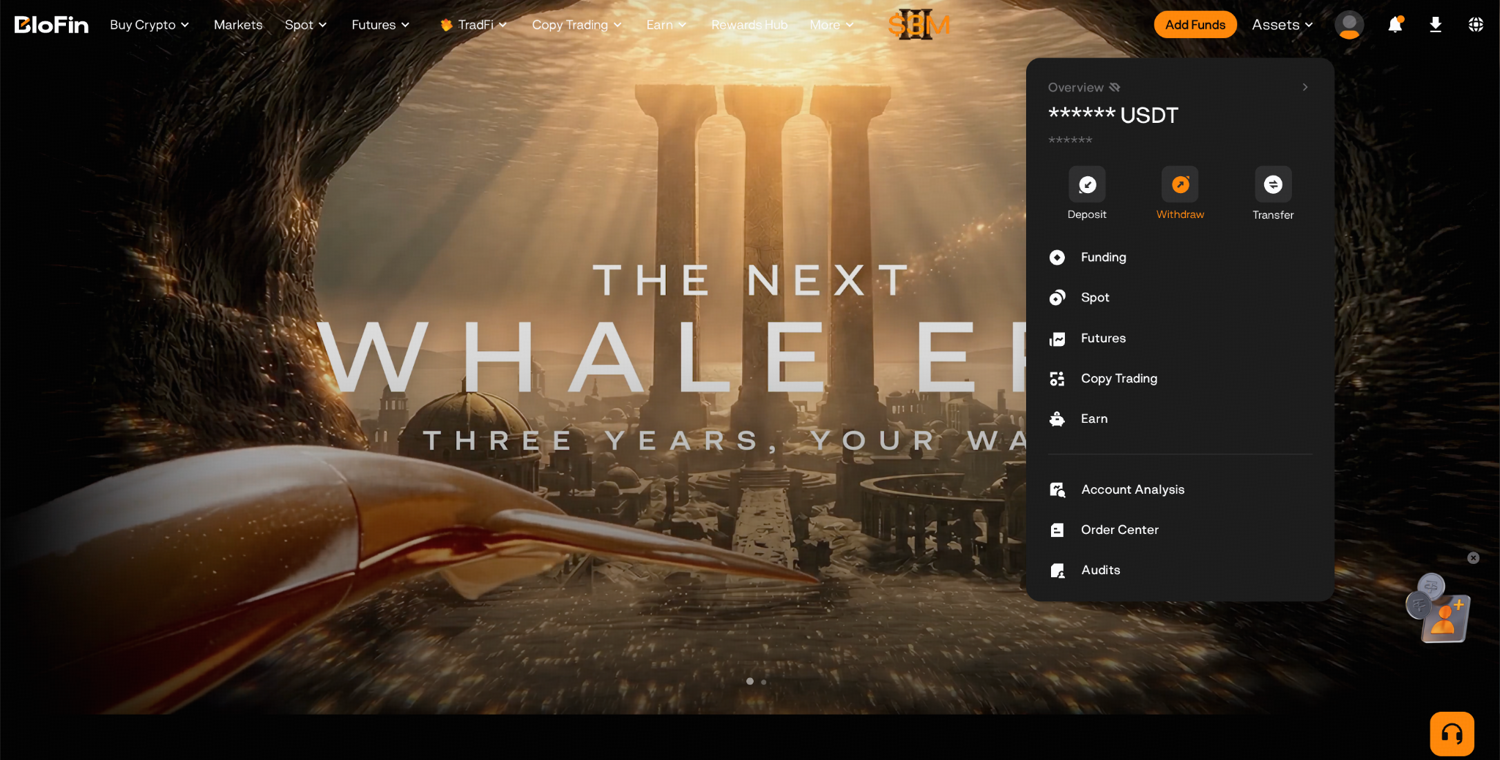
Step 1: Log in to your BloFin account and hover your cursor over the Assets tab. Then, click Withdraw.
Step 2: In the first search field, type AMZNX and select it as the coin you want to withdraw.
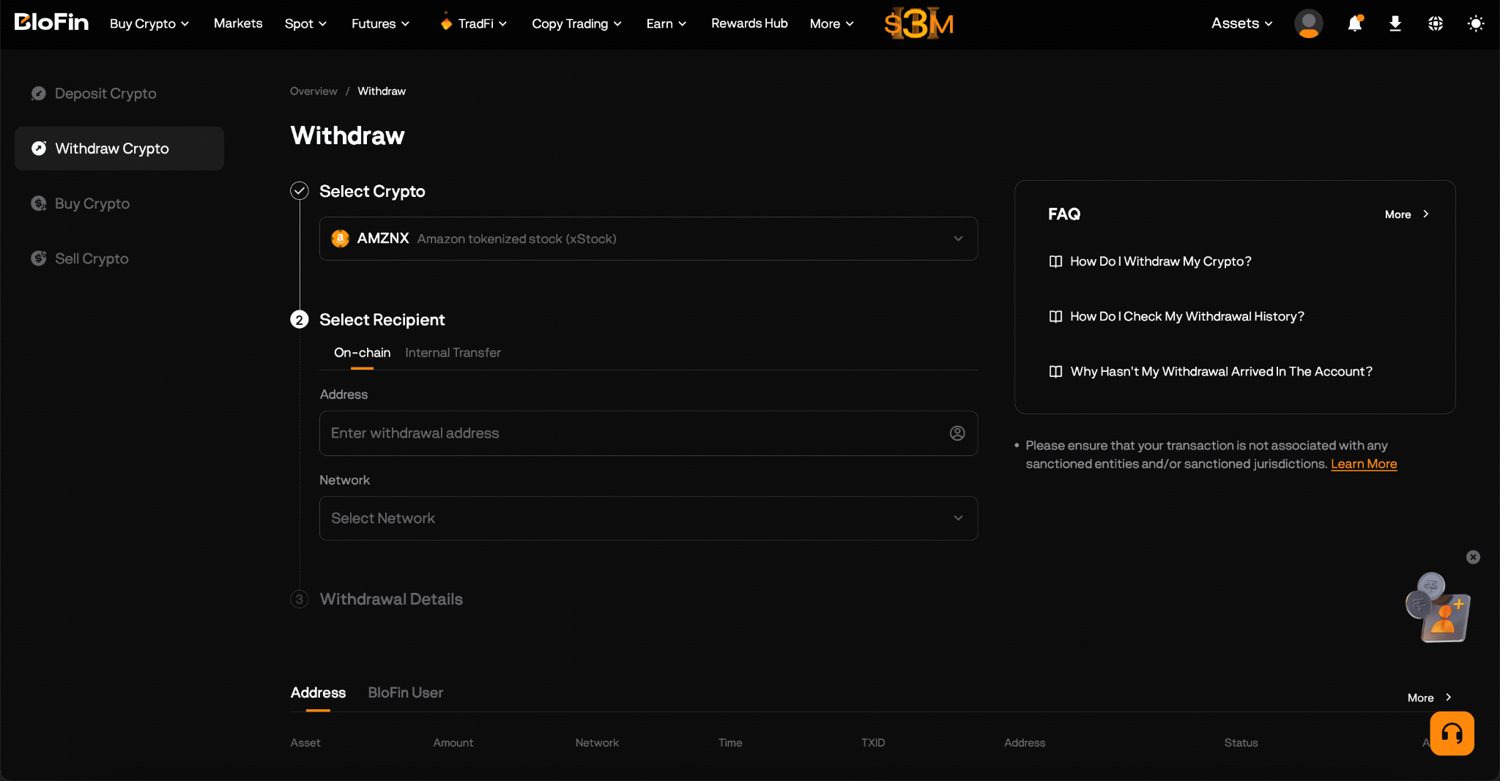
Step 3: Choose the withdrawal network that matches the wallet which will receive the tokens.
Step 4: Paste the receiving address from your wallet, and enter a Memo/Tag only if the page asks for one.
Step 5: Enter the amount, then read the minimum withdrawal and the network fee the page shows for that network.
Step 6: Click Withdraw and complete the security check with your email code and your Google Authenticator code. Both codes expire after five minutes.
Step 7: Check the address, the network and the amount on the confirmation screen once more, then confirm.
Keep the AMZNX you want to withdraw in your Funding account, and if it sits in Spot, move it there first, because BloFin processes withdrawals from the Funding account. Moving funds between BloFin accounts is free (source: BloFin transfer FAQ).
The fee shown on the withdrawal page is a network fee paid to the blockchain to process the transaction, not a BloFin charge, and its size depends on the token and the network. It comes out on the sending side, so the amount that lands in your wallet is the amount you entered minus the fee.
How much you can move in a day depends on your identity checks, known as KYC (Know Your Customer). The withdrawal guide puts the daily limit at 20,000 USDT for a standard account, 1,000,000 USDT with personal verification and 2,000,000 USDT with address verification.
Say you hold 10 AMZNX and want them in your own wallet. At a price of 250 USDT, your ten tokens are worth about 2,500 USDT, well inside the 20,000 USDT limit at basic KYC. You start with a small test amount above the minimum the page shows, and you wait until it appears in your wallet. Then you send the rest. That test adds one network fee, and in return you know the address and the network work before most of your tokens move.
How to check the AMZNX contract address in your wallet
To check that the AMZNX in your wallet is the real token, compare its contract address with the one Backed publishes: Xs3eBt7uRfJX8QUs4suhyU8p2M6DoUDrJyWBa8LLZsg on Solana and 0x3557ba345b01efa20a1bddc61f573bfd87195081 on Ethereum (source: Backed Assets, Amazon xStock). Solscan, a Solana block explorer, lists that token as Amazon.com xStock with the symbol AMZNx (source: Solscan, AMZNx).
A contract address is the token's identity on its network. The name and the symbol are labels that anyone can copy onto a new token, so a balance called Amazon.com xStock proves nothing until its address matches.
Solscan shows the Solana values (source: Solscan, AMZNx), and Etherscan shows the Ethereum ones (source: Etherscan, AMZNx).
What to compare | Solana version | Ethereum version |
|---|---|---|
Contract address | Xs3eBt7uRfJX8QUs4suhyU8p2M6DoUDrJyWBa8LLZsg | 0x3557ba345b01efa20a1bddc61f573bfd87195081 |
Token name | Amazon.com xStock | Amazon.com xStock |
Symbol | AMZNx | AMZNx |
Token program or type | Token-2022 program | ERC-20 proxy contract |
After you submit a withdrawal, your withdrawal history shows its status, the amount, the network, the destination address and the transaction ID (TxID). The TxID is the reference you paste into a block explorer, a public website that shows every transaction on a network. Run the check in three places: Backed's product page, the block explorer for your network and your wallet's token details. If your wallet shows nothing after the TxID confirms, add AMZNX to it by pasting the checked contract address, then compare the balance with the explorer. A token that turns up in your wallet by itself, from an address you never used, is a warning sign. BloFin's guide to wallet drainers explains how those scams try to get a signature from you.
Which issuer controls apply to AMZNX in your wallet
AMZNX keeps its issuer's controls in every wallet. Backed describes the tokens as Solana and ERC-20 tokens "without technical transfer restrictions" (source: Backed legal documents). The Solana version still carries a pause function and a permanent delegate (source: Solscan, AMZNx), an authority that can move or burn the token in any account holding it (source: Solana docs, permanent delegate).
A permanent delegate is set on the token itself, and the holder of an account cannot remove it (source: Solana docs, permanent delegate). A paused token rejects transfers, new issuance and burns across the whole token until the pause is lifted (source: Solana docs, pausable mint). Solscan shows the AMZNx pause function set to off (source: Solscan, AMZNx).
The legal terms say how those powers may be used. The Amazon xStock Final Terms, dated May 8, 2026, give the tokenizer, the party that runs the token contract, a function to stop all transfers of the token (source: Amazon xStock Final Terms). They allow a pause after a technical change, a vulnerability or a hack attempt, for as long as reasonably needed (source: Amazon xStock Final Terms). They limit the tokenizer's burning function to tokens it holds itself (source: Amazon xStock Final Terms).
The same terms let the contract block addresses flagged under sanctions rules, such as those of the US Office of Foreign Assets Control (OFAC), including transfers to and from them (source: Amazon xStock Final Terms). They describe a freezing function only as a possible future update, which the tokenizer could use if a court, a regulator or another authority compelled it (source: Amazon xStock Final Terms). On Solana, the AMZNx mint already has a freeze authority set (source: Solana Explorer, AMZNx). A freeze authority is the account allowed to freeze the tokens in a token account so they cannot be transferred or burned (source: Solana docs, tokens). On Ethereum, Etherscan lists AMZNx as a proxy contract that points to a separate implementation (source: Etherscan, AMZNx). The Final Terms give the tokenizer the ability to update the smart contract code (source: Amazon xStock Final Terms).
Say you hold 10 AMZNX in a Solana wallet and the tokenizer pauses the token after a hack attempt somewhere on the network. Your wallet still shows 10 tokens, but you cannot send them anywhere, including back to an exchange to sell, until the pause ends. The pause covers the whole Solana token, so an exchange's own Solana addresses cannot move it on-chain either, and self-custody gives you no route around it.
Matching the network and address when you send AMZNX
Matching the network and the address decides whether an AMZNX withdrawal arrives, and a mistake can lose the tokens for good. Once a withdrawal is on the blockchain it cannot be reversed, and BloFin's xStocks risk disclosure says digital asset transactions are final (source: BloFin xStocks risk disclosure).
The two main versions of AMZNX use different address shapes, which makes a mix-up easy to spot if you look. An Ethereum-style address starts with 0x and runs to 42 characters, like the AMZNX contract address. A Solana address, like the AMZNX mint, is a string of letters and numbers with no 0x at the front, and TON and TRON addresses have none either. If your wallet shows an address starting with 0x, the network on BloFin's withdrawal page has to be an Ethereum-style one, and the same rule runs the other way for Solana.
BloFin's deposit guide describes the same mistake from the receiving side. If you choose one network on BloFin while the other side sends on another, the funds land on the wrong chain and do not arrive in your account, and recovery is not guaranteed.
Four habits prevent most of these losses. Copy the address with your wallet's copy button, compare its first and last few characters after you paste it, match the network name on both sides, and send a small test before the rest. The same seed phrase can produce different addresses on different chains, which BloFin's guide to multi-chain wallet security explains.
Say you want your 10 AMZNX in a Solana wallet. You copy the wallet's receiving address, see that it has no 0x at the front, and pick a Solana network on BloFin's withdrawal page if it offers one for AMZNX. You compare the first four and last four characters on both screens, send a small amount, and find the TxID on Solscan before you send the rest. If the address had started with 0x, that one glance would have told you the network was wrong.
What you can do with AMZNX in your own wallet
In your own wallet, AMZNX can sit untouched, go to another address, cross to another blockchain through the issuer's bridge, be redeemed with the issuer or return to an exchange. Wherever it sits, it stays a tracker certificate on Amazon's share, backed one to one by shares held with regulated custodians (source: xStocks product legal overview).
Holding is the simplest use. The issuer reflects dividends and stock splits through a multiplier applied to token balances (source: xStocks FAQ), and the Solana version's multiplier stands at 1 (source: Solscan, AMZNx). If Amazon split its stock, that multiplier would rise with the split, which BloFin's guide to Amazon's stock splits explains.
Moving between chains uses the issuer's public bridge, which runs on Chainlink's Cross-Chain Interoperability Protocol (CCIP) and is open to all holders (source: xStocks developer docs). It moves the token between supported networks without selling it and buying it back (source: xStocks FAQ), as BloFin's explainer on what tokenized Amazon is also describes.
Redeeming means handing the token back to the issuer for its value. The issuer accepts redemptions from retail holders who pass its identity checks, for $5,000 or more (source: xStocks FAQ), and only from a wallet address it has whitelisted (source: xStocks issuance and redemption). BloFin's guide to whether AMZNX is backed explains who can use that route, what it costs and how to check the reserves first.
Say you hold 10 AMZNX in your wallet. At the same 250 USDT a token, and treating one USDT as one dollar, they are worth about $2,500, half the $5,000 minimum. At that size the issuer route is closed to you, and selling on an exchange is the way out.
Sending AMZNX back to BloFin to sell it
To sell AMZNX from your own wallet on BloFin, deposit it back on a network BloFin supports for AMZNX, wait for the deposit to be credited, and sell it on the AMZNX/USDT Spot pair. Take the deposit address and the network from your BloFin deposit page.
The deposit page works like the withdrawal page in reverse. You open Assets, click Deposit, select the token, choose the network, and BloFin shows your deposit address and a QR code. If the page asks for a memo or tag, include it exactly as shown. Each coin has a minimum deposit, and a deposit below it will not be credited. A deposit only becomes available once the network has confirmed it, and you can follow it on a block explorer with its TxID in the meantime.
Say you bring your 10 AMZNX back from a Solana wallet. You open Deposit, select AMZNX, choose the same Solana network you used on the way out if BloFin lists it, copy the address, and send a small amount first. When it is credited, you send the rest. Deposits land in your Funding account, the account BloFin uses for deposits and withdrawals (source: BloFin transfer FAQ). You then move the tokens to Spot and place a limit order to sell at a price you choose.
Selling on the pair costs the spot trading fee for your level, and BloFin's fee schedule lists the maker and taker rates for each fee tier.
Keeping AMZNX on BloFin or holding it yourself
Keeping AMZNX on BloFin suits you if you plan to trade it, since selling takes one order and BloFin looks after custody. Holding it in your own wallet suits you if you want direct control or on-chain use, at the cost of guarding your private key and paying a network fee each time the tokens move.
Neither choice changes what the token is. The issuer, the backing, the certificate and the issuer's controls stay the same in both places. The decision is about who holds the key and how quickly you can trade. A lost seed phrase locks the tokens away for good, and BloFin's guides to choosing a crypto wallet and to hardware wallets cover backups and devices.
Say you hold 10 AMZNX and trade it a few times a month. Each round trip to a wallet costs two network fees and two waits for confirmation, and you would need to return the tokens before every sale. If instead you plan to hold them for a year and want them away from any exchange, one withdrawal and a well-kept backup may suit you better.
You can also split the balance. Keep the tokens you trade on BloFin and withdraw only the part you plan to hold for a long time. That limits both the fees and the size of any single mistake.
Looking to trade the AMZNX/USDT Spot pair? To get started, you'll need to first create a BloFin account, fund your account with cryptocurrency, and navigate to the AMZNX/USDT Spot trading page.
Frequently asked questions
Can you send AMZNX from BloFin to another exchange?
Yes, as long as the other exchange accepts AMZNX on a network BloFin also offers for it. The issuer's guide for exchanges says each venue may list xStocks on any of the supported networks, so two exchanges can support different ones (source: xStocks exchange guide). Take the deposit address and network from the receiving exchange's own deposit page, select the matching network on BloFin, and send a small amount first. The receiving exchange's own eligibility rules then apply to your account there.
Can you withdraw AMZNX to a bank account?
A bank account has no blockchain address, so it cannot receive AMZNX. BloFin's withdrawal guide lists the places a withdrawal can go: a personal wallet, a hardware wallet, or a decentralized finance (DeFi) protocol or Web3 app. To turn AMZNX into money, you first sell it on the AMZNX/USDT Spot pair for USDT, a stablecoin that tracks the US dollar, and then move that USDT onward. Selling on BloFin also avoids paying a network fee to move the tokens themselves.
Why does AMZNX show 8 decimals on Solana and 18 on Ethereum?
Each version of the token was created with its own precision. Solscan lists the Solana token with 8 decimals, so its smallest unit is 0.00000001 AMZNX (source: Solscan, AMZNx), while Etherscan lists the Ethereum contract with 18 decimals (source: Etherscan, AMZNx). Your balance is the same number of tokens either way. On Solana, the issuer keeps the raw on-chain amount fixed and tells exchanges to build transactions with that raw amount (source: xStocks exchange guide).
Is AMZNX in your own wallet insured?
AMZNX carries no insurance in any wallet. The Amazon xStock Final Terms say the products are neither insured nor guaranteed by any government, regulator or agency (source: Amazon xStock Final Terms). BloFin's xStocks risk disclosure says xStocks tokens on BloFin lack government or private insurance (source: BloFin xStocks risk disclosure). What stands behind the token is collateral: shares held with custodians in segregated accounts, which an independent security agent can take control of if the issuer defaults (source: xStocks product legal overview).
How many wallets hold AMZNX on Solana?
About 18,000 addresses hold the Solana version of AMZNX, and Solscan's holders tab shows the live count. Solscan dates the token's first mint to June 12, 2025 (source: Solscan, AMZNx). The count covers Solana addresses only, so holders on Ethereum and the other networks come on top. Each holder is an address, and an exchange that keeps tokens for many customers can appear as a single address, so the figure counts wallets rather than people.
Researched and written by the BloFin Academy editorial team with AI-assisted drafting. All facts independently verified. Primary sources include BloFin's xStocks listing notice, xStocks risk disclosure and Help Center transfer FAQ, BloFin Academy's withdrawal and deposit guides, Backed's Amazon xStock page, legal documents and Final Terms, the xStocks docs, Solana's token docs, and the AMZNx pages on Solscan, Solana Explorer and Etherscan, current as of October 5, 2026.
Nothing in this article constitutes financial advice, and nothing in it is a recommendation to buy, sell or hold Amazon in any form. A withdrawal sent on the wrong network or to the wrong address can lose the tokens for good. A lost seed phrase locks them away with no one able to restore access. In your own wallet, AMZNX stays subject to the issuer's pause function, and on Solana to a permanent delegate and a freeze authority, so self-custody does not remove issuer risk. Past performance does not indicate future results. Do your own research and consider your risk tolerance before you trade on BloFin.