
There are two ways to hold a digital asset. You can leave it with a company that keeps a record of what is yours, or you can hold it at an address that only your own key can move. The first is easy to trade from, while the second puts every decision, and every mistake, in your hands.
Moving an asset from the first kind of holding to the second takes one transfer, and that transfer is final once the blockchain confirms it. Pick the wrong network or paste the wrong address and the coins can be gone for good. Some tokens add a second puzzle on arrival, because the number your wallet shows can differ from the number you sent.
Tokenized shares are one of those tokens. Each share token lives on public blockchains, so an exchange can send it out much as it sends a coin, but the issuer's rules travel with it. The issuer also raises each holder's stake when the company pays a dividend, and different blockchains show that rise in different ways.
Meta Platforms is available this way as METAX, which trades on BloFin's METAX/USDT Spot market. BloFin also runs the METAUSDT Perpetual, which follows Meta's price as a futures contract and never leaves the exchange. Only the token can leave BloFin, and getting it to a wallet safely comes down to the network, the address and knowing what the wallet will display.
What is withdrawing METAX to your own wallet?
Withdrawing METAX to your own wallet means moving the token from your BloFin Funding account to a wallet address whose private key only you hold. You pick METAX and your wallet's network, add the address and amount, and approve with two codes. BloFin's listing notice set METAX withdrawals to open at 10AM UTC on September 3, 2025 (source: BloFin xStocks listing notice).
METAX began trading a day earlier, on September 2, 2025, alongside four more tokenized-share pairs in the Spot Innovation Zone on BloFin (source: BloFin xStocks listing notice). Backed issues the xStocks range of tokenized shares, and METAX is the Meta member of that range.
Holding METAX this way is known as self-custody with your own keys. Your wallet's private key signs every transfer, so anyone who gets that key can move the tokens, and nobody else can recover it for you.
Before a first METAX withdrawal, get three things in place:
A wallet on a blockchain METAX uses, for example a Solana wallet, or one built for Ethereum and the chains that copy its design.
Two-factor authentication on your BloFin account. BloFin's withdrawal guide requires Google Authenticator or a passkey before any withdrawal.
Your METAX in your Funding account, since BloFin processes withdrawals from that account only.
Say you bought METAX last month and it sits in your Spot account. You would first move it to Funding, then open the Solana or Ethereum wallet you already have and copy its receiving address. Everything else happens on BloFin's withdrawal page. Before you start, read what tokenized Meta (METAX) is, because METAX is one tracker certificate whichever chain carries it.
Which blockchains METAX can be sent on
METAX exists on eleven different blockchains, according to the issuer's product page. One contract address serves eight of them: Arbitrum, BNB Smart Chain, Ethereum, Ink, Mantle, Monad, Optimism and X Layer. Solana, Tron and The Open Network (TON) each carry their own address (source: Backed Meta xStock page).
Backed calls METAx, its own spelling of the token, a tracker certificate issued as Solana Program Library (SPL) tokens and Ethereum Request for Comments 20 (ERC-20) tokens (source: Backed Meta xStock page). ERC-20 is the token format of Ethereum and of the networks built like it, often called Ethereum Virtual Machine (EVM) networks. SPL is Solana's format, and METAx uses Token-2022, Solana's newer token program, plus an add-on that lets wallets show the stored balance multiplied up (source: xStocks developer docs).
Network | Token format | METAx contract address |
|---|---|---|
Arbitrum, BNB Smart Chain, Ethereum, Ink, Mantle, Monad, Optimism, X Layer | ERC-20 | 0x96702be57cd9777f835117a809c7124fe4ec989a |
Solana | SPL (Token-2022) | Xsa62P5mvPszXL1krVUnU5ar38bBSVcWAB6fmPCo5Zu |
Tron | TRC-20 | TGJaEbWPNmM6NErggxJwWQ5ChRH7KxXF3a |
TON | jetton | EQD3cgQg432BiCSRli-hMswoVuvNnO42FuMdc-AXqd83SfcV |
Every version is the same product, so METAX on Solana and METAX on Arbitrum are one product on two ledgers. Exchanges choose which of those chains to support, since the issuer's integration guide leaves every venue free to list xStocks on any network it runs on (source: xStocks exchange guide).
That makes BloFin's withdrawal page the list that counts. Once you select METAX there, the network menu shows the chains BloFin supports for it. The page then shows the network fee and the minimum withdrawal for the chain you pick. Whatever the issuer runs on, your wallet needs one of the chains in that menu.
METAX on Monad and the growing chain list
The list of chains METAX can live on keeps growing. On October 6, 2026, xStocks announced a native deployment on Monad at Monad's Open conference in Singapore, under which its tokens will be minted and settled on Monad itself (source: CoinGape). METAx already runs there today.
The Monad version uses the same 0x9670 address as the Ethereum one, carries the same dividend multiplier of about 1.00285 and holds more than 4,000 METAx (source: Monadscan). Backed's product page lists Monad among the eight networks that share the address (source: Backed Meta xStock page).
The issuer's public data goes further still. Its asset feed lists a twelfth deployment for METAx, on HyperEVM, at the same EVM address, which the product page does not show yet (source: xStocks asset data). Two official lists that differ by one chain are a good reason to treat any chain list as a moving one.
For a BloFin user, a new issuer chain changes nothing until BloFin adds it to its own withdrawal menu. A wallet on Monad can hold METAx today, but a METAX withdrawal can only go out on a network BloFin's page offers. Tokens can still move between the issuer's chains later through its public bridge, without being sold.
How to withdraw METAX from BloFin, step by step
To withdraw METAX from BloFin, transfer it into your Funding account, go to Assets, pick Withdraw and select METAX. Then choose a network your wallet runs on, add the wallet address and the amount, and approve with your email and authenticator codes. BloFin's withdrawal guide says the withdrawal screen shows the fee before you confirm.
Start by checking where your METAX sits. A purchase lands in your Spot account, and BloFin's withdrawal guide says withdrawals come from the Funding account only. Moving METAX across is instant and free.
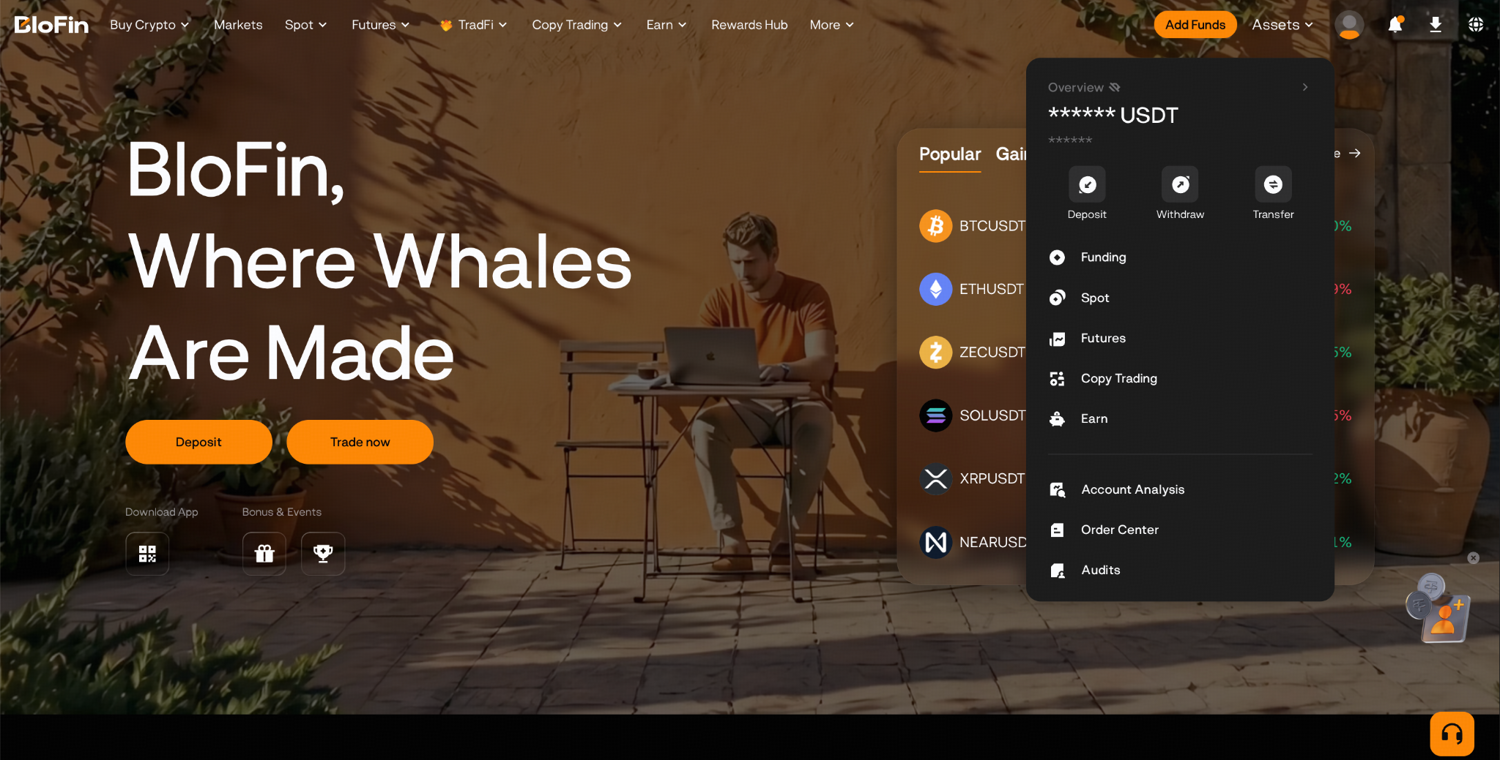
Step 1: Log in to your BloFin account and hover your cursor over the Assets tab. Then, click Withdraw.
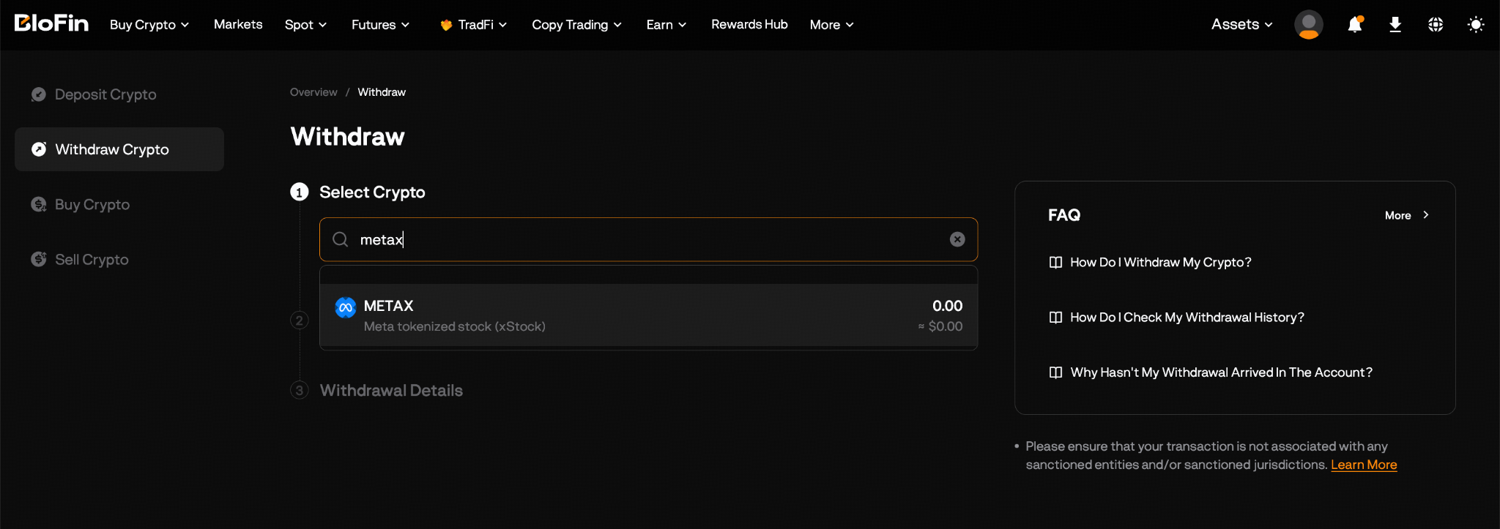
Step 2: Search for METAX and select it as the coin to withdraw.
Step 3: Choose the withdrawal network that matches your receiving wallet, for example Solana for a Solana wallet if the menu lists it.
Step 4: Paste your wallet's receiving address. If the screen asks for a Memo or Tag, as with XRP, XLM, TON and EOS in BloFin's guide, copy it from the receiving side too.
Step 5: Type how much METAX to send, and check the minimum withdrawal and the fee displayed for the chain you picked.
Step 6: Click Withdraw, then enter the code BloFin emails you and the current code from Google Authenticator. Each one stays valid for five minutes.
Step 7: Review the address, network and amount on the confirmation screen, then confirm.
The network fee goes to the blockchain that carries the transfer, and it varies with the asset and the chain. BloFin takes it out of the amount you send, so if exactly 10 METAX must arrive, add the fee on top. Daily limits rise as you pass know-your-customer (KYC) identity checks. In BloFin's withdrawal guide a standard account can send up to 20,000 USDT a day, personal verification lifts that to 1,000,000 USDT, and address verification to 2,000,000 USDT.
Here is how those limits work for METAX. Say METAX trades at 730 USDT and you want 10 tokens in your wallet. That holding is worth 7,300 USDT, well inside the standard limit, which at that price allows about 27.40 METAX a day. Send a first test transfer just over the minimum and wait for it to arrive. You pay one more network fee that way, but the address and the network are proven before the rest moves.
After you submit, the withdrawal appears under Withdrawal History in Assets with its status, amount, network, address and transaction hash (TXID). Pasting the TXID into a block explorer, a site that lists every transfer recorded on a chain, lets you watch the tokens move.
The METAX/USDT Spot page is also where withdrawn tokens come back to be sold, and its order book shows what they would fetch before you move them. Trading METAX there costs a flat 0.2000% for makers and takers alike (source: BloFin fee schedule).
Choosing the right network and address
A METAX withdrawal arrives only when the network on BloFin matches the network your wallet uses, and the address belongs to that wallet. A confirmed transfer stays where it lands, and BloFin's xStocks risk disclosure treats every digital asset transaction as final (source: BloFin xStocks risk disclosure).
The four address families look different, which makes most mix-ups easy to catch. An EVM address begins with 0x followed by 40 letters and digits, just as the METAx contract does. Solana addresses mix capital and small letters with digits and never begin with 0x. Tron and TON use formats of their own. On Backed's page, the Tron address for METAx starts with a capital T and the TON one with a capital E.
A wrong pick among the eight EVM networks is usually fixable. A wallet's seed phrase gives you the same address on every network built like Ethereum. So tokens sent to your own ordinary wallet on the wrong one of those networks are usually still yours (source: MetaMask support). You switch the wallet to the network where they landed, and they appear.
The same mistake toward an exchange is far harder to fix. BloFin's deposit guide warns that funds sent on the wrong network land on the wrong chain and recovery is not guaranteed. Tokens sent to an address on a chain outside the Ethereum family, where your wallet holds no matching account, are likely lost for good (source: MetaMask support).
Say your wallet address starts with 0x and BloFin's menu offers both Ethereum and Arbitrum for METAX. If you meant Ethereum and picked Arbitrum, the tokens arrive at your own address on Arbitrum, and you add that network in your wallet to see them. With a Solana wallet, the address would lack the 0x opening, and only a Solana network on BloFin's menu would fit it.
Once the tokens land, check that they are the real METAx by its contract address, never by its name. Anyone can create a token called Meta xStock, so compare the address in your wallet's token details with the issuer's list. The issuer also keeps powers that reach your wallet, such as pausing all transfers, and BloFin's guide to METAX's issuer controls after withdrawal explains each one.
What your wallet shows after a METAX withdrawal
Your wallet shows METAX in one of two ways. On EVM networks the token's contract raises every balance when the issuer applies Meta's dividend. On Solana and TON the stored amount never changes, and the wallet must multiply it by the token's multiplier to show it (source: xStocks multiplier docs). That multiplier has been about 1.00285 since Meta's September 2026 dividend (source: Solana Explorer) (source: xStocks multiplier history).
The multiplier is the number of Meta shares that one stored token now represents. Its value was 1.0 at the launch of METAX and rises each time the issuer reinvests a dividend, which is how METAX passes on Meta's dividends without paying out cash (source: xStocks multiplier docs).
Chain | What the chain stores | What a correct wallet shows | Amount a transfer uses |
|---|---|---|---|
Ethereum and networks built like it | fixed share units inside the contract | the balance, already adjusted | the balance as shown |
Solana | a fixed raw amount | raw amount times the multiplier | the raw amount |
TON | a fixed raw amount | raw amount times the multiplier | the raw amount |
The gap is easy to see on the chain itself. In mid-October 2026, Solana stored about 72,377 raw METAx tokens and reported about 72,583 once the multiplier was applied (source: Solana Explorer). On BNB Smart Chain the contract reported 10,028.52 tokens, exactly 10,000 share units times the multiplier (source: BscScan).
Here is what that means for 10 raw tokens in a Solana wallet. A wallet that supports Solana's scaled display shows 10.0285 METAx, while one that ignores the multiplier shows 10. At a round 730 USDT a token, that 0.0285 difference is worth about 20.81 USDT, and it is the dividends reinvested since launch, never a gain or a loss.
So the first number you see after a withdrawal may sit about 0.3% above or below the amount BloFin sent, net of the fee, depending on whether your wallet applies the multiplier. A gap of that size is the multiplier, and a correct wallet and a block explorer will agree on the value. A gap of any other size is worth a closer look at the TXID before you do anything else.
Raw amounts also matter when you send the tokens onward from a Solana wallet. The issuer tells wallets and exchanges to build every Solana transfer with the raw amount (source: xStocks multiplier docs), so a transfer worth five shown tokens moves about 4.9858 raw tokens at the current multiplier. A good wallet does that conversion for you, and a wallet without scaled-display support may show the raw figure throughout.
Issuer and BloFin rules on moving METAX
METAX can move between wallets like other tokens, but every transfer still falls under the issuer's terms and BloFin's xStocks terms. The issuer's terms let the token contract shut out addresses on sanctions lists (source: Meta xStock Final Terms). Under BloFin's terms, moving xStocks tokens is off limits whenever the move would breach a law you are subject to (source: BloFin xStocks risk disclosure).
Under the Meta xStock Final Terms, a transfer happens when control over the tokens moves on the ledger from one person to another, and it must comply with those terms. Any transfer of the entitlement outside the ledger is prohibited. The contract may refuse to deal with addresses on sanctions lists, such as those kept by the US Treasury's Office of Foreign Assets Control (OFAC). An outside firm like Chainalysis supplies that data (source: Meta xStock Final Terms).
The same terms say the products are not for distribution to any US person, any address in the United States, or residents of sanctioned or high-risk countries (source: Meta xStock Final Terms). BloFin's own notice also has you confirm that you did not buy xStocks with a view to an arrangement under which their economic benefits and risks would pass to another person (source: BloFin xStocks risk disclosure).
Say you want to send 2 METAX to a friend's wallet as a gift. In practice it takes one transfer on the right network. Under these terms the transfer has to stay within the law that applies to both of you, and the issuer's terms keep the product away from groups such as US persons. That confirmation about buying with a view to passing on a token's gains and risks is worth reading before you plan a gift.
Losing your keys is the harshest case. The Final Terms describe a court process in Zug, Switzerland, for canceling securities whose holder has lost access, after which new tokens would go to a new address. That process depends on a future upgrade to the token's burning function, and the issuer calls the evidence it requires very challenging to provide (source: Meta xStock Final Terms).
The issuer's own exit route also has conditions. Retail holders may redeem through the issuer's own redemption route only after identity checks and with a minimum of $5,000 (source: xStocks FAQ). The wallet they redeem from must also be whitelisted by the issuer first (source: xStocks issuance and redemption).
Using METAX in DeFi
Decentralized finance (DeFi) apps can hold METAX because the issuer calls xStocks freely transferable tokens on Solana and EVM chains (source: xStocks FAQ). Using one means handing your tokens to that app's smart contract. The app also has to read the multiplier correctly, or it will value your METAX wrongly.
BloFin's withdrawal guide lists a DeFi protocol or Web3 app as one of the places a withdrawal can go, next to personal and hardware wallets. The Final Terms add a legal point that matters for lending: a pledge over METAX can be created only by transferring the tokens themselves (source: Meta xStock Final Terms). Posting METAX as collateral therefore moves it out of your wallet and into the app's contract until you repay.
The multiplier is the part most apps can get wrong. The issuer's exchange guide warns that mixing up raw and scaled balances "will result in incorrect user balances" (source: xStocks exchange guide). Its docs also advise venues and protocols to pause dealings in a token for a short window around each new multiplier, about 15 minutes before and after it takes effect (source: xStocks multiplier docs).
Say you lock 10 raw METAx on a Solana app that reads only the raw amount. The app values your deposit as 10 tokens, while the same tokens are worth 10.0285 Meta shares. On an EVM chain the contract balance already includes the multiplier, so an app that reads the standard balance sees the larger figure.
Every app adds its own code, its own owners and its own failure modes to the issuer's. The pause and freeze settings the issuer holds still apply while your tokens sit inside an app's contract, so DeFi stacks two sets of rules on one asset. Weighing that is a personal decision, and the issuer's terms describe what is technically possible, never what is suitable for you.
Depositing METAX back to BloFin
To bring METAX back to BloFin, open the deposit page, select METAX, choose a network BloFin supports for it, copy the deposit address and send the tokens on that same network. BloFin's listing notice had METAX deposits open before spot trading began on September 2, 2025 (source: BloFin xStocks listing notice).
The same route works for METAX held at another exchange, as long as both venues support a shared network for it. Each venue chooses its own chains from the issuer's list, so check the sending side's withdrawal menu against BloFin's deposit menu before you start.
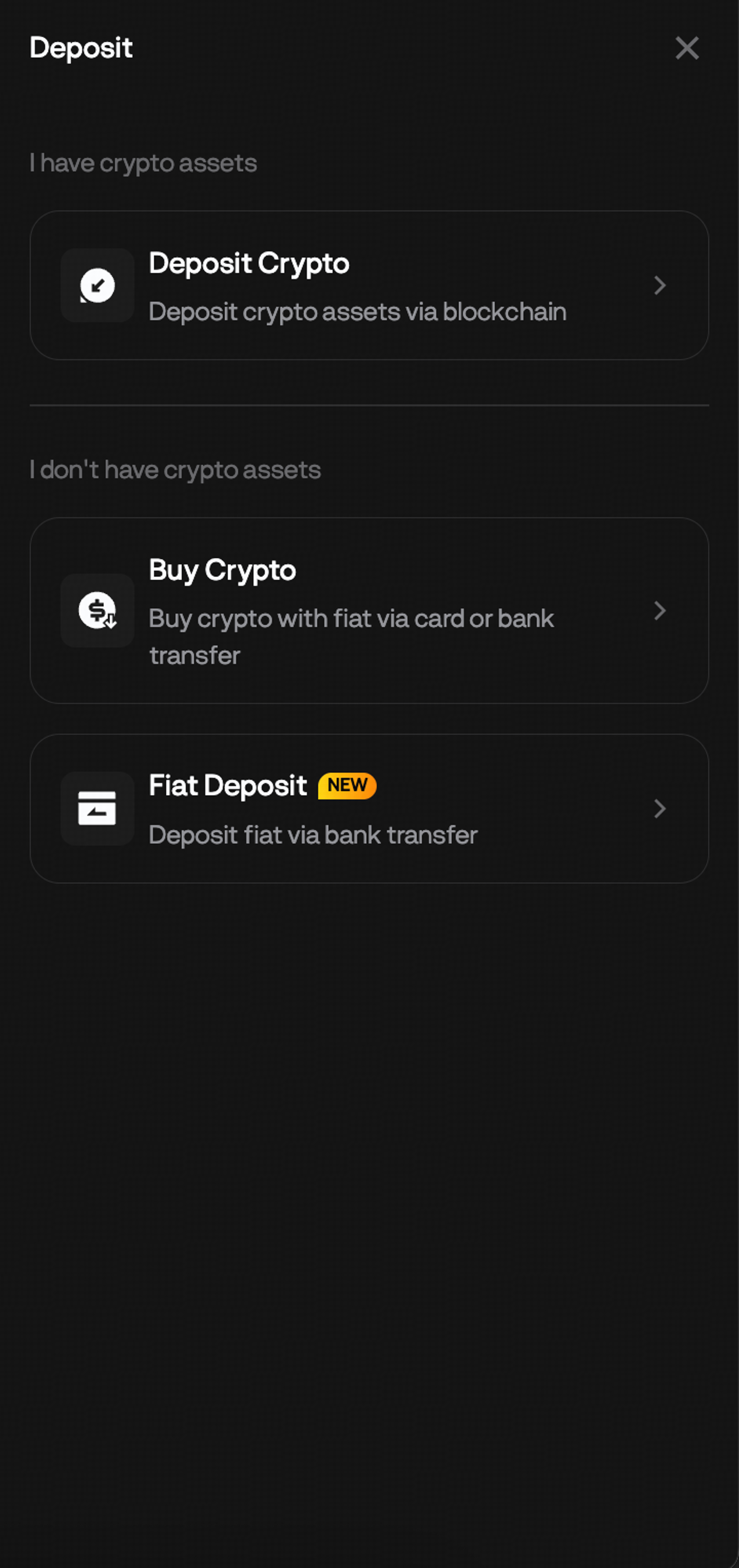
Step 1: On the BloFin homepage, hover your cursor over the Assets tab and click Deposit. Then, click Deposit Crypto.
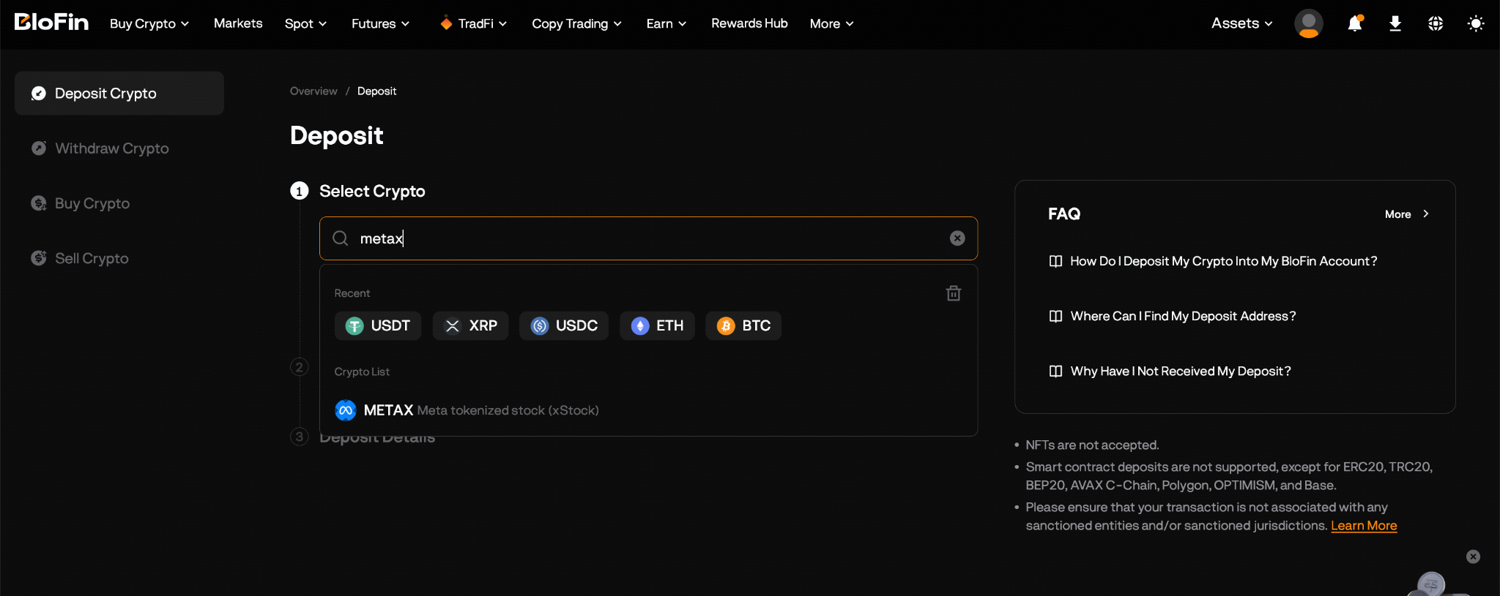
Step 2: Search for METAX and select it.
Step 3: Select the deposit network your wallet or the other exchange will send on.
Step 4: Copy the deposit address or scan the quick response (QR) code shown beside it.
Step 5: In your wallet or on the other exchange, paste the address, select the same network and confirm the transfer.
Step 6: Once the blockchain confirms it, find the METAX in your Funding Account, then use Transfer under Assets to move it to your Spot Account before you sell.
BloFin's deposit guide sets a minimum deposit for each asset, and deposits under that amount never reach your balance, so read the minimum on the deposit screen first. The guide also suggests a small test whenever an address is new to you.
Selling on the pair costs BloFin's 0.2000% spot fee for METAX/USDT (source: BloFin fee schedule). Ten METAX at a round 730 USDT come to 7,300 USDT and pay about 14.60 USDT in fees. Selling METAX back to USDT uses the same order panel as a purchase, and METAX liquidity and slippage shows how far a larger order moves the price.
How often you trade METAX decides where it is cheaper to keep it. Each trip out to a wallet and back pays a fee on both legs and waits for two sets of confirmations, and between trips the tokens are only as safe as your recovery phrase. A multi-chain wallet that holds METAX on Solana and on an EVM network guards both with that one phrase, so keeping one recovery phrase safe protects every chain the tokens sit on.
Looking to move tokenized Meta between BloFin and a wallet you control? To get started, you'll need to first create a BloFin account, fund your account with cryptocurrency, and go to the METAX/USDT Spot trading page or the METAUSDT Perpetual trading page.
Frequently asked questions
How long does a METAX withdrawal take?
A BloFin withdrawal goes through a short processing period before it is broadcast to the blockchain, and arrival time then depends on the network. Ethereum transfers can take longer when the network is busy. Once your METAX withdrawal is on-chain, the TXID in Withdrawal History lets you follow it on a block explorer until it confirms.
Can you cancel a METAX withdrawal after submitting it?
A withdrawal that still shows as pending inside BloFin may be stopped if you contact support straight away, according to BloFin's withdrawal guide. Once BloFin has broadcast it, the transfer is permanent. If you spot a wrong address or network after submitting, speed matters more than anything else.
What should you do if a METAX withdrawal goes missing?
A transfer that a block explorer lists as confirmed has already reached the address you entered. What is left to check is the wallet: switch it to the network you picked, or add METAx to its token list by the contract address. If the TXID from Withdrawal History shows no activity at all, BloFin's withdrawal guide says to contact BloFin support. If the tokens went to another exchange and the transfer is confirmed there, that exchange's support team is the one to ask.
How do you move METAX from Solana to Ethereum?
The issuer runs a public bridge on Chainlink's Cross-Chain Interoperability Protocol (CCIP) that any holder can use to move xStocks between supported chains. Bridging changes only the network the token sits on, and the product stays the same certificate (source: xStocks developer docs). Before you send bridged METAX back to BloFin, check that BloFin's deposit menu offers the network it now sits on.
Can you send METAX from BloFin straight to another exchange?
Yes, provided the receiving exchange supports METAX on at least one chain that BloFin's withdrawal menu also shows. Copy the address from that exchange's METAX deposit page, choose the identical chain on BloFin and try a small transfer before the full amount. Once the tokens land, that exchange's own rules on who may hold xStocks govern your account.
Researched and written by the BloFin Academy editorial team with AI-assisted drafting. All facts independently verified. Primary sources include BloFin's xStocks listing notice, xStocks risk disclosure and fee schedule, and BloFin Academy's withdrawal and deposit guides. Issuer and chain sources include Backed's Meta xStock page, the Meta xStock Final Terms, the xStocks FAQ, developer docs, exchange guide and multiplier docs, CoinGape's report from Monad's Open conference, MetaMask support, the xStocks asset data and multiplier history, and the METAx token on Solana Explorer, BscScan and Monadscan, current as of October 21, 2026.
Nothing in this article constitutes financial advice, and nothing in it is a recommendation to buy, sell or hold METAX or Meta in any form. A METAX withdrawal sent on the wrong network or to the wrong address can be lost for good, and a lost seed phrase can lock the tokens away with no practical route back. In your own wallet or inside a DeFi app, METAX keeps Meta's price risk and the issuer's power to pause or block transfers, and a wallet that ignores the multiplier can show the wrong balance. Past performance does not indicate future results. Do your own research and consider your risk tolerance before you trade on BloFin.