
You cannot withdraw shares from a broker. However much Apple stock you own, there is no button that hands it over for you to keep somewhere of your choosing, because ownership in traditional markets is a record in someone else's system. A custodian holds the position, a transfer agent maintains the register, and your access to it runs through an intermediary by design.
Tokenized equities break that assumption. Because the token is a blockchain asset, it can leave the exchange entirely and sit in a wallet whose keys only you hold. That is genuinely new for equity exposure, and it is also a real transfer of responsibility: on-chain transactions are irreversible, and nobody can undo a mistake for you.
This guide covers exactly how to withdraw NVDAX from BloFin to a self-custodial crypto wallet, including prerequisites, wallet selection, the withdrawal itself, fees, and verification.
What withdrawing NVDAX (Nvidia tokenized stock) means on BloFin
NVDAX is Backed Finance's NVIDIA xStock, a blockchain token that tracks the price of NVIDIA stock and is collateralized 1:1 by real shares held in custody (source: xStocks Docs). When you withdraw it from BloFin, you are sending that on-chain token from BloFin's custody to a wallet where you hold the private keys. This is not a sale or a conversion, just a transfer of tokens across the blockchain.
This guide covers only the withdrawal and self-custody process. If you want to learn what NVDAX represents and what rights it does (and does not) grant, read our explainer on what tokenized NVDA (NVDAX) is and what you actually own. For a side-by-side look at how this token compares to holding actual shares, see the article on tokenized NVDA vs real NVDA shares.
Here is what you should know before starting:
NVDAX is available on Solana, and the withdrawal network you choose on BloFin must match your destination wallet.
NVDAX withdrawals differ based on whether tokens are held on centralized exchanges or decentralized wallets. This guide focuses on moving tokens from BloFin (centralized) to your own wallet.
Tokens can be moved on-chain to a compatible self-hosted wallet or sold for cash. Once withdrawn, you can exchange NVDAX, sell NVDAX, swap NVDAX, or convert NVDAX to other tokens at your discretion.
As of August 20, 2026, the NVDAX price sits at $219.64, with a 24-hour trading volume of $9 million and a market capitalization of $35.9 million. The token reached a 24-hour high of $222.06, its all-time high price is $240.34, and its price increased by 31.08% over the last month.
Prerequisites before you withdraw NVDAX
Before you head to the withdrawal screen, run through this checklist to avoid delays or errors.
NVDAX balance in your Spot account. You must already hold NVDAX. If you still need to buy NVIDIA tokenized stock, follow the how to buy tokenized NVDA (NVDAX) on BloFin guide first.
Account verification and security. Complete your BloFin registration, pass any requested KYC checks, and enable 2FA. Without these, withdrawals may be blocked.
Unlocked funds. Your NVDAX must not be locked in open orders, futures margin, or Earn products. Transfer the requested amount to your Funding Account if it is currently in Spot.
Compatible destination wallet. Your crypto wallet must support the same network BloFin uses for NVDAX. Users must ensure their destination wallet network matches the NVDAX token blockchain to avoid losing funds.
Seed phrase backup. On-chain transfers are irreversible. Back up your wallet's recovery phrase in a secure, offline location before initiating any transaction.
Choosing a self-custody crypto wallet for NVDAX
Your wallet choice depends on how much NVDAX you plan to hold, how often you access it, and your security requirements. For a broader framework, see BloFin's guide on how to choose a crypto wallet.
Browser wallets such as MetaMask suit frequent access on EVM networks. You may need to import the NVDAX contract address manually if the token does not appear on its own. Cheap and quick to set up, but more exposed to phishing if your browser habits are loose.
Mobile wallets are convenient for checking a position on the move. Confirm the app supports your specific network, keep it updated, and turn on a biometric lock.
Hardware wallets such as Ledger or Trezor are the strongest option for meaningful balances, because every transaction needs physical confirmation on the device. Less convenient if you trade often, which is rather the point.
BloFin Wallet offers self-custody with built-in swap and on-chain access, which is efficient if you are already working inside the BloFin ecosystem.
Once NVDAX is in your own wallet, you can track market data, swap NVDAX for other cryptocurrencies, send it to different platforms, or connect to DeFi protocols, depending on available liquidity on that network.
How to withdraw NVDAX from BloFin to your wallet
This is the core how to withdraw NVDAX step-by-step guide. Follow each step carefully, since on-chain withdrawals cannot be reversed.
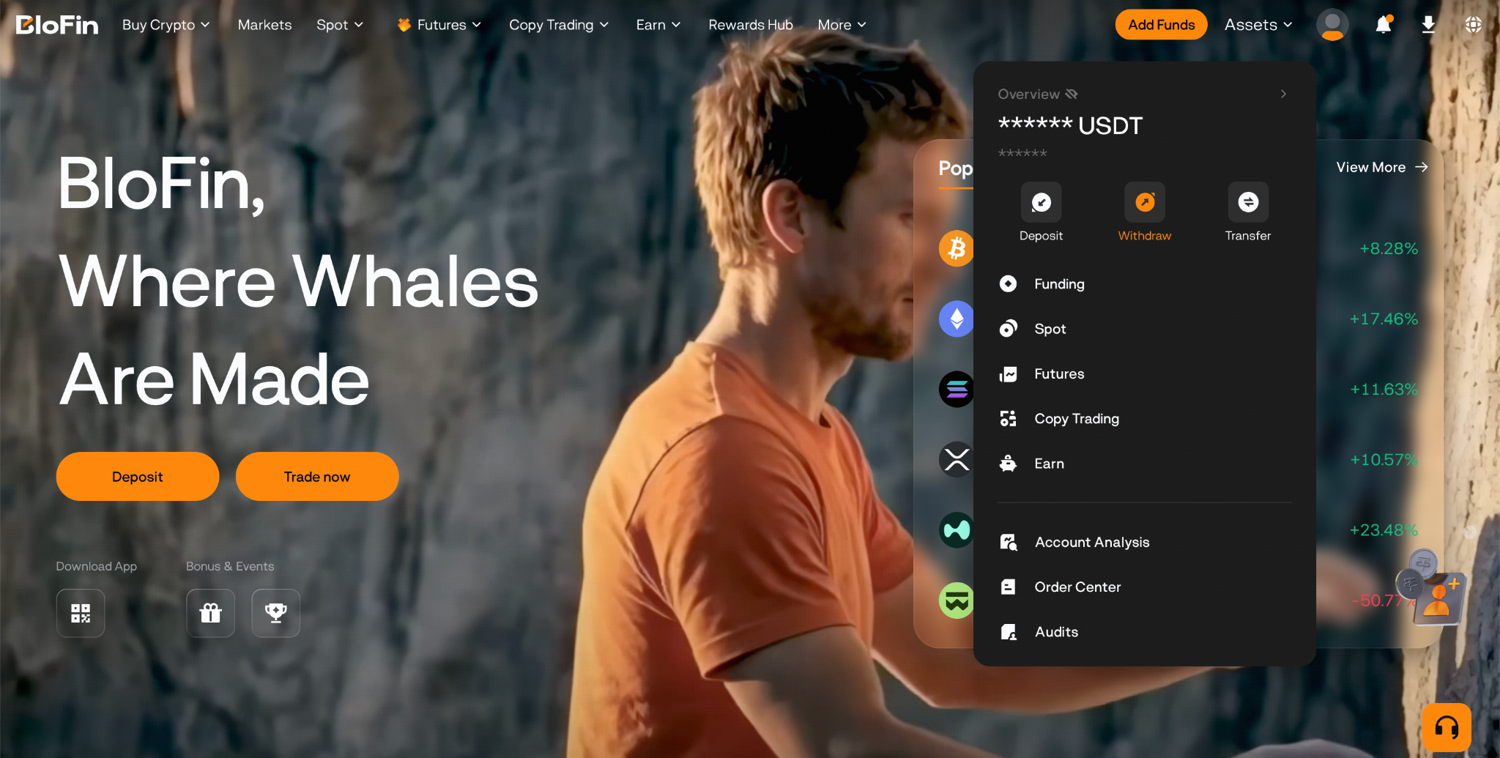
Step 1: Log in to your BloFin account and hover your cursor over the Assets tab. Then, click Withdraw.
Step 2: Select NVDAX from the dropdown box and input your own wallet's address. To get your wallet's address, you'll need to open your crypto wallet and copy the deposit address for a network, which in this case is Solana. This destination address is where the coin will be sent, so the network must match exactly. Double-check the first four and last four characters against the original.
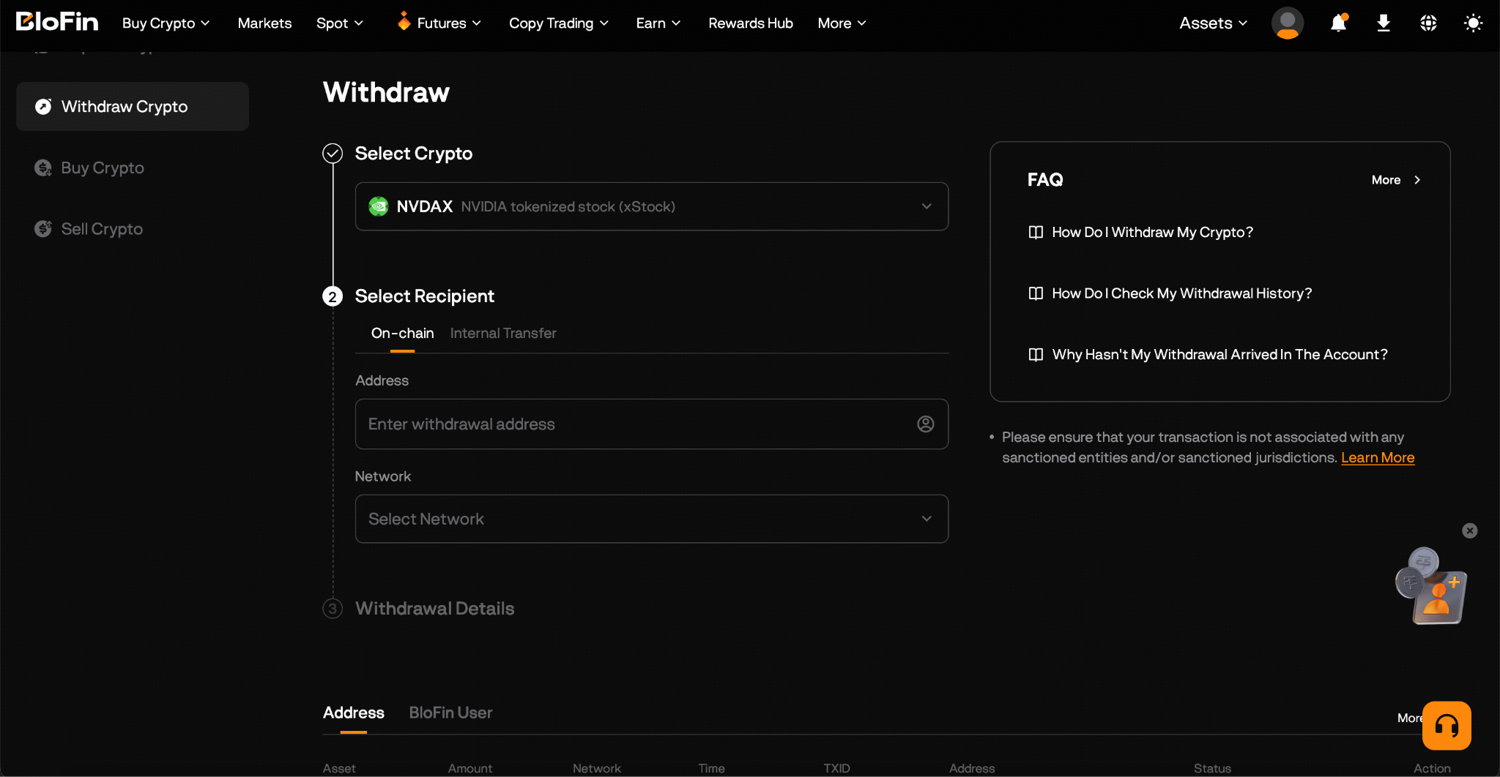
Step 3: Select the Solana network.
Step 4: Indicate the amount of NVDAX you want to withdraw. BloFin will display the estimated on-chain fee, the net amount you will receive, and any withdrawal limits shown on the screen. Confirm the total exceeds the minimum.
Step 5: Approve the transaction and once you confirm, the withdrawal is submitted and cannot be canceled.
You can then monitor status and track confirmation data until the transaction is completed. Your withdrawal will move through "Processing," then "On-chain," and finally "Completed" after the network confirms the transaction.
Network fees, exchange rate considerations, and timing
Withdrawing NVDAX is an on-chain token transfer, not a fiat conversion. There is no exchange rate involved at this stage. BloFin charges only the blockchain network fee, which is shown before you confirm. For a deeper look at how crypto fees work across the platform, see all crypto trading fees explained.
Fee structure. BloFin displays a fixed network fee in NVDAX (or native chain currency) that covers gas. No more than a 0.5% fee typically applies for NVDAX to USDT conversions on third-party swap services.
Speed. Solana confirmations usually complete within seconds. The average NVDAX to USDT conversion time on swap platforms is under 5 minutes, though that applies to conversion, not withdrawal itself.
Timing tip. Network congestion can temporarily rise during high market demand or when market sentiment shifts sharply. If the displayed fee looks unusually high, wait 15 to 30 minutes and check again.
Post-withdrawal conversion. If you later want to sell NVDAX for US dollars or another fiat currency, or swap NVDAX for USDT, that happens on a separate platform or trading pair, not during this withdrawal step. Compare the exchange rate and transaction fees on the destination platform before sending.
Verifying your NVDAX withdrawal arrived safely
After you submit the withdrawal, verification takes just a few steps.
Check BloFin withdrawal history. Go to Assets, then click Overview. You will be able to see your withdrawal and its status under Recent Transactions.
Use the TXID on a block explorer. BloFin provides a transaction hash. Paste it into the appropriate explorer (Solscan for Solana) to confirm the tokens reached your address.
Add NVDAX as a custom token. If your wallet does not display the NVDAX balance automatically, import the token using the correct contract address from a trusted source.
Send a test amount first. Especially for large holdings or a new wallet, withdraw a small amount of NVDAX before sending the full balance. The minor extra fee is worth the peace of mind.
If something looks wrong. Verify the address and network you used. If funds do not arrive after a reasonable number of confirmations, contact BloFin support with your TXID and timestamps.
What you can do with NVDAX after withdrawing
Once NVDAX is in your own wallet, you have full control over the tokens. Here are the most common paths forward.
Hold in self-custody. Keep your NVIDIA tokenized stock in your wallet for long-term exposure without relying on any exchange.
Transfer or gift. Send NVDAX to another wallet address or to another person on the same network.
Sell or exchange on other platforms. You are no longer tied to one venue and can trade on-chain or on another platform, subject to that platform's rules and the liquidity available on your network.
Swap on DEX platforms. NVDAX can be swapped for other cryptocurrencies on DEX platforms, subject to available liquidity on the relevant network.
Advanced strategies. Using NVDAX alongside the NVDA perpetual for hedging or basis trades is covered in the dedicated guide on hedging NVDA exposure with the perpetual.
The bottom line
Withdrawing NVDAX gives you direct control of your NVIDIA exposure in a wallet you own, which is something the equity itself cannot offer. That control comes with the responsibility of securing your keys and selecting the right network, neither of which anyone can do on your behalf.
Follow the steps in order, send a test transaction first, and check every detail before you confirm. The habits that feel excessive on a small withdrawal are the ones that protect you on a large one.
Frequently asked questions
Is there a minimum withdrawal amount for NVDAX on BloFin?
Yes, and BloFin displays it on the withdrawal screen for the specific asset and network you have selected. Minimums vary by network, because they are set relative to the cost of the underlying transaction, so a chain with cheap transfers will generally allow a smaller minimum than one with expensive ones. Always work from the figure on screen rather than a number quoted elsewhere, since it is the only one that applies to your transaction.
How long does an NVDAX withdrawal take?
Once submitted and verified, Solana withdrawals typically complete within seconds and Ethereum transactions within a few minutes, depending on congestion. BloFin's internal review adds a short processing window before the transaction is broadcast, so the total time is usually a little longer than the network alone would suggest. If a withdrawal sits in Processing far longer than expected, that is the point to contact support rather than resubmitting.
Can I withdraw NVDAX directly to a hardware wallet?
Yes, provided the hardware wallet supports the network you are withdrawing on and you paste the deposit address generated for that specific network. This is the recommended approach for larger balances, since every outgoing transaction then requires physical confirmation on the device. Set up and test the wallet with a small amount before moving a significant position to it.
What happens if I choose the wrong network?
Funds sent on an incompatible network are almost certainly lost, and neither BloFin nor anyone else can reverse an on-chain transaction. Recovery is occasionally possible when the receiving address exists on both chains and you control the keys, but it is technical, not guaranteed, and not something to rely on. Always match the network selected on BloFin with the network configured in your destination wallet, and confirm both before you press send.
Can I withdraw NVDAX directly to a bank transfer?
No, because a bank transfer moves fiat currency and NVDAX is a token. You would first need to sell it for dollars, euros, or another currency, or swap it for a stablecoin, on a platform that supports that, and then withdraw the fiat to your bank. Those are separate transactions with their own fees and processing times, so factor both in if you are planning a full exit rather than a transfer.
Researched and written by the BloFin Academy editorial team with AI-assisted drafting. Updated August 2026. Primary sources include BloFin support documentation, Backed Finance, and the xStocks product documentation. Withdrawal minimums, network fees, and supported networks are set by the venue and the blockchain and change over time, so always work from the figures displayed on the withdrawal screen at the time of your transaction rather than from any figure quoted here.
This article is educational content, not financial advice. Crypto assets, including tokenized equities such as NVDAX, are volatile and carry a risk of loss. On-chain transfers are irreversible, self-custody carries the risk of permanent loss if you lose access to your keys or recovery phrase, and sending funds on the wrong network usually means they cannot be recovered. Do your own research and consider speaking with a qualified financial professional before acting.