
You've created your account and you're ready to start trading. The next step is funding it. BloFin gives you two ways to do that: depositing crypto you already own from another wallet or exchange, or buying crypto directly on BloFin using a card, bank transfer, or Apple Pay. Both work well, but they suit different situations and come with different things to be aware of.
This guide walks through both methods, explains the decisions you'll need to make along the way, and covers the mistakes that catch people out most often.
Crypto deposit vs buying crypto: Which makes sense for you
Method | Best for | Typical time |
Deposit crypto | You already hold crypto elsewhere and want to move it to BloFin | A few minutes once on-chain confirmations are complete |
Buy crypto with fiat | You're starting with cash and want to convert directly | A few minutes, with a 48-hour security hold before withdrawals |
If you already have crypto on another exchange or in a personal wallet, depositing is the faster and cheaper route. If you're starting from scratch with no crypto, buying directly on BloFin through the Buy Crypto feature is the simpler path.
How to deposit crypto on BloFin
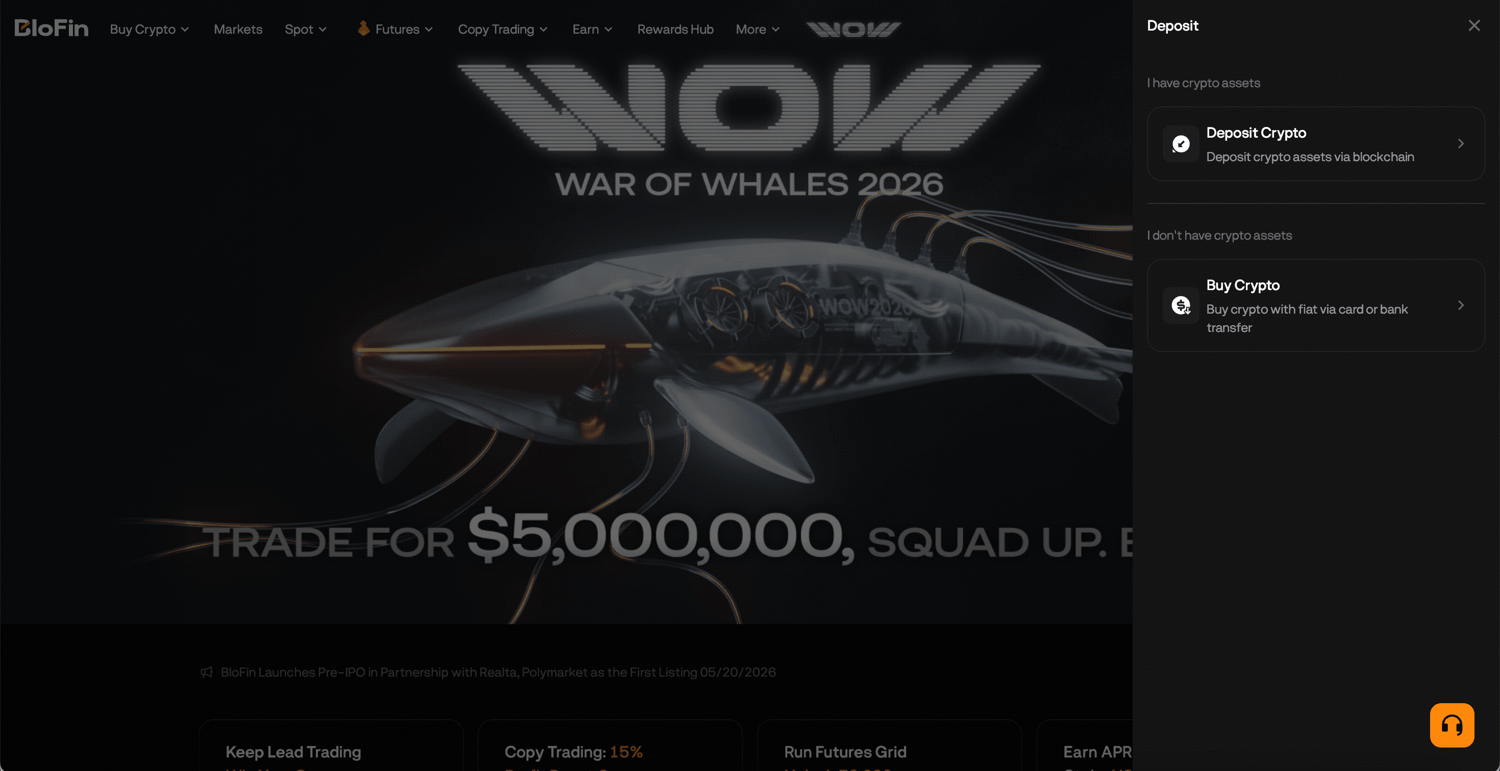
Step 1: Log in on the official BloFin webpage and click on the Deposit button in the top right corner of the navigation bar. Then, select Deposit Crypto.

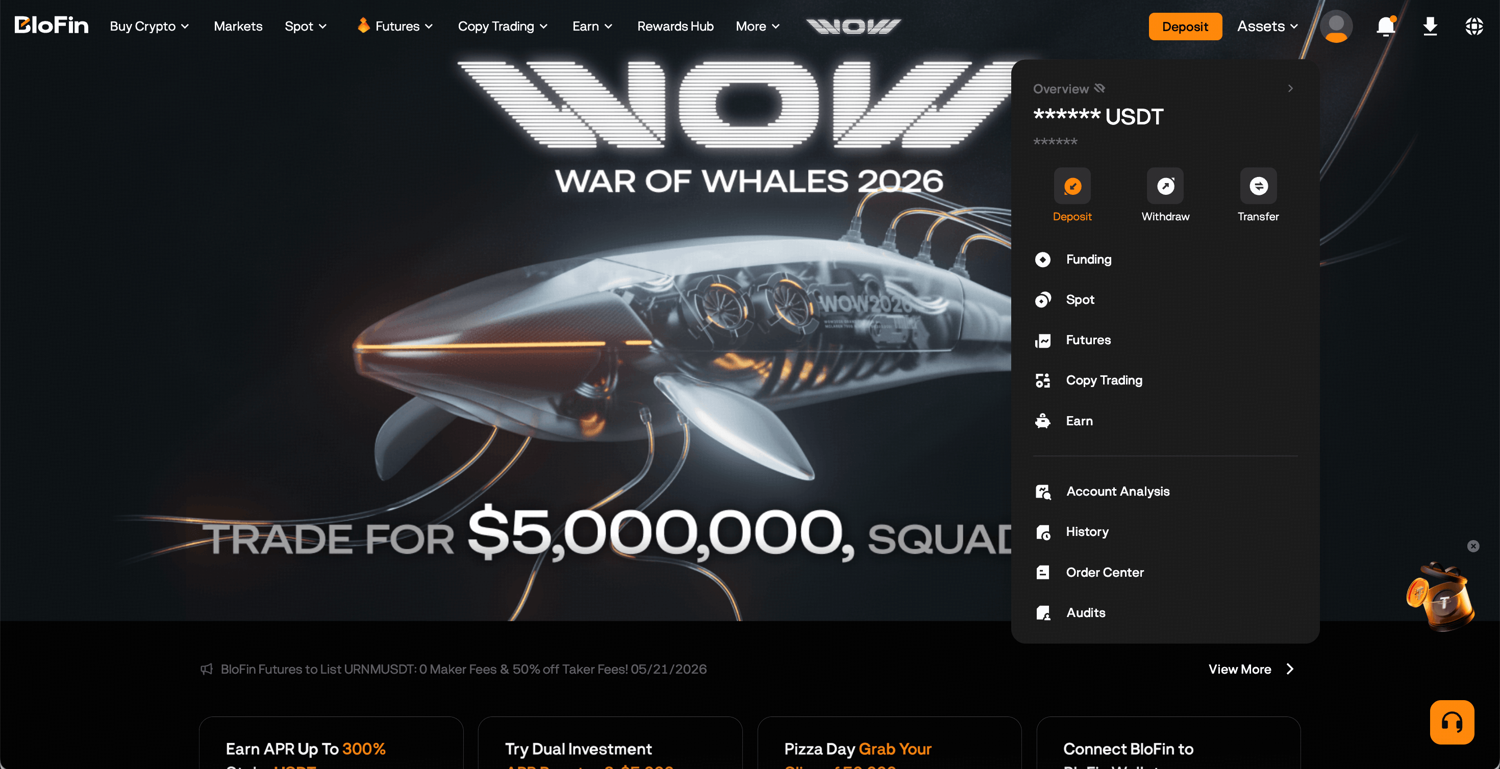
Alternatively, hover your cursor over the Assets button in the top right corner of the navigation bar, then select Deposit.
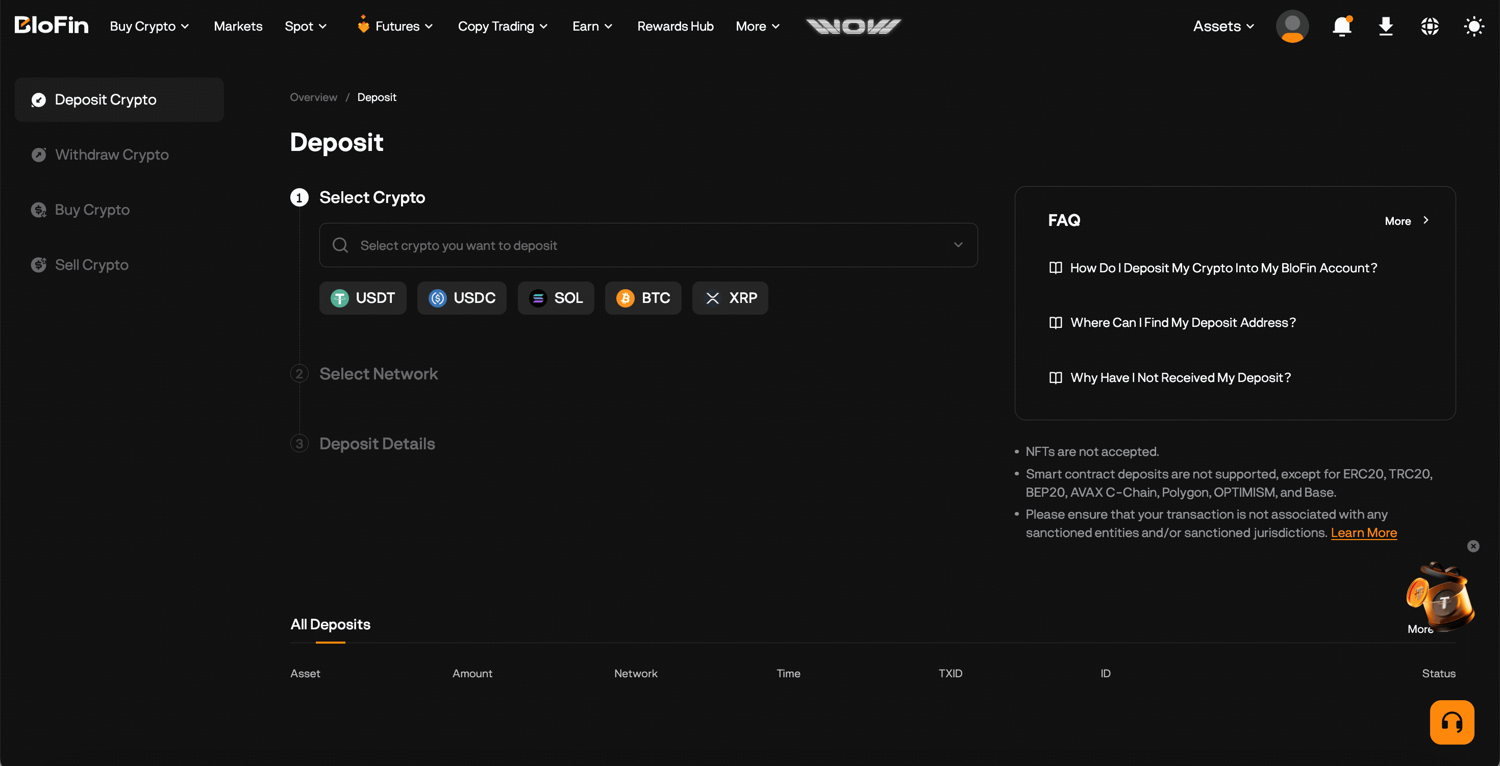
Step 2: Search for and select the asset you want to deposit.
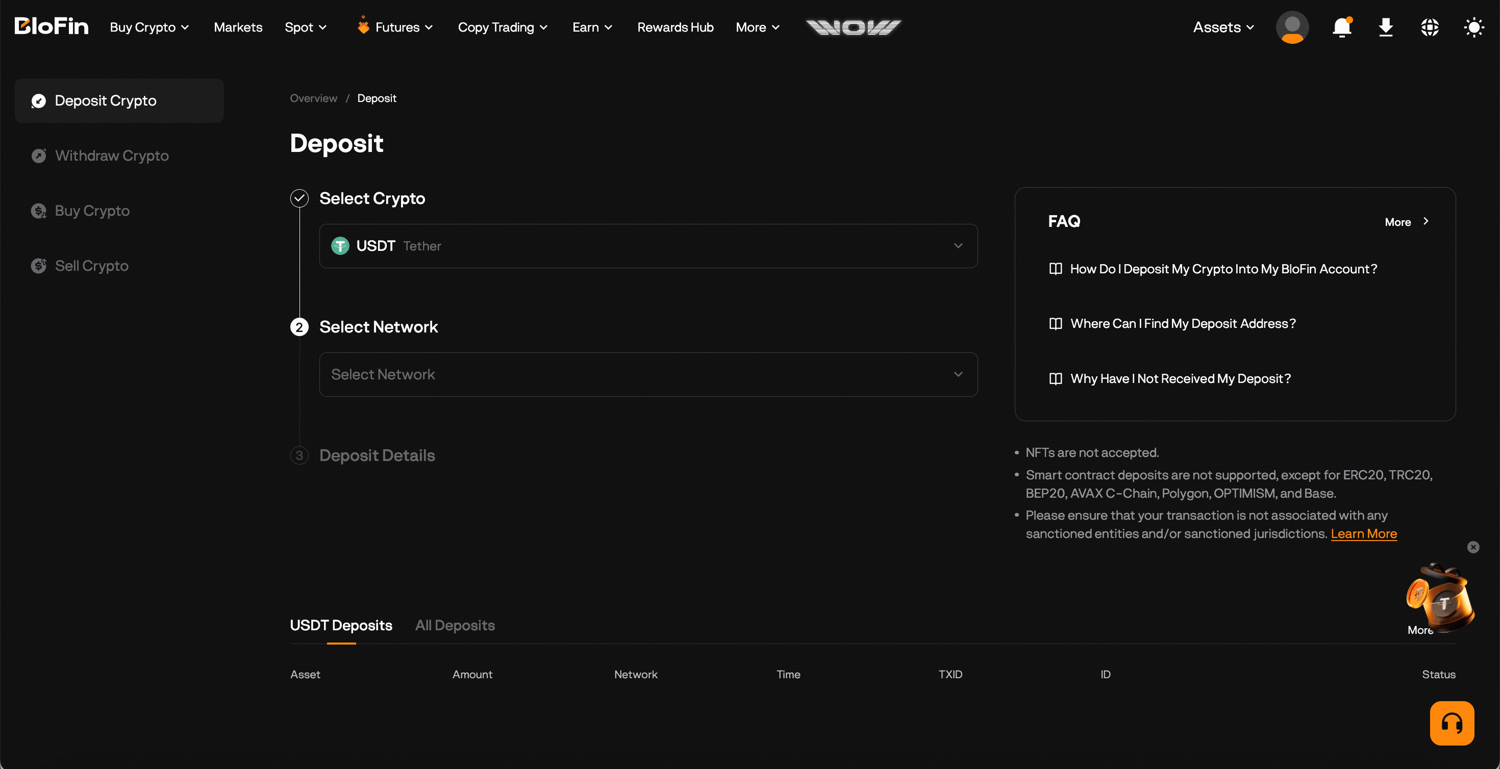
Step 3: Select your deposit network.
Step 4: Copy the deposit address shown or scan the QR code.
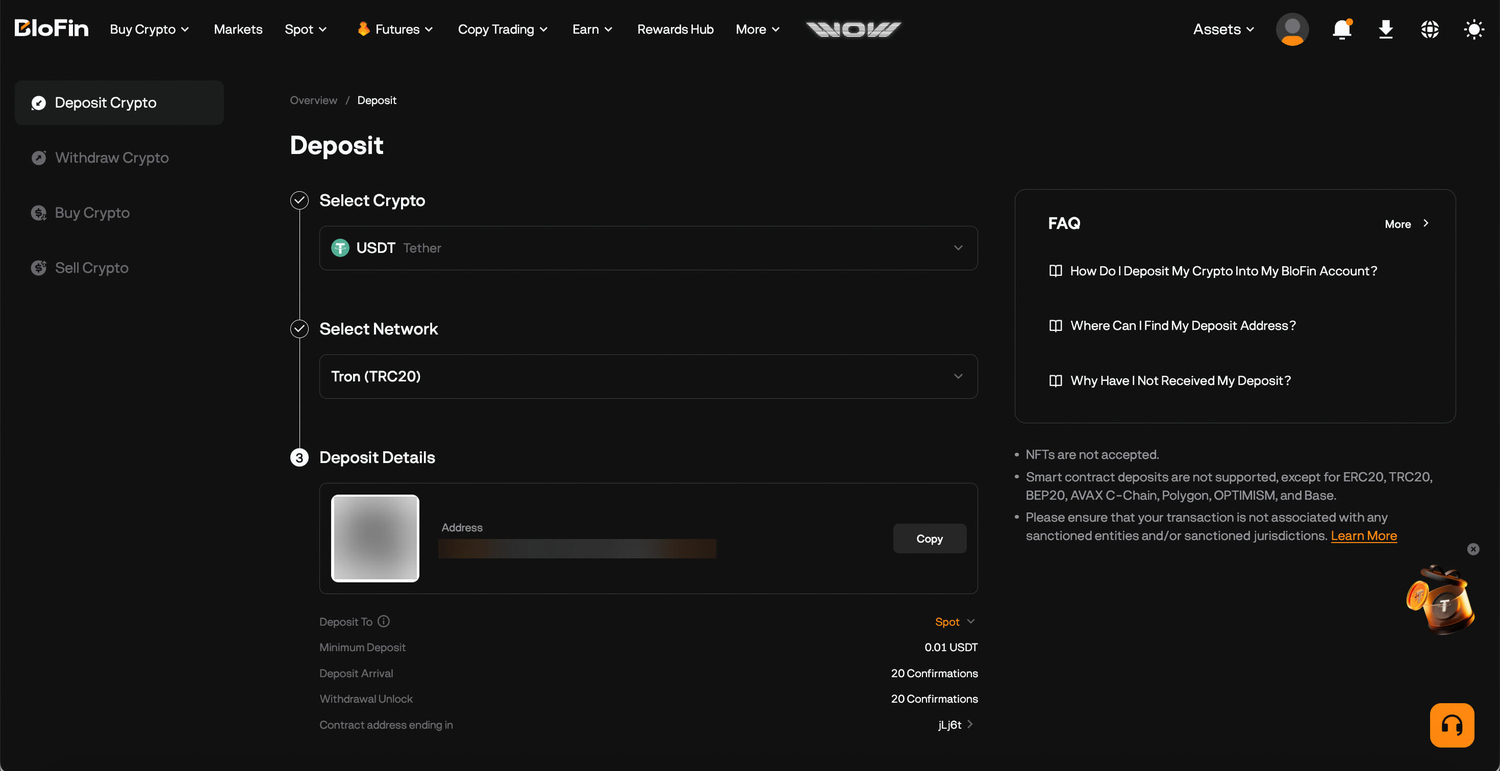
Step 5: Navigate to the wallet or exchange that you’re sending from, paste the copied deposit address, select the same network, and confirm the transfer.
Step 6: Once the required blockchain confirmations are complete, your funds will appear in your BloFin Funding Account.
Choosing the right network: The most important step
This is where most deposit errors happen, and it's worth understanding properly before you send anything.
Every blockchain asset can exist on multiple networks. USDT, for example, runs on Ethereum (ERC20), Tron (TRC20), BNB Chain (BEP20), Solana, and others. These are technically different versions of USDT on different blockchains. When you deposit, BloFin needs to know which network your funds are coming from, and that selection must match the network you're actually sending on.
If you select TRC20 on BloFin but send via ERC20, the funds will land on the wrong chain and won't arrive in your account. Recovery in this situation is not guaranteed.
Here's a quick guide on the most common assets:
Asset | Available networks | Recommendation |
USDT | TRC20, ERC20, BEP20, Solana, and others | TRC20 is usually the cheapest and fastest. ERC20 works but costs more in gas fees. |
BTC | Bitcoin, BNB Smart Chain | Use the Bitcoin network for native BTC. BEP20 is for wrapped BTC on BNB Smart Chain. Only use the BNB Smart Chain if you're specifically sending from a BNB Chain wallet. |
ETH | Ethereum, BEP20, and others | Use Ethereum (ERC20) unless you specifically need BEP20. |
USDC | ERC20, BEP20, Solana, and others | Check which network your sending wallet uses before selecting. |
Before you send:
Always verify the network on both the sending and receiving side before confirming.
If you're sending to a new address for the first time, start with a small test transfer that still meets the minimum deposit amount. Confirm it arrives before sending the full amount.
Each asset has a minimum deposit threshold. Transfers below that minimum won't be credited.
Understanding blockchain confirmations
After you send a deposit, it doesn't arrive instantly. The blockchain needs to validate and confirm your transaction before BloFin credits your account. The number of confirmations required and the time they take varies by network:
TRC20 (Tron): typically fast, often within 1 to 2 minutes
ERC20 (Ethereum): varies with network congestion, usually a few minutes but can be longer during busy periods
Bitcoin: slower by design, usually 30 minutes to an hour for the required confirmations
During this time, your transaction is visible on the blockchain and you can track it using the transaction hash (TXID) on a block explorer. If your deposit hasn't arrived after a reasonable amount of time, check the TXID first before contacting support.
Buying crypto with fiat on BloFin
If you don't have crypto yet, BloFin lets you buy it directly using fiat currency under the Buy Crypto page. The available payment methods are:
Credit and debit card (Visa, Mastercard)
Apple Pay
Google Pay
SEPA bank transfer
Payments go through BloFin's integrated fiat gateways such as Alchemy and Simplex.
One important thing to know: all fiat purchases have a 24-hour security hold before the resulting crypto can be withdrawn. You can trade with the funds during that window, but you can't move them off the platform until the hold clears. This is a standard fraud prevention measure, not specific to BloFin.
Where your funds go after depositing
This is something new users often miss. When crypto arrives on BloFin, it lands in your Funding Account, not your trading account. Before you can trade, you need to transfer funds to the right account:
Futures trading: transfer to your Futures Account
Spot trading: transfer to your Spot Account
You can do this from the Assets page. The transfer is instant and completely free between your own BloFin accounts. It's a simple extra step, but knowing to expect it saves confusion when your deposit arrives and doesn't appear where you expect it.
Common deposit mistakes to avoid
Sending on the wrong network
This is the most common and most costly error. When it happens, your funds land on the wrong blockchain and don't show up in your BloFin account. Whether they can be recovered depends on the specific situation, sometimes it's possible with support's help, sometimes it isn't. The safest approach is to verify the network on both ends before you hit send, every single time, even if you've done it before.
Depositing below the minimum amount
Every asset has a minimum deposit threshold on BloFin, and transfers below that amount simply won't be credited. The funds leave your wallet but never arrive. Always check the minimum on the deposit screen before initiating a transfer, especially when sending smaller amounts.
Not verifying the address before sending
Copy-paste errors and clipboard hijacking malware are both real risks. Some malware specifically targets crypto users by silently replacing a copied address with the attacker's address. Get into the habit of checking the first and last few characters of the deposit address after pasting it, before confirming. An extra ten seconds of verification is worth it on any significant amount.
Not doing a test transfer
If you're using a new deposit address or a network for the first time, sending a small amount first to confirm it arrives correctly is worth the minimal extra fee. Once you've confirmed the test transfer lands as expected, you can send the full amount with confidence. This is especially important when moving large sums.
Forgetting to move funds to your trading account
When your deposit arrives, it lands in your Funding Account. Please note that it is not your Futures or Spot Account. If you try to place a trade and your balance shows zero, this is usually why. Go to Assets, select Transfer, and move the funds to the relevant trading account. It takes seconds and costs nothing, but it's easy to miss if you're not expecting it.
Assuming all exchanges support all networks for the same token
Just because BloFin supports TRC20 USDT doesn't mean the exchange or wallet you're sending from does and vice versa. Before selecting a network, confirm it's supported on the sending side too. If your sending platform only supports ERC20, you need to select ERC20 on BloFin as well, even if TRC20 would normally be your preference.
Start exploring BloFin
With your account funded, everything on the platform is open to you. Here's what you can do:
Trade crypto at real-time market prices with Spot Trading. This is straightforward with no leverage, so you own the asset directly.
Go long or short on futures pairs with up to 150x leverage through Futures Trading.
Follow and automatically mirror experienced traders through Copy Trading. Set your allocation and let BloFin handle the rest.
Automate your strategy around the clock with Trading Bots. From grid trading to DCA, you won’t have to watch the market manually.
Put idle assets to work and earn daily interest through three different products under BloFin Earn. There are flexible terms as well so you can withdraw anytime.
Frequently asked questions
How long does a crypto deposit take on BloFin?
It depends on the network. TRC20 deposits typically arrive within a couple of minutes. Ethereum-based deposits can take longer depending on network congestion. Bitcoin deposits usually require more confirmations and can take 30 minutes to an hour. You can track your transaction using the TXID on a block explorer while you wait.
What should I do if my deposit hasn't arrived?
First, check the transaction on a block explorer using your TXID to confirm it was sent successfully and is on the correct network. If the transaction shows as confirmed on-chain but hasn't appeared in your BloFin account, contact BloFin support with your TXID and deposit details.
What happens if I send on the wrong network?
If the network doesn't match, the funds may not arrive. Contact BloFin support as soon as possible with your transaction details. Whether recovery is possible depends on the specific situation, which is why verifying the network before sending is so important.
Is there a fee to deposit crypto on BloFin?
No. BloFin does not charge a deposit fee. However, the network itself may charge a transaction fee (gas fee) on the sending side, which is paid to the blockchain, not to BloFin.
Why are my fiat-purchased funds on hold for 24 hours?
The 24-hour hold applies to all fiat purchases as a fraud prevention measure. You can trade with the funds during this period, but withdrawals are restricted until the hold clears.
What is the Funding Account and why do funds go there first?
The Funding Account is BloFin's central wallet for holding assets. All deposits, withdrawals, and transfers between your accounts pass through it. Before trading, you transfer funds from the Funding Account to your Futures or Spot Account. The transfer is instant and free.
Disclaimer: This content is for educational purposes only and does not constitute financial, investment, legal, or tax advice. Crypto assets are highly volatile and carry significant risk of loss. Always verify local regulations and consult a qualified professional before making financial decisions.