
When you place a large order at market price, the market notices. A big buy sweeps through the order book, clearing available liquidity at each price level and pushing the price higher before your order finishes filling. By the time it's done, your average fill price is worse than the price you saw when you clicked buy. That gap is market impact, and for traders moving meaningful size, it's a real and recurring cost.
The BloFin TWAP Bot solves this by breaking a large order into a series of smaller orders and executing them at regular time intervals across a window you define. Instead of one large market order that moves the price, you get dozens or hundreds of smaller ones spread across minutes or hours, each small enough that the market absorbs them without significant disruption. The result is an average execution price that tracks the market closely rather than being pushed against you by your own order.
What is the BloFin TWAP Bot?
TWAP stands for Time-Weighted Average Price. As an execution strategy, it means completing a defined total order quantity by dividing it into equal sub-orders placed at equal time intervals. Each sub-order is a market order for a fraction of the total. Together, they add up to your intended position size, executed gradually rather than all at once.
On BloFin, the TWAP Bot applies this strategy to perpetual futures contracts. You define the total amount you want to trade, the time window over which you want to execute, and the frequency of sub-orders within that window. The bot calculates the sub-order size automatically and executes each one at the scheduled interval until the total quantity is filled or the time window expires.
The bot supports all perpetual futures contracts on BloFin. It works for both opening and closing positions, meaning it's useful both when you want to build into a position and when you want to unwind one.
How the BloFin TWAP strategy works
The mechanism is straightforward. You set three core parameters: the total amount to execute, the total time to run the strategy, and the frequency of sub-orders. From those three numbers, the bot calculates everything else.
Sub-orders = total running time / frequency interval
Sub-order size = total amount / number of sub-orders
A concrete example: you want to open a 96 BTC long position over 4 hours, placing an order every 30 seconds.
Total running time: 4 hours = 14,400 seconds
Number of sub-orders: 14,400 / 30 = 480 orders
Sub-order size: 96 BTC / 480 = 0.2 BTC per order
Every 30 seconds, the bot places a market order for 0.2 BTC. After 4 hours, up to 96 BTC may have been executed, with each sub-order absorbing current market liquidity at the price available at that moment. Full execution is not guaranteed, as individual sub-orders may not fill under certain market conditions. The average fill price reflects the market's behavior over those 4 hours rather than a single point in time.
All sub-orders are market orders placed as IOC (Immediate or Cancel) orders. If a sub-order doesn't fill completely under exceptional circumstances, the system attempts to match it again. If the second attempt also fails, that sub-order is canceled and the bot waits for the next scheduled interval. The TWAP continues until the total time window expires or the full quantity is filled.
TWAP vs DCA: Understanding the difference
These two tools are often confused because both spread execution across time. They solve different problems, and choosing between them matters.
TWAP answers the execution question: "I know how much I want to buy. How do I execute that quantity without moving the market against myself?" It breaks a known target quantity into equal time-based slices. The price isn't a factor in when or whether orders fire. Each sub-order executes at the scheduled interval regardless of market conditions. The focus is on execution quality over a fixed quantity.
DCA answers the entry question: "I'm not sure where the price will go. How do I build a position while managing the uncertainty of entering at the wrong price?" It places orders when the price drops to predetermined levels, averaging down your entry cost. The focus is on price averaging across an uncertain entry point.
The clearest way to separate them: if you've already decided how much to buy and you're trying to minimize the cost of executing that decision, TWAP is the right tool. If you haven't decided your full position size and you're willing to add more if the price drops, DCA is the right tool.
In practice, some traders combine both approaches on different parts of a position, using TWAP for the initial entry and DCA to manage further additions if the price moves against them.
When the TWAP strategy makes the most sense
Entering a large futures position
The most direct use case. If you want to open a position worth several thousand USDT or more, a single market order will sweep the order book and give you worse fills than the quoted price. Spreading the entry over 30 minutes to a few hours keeps each sub-order small enough that the market absorbs it without meaningful price movement.
Exiting or unwinding a large position
The same logic applies in reverse. Closing a large position all at once can push the price against you during the exit, reducing your realized profit. Running a TWAP to close the position gradually produces a better average exit price, particularly in less liquid market conditions or during off-peak trading hours.
Hedging a spot position over time
If you hold a large spot position and want to open a short futures hedge without causing a sharp price move in the futures market, a TWAP order lets you build the hedge gradually. The total hedge size executes cleanly without creating the price spike that a large single short would produce.
Building into a strong trend with reduced timing risk
When you have a directional view but want to avoid committing the full position at one price, TWAP distributes the entry across a time window. Unlike DCA, you're not adding more if the price drops. Instead, you're accepting the average market price over the period as your entry cost and removing the single-entry timing risk entirely.
Executing around news or scheduled events
When you want to build a position before an event but don't want a single large entry that telegraphs intent or creates slippage, TWAP lets you accumulate gradually in the minutes or hours before the event window.
When TWAP is not the right tool
TWAP assumes a neutral market stance: you're not trying to predict the price direction during execution, just to average your fills over time. That assumption fails in certain conditions.
When speed of execution matters more than price
If you need to enter a position immediately because a setup is breaking in real time, a TWAP order running over 30 to 60 minutes will leave you partially filled while the price moves. In these situations, a single market order is the right call. TWAP trades execution quality for time. If time is the constraint, TWAP is the wrong tool.
In a strongly trending market moving against your direction
If you're building a long position via TWAP and the market is falling steadily during your execution window, every sub-order fills at a worse price than the last. You're averaging into a declining price rather than a stable one. TWAP works best in calm or modestly trending markets where the price oscillates around a mean during the execution window.
For very small positions
The market impact problem TWAP solves is a function of order size. If your total order is already small relative to typical market liquidity, a single market order will fill without meaningful slippage and a TWAP adds no benefit while introducing execution complexity.
When the position direction is highly time-sensitive
If the trade thesis depends on entering before a specific price level is reached or broken, a TWAP that slowly accumulates over hours may miss the window. TWAP is a patient tool for patient entries. It's not suited to trades where the setup has an expiry.
Key parameters explained
Total amount is the complete quantity you want to execute across the entire TWAP run. This can be entered as a contract quantity or calculated using the percentage bar based on your available margin. The bot divides this evenly across all sub-orders.
Total running time is the duration of the TWAP strategy. BloFin supports total times from 5 minutes to 24 hours, with preset options at 10 minutes, 30 minutes, 1 hour, 4 hours, and 8 hours. A longer window means a smaller market footprint per unit time but a longer wait for the full position to be built. A shorter window concentrates execution but requires higher sub-order frequency to cover the same total quantity.
Frequency is the interval between sub-orders. Options range from 5 seconds to 60 seconds. Combined with the total running time, this determines how many sub-orders the bot places. A 5-second frequency over 1 hour produces 720 sub-orders. A 60-second frequency over 1 hour produces 60. More sub-orders at smaller sizes reduce the market footprint of each individual execution but require the platform to process more orders. For most use cases, a frequency of 15 to 30 seconds provides a good balance.
Sub-order quantity is calculated automatically based on the total amount, total time, and frequency. Review this number before confirming. It tells you exactly how large each individual market order will be, which gives you a realistic picture of the market impact per sub-order before the strategy starts.
Reduce only is available in one-way position mode. Enabling this ensures the TWAP only reduces an existing position and cannot open a new one in the opposite direction. This is the appropriate setting when using TWAP to unwind or partially close a position rather than build one.
Platform limits and important conditions
BloFin supports up to 50 TWAP strategies running simultaneously per account, with a maximum of 5 strategies per trading pair at any time. All sub-orders are market orders and do not occupy margin before execution, which means your full account balance remains available until each sub-order fires. Ensure you have sufficient available balance in your account at the time each sub-order executes, as the TWAP will terminate automatically if balance becomes insufficient.
The strategy also terminates automatically under certain conditions: insufficient balance to fill a sub-order, a change in position mode while the strategy is running, or the position value exceeding the platform's risk limit or open interest limit. If any of these conditions occur, the TWAP stops and any quantity not yet executed remains unexecuted. Check the conditions carefully before running a long-window TWAP if your account balance is close to the threshold needed to fund the full position.
How to access the BloFin TWAP Bot
There are two ways you can access the TWAP Bot on BloFin.
From the Trading Bots page:
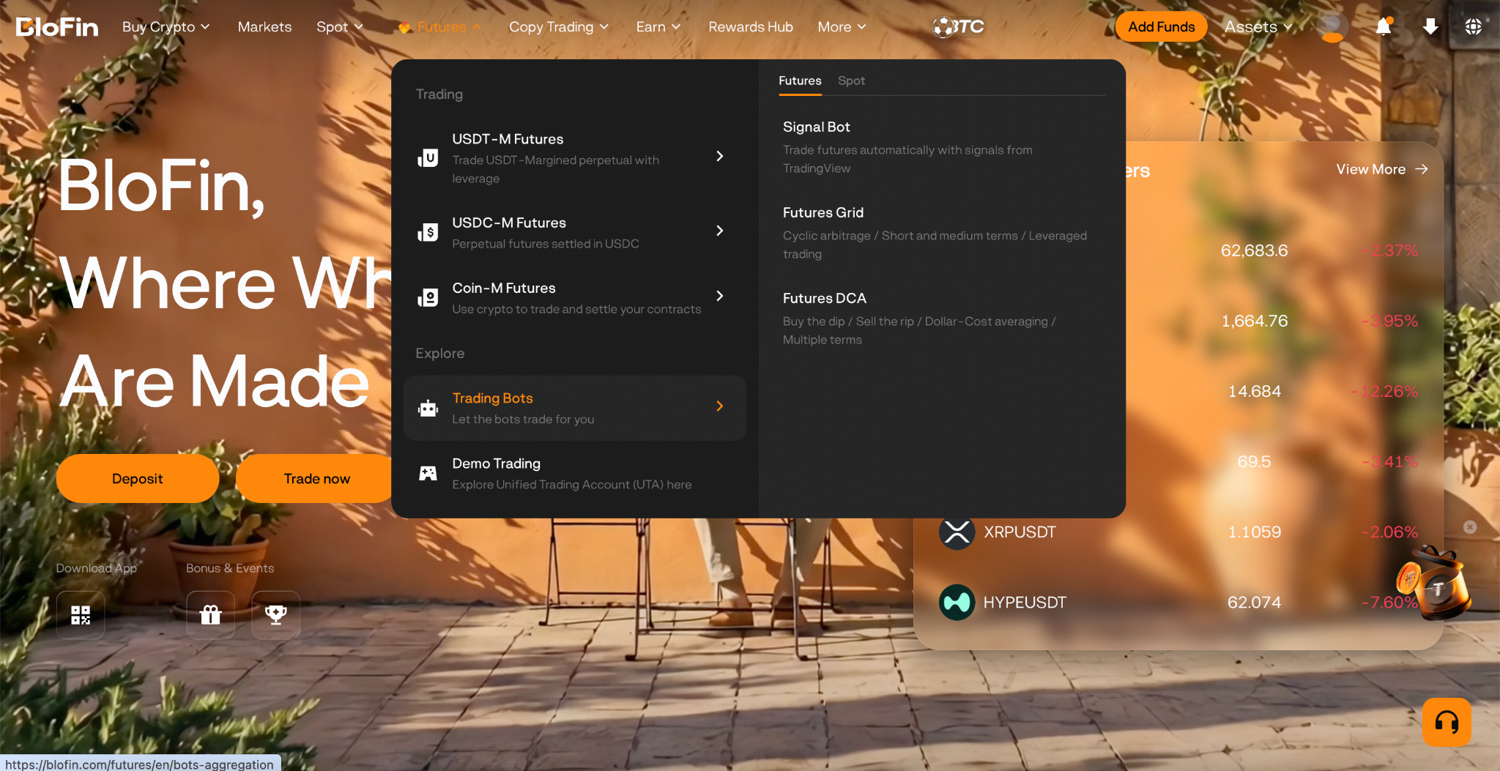
Step 1: Log in to your BloFin account and hover over the Futures tab in the navigation bar. Select Trading Bots from the dropdown.
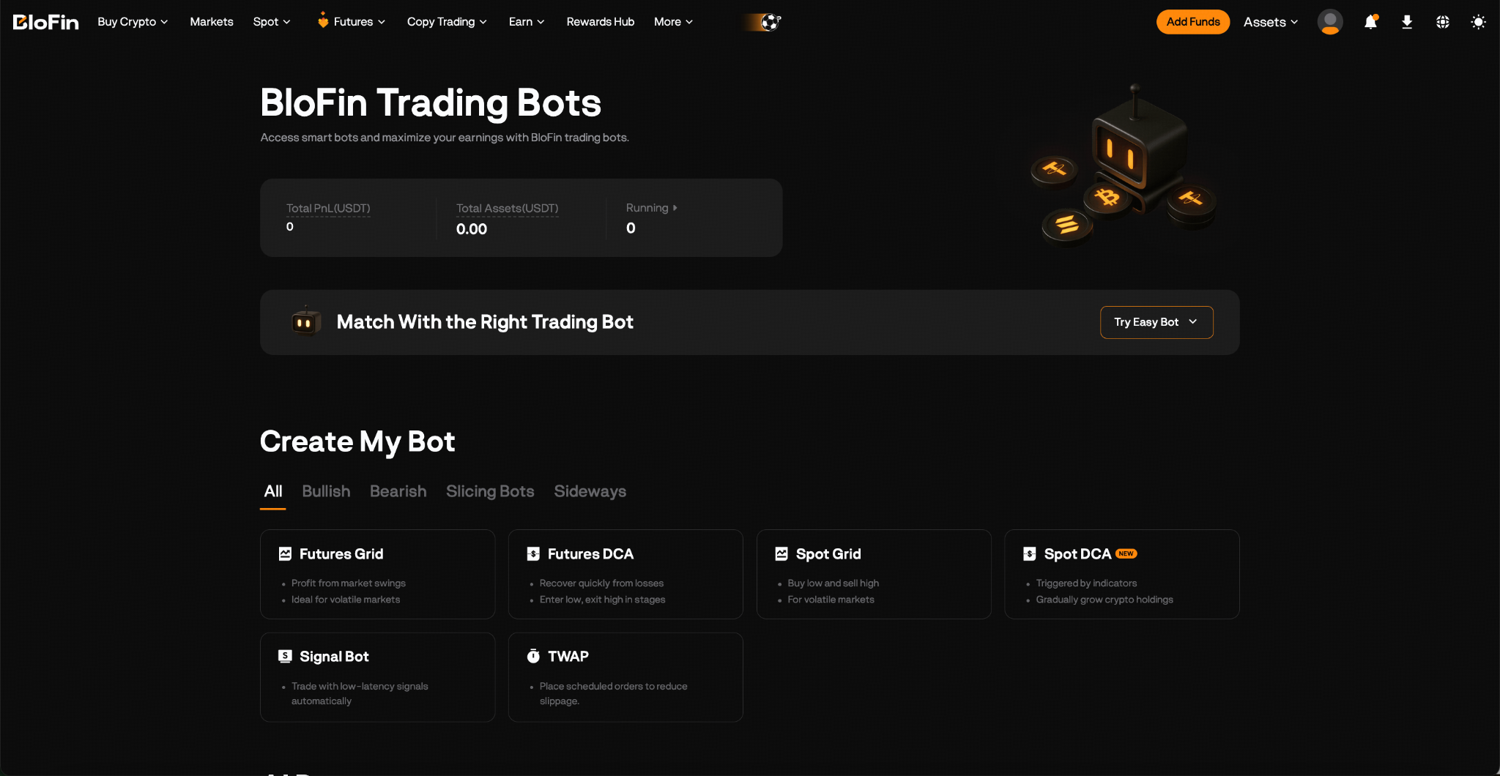
Step 2: On the Trading Bots page, locate TWAP and click it to open the strategy creation page.
From the Futures trading interface:
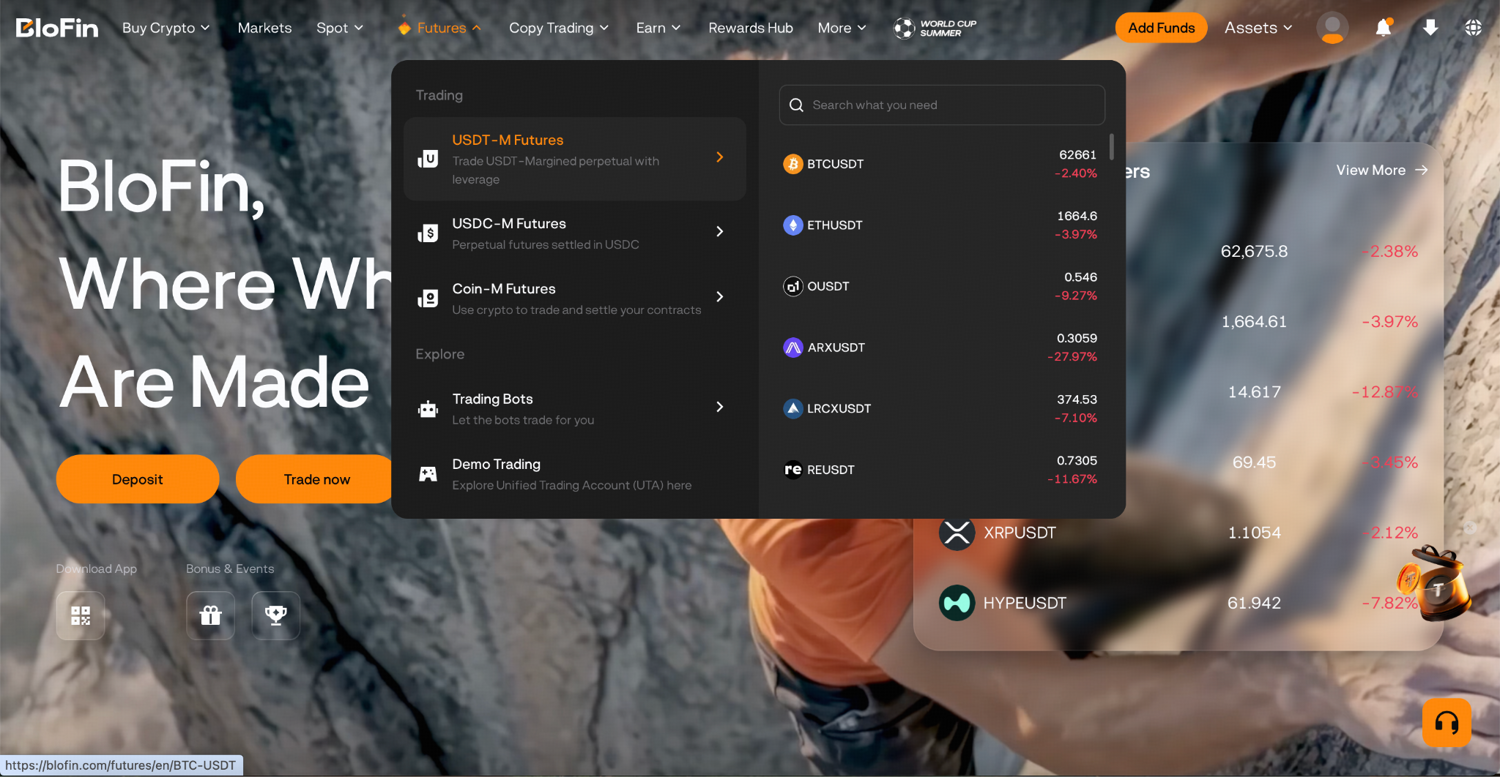
Step 1: Log in to your BloFin account and hover your cursor over the Futures tab. Then, select USDT-M Futures to open the trading page.
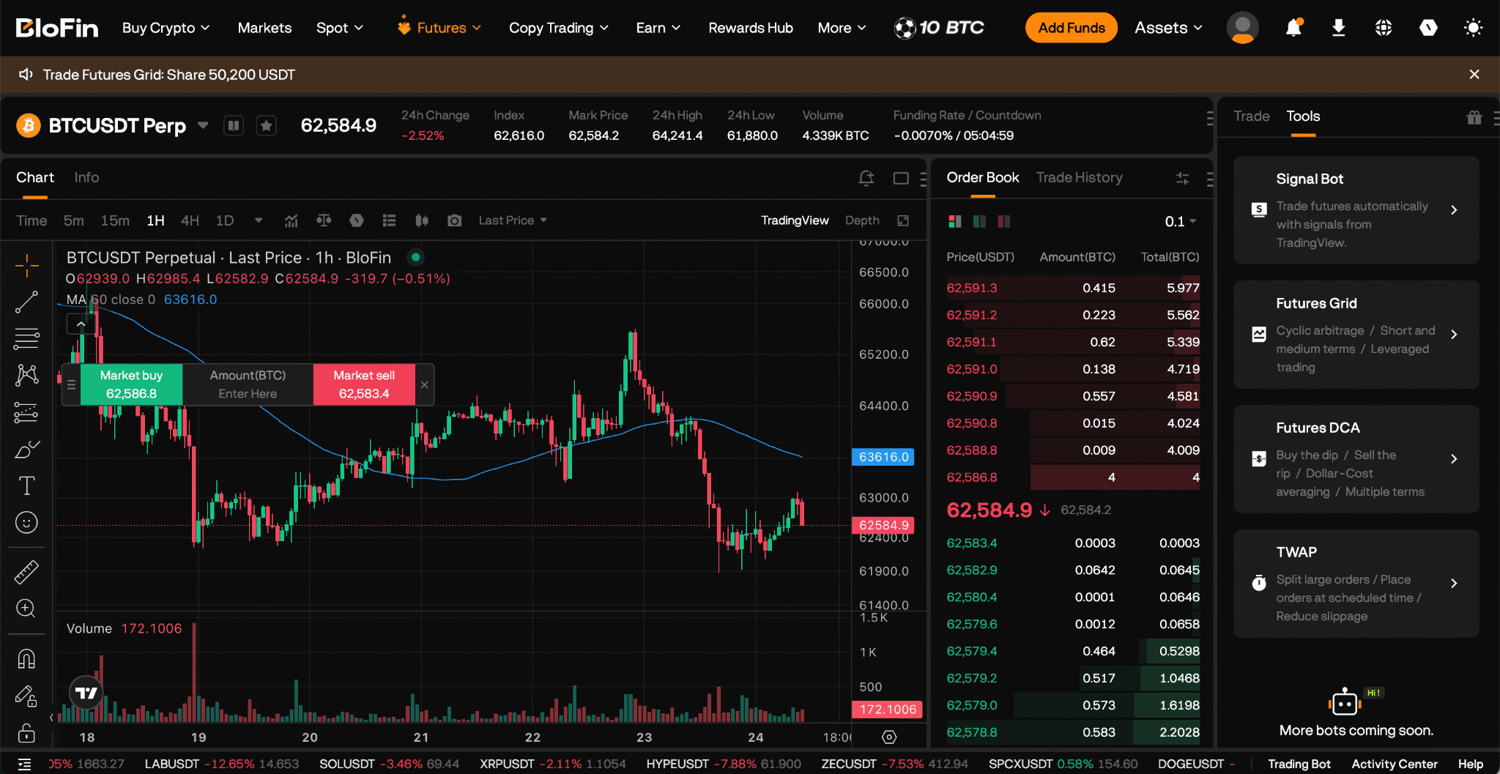
Step 2: On the order panel on the right side, click the Tools tab and select TWAP from the order type options.
How to set up your TWAP strategy
Once you're on the TWAP creation page, the setup process is direct. Here's how to think through each step.
Step 1: Select your trading pair by clicking on BTCUSDT Perp. The TWAP works across all perpetual futures pairs on BloFin.
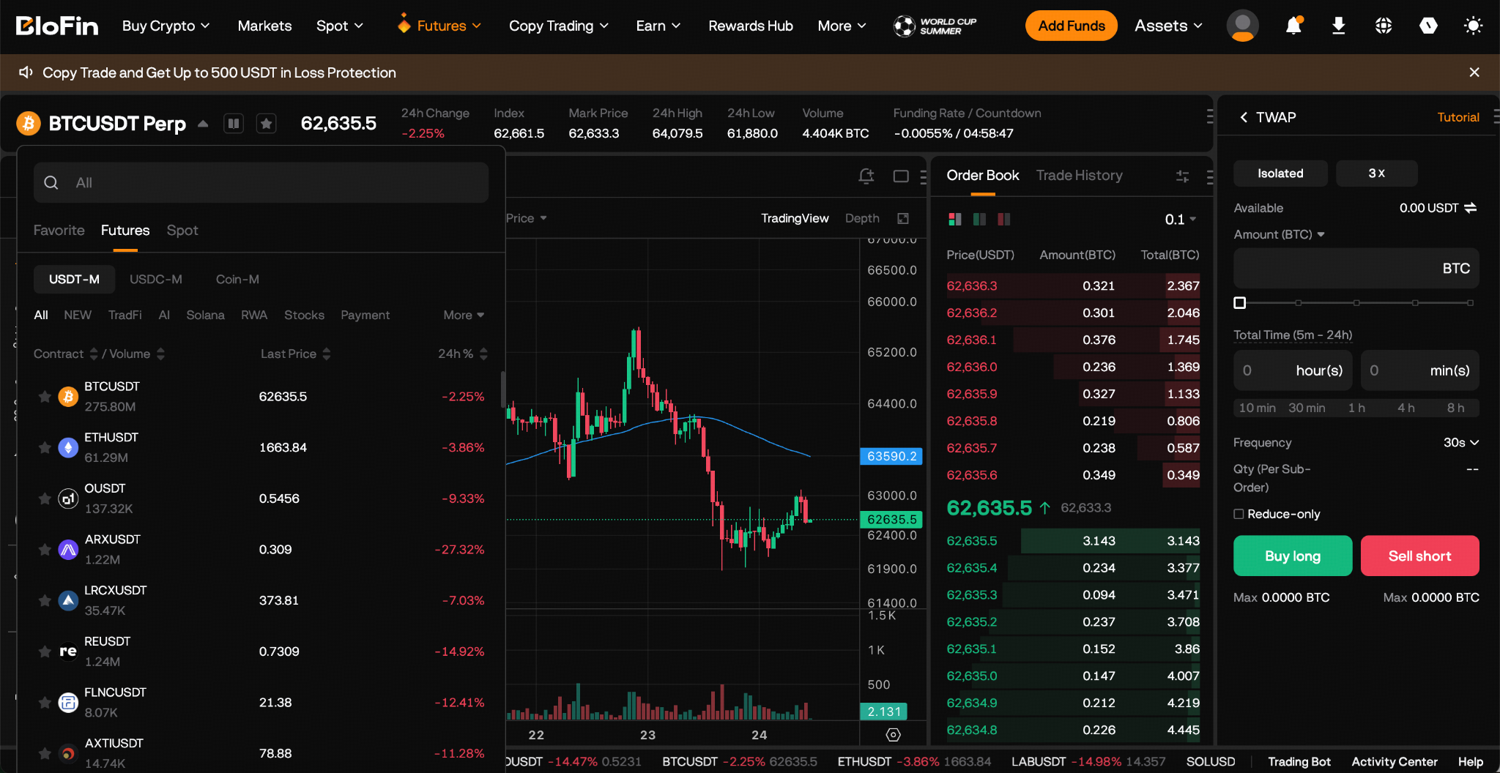
Step 2: Set your direction by choosing Buy (Long) to build an open position or Sell (Short) to close or short. If you're closing an existing position, enable the Reduce-only toggle to ensure the orders only reduce your position and don't create an offsetting one.
Step 3: Input the total contract quantity you want to execute. You can type the quantity directly or use the percentage bar to set a proportion of your available margin. This is the full size of the position you're building or closing, not the size of each individual order.
Step 4: Choose how long the TWAP will run. Consider the size of your order and the typical liquidity of the pair. For most retail-sized positions on major pairs like BTCUSDT or ETHUSDT, a 15 to 30-minute window is sufficient to avoid meaningful market impact. For larger positions or less liquid pairs, a longer window of 1 to 4 hours reduces the footprint further.
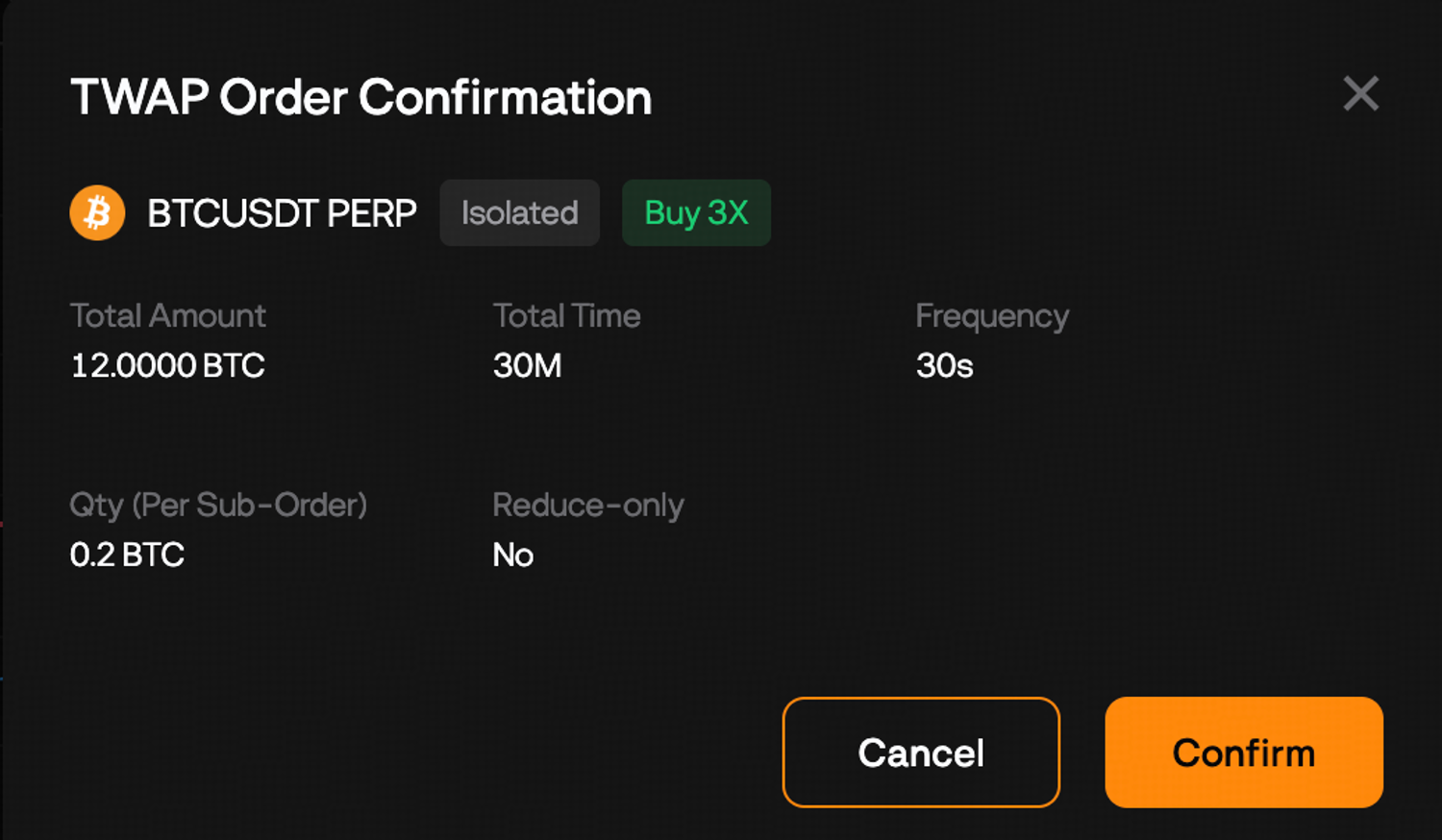
Step 5: Choose the interval between sub-orders. The creation page will automatically calculate the number of sub-orders and the size of each one based on your total amount, total time, and frequency. Review this figure before confirming. If the sub-order size still looks large relative to the pair's typical order book depth, either extend the window or decrease the frequency interval.
Step 6: Before confirming, check the estimated sub-order quantity against the market conditions. If the pair is thinly traded or experiencing unusual volatility, consider whether your parameters still achieve the goal of minimizing market impact.
Step 7: Click Confirm to launch the bot. It begins executing the first sub-order at the scheduled interval immediately after launch.
Managing your TWAP strategy while it runs
Once a TWAP strategy is active, you can monitor it through the Trading Bots section on the Futures trading page. Select TWAP from the bot list to view the details of the running strategy, including the number of sub-orders completed, the quantity filled so far, and the current execution status.
There is no pause function. If you need to stop execution before the window expires, click Stop on the strategy. This cancels all remaining scheduled sub-orders. The quantity already executed remains as an open position. The portion not yet executed is not filled and requires a separate manual order if you still want to complete the full target size.
Monitor the execution particularly if market conditions change significantly during your TWAP window. A sharp price move in the opposite direction of your position during a long execution window means your later sub-orders are filling at worse prices than your earlier ones. In these situations, stopping the TWAP and reassessing whether the setup still makes sense is a valid response.
Viewing your order history
Your completed TWAP sub-orders are recorded in the Order Center. Navigate to Order Center and select Bots to view the full execution history of any TWAP strategy, including each sub-order's fill price, quantity, and timestamp. This lets you calculate the actual average fill price across the full run and compare it against what a single market order would have achieved.
How TWAP differs from other BloFin order types
TWAP vs single market order
A market order executes immediately at the best available price, sweeping the order book until filled. For large orders, this causes significant slippage. TWAP spreads the same execution across many smaller orders, each of which fills at the prevailing market price at that moment. The average of many small fills in a calm market is typically better than the average of one large fill that creates its own market impact.
TWAP vs limit order
A limit order waits for the price to reach your specified level before filling. It offers price certainty but no execution certainty. If the price never reaches your limit, you don't fill. TWAP offers no price certainty (each sub-order takes the current market price) but near-certain execution across the window, since every sub-order is a market order that fills immediately.
TWAP vs DCA Bot
As covered earlier, the fundamental distinction is that TWAP executes a fixed quantity over time regardless of price, while the DCA Bot adds to a position only when the price drops to predetermined levels. TWAP is an execution strategy for a known quantity. DCA is an entry strategy for an uncertain quantity.
TWAP vs Scaled Order
A Scaled Order distributes a total quantity across multiple limit orders at different price levels within a range. It's designed to achieve average entry across a price range. TWAP distributes across time intervals. Scaled orders are passive (they wait for the price to come to them); TWAP orders are active (they execute at market price at scheduled intervals).
Who the BloFin TWAP Bot is for
The TWAP Bot is most valuable for traders who are already working with position sizes large enough that execution quality materially affects their returns. If a single market order for your intended position size would visibly move the price on your chosen pair, TWAP is the appropriate execution tool.
It's also useful for traders who want to remove single-entry timing risk from a position they've already decided to take. Spreading execution over a window removes the "wrong moment" problem from the entry decision without requiring you to predict where the price will be during the window.
Traders running systematic strategies who need to execute defined position sizes at regular intervals, or who need to close large positions efficiently without creating obvious price moves, will find TWAP one of the more practical tools on the platform.
What TWAP is not suited for is opportunistic or reactive trading, where the value of the trade depends on entering quickly at a specific price. In those situations, TWAP's time-spread execution is a constraint rather than a benefit.
Frequently asked questions
What is the BloFin TWAP Bot?
The BloFin TWAP Bot is an automated execution strategy that splits a large futures order into equal-sized sub-orders placed at regular time intervals. It's designed to minimize market impact and slippage when entering or exiting large positions by executing gradually rather than all at once.
What is the difference between TWAP and DCA?
TWAP executes a fixed total quantity over a fixed time window, regardless of price. Each sub-order fires at its scheduled interval and takes the current market price. DCA adds to a position when the price falls to predetermined levels, building a position based on price behavior rather than time. TWAP is an execution strategy for known quantities. DCA is an entry strategy for uncertain price levels.
What is market impact and why does TWAP reduce it?
Market impact is the effect your own order has on the market price. A large buy order sweeps through the order book, consuming available sell liquidity at progressively worse prices as the order fills. TWAP reduces this by replacing one large order with many small ones, each sized to be absorbed by normal market liquidity without pushing the price significantly.
How is sub-order size calculated?
Sub-order size = total amount divided by number of sub-orders. The number of sub-orders equals the total running time in seconds divided by the frequency interval in seconds. For example, a 96 BTC total amount with a 4-hour window at 30-second frequency produces 480 sub-orders of 0.2 BTC each.
Can I use TWAP to close a position?
Yes. Set the direction to Sell and enable Reduce Only if you're in one-way position mode. This ensures the sub-orders only reduce your existing position rather than opening a new short.
What happens if my balance runs out mid-TWAP?
The strategy terminates automatically. Any quantity already executed remains as an open position. The unfilled portion is not executed. Ensure your account has sufficient margin to fund the full total amount before launching a TWAP, particularly for longer-window strategies.
Can I pause a running TWAP?
No. There is no pause function. You can stop the strategy, which cancels remaining sub-orders, or let it run to completion. Stopping and restarting is the only way to modify execution mid-run.
How many TWAP strategies can I run at once?
Up to 50 TWAP strategies simultaneously across your account, with a maximum of 5 per trading pair.
What timeframes are available for the TWAP window?
The total running time can be set from 5 minutes to 24 hours. BloFin offers preset options at 10 minutes, 30 minutes, 1 hour, 4 hours, and 8 hours, or you can enter a custom duration.
What frequency intervals are available?
Frequencies range from 5 seconds to 60 seconds per sub-order. The page calculates and displays the resulting sub-order size automatically as you adjust this parameter.
Do TWAP orders occupy margin before execution?
No. TWAP sub-orders are market orders placed at execution time. Margin is not reserved in advance. Your full account balance remains available until each sub-order fires. This means you need to ensure sufficient balance is maintained throughout the strategy's run.
How do I view my TWAP order history?
Navigate to Order Center and select Bots. This displays the full execution record for all TWAP strategies, including individual sub-order fill prices, quantities, and timestamps.
When should I use TWAP instead of a single limit order?
Use TWAP when execution certainty matters more than price certainty and your order size is large enough to cause meaningful slippage with a single fill. Use a limit order when you have a specific target price you want to enter at and you're willing to wait or potentially not fill if the price doesn't reach it.
Disclaimer: This content is for educational purposes only and does not constitute financial, investment, legal, or tax advice. Crypto assets are highly volatile and carry significant risk of loss. Always verify local regulations and consult a qualified professional before making financial decisions.