
Most crypto wallets make you choose between convenience and control. Self-custody wallets give you ownership but saddle you with mnemonic phrases, gas management headaches, and fragmented apps for different things you want to do. BloFin Wallet is built around the idea that you shouldn't have to make that tradeoff.
It's a self-custody smart wallet that covers trading, payments, earning, and on-chain activity, all from a single app, without the complexity that typically comes with managing your own assets on-chain.
What is BloFin Wallet?
BloFin Wallet is a self-custody on-chain smart wallet for trading, payments, and asset management. It is a completely separate product from BloFin Exchange. You do not need a BloFin Exchange account to use it, and your wallet assets are entirely under your own control. BloFin cannot access, move, or freeze your funds.
It's available on iOS, Android and Google PlayStore, and supports multiple blockchains including Ethereum, Arbitrum, Avalanche, Base, BNB Chain, Optimism, Polygon, Solana, Tron, and more.
Passkey wallet: Self-custody without the mnemonic phrase
The biggest friction point in self-custody has always been the mnemonic phrase. A 12 to 24 word phrase that you need to store securely, never share, and hope you never lose. Lose it and your funds are gone.
BloFin Wallet offers a Passkey wallet that eliminates this entirely. Instead of a mnemonic phrase, your wallet is secured by your device's biometric authentication (Face ID or fingerprint) using WebAuthn and Account Abstraction (AA) technology. Your wallet is tied to your device hardware and cloud account (Apple ID or Google Account) rather than a string of words.
If you lose your phone, you sign into the same cloud account on a new device and authenticate with biometrics. Access is restored. No mnemonic phrase to misplace, no manual backup to manage.
The standard mnemonic wallet option is also available for users who prefer the traditional approach. Both are fully self-custodial.
Swap and bridge
BloFin Wallet has a built-in swap and bridge feature with a competitive 0.3% service fee. It routes through a DEX aggregator to find the best available price across supported liquidity sources, so you're not manually comparing rates or hunting for the best route.
For Passkey wallet users, token approval and the swap itself are combined into a single step, rather than the two separate transactions most wallets require. This reduces both the time and the gas cost of swapping.
Supported networks for swap and bridge include Ethereum, BNB Smart Chain, Solana, Base, Arbitrum, Optimism, Polygon, and more.
Smart Gas: Pay gas with USDT or USDC
One of the more frustrating parts of using multiple blockchains is gas management. Every chain has its own native token for fees. If you want to do anything on Ethereum you need ETH. On BNB Chain you need BNB. Managing small balances of multiple tokens just to pay transaction fees is tedious and wasteful.
Smart Gas solves this. You deposit USDT or USDC into your Smart Gas balance once, and gas fees across all supported chains are paid automatically from that single balance. No more holding chain-specific native tokens, no more failed transactions because you don't have the right gas token for that network.
Supported chains for Smart Gas: Ethereum, Arbitrum, Avalanche, Base, BNB Chain, Optimism, Polygon.
A few things to note:
Minimum deposit into Smart Gas is 5 USDT or USDC.
Smart Gas balance cannot be withdrawn or transferred. Deposit only what you expect to use for gas.
Smart Gas is currently available for Passkey wallets only. Mnemonic wallet support is coming.
Card: Spend crypto anywhere
BloFin Wallet includes a built-in card that lets you spend your crypto holdings anywhere Visa is accepted, including Apple Pay and Google Pay. The card type available depends on your region.
The Visa Card is issued by Rain, a Visa Principal Member, and operates on the Visa network. Your digital assets can be used as collateral to support your available credit line. Funding is through USDT or USDC from your wallet.
Physical cards are coming soon. Digital cards are available now through the app.
Earn: 6%+ APY on stablecoins
BloFin Wallet has a built-in earning product for idle assets. Supported stablecoins earn 6%+ APY with no upper limit on the amount you can deposit. It's a flexible product, meaning you maintain access to your funds rather than locking them up for a fixed term.
For users who hold crypto in a self-custody wallet but don't want it sitting completely idle, this provides a passive return without leaving the app.
Prediction Market
The Prediction Market lets you take positions on real-world events directly from your wallet. Sports results, crypto price movements, and more. Choose an event, pick your outcome, and earn rewards if the result matches your prediction.
It's an on-chain activity built natively into the wallet, so you don't need to connect to external platforms or manage separate accounts.
Is BloFin Wallet right for you?
BloFin Wallet suits users who want genuine self-custody without the traditional complexity of managing an on-chain wallet. The Passkey option in particular removes the mnemonic phrase burden that puts many people off self-custody entirely, while still giving you full ownership of your assets.
If you're already using BloFin Exchange and want a wallet that integrates smoothly with it, the direct transfer feature makes that practical. If you've never used BloFin Exchange at all, BloFin Wallet stands completely on its own.
The combination of swap, gas abstraction, card, earn, and prediction market in one place makes it a more complete product than most standalone wallets. The tradeoff is that it's mobile-only for now, and Smart Gas is currently limited to Passkey wallets.
How to create BloFin Wallet
Here's how to get your wallet set up in a few steps.
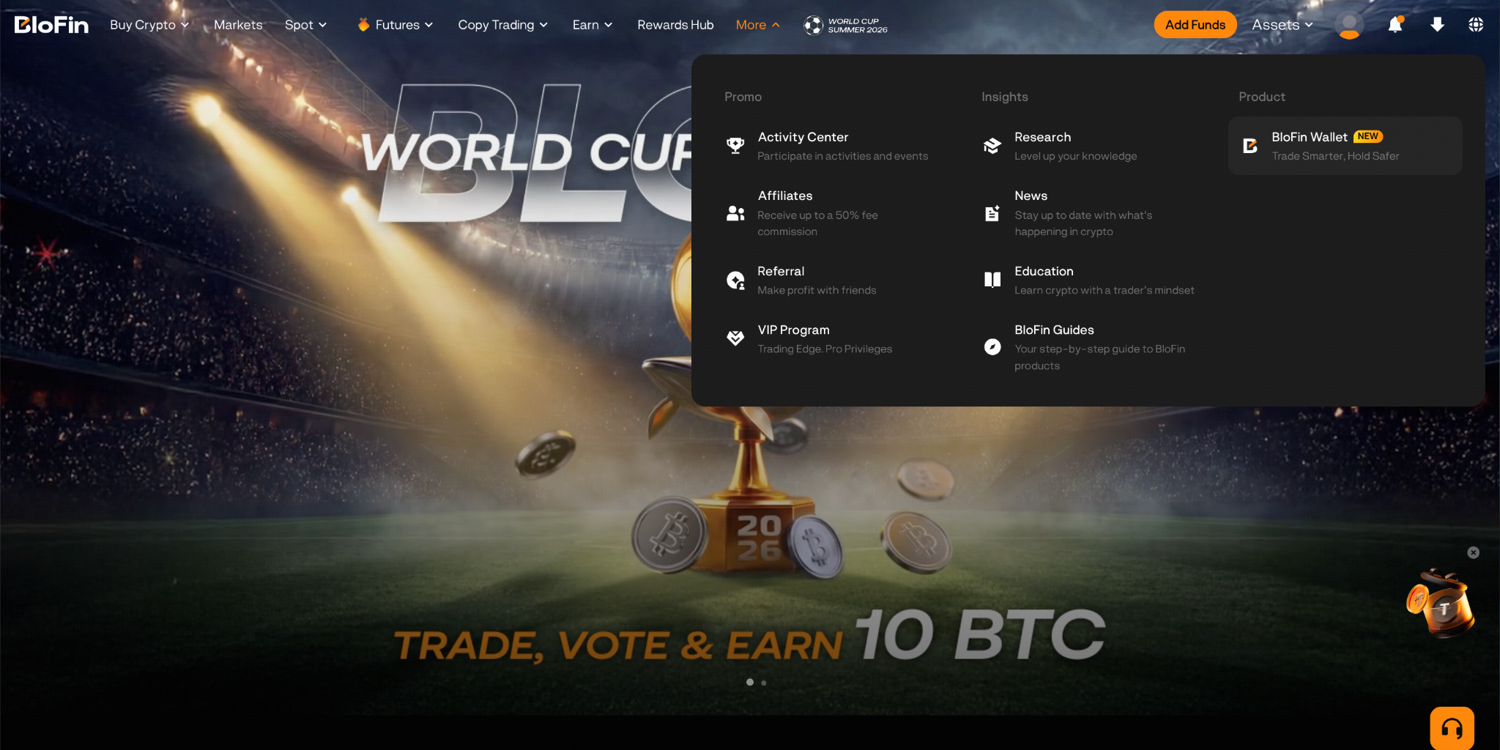
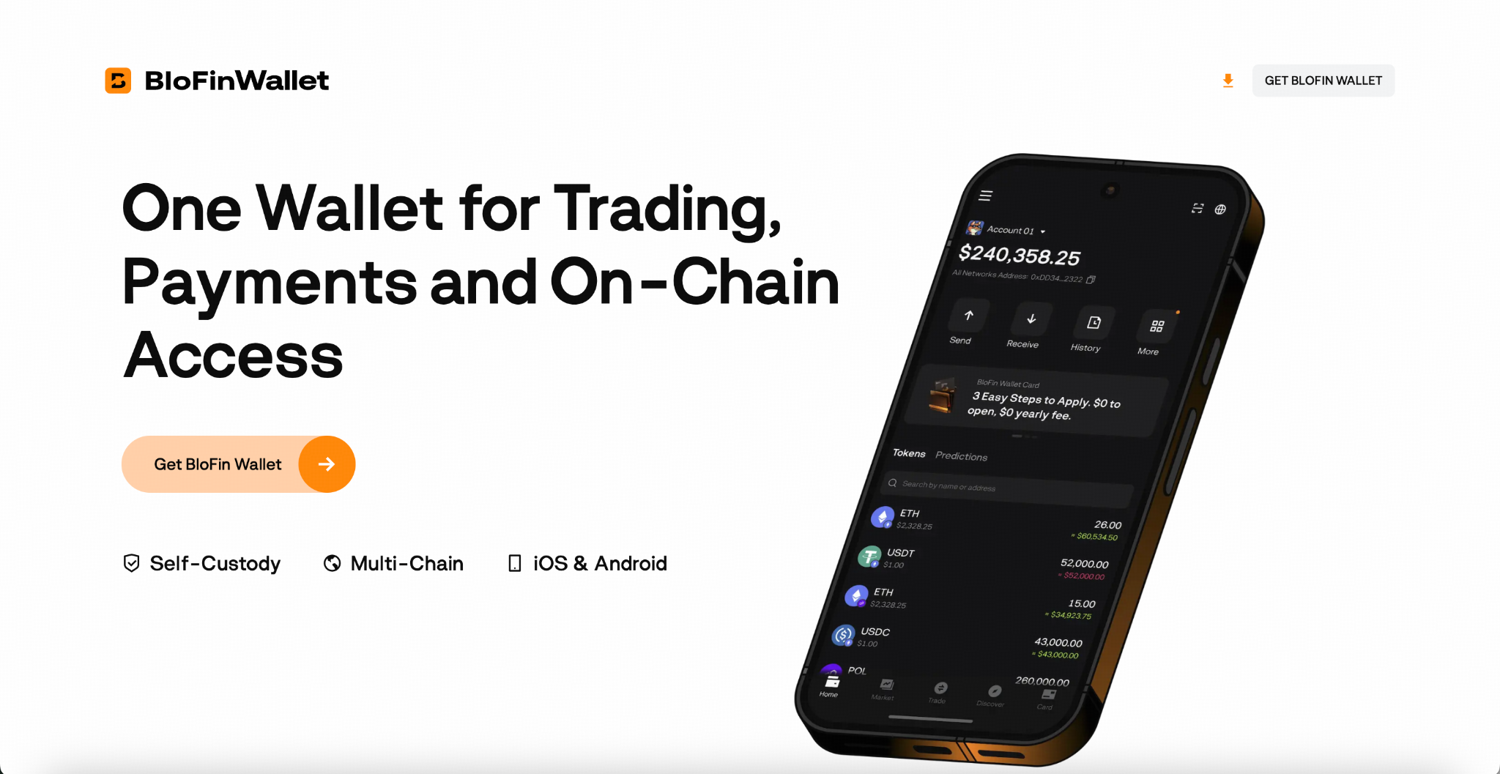
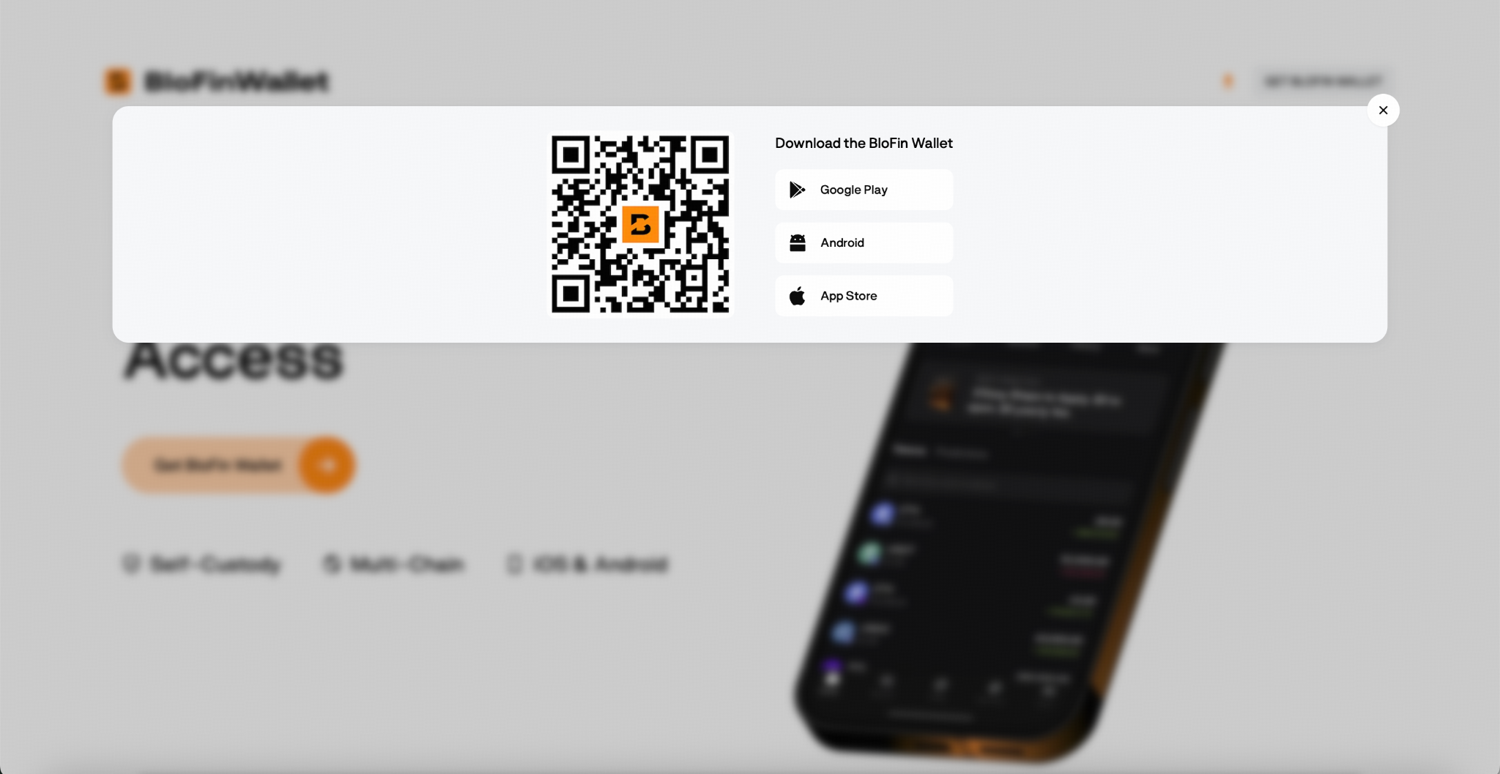
Step 1: Download BloFin Wallet from the Apple App Store or Google Play Store. If you're already a BloFin Exchange user, you can also navigate to the BloFin Wallet page by hovering your cursor over the More tab in the navigation bar on the BloFin homepage and clicking BloFin Wallet. From there, you can click on the Get BloFin Wallet button and choose your device.
Step 2: Launch the app once it’s been successfully downloaded to your device. If you’re a new user, tap Create Wallet and you can choose to back up with a mnemonic phrase (create a mnemonic wallet) or set up a Passkey (create a Passkey wallet). If you already have an existing wallet, tap Import Wallet, enter your mnemonic phrase or authenticate with your backed-up Passkey, and click Confirm.
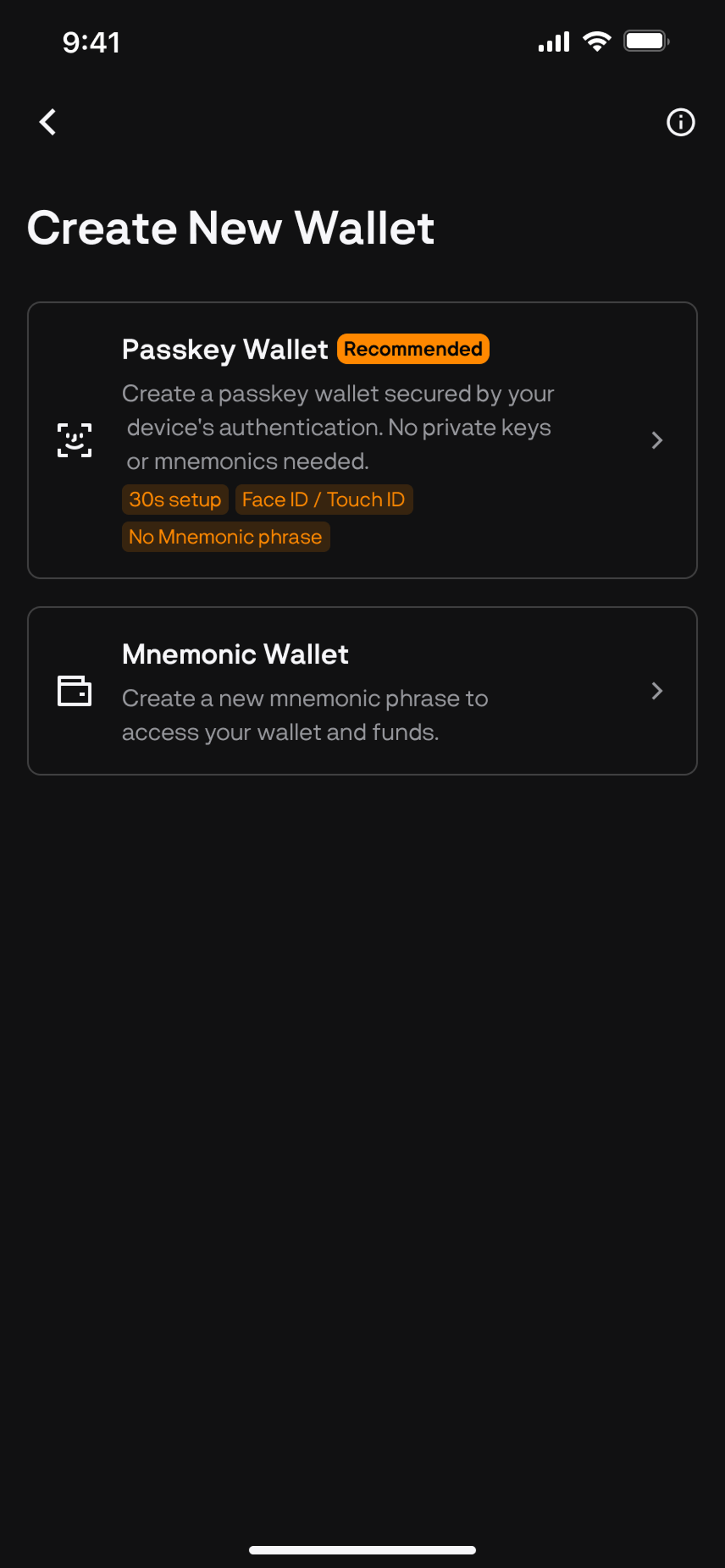
Step 3: Follow the prompts for whichever wallet type you chose to complete your setup. For the Passkey wallet, authenticate with Face ID or fingerprint and your wallet is created. With this option, there is no phrase to record. For the mnemonic wallet, the app generates a mnemonic phrase. Write every word down in the correct order and store it somewhere secure and offline. Do not screenshot it, store it in a notes app, or share it with anyone. Confirm a few words when prompted and your wallet is created.
Step 4: Now that your wallet has been created, you’ll need to fund it to start using its features. Tap Receive to get your wallet address and deposit from another wallet or exchange. Always confirm the network matches before sending. It is important to note that funds sent on an unsupported network will not appear and may not be recoverable. Supported networks include Ethereum, Arbitrum, Avalanche, Base, BNB Chain, Optimism, Polygon, Solana, and Tron.
Step 5: If you created a Passkey wallet, you can proceed to also set up Smart Gas. Navigate to the Smart Gas page in the app and tap Deposit Smart Gas. Deposit a minimum of 5 USDT or USDC from any supported EVM chain. From that point, gas fees across all supported chains are covered automatically from that balance. You may check your deduction records at the bottom of the Smart Gas page under Recent Activity.
Moving between BloFin Exchange and BloFin Wallet
If you use both BloFin Exchange and BloFin Wallet, you can move assets between them directly from the app with fewer steps than a standard external transfer. The two products share a brand but operate independently, so this is a convenience feature rather than a default connection.
Frequently asked questions
What is BloFin Wallet?
BloFin Wallet is a self-custody on-chain smart wallet for trading, payments, and asset management. It's separate from BloFin Exchange and available on iOS and Android.
Do I need a BloFin Exchange account to use BloFin Wallet?
No. BloFin Wallet is an independent product. You can create and use it without any connection to BloFin Exchange.
What is a Passkey wallet?
A Passkey wallet replaces the mnemonic phrase with your device's biometric authentication using WebAuthn and Account Abstraction technology. It's secured by your device hardware and cloud account (Apple ID or Google Account). Recovery works through the same cloud account on a new device, no mnemonic phrase required.
What's the difference between a Passkey wallet and a mnemonic wallet?
A Passkey wallet replaces the mnemonic phrase with your device's biometric authentication using WebAuthn and Account Abstraction technology. It's secured by your device hardware and cloud account (Apple ID or Google Account). Recovery works through the same cloud account on a new device, with no mnemonic phrase required. A mnemonic wallet uses a standard 12 to 24 word seed phrase that you back up and store yourself. Both are fully self-custodial.
Can BloFin access or freeze my wallet?
No. BloFin Wallet is fully self-custodial. BloFin has no access to your funds and cannot recover your wallet on your behalf. For Passkey wallets, recovery goes through your cloud account. For mnemonic wallets, the seed phrase you backed up is the only recovery method.
What if I lose my phone?
For Passkey wallets: sign into the same cloud account (Apple ID or Google Account) on your new device and authenticate with biometrics. Your access will be restored. For mnemonic wallets, you’ll need to import your wallet using the seed phrase you backed up. If you didn't back it up, access cannot be recovered.
What is Smart Gas?
Smart Gas is a prepaid gas balance that covers transaction fees across all supported chains using USDT or USDC. You deposit once and the correct gas fee is deducted automatically for every transaction, regardless of which chain you're on. Currently available for Passkey wallets only.
What blockchains does BloFin Wallet support?
Ethereum, Arbitrum, Avalanche, Base, BNB Chain, Optimism, Polygon, Solana, and Tron. Always verify the network before sending funds. Transfers on unsupported networks cannot be recovered.
Can I import an existing wallet into BloFin Wallet?
Yes. Tap Import Wallet on the app's welcome screen, then enter your seed phrase or authenticate with your backed-up Passkey to restore access.
What is the card available in BloFin Wallet?
A Visa issued through the app, depending on your region. It lets you spend crypto at any merchant accepting those networks, including via Apple Pay and Google Pay. Physical cards are coming soon.
What fees does BloFin Wallet charge?
Swaps and bridges carry a 0.3% service fee. Card deposits and prediction market payouts also carry small service fees shown before you confirm. Receiving funds, holding assets, and browsing the app are free. Gas fees are paid to the network and are separate from BloFin's own fees.
Disclaimer: This content is for educational purposes only and does not constitute financial, investment, legal, or tax advice. Crypto assets are highly volatile and carry significant risk of loss. Always verify local regulations and consult a qualified professional before making financial decisions.