
Internal Transfer FAQ
August 4, 2026 at 10:53 AM1. What is Internal Transfer?
Internal Transfer allows you to send cryptocurrency directly to another BloFin user without using the blockchain.
Unlike an on-chain withdrawal, Internal Transfer is completed within the BloFin platform, making it faster and easier.
2. What are the benefits of Internal Transfer?
Internal Transfer offers several advantages:
- Fast transfer between BloFin users
- No blockchain confirmation required
- No network (gas) fees
- Simple and convenient transfer process
3. Who can I transfer funds to?
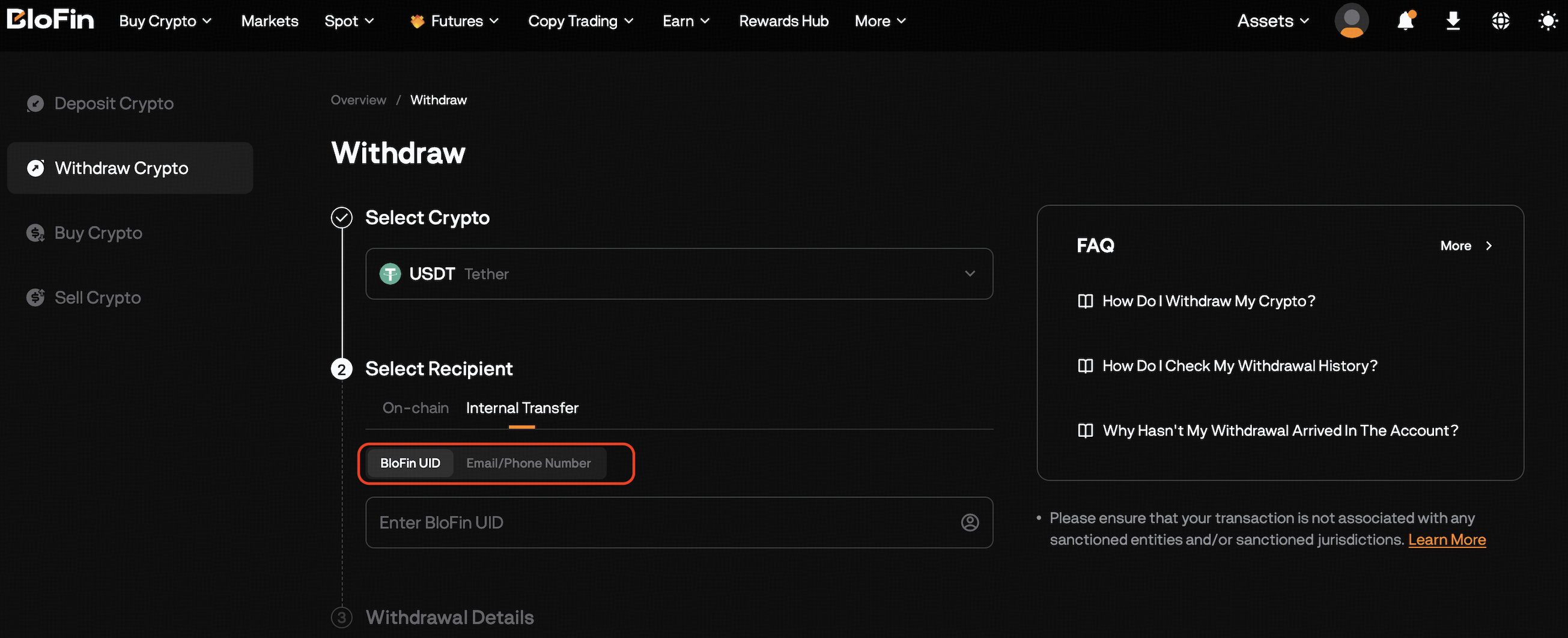
You can transfer funds to another BloFin user using any of the following:
- UID
- Registered email address
- Registered phone number
The system will verify the recipient before you confirm the transfer.
4. Can I transfer funds to a sub-account?
No.
Currently, Internal Transfer is only supported between main accounts.
The following are not supported:
- Transfers from a sub-account
- Transfers to a sub-account
- Transfers to your own account
5. How do I make an Internal Transfer?
On the Web
- Log in to your BloFin account.
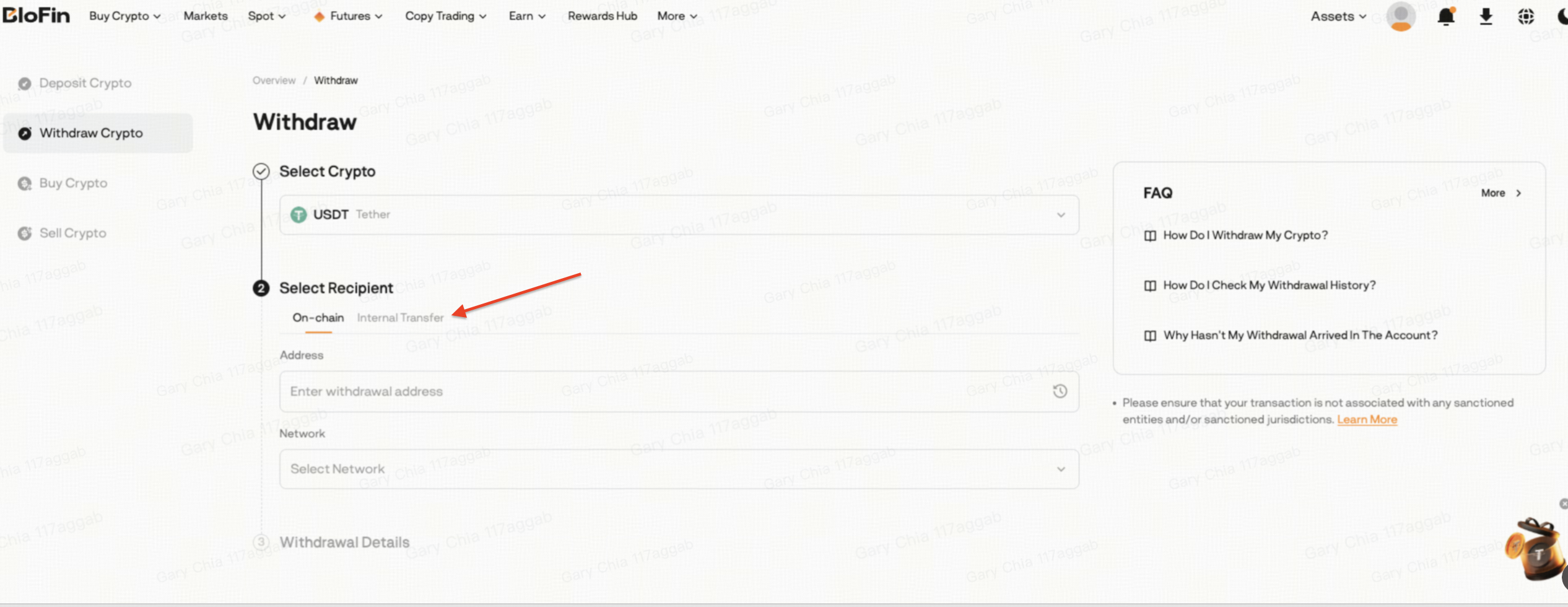
- Go to Assets → Withdraw.
Select Internal Transfer.
Enter the recipient's UID, email address, or phone number.
- Enter the transfer amount.
- Complete the required security verification.
- Confirm the transfer.
On the App
- Open the BloFin App.
- Go to Assets → Withdraw.
Select BloFin Users.
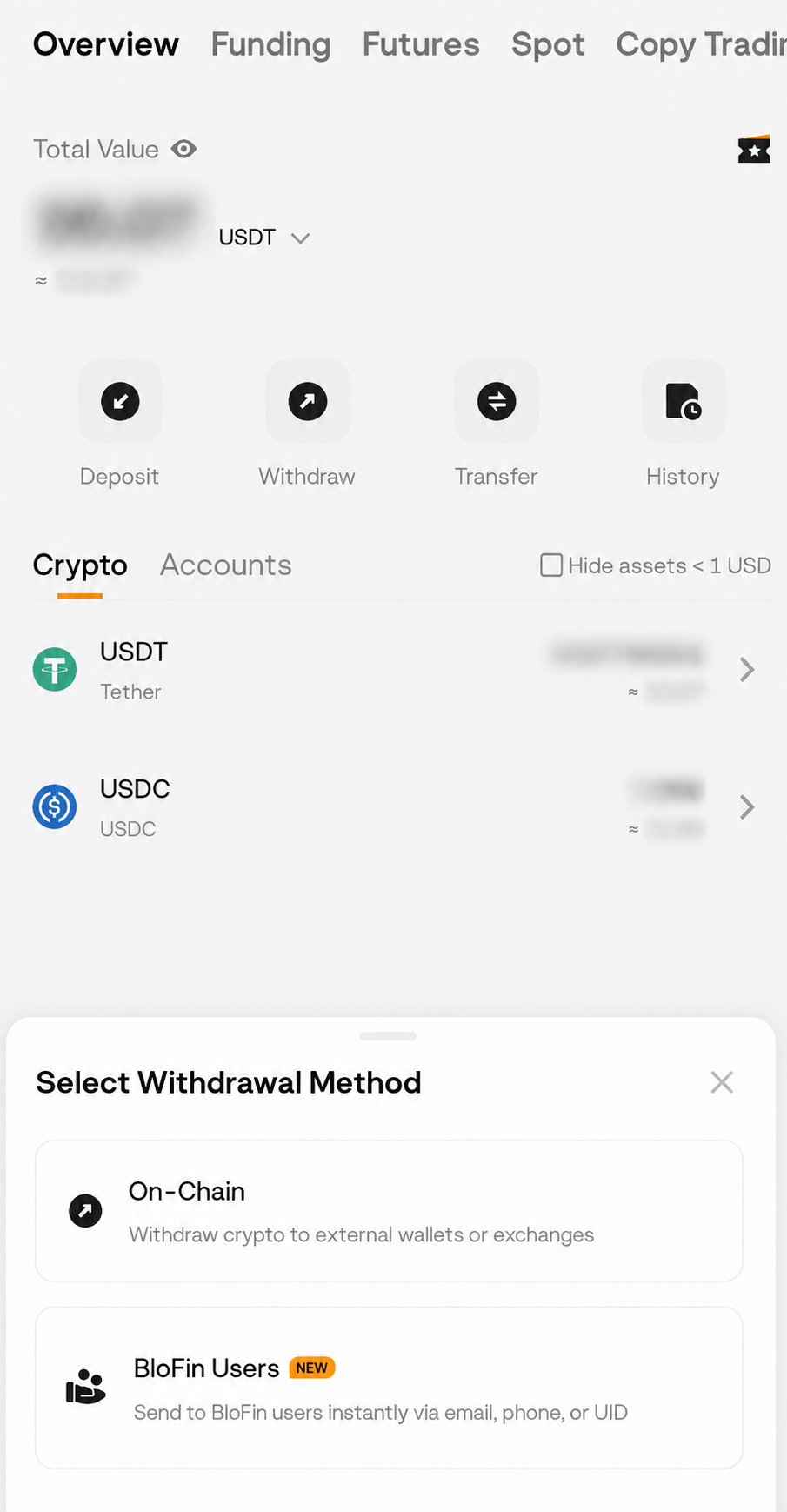
- Follow the on-screen instructions to complete the transfer.
6. How can someone transfer funds to me?
You can share your:
- BloFin UID
- Registered email address
- Registered phone number
The sender can use this information to transfer funds directly to your account.
7. Is there a fee for Internal Transfer?
Internal Transfers are generally completed without blockchain network (gas) fees because the transfer takes place within the BloFin platform.
8. Does Internal Transfer require security verification?
Yes.
To protect your assets, you'll need to complete the required security verification before submitting an Internal Transfer.
9. Why can't I complete an Internal Transfer?
You may be unable to complete an Internal Transfer if:
- The recipient information is incorrect.
- You're attempting to transfer to a sub-account.
- You're attempting to transfer to your own account.
- Your available balance is insufficient.
- Security verification has not been completed.
If the issue persists, please contact Live Chat Support for assistance.
10. Where can I view my Internal Transfer history?
You can view your Internal Transfer records in the Internal Transfer History page on both the BloFin Web and App.
The history includes:
- Sent transfers
- Received transfers
- Sender and recipient information
- Transfer details
11. Why is my Internal Transfer input temporarily unavailable?
For account security, repeatedly entering incorrect recipient information may temporarily restrict your ability to use the Internal Transfer function.
If this happens:
- Please wait 2 hours before trying again.
- No manual reset is required.
- The restriction will be lifted automatically after the 2-hour period.
If you're unsure about the recipient's information, please verify their UID, registered email address, or phone number before trying again to avoid triggering the temporary restriction.
Share
Related Articles
- Why Is My Withdrawal Temporarily Restricted After Logging In From a New Device?
- Deposit Not Credited: Wrong Network, Wrong Address, Missing Memo/Tag or Network Maintenance
- Is There A Minimum Withdrawal Limit Required For Each Crypto?
- How To Transfer Assets Among Different Accounts?
- How Do I Check My Withdrawal History?