
Order Types on BloFin
July 14, 2026 at 06:49 AM1. Market Order
A Market Order executes immediately at the best available market price.
Best for:
- Entering or exiting a position quickly.
- Fast-moving market conditions.
Things to note:
- Market Orders prioritize execution speed over execution price.
- During periods of high volatility or low liquidity, the final execution price may differ from the displayed price due to slippage.
2. Limit Order
A Limit Order allows you to specify the price at which you want to buy or sell.
The order will only execute if the market reaches your specified price or a better price.
Best for:
- Entering or exiting at a desired price.
- Traders who want greater price control.
Things to note:
- A Limit Order may remain unfilled if the market never reaches your specified price.
- Even if the market reaches your limit price, the order may only be partially filled depending on available market liquidity and price-time priority.
- If you are using the web page to access BloFin transactions. You can place orders directly through the K-line chart, Manually slide on the K-line to select the price, click the "+" sign on the right, and then place an order after setting the amount. However, please note that currently only the website is supported, and only setting limit orders is supported, as shown below.
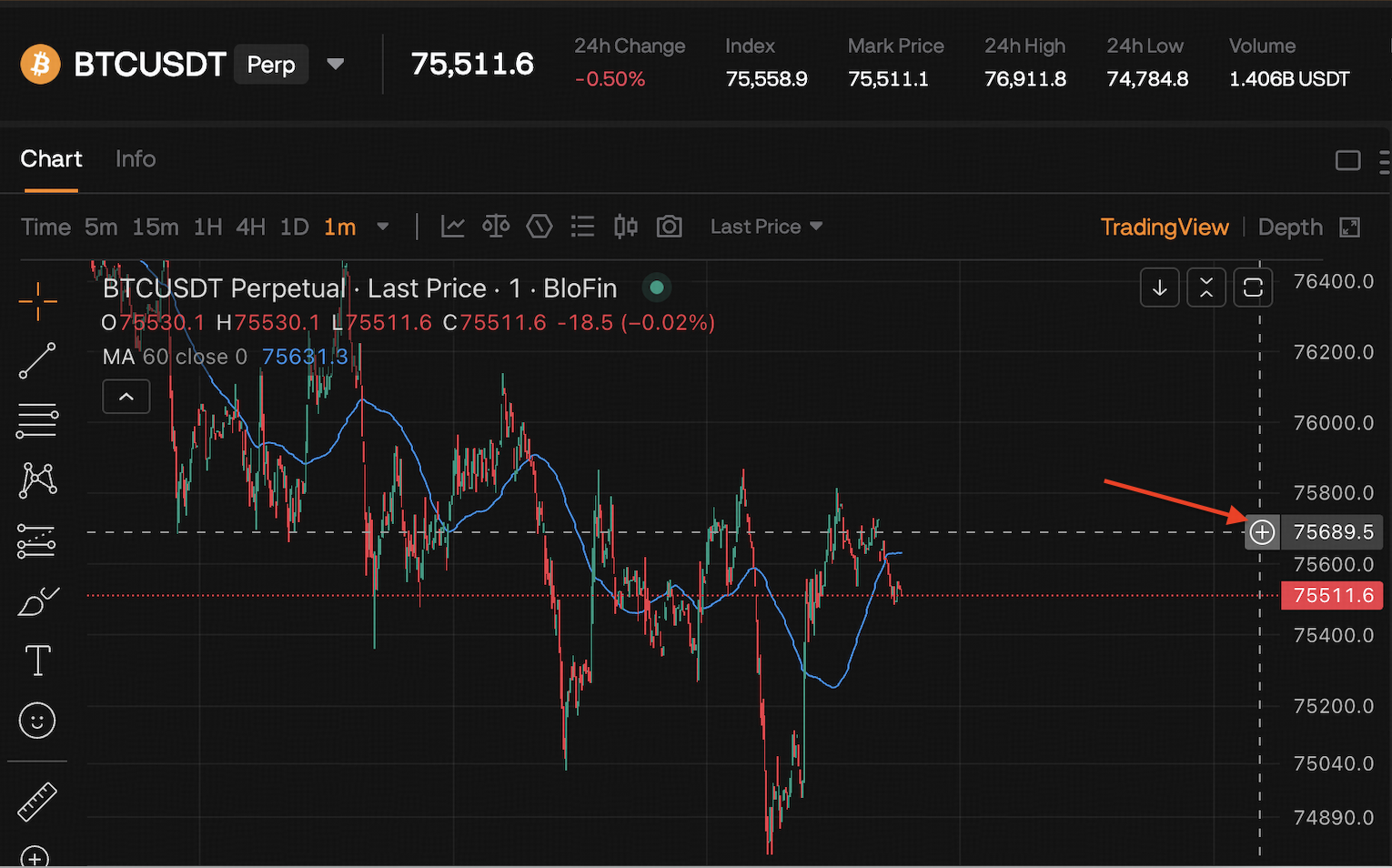
If you already have a position, you can close the position on the K line or reverse order.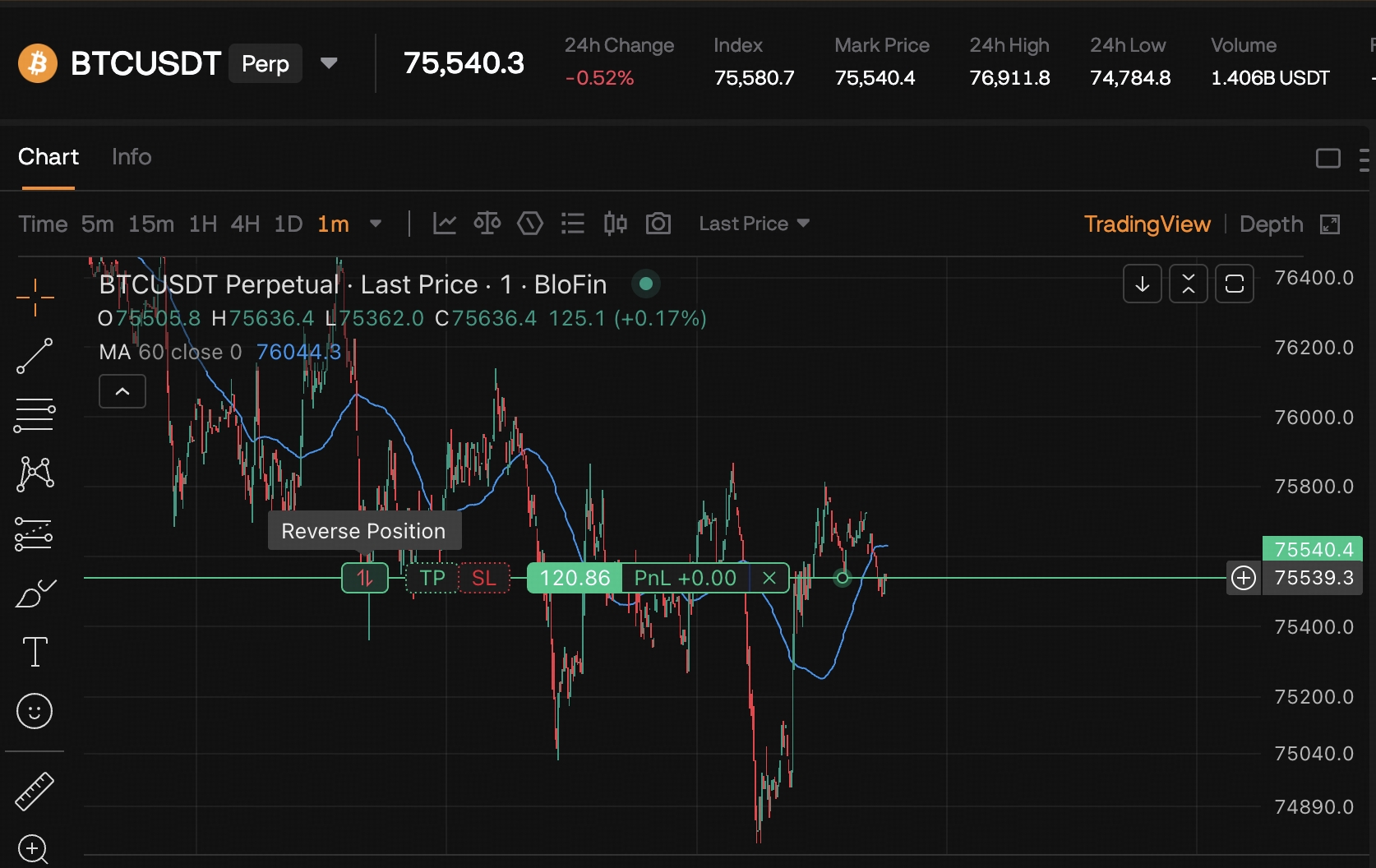
3. Trigger Order
A Trigger Order becomes active only after the market reaches your specified trigger price.
Once triggered, it will be submitted as either:
- a Market Order, or
- a Limit Order.
Trigger Orders are commonly used for breakout entries or automated trade execution.
4. TP/SL Order
A Take Profit / Stop Loss (TP/SL) Order helps automate risk management by closing your position when the predefined trigger conditions are met.
Users can configure:
- Take Profit
- Stop Loss
- Both TP and SL simultaneously
5. Trailing Stop Order
A Trailing Stop dynamically adjusts the stop price as the market moves in your favor while maintaining a predefined callback distance.
This helps protect profits while allowing positions to continue benefiting from favorable price movements.
6. TWAP Order
A Time-Weighted Average Price (TWAP) Order divides a large order into multiple smaller orders executed over a specified time period.
TWAP helps:
- Reduce market impact
- Improve average execution price
- Execute large trades more efficiently
7. Reverse order
A reverse order involves simultaneously closing an existing open position and opening a position of equal size in the opposite direction. It is executed through market orders. Reverse orders allow you to quickly react to market shifts by effectively “reversing” your current market stance.
Advanced Order Options
Four effective mechanisms can be selected, “Post only”, “FOK (Fill Or Kill)”, “IOC (Immediate Or Cancel)", and "GTC (Good-Till-Cancel)".
Post only: When the user's order is sent to the market if the transaction type can be executed immediately with Taker, the order will be canceled for the user to ensure that the user's transaction type is always Maker after the order is placed in the Maker-only way.
FOK (Fill Or Kill): If the user's order cannot be completed immediately after being sent to the market, all orders will be canceled.
IOC (Immediate Or Cancel): If the user's order is not executed immediately after it is sent to the market, the unexecuted part will be canceled.
GTC (Good-Till-Cancel): The order will last until it is completed or canceled.
Users can obtain income from the price rise or fall of digital assets by buying long or selling short-forward perpetual contracts.
Order Execution & Fill Conditions
No. No order type can guarantee execution under all market conditions.
Whether an order is executed depends on factors such as market price, available liquidity, order type, and market volatility.
Market Orders
Market Orders generally have the highest probability of execution because they match against the best available prices in the order book.
However:
- The execution price cannot be guaranteed.
- Slippage may occur during periods of high volatility or insufficient liquidity.
Limit Orders
Limit Orders provide price certainty but do not guarantee execution.
Your order may remain open or only be partially filled if:
- The market never reaches your specified price.
- There is insufficient liquidity at your limit price.
- Earlier orders at the same price are filled first according to price-time priority.
Trigger Orders
Trigger Orders are not active orders until the trigger condition is met.
If the trigger price is never reached, the order will not be submitted to the market.
After activation, execution depends on whether the triggered order is a Market Order or Limit Order.
Factors That Affect Order Execution
Order execution may be affected by:
- Market volatility
- Available liquidity
- Order book depth
- Price-time priority
- The selected order type
During periods of rapid market movement, prices may change before your order can be matched, which may result in delayed execution, partial fills, or no execution depending on the order type.