
Moving crypto from one exchange or wallet to another feels like a bank transfer, but it works differently in one important way. A blockchain transfer can't be called back once it's confirmed, so a wrong address, network or tag usually can't be fixed by the sender's bank or app.
That risk was on many traders' minds in early November 2026. After hackers took about $6.3 billion from Binance on October 29, the exchange suspended services and then restored withdrawals in stages, starting with Bitcoin, Ether and some stablecoins (source: Al Jazeera, November 1, 2026). Anyone moving coins between exchanges that week needed to check, coin by coin, which networks were open on both sides.
That same check sits behind every deposit. On BloFin, you pick the coin, pick the network and copy an address, and the details you choose decide whether the coins arrive.
What is a crypto deposit on BloFin?
A crypto deposit on BloFin is a blockchain transfer from another wallet or exchange to an address that BloFin creates for your account. You choose the coin and the network on BloFin's deposit page, send the coins from the other platform on that same network, and BloFin credits them to your Funding Account once the blockchain confirms the transfer.
Think of the network as the road and the address as the house number: the number only leads to your account on the road BloFin chose, so the sending platform has to use the same network as well as the same address. Getting either one wrong sends the coins somewhere BloFin can't credit them.
Depositing crypto vs buying crypto on BloFin
Deposit crypto if you already own coins on another exchange or in a personal wallet. Buy crypto if you're starting with cash. A crypto deposit usually arrives within minutes to an hour or more, depending on the network, while a card purchase carries a 24-hour hold before you can withdraw the coins.
Both routes end in the same place, your Funding Account, and from there a free transfer moves the coins to the account you trade from. The difference is what you start with and what each route costs. A deposit costs the withdrawal or network fee charged by the platform you send from. A purchase costs the payment provider's processing fee, which you see before you confirm, so compare it with the cost of depositing coins you already own.
You can buy crypto on BloFin with Apple Pay, Google Pay, a Visa or Mastercard card, or a SEPA or SWIFT bank transfer from the Buy Crypto menu, and third-party payment providers such as Alchemy and Simplex process the payment. The 24-hour hold applies whichever method you use, and you can still trade the coins during it. Each payment method has its own steps in the guide to buying crypto on BloFin.
How to deposit crypto on BloFin
Before you proceed, you’ll need to first sign up for a BloFin account. So if you haven’t already created an account, you may refer to our sign-up guide on how to do so. Once that’s done, you can proceed to deposit crypto on BloFin by choosing the coin and network on the deposit page, copying the address BloFin shows, and sending the coins to it from your other wallet or exchange on the same network. The six steps take a couple of minutes, and the coins appear once the blockchain confirms the transfer.
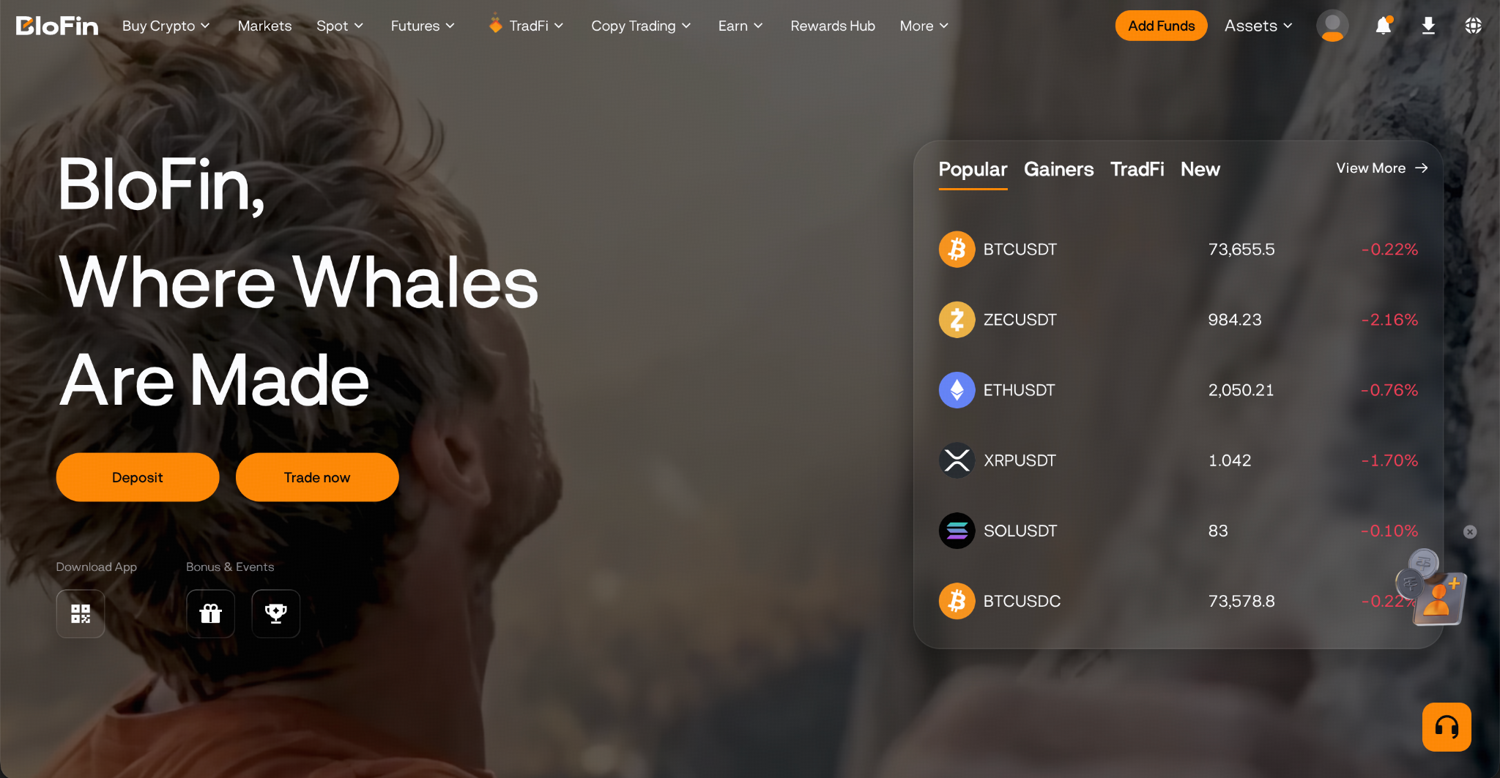
Step 1: Log in on the official BloFin webpage and click on the Add Funds button in the top right corner of the navigation bar. Then, select Deposit Crypto.
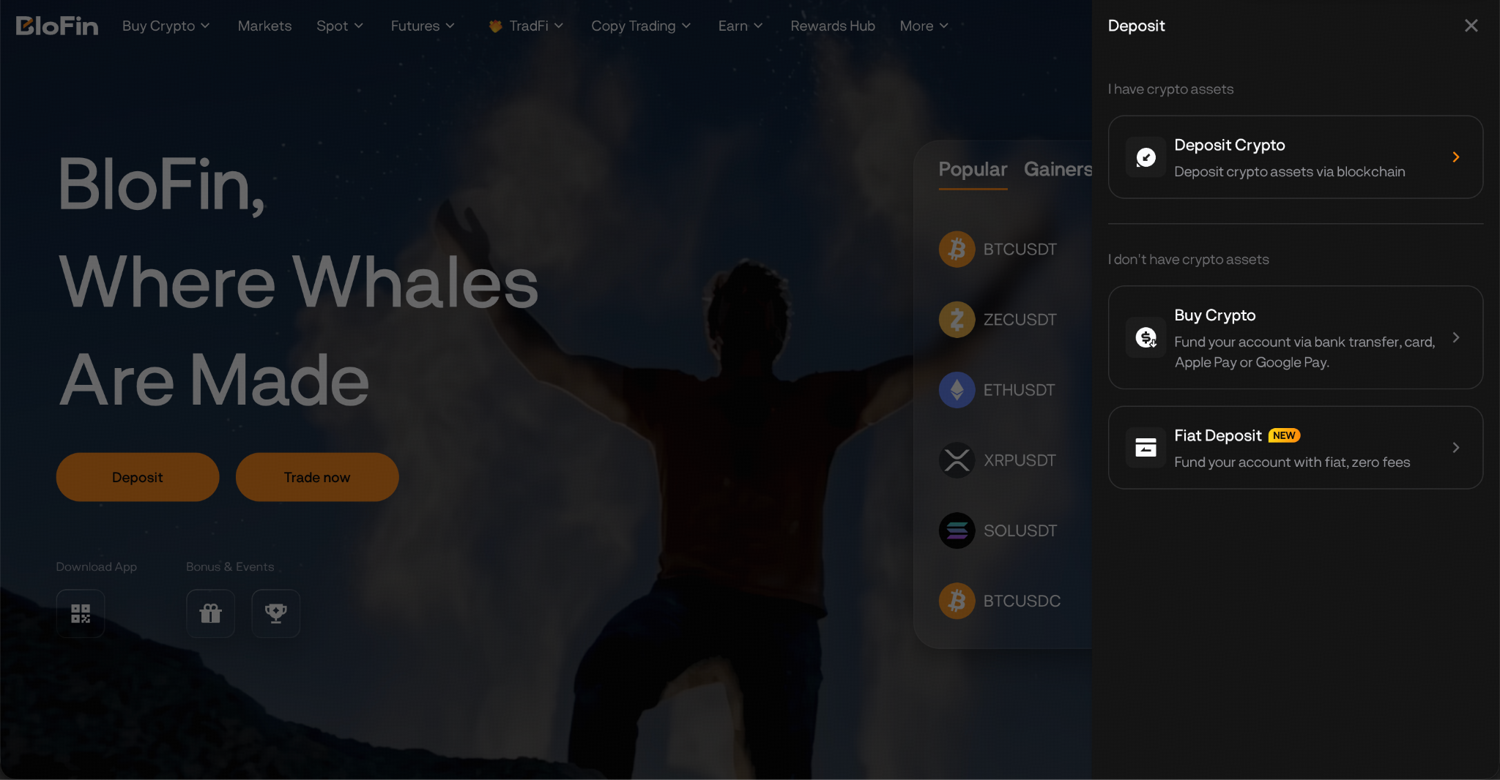
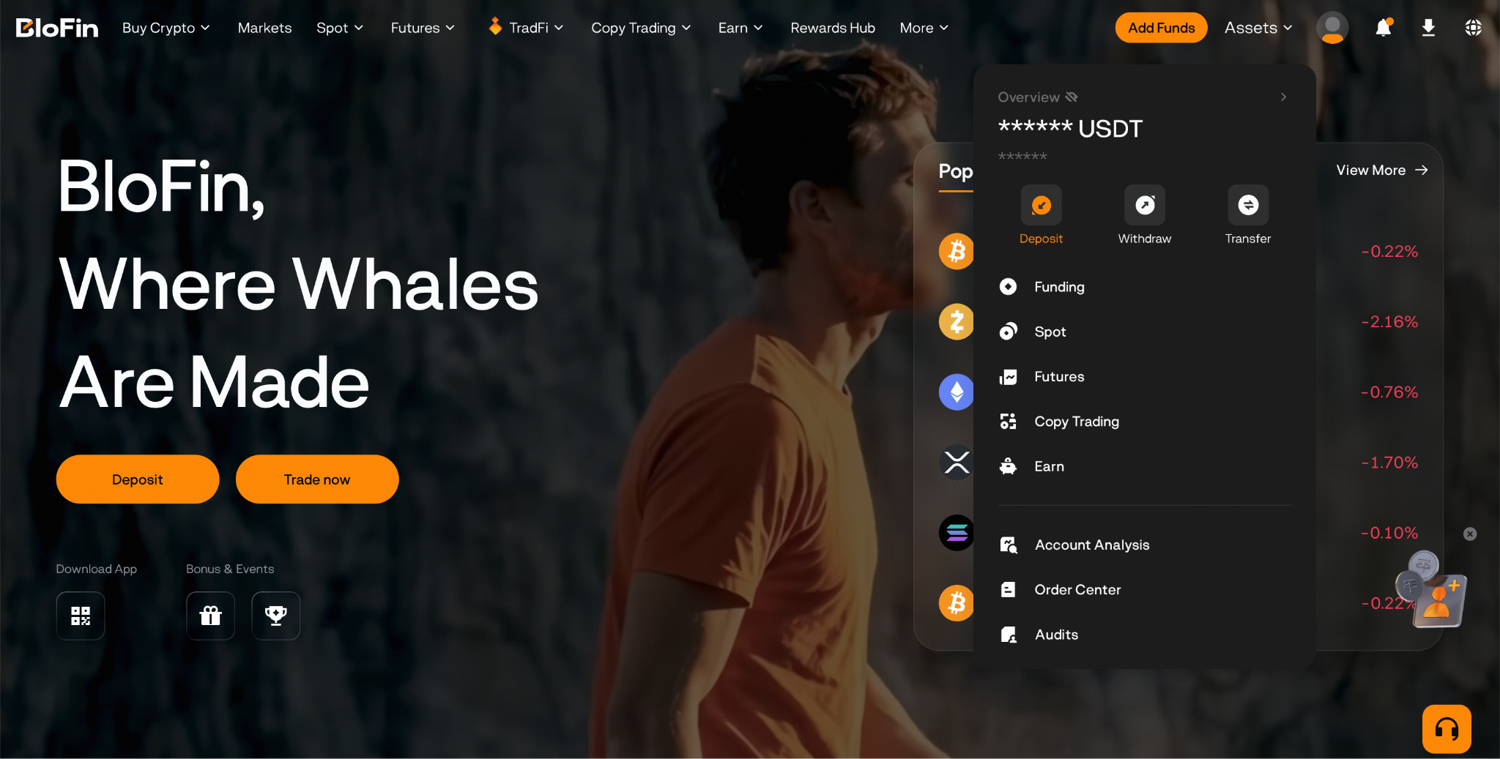
Alternatively, hover your cursor over the Assets button in the top right corner of the navigation bar, then select Deposit.
Step 2: Search for and select the asset you want to deposit.
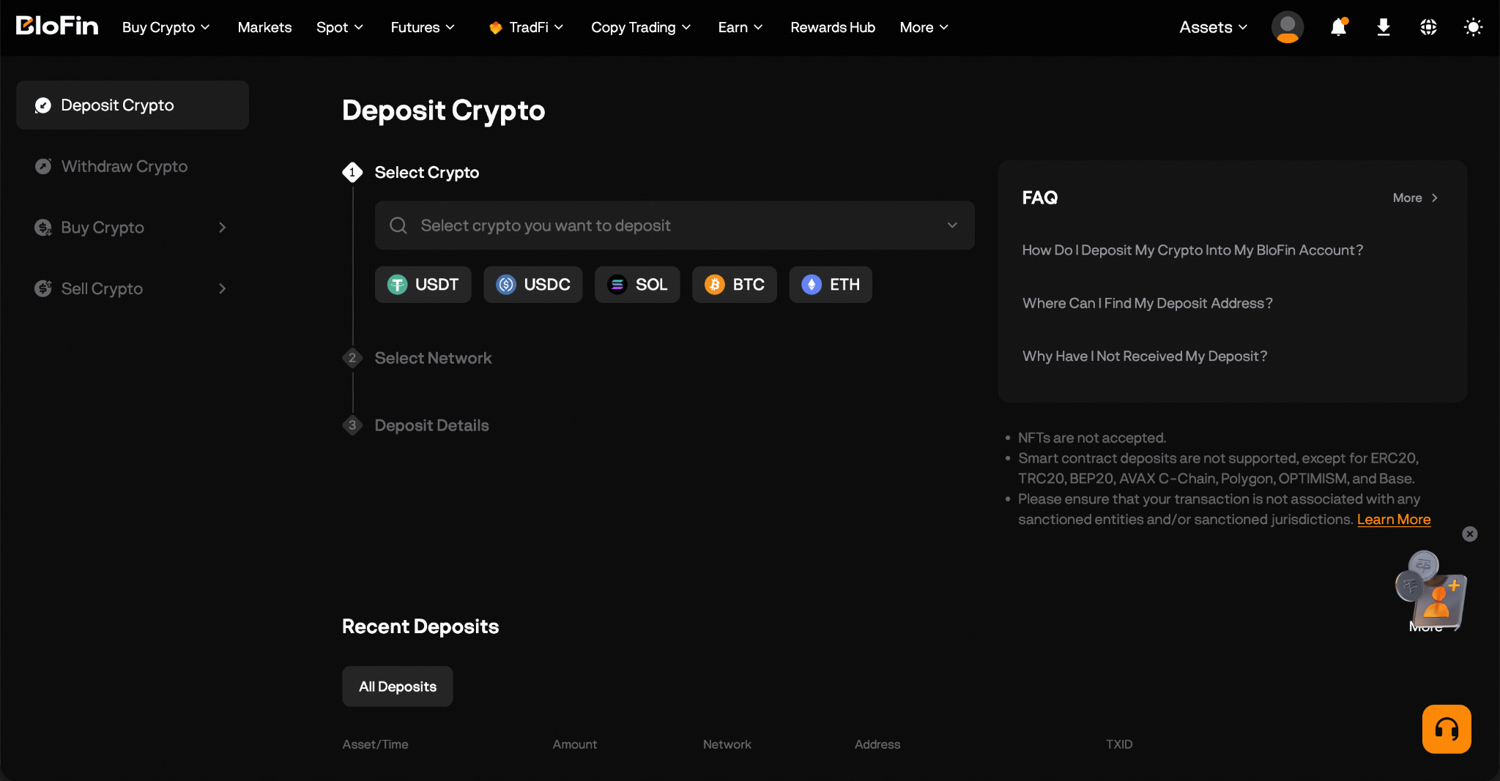
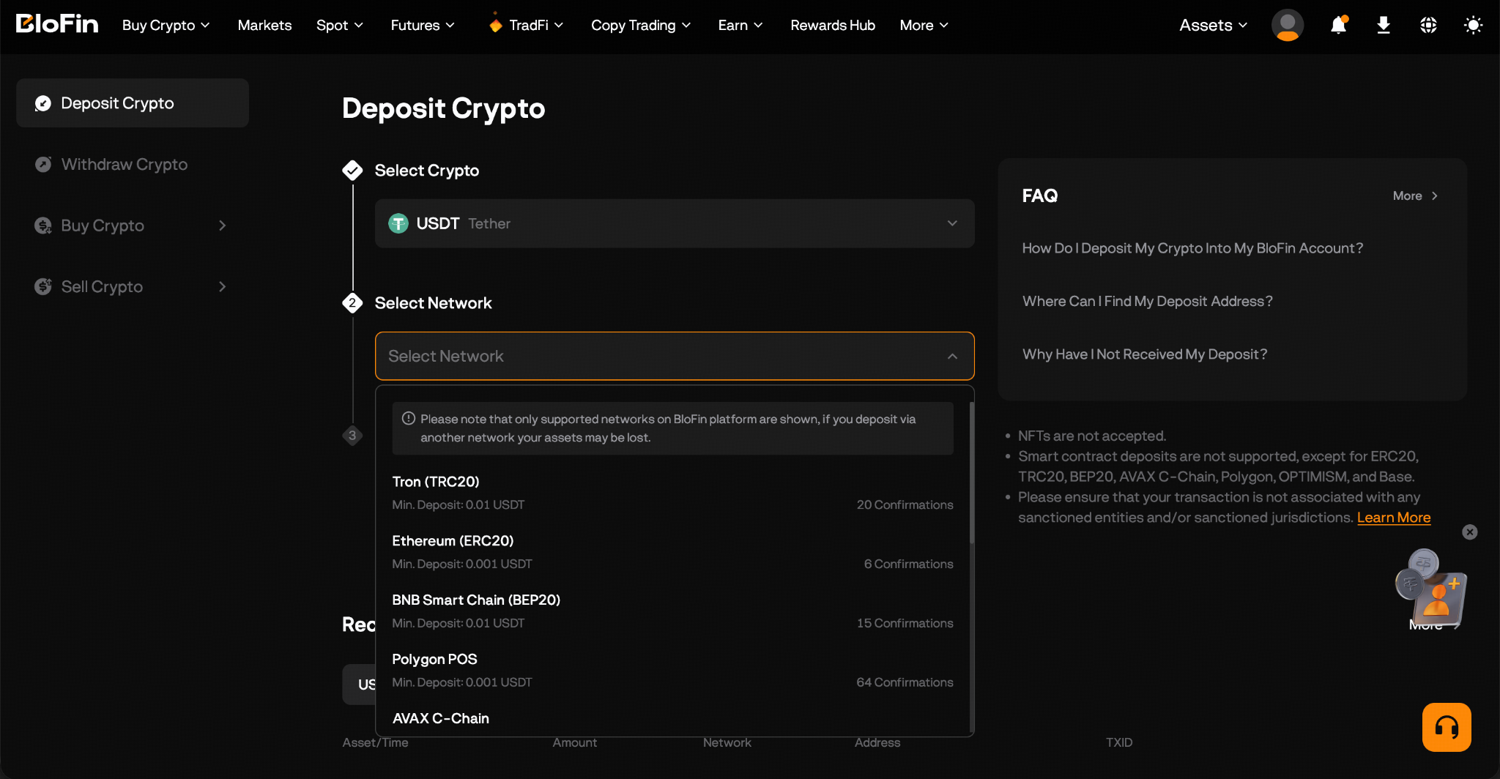
Step 3: Select your deposit network.
Step 4: Copy the deposit address shown or scan the QR code.
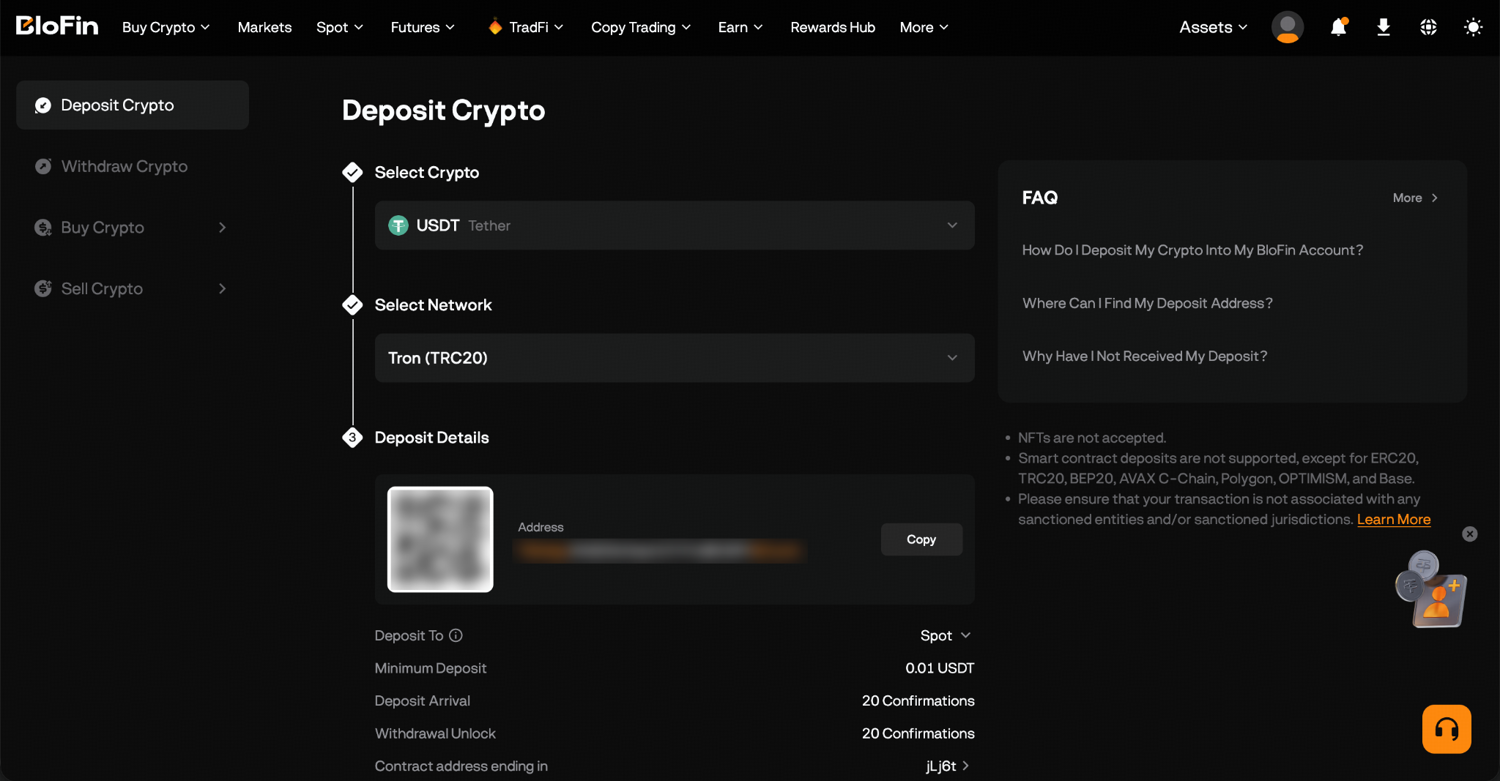
Step 5: Go to the wallet or exchange that you're sending from, paste the copied deposit address, select the same network, then confirm the transfer.
Step 6: Once the required blockchain confirmations are complete, your funds will appear in your BloFin Funding Account.
BloFin sends you a confirmation by email and in its notification center when the deposit is credited. You can check past deposits under the history on the deposit page.
How to deposit on the BloFin app
In the BloFin app, tap Add Funds and then Deposit Crypto, or go to Wallet and tap Deposit. Choose the coin and network, then copy the address or scan the QR code from your sending wallet. Your deposit history sits behind the history icon on the deposit page, or under Wallet and then History.
How to choose the right deposit network
The deposit network is the blockchain that carries your coins, and it must match on BloFin and on the sending platform. Many coins run on several blockchains, so picking the coin isn't enough. USDT, for example, can arrive on BloFin over Tron (TRC20), Ethereum (ERC20) or BNB Smart Chain (BEP20), and each one is a separate version of the token.
If you choose ERC20 on BloFin but send over BNB Smart Chain (BEP20), which uses the same address format, the sending platform accepts the address but the coins travel on a different blockchain from the one BloFin expects, and they won't be credited to your account. Recovery isn't guaranteed. The safe habit is to read the network name on both screens before you press send, every time, even for a transfer you've made before.
Check that the sending platform supports the network too. If your other exchange only offers ERC20 withdrawals for a coin, choose ERC20 on BloFin as well, even if another network would be cheaper. Send only the coins and networks that BloFin's deposit page lists, because a coin sent on a network BloFin doesn't support can be lost for good.
TRC20 vs ERC20: Which network should you use for USDT?
TRC20 is usually the faster and cheaper network for sending USDT to BloFin, and ERC20 is the right choice when the platform you send from only supports Ethereum. A TRC20 deposit usually confirms in 1 to 5 minutes, while an ERC20 deposit takes 10 to 30 minutes and can take longer when Ethereum is busy.
The cost difference comes from how each blockchain charges. An ERC20 transfer pays a gas fee in ether, and when demand is high, users have to offer bigger tips to get their transactions into the next block (source: ethereum.org, Gas and fees). Ethereum also charges that fee whether or not the transaction succeeds (source: ethereum.org, Gas and fees). Tron charges in network resources called bandwidth and energy, which you get by staking its coin, TRX, or cover by burning TRX instead (source: TRON Developer Hub, Resource Model).
Whichever network you choose, the coins on BloFin are the same USDT once they arrive. The network only decides the route and the fee you pay on the way in.
When a crypto deposit needs a memo or tag
Some coins need a memo or tag as well as the deposit address, including XRP, XLM (Stellar) and TON. The tag tells BloFin which account the coins belong to. If you leave it out or type it wrong, the deposit isn't credited automatically, even though the coins reached BloFin's address.
On these blockchains, an exchange often uses one shared address for many customers, and the tag does the sorting. The XRP Ledger's own documentation describes a destination tag as the way a payment to an exchange tells it "which customer to credit" (source: XRP Ledger, Source and Destination Tags). When BloFin shows a memo or tag next to the address, copy both into the sending platform, in the separate fields it provides.
How to check a token's contract address
A token on Ethereum or BNB Smart Chain is defined by its contract address, the on-chain identity of that token. Two tokens can share a ticker such as USDT and still be different tokens with different contracts. Before you send, check that the contract on the sending platform matches the one the token's issuer or BloFin's deposit page shows.
Wrapped coins are the other trap. Wrapped ether (WETH) is a separate token made by a smart contract that holds ETH and gives you the same amount of an ERC-20 token in return (source: ethereum.org, What is Wrapped Ether). WETH and ETH are different assets, as are WBTC and BTC, so deposit exactly the asset BloFin's deposit page names.
How long does a BloFin deposit take?
A BloFin deposit takes as long as the network needs to confirm it: usually 1 to 5 minutes on TRC20, 10 to 30 minutes on ERC20, and anywhere from 10 minutes to over an hour on Bitcoin. Each network needs a set number of confirmations before BloFin credits the coins, and that wait depends on fees and traffic.
Bitcoin shows why. New blocks arrive about every 10 minutes on average, and a transaction becomes harder to reverse with each confirmation it collects (source: Bitcoin.org, Some things you need to know). A deposit that needs several confirmations can take an hour, and a low fee can make it longer.
While you wait, you can follow the transfer's confirmations with its transaction ID, or TXID, which the sending platform shows in its withdrawal history. The guide to checking a transaction on a block explorer shows how.
How to avoid address poisoning when you deposit
Check the whole deposit address after you paste it, never only the first few characters, and copy it fresh from BloFin each time instead of from your transaction history. Scammers create look-alike addresses and send tiny amounts to your wallet so the fake address shows up in your history, ready to be copied by mistake.
This trick is called address poisoning. In one case Chainalysis studied, a victim sent about $68 million in wrapped bitcoin, later returned, to a scammer's address that matched the real one in its first six characters (source: Chainalysis, Anatomy of an Address Poisoning Scam). Malware can do something similar by swapping an address on your clipboard, as the address poisoning guide explains.
A small test transfer is the cheapest protection. In the same campaign, Chainalysis found that 756 addresses sent between $1 and $100 to fake addresses, likely as test payments, and because those tests never reached the intended address, they prevented larger losses (source: Chainalysis, Anatomy of an Address Poisoning Scam). Say you're moving 2,000 USDT to BloFin for the first time: send 20 USDT, as long as that meets BloFin's minimum, wait for it to arrive, then send the remaining 1,980 USDT.
Scan QR codes only from your own BloFin deposit page, and keep two-factor authentication switched on. The BloFin account security guide covers the settings that protect the account receiving your coins.
Where your deposit goes on BloFin
Every deposit lands in your Funding Account, which is where BloFin handles money coming in and going out. Before you trade, move the coins to the account for the market you want: the Spot Account for spot trading, or a futures account such as USDT-M for USDT-margined futures. Transfers between your own BloFin accounts are free.
To move funds on the website, go to Assets, open Overview and click Transfer. Choose the account to move from and the account to move to, pick the coin, enter the amount and click Confirm. In the app, tap Wallet and then Transfer. If your trading balance shows zero right after a deposit, the coins are usually still sitting in the Funding Account.
If you've upgraded to the Unified Trading Account, one balance covers both spot and futures, so you skip the transfer between them before each trade. Deposits still arrive in the Funding Account first. From there, a first trade on the BTCUSDT Perpetual, a futures contract that tracks the price of bitcoin, is a common place to start.
Before you place it, check the maker and taker rates on BloFin's fee schedule, since each trade you open and close is charged.
How to track down a delayed BloFin deposit
If your deposit hasn't arrived, start with the transaction ID. Look it up on the blockchain's explorer to confirm the transfer went through and how many confirmations it has. A transfer still collecting confirmations needs more time, while a confirmed transfer that hasn't been credited usually points to a network, tag or address problem.
Work through the likely causes in order:
Network: check that the network you sent on matches the one you chose on BloFin.
Memo or tag: for coins such as XRP, XLM and TON, check that you entered the tag BloFin showed.
Asset: check that you sent the exact token BloFin lists, not a wrapped or look-alike version.
Address: check that you used the address from your own BloFin account.
If everything checks out and the deposit still hasn't appeared after the normal confirmation time, contact BloFin support. Have the TXID, the coin and network, the amount, the time you sent it, and a screenshot of the withdrawal on the sending platform ready, because support asks for each of them.
How to start trading after your deposit
Once your coins are in the right account, you can buy and sell on the spot market, where you own the coins outright, or open a futures position, which lets you trade a price move with leverage. If you've never traded before, the first-trade guide covers opening a position on BloFin.
Looking to trade crypto on BloFin? To get started, you'll need to first create a BloFin account, fund your account with cryptocurrency, and go to the BTCUSDT Perpetual page.

Frequently asked questions
What happens if you deposit less than the minimum on BloFin?
A deposit below the minimum for that coin and network isn't credited to your account, and such small amounts generally can't be recovered. The minimum is shown on the deposit page for each coin and network, so check it each time, including before a test transfer.
Is there a fee to deposit crypto on BloFin?
BloFin doesn't charge a fee to deposit crypto. The only cost is the withdrawal or network fee charged by the platform you send from, and none of it goes to BloFin. Because that fee is taken on the sending side, check how much the other platform deducts before you choose a network.
Can you deposit while a network is under maintenance?
A deposit sent while BloFin has paused deposits for that coin or network may not be credited straight away. If the blockchain shows the transfer as successful, keep the TXID and wait for the deposit service to resume, when eligible deposits are processed.
Can you reuse an old BloFin deposit address?
BloFin asks you not to send to an old deposit address you saved, or to an address from another platform. Open the deposit page and copy the address it shows for that coin and network before every transfer, so the coins go to the address your account displays at the time you send.
Do you need to move funds back to the Funding Account to withdraw?
You don't need to move funds back to the Funding Account before you withdraw. On the withdrawal screen, you can choose to withdraw from supported accounts such as Funding, Spot or Earn flexible balances directly from the account selection list.
Written by the BloFin Academy editorial team. Nothing in this article constitutes financial advice. Blockchain transfers can't be reversed, so a deposit sent on the wrong network, without a required tag or to the wrong address may be lost. Once your account is funded, crypto prices can fall quickly, and leveraged futures can lose your whole margin. BloFin services are not available in restricted locations. Do your own research and consider your risk tolerance before you trade on BloFin.