
On November 10, 2026, bitcoin fell under $74,000 when the October consumer price index came in up 0.4%, ahead of the 0.3% economists had forecast (source: The Block, November 10, 2026).
By November 16, BTC/USDT on BloFin's spot market was trading about 12% below the $73,363 The Block reported on November 10. A falling market is when the classic first-trade slips cost the most: a market order that fills worse than the price on screen, leverage set far too high, or a futures position left open overnight with no stop-loss.
Each of those comes down to a setting on BloFin's order panel, from the order type and the leverage slider to the stop-loss box, and you choose every one of them before you submit.
What does placing a trade on BloFin mean?
Placing a trade on BloFin means sending an order to buy or sell a crypto pair on BloFin's order book. On the spot market, you buy the coin itself and own it. On the futures market, you open a long or short position on its price with margin and optional leverage, and the order fills against other traders' orders.
Every order you send has the same parts: the pair, the direction (buy or sell), the order type, the amount and, for a limit order, the price you're willing to pay. The order type decides how the order fills. A market order trades at once against the best prices on offer, and a limit order sits in the book until the market comes to your price.
Should your first trade be spot or futures?
Your first trade should usually be a spot trade, because spot is the simpler of the two markets on BloFin. You buy the coin with USDT and hold it, with no leverage, no funding payments and no liquidation, so the most you can lose is the amount you spent if the price falls to zero.
Futures let you go long or short with leverage, which means a small amount of margin controls a larger position. That raises the gain on a move in your favor and the loss on a move against you by the same multiple, and BloFin can liquidate the position if the market runs far enough against it. The comparison of BloFin spot and futures trading goes through the differences in detail, and a few spot orders first let the order panel feel familiar before margin enters the picture.
What you need before your first trade on BloFin
Before your first trade on BloFin, you need a funded account and your coins sitting in the account the market draws from: the Spot Account for spot trades, or the futures account for futures trades. Decide how much to put into the trade before you open the order panel, too.
Funds in your account. If you haven't added crypto yet, the BloFin deposit guide shows how to send coins in on the right network. USDT, Tether's US-dollar stablecoin, is the usual starting point, since BTC/USDT and the BTCUSDT Perpetual are both priced in it.
Funds in the right account. Deposits arrive in your Funding Account. To trade, open Assets, then Transfer, and send your USDT across to the Spot Account or the futures account. Transfers between your own accounts are free and arrive straight away. If you've upgraded to the BloFin Unified Trading Account, one balance covers spot and futures, so you never move funds between the two markets, though deposits still arrive in your Funding Account first.
A size you're comfortable losing. Pick an amount small enough that a mistake teaches you something without hurting. Each pair has a minimum order size, and on the BTCUSDT Perpetual it is small enough that a first futures trade can use very little margin.
How to read the BloFin trading page
The BloFin trading page puts everything for one pair on a single screen. The pair and price sit at the top, the chart and order book fill the middle, the order panel is on the right, and your orders run along the bottom. Knowing where each one sits before you trade saves you from clicking the wrong button under pressure.
Pair selector. Moving your cursor onto the pair name, such as BTC/USDT, opens a search box for other pairs. On the futures page, the header also carries the index price and mark price, plus the funding rate and a timer counting down to the next payment.
Chart. Quick buttons switch between timeframes such as 15 minutes, 1 hour, 4 hours and 1 day, plus a fuller TradingView view. The 1-hour and 4-hour charts give useful context for a first trade without the noise of the shortest timeframes.
Order book. The order book lists buy orders (bids) and sell orders (asks) waiting at each price. The spread is how far apart the top bid and the cheapest ask sit. When the book is thin, a market order can eat through several price levels and fill worse than the last price, which is called slippage.
Order panel. This is where you choose Buy or Sell, the order type, the price and the amount. The BBO button fills the price field with the best bid or ask. GTC (good till canceled) keeps a limit order live until it fills or you cancel it yourself.
Orders and positions. The tabs along the bottom show your Open Orders and Order History, plus Positions on the futures page.
How to place a spot trade on BloFin
To place a spot trade on BloFin, open the spot page, pick your pair, choose an order type, select Buy, enter your price and amount, and submit. A market order trades immediately, and a limit order rests on the book until the price comes to you. Make sure your USDT is in your Spot Account first.
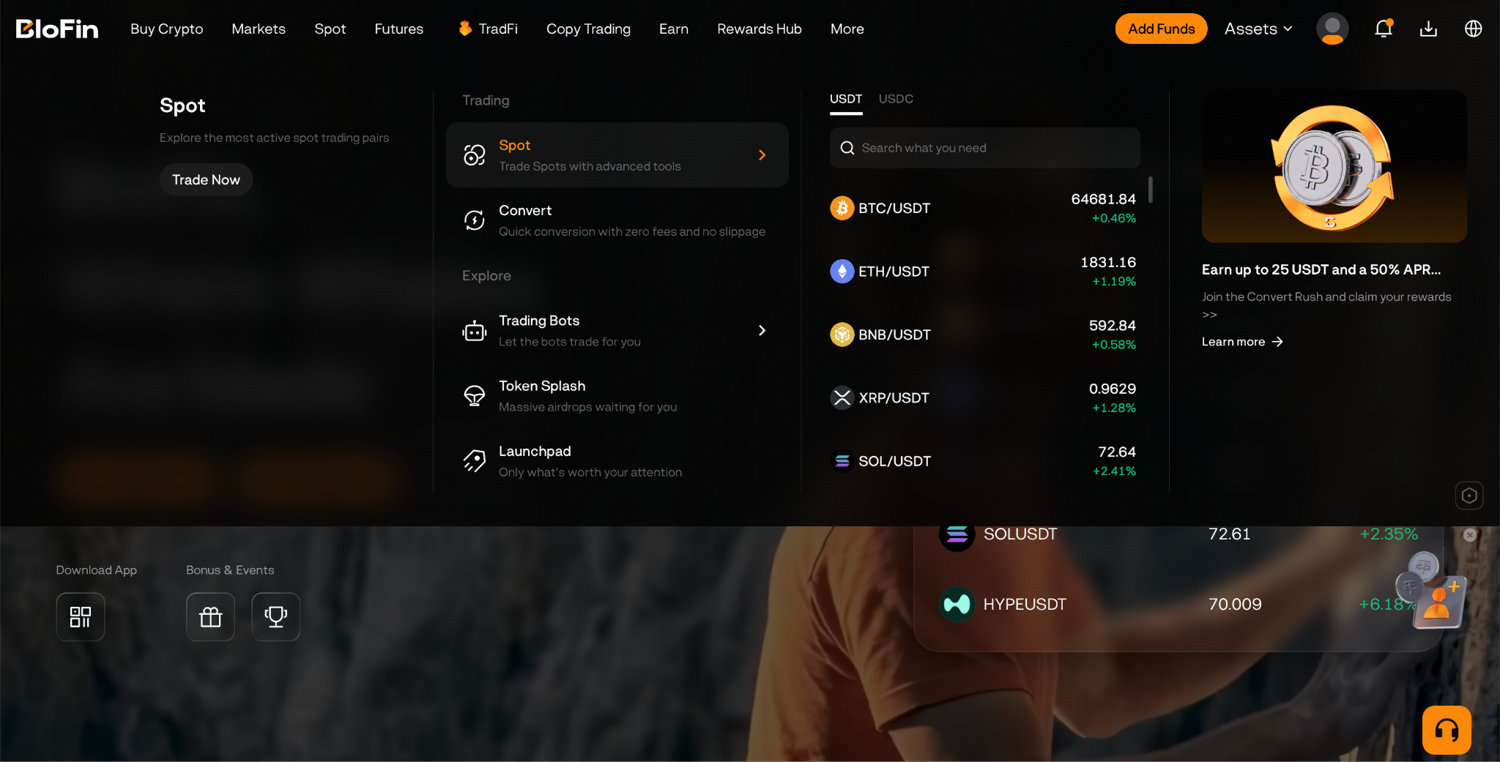
Step 1: Log in to your BloFin account, hover your cursor over the Spot tab in the top menu bar, and click Spot in the list that opens.
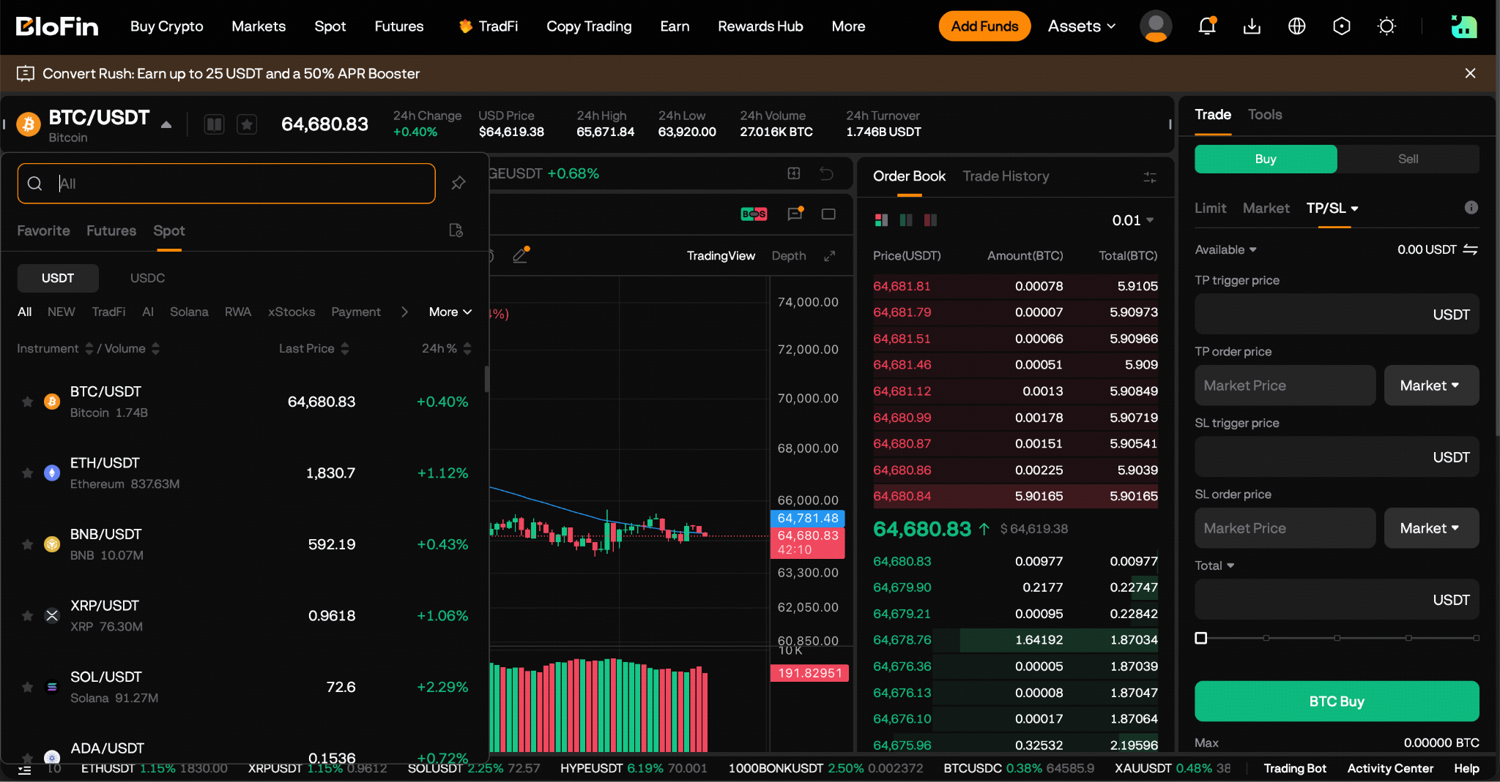
Step 2: Click on the BTC/USDT pair and use the search bar or the asset list to find the trading pair you want. For example, ETH/USDT for Ether priced in USDT.
Step 3: In the order panel on the right, select your order type: Limit, Market or Trigger.
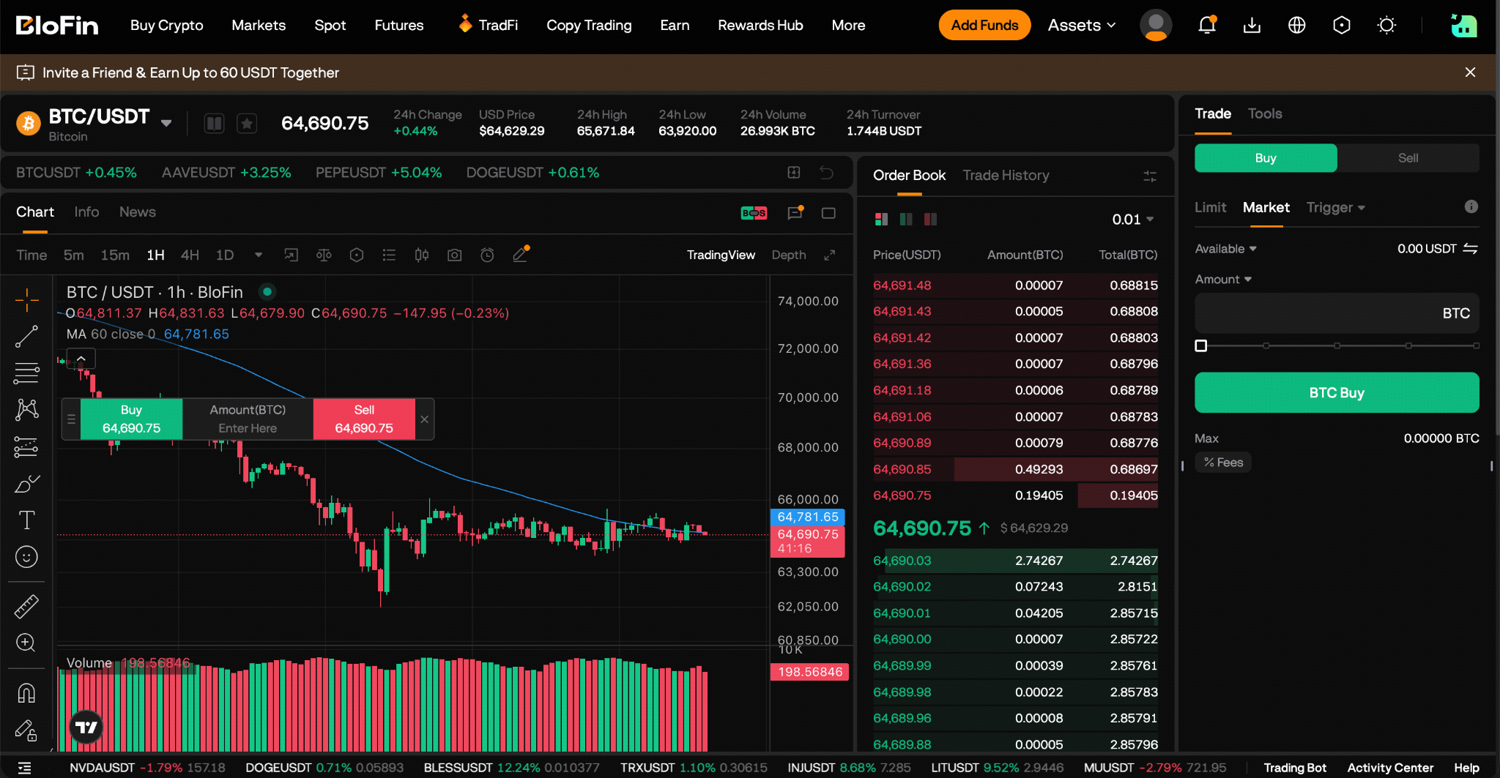
Step 4: Select Buy.
Step 5: Enter your order details. For a limit order, set the Price you want to trade at and the Amount. For a market order, just enter the Amount and it'll fill at the best available price.
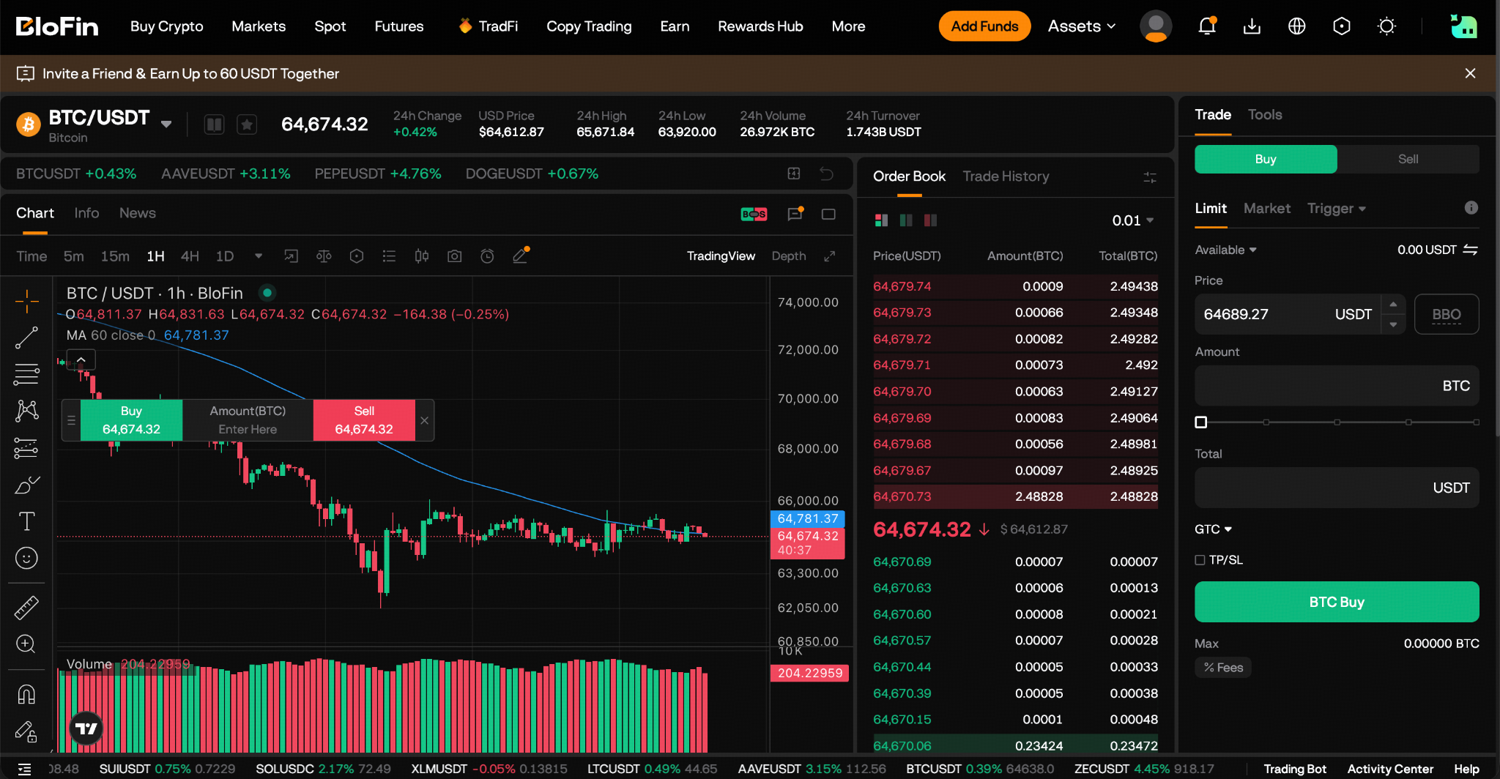
Step 6: Click Buy to submit. Your order will either execute immediately (market order) or sit on the book until the market reaches your price (limit order).
Here's what a small first order looks like with round numbers. Say you place a limit buy for 200 USDT of bitcoin at 50,000 USDT. When it fills, you get 0.004 BTC, and BloFin's 0.1% spot fee is taken from the coin you receive, so 0.000004 BTC goes to the fee and 0.003996 BTC lands in your Spot Account. The coin you buy is the coin that pays the fee, which is why a spot balance often ends up a few decimals short of the round number you expected.
Which order type should you use for your first trade?
For your first trade, a limit order on a busy pair such as BTC/USDT is usually the safer choice, because your fill can't come in worse than your own limit. A market order is faster and fills almost every time, but you accept whatever price the order book offers at that moment, which can move in a fast market.
The US Securities and Exchange Commission puts the trade-off plainly. A market order guarantees that the order will be executed but doesn't guarantee the price, while a limit order trades only at a specific price or better (source: Investor.gov, Types of Orders). Those definitions come from the stock market, and market, limit and stop orders work the same way on a crypto order book.
Limit. You set the price, and the order waits in the book. On a spot pair, a limit buy set a little under the current price fills only if the market dips to it. Under GTC, the order stays open until you cancel it. The Financial Industry Regulatory Authority (FINRA), the self-regulatory organization that oversees US brokerage firms, describes limit orders as the tool for moments when getting the right price matters more than getting filled quickly (source: FINRA, Order Types).
Market. You set only the amount, and the order fills straight away against the best prices in the book. It suits a liquid pair when getting in now matters more than the exact price, and Investor.gov's glossary names the catch: what you pay may differ from what you expected (source: Investor.gov, Market Order).
Trigger. You set a trigger price, and nothing happens until the market reaches it. Then BloFin sends a market or limit order for you. That lets you buy a breakout or a dip while you're away from the screen.
TP/SL box. On a spot limit buy, ticking TP/SL attaches a take-profit and a stop-loss to the order, so your exit is planned at the moment you enter.
Fees work differently on the two markets. On spot, BloFin charges makers and takers the same rate, so a limit order buys you price control, with no fee saving. On futures, a limit order left resting on the book is charged the lower maker rate.
How margin mode and leverage work on a futures trade
On a BloFin futures trade, margin mode decides how much of your balance backs the position, and leverage decides how large the position is compared with that margin. Under isolated margin, a liquidation costs only the margin you put behind that one trade. With cross margin, the position can pull on everything in your futures balance.
Isolated margin. The collateral for the position is only the margin you put into it, so its liquidation price is fixed by that margin. If the position is liquidated, the rest of your futures balance is untouched. That makes isolated margin the easier mode to reason about on a first trade.
Cross margin. Every dollar in your futures balance stands behind the position, so it takes a bigger move to liquidate it, but a bad trade can eat into funds you meant for something else.
Leverage. BloFin offers up to 150x on major pairs such as BTCUSDT, and you pick the setting yourself on the order panel before each order. Leverage multiplies everything: in the words of the US Commodity Futures Trading Commission (CFTC), leverage amplifies the underlying risk, making a change in the cash price even more significant (source: CFTC, Understand the Risks of Virtual Currency Trading).
Here's how that plays out with illustrative numbers. Put 100 USDT of margin into an isolated BTCUSDT position at 5x, and you control a position worth 500 USDT. If bitcoin falls 2%, the position loses 10 USDT, which is 10% of your margin. A 20% fall would wipe out the whole 100 USDT, and BloFin liquidates the position before it gets that far, because some margin has to stay in the position to keep it open. Switch the same trade to Cross, and your other futures funds join the 100 USDT as collateral, which pushes the liquidation price further out but puts more than 100 USDT on the line. At 20x, the same 100 USDT controls 2,000 USDT, and a 5% fall does the same damage. The leverage and liquidation guide shows how the liquidation price is worked out, and the Liq. Price figure on the order panel shows it for your order before you submit.
How to place a futures trade on BloFin
To place a futures trade on BloFin, open the USDT-M page, pick the pair, set your margin mode and leverage, and choose an order type. Then open a long to profit from a rise or a short to profit from a drop. Enter your price and size, submit and confirm. Your USDT needs to be in your futures account first.
Step 1: Log in to your BloFin account, hover your cursor over the Futures tab in the top menu bar, and pick your contract type (USDT-M is the most common).
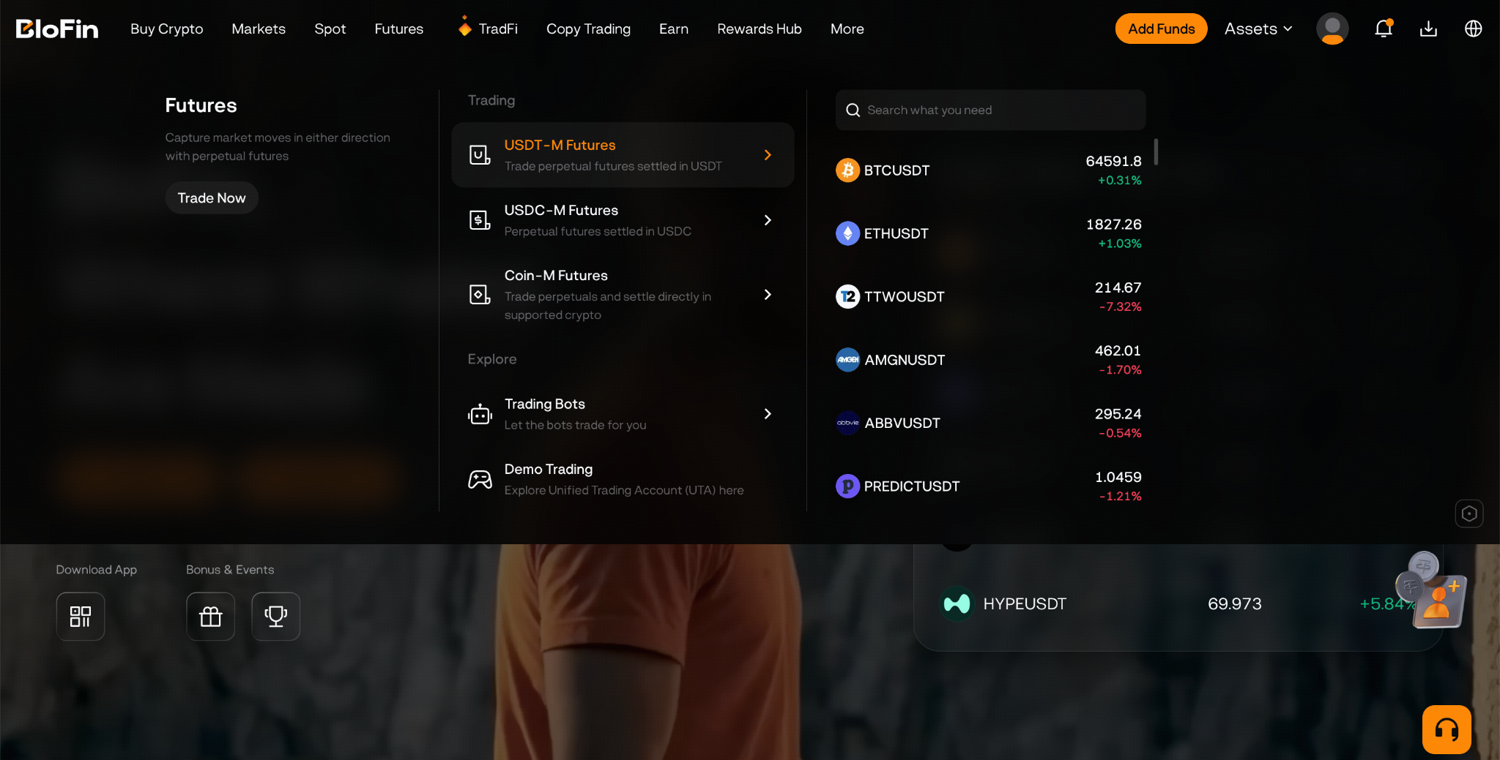
Step 2: Click the BTCUSDT pair and use the search bar or the asset list to find the trading pair you want. For example, ETHUSDT for Ether priced in USDT.
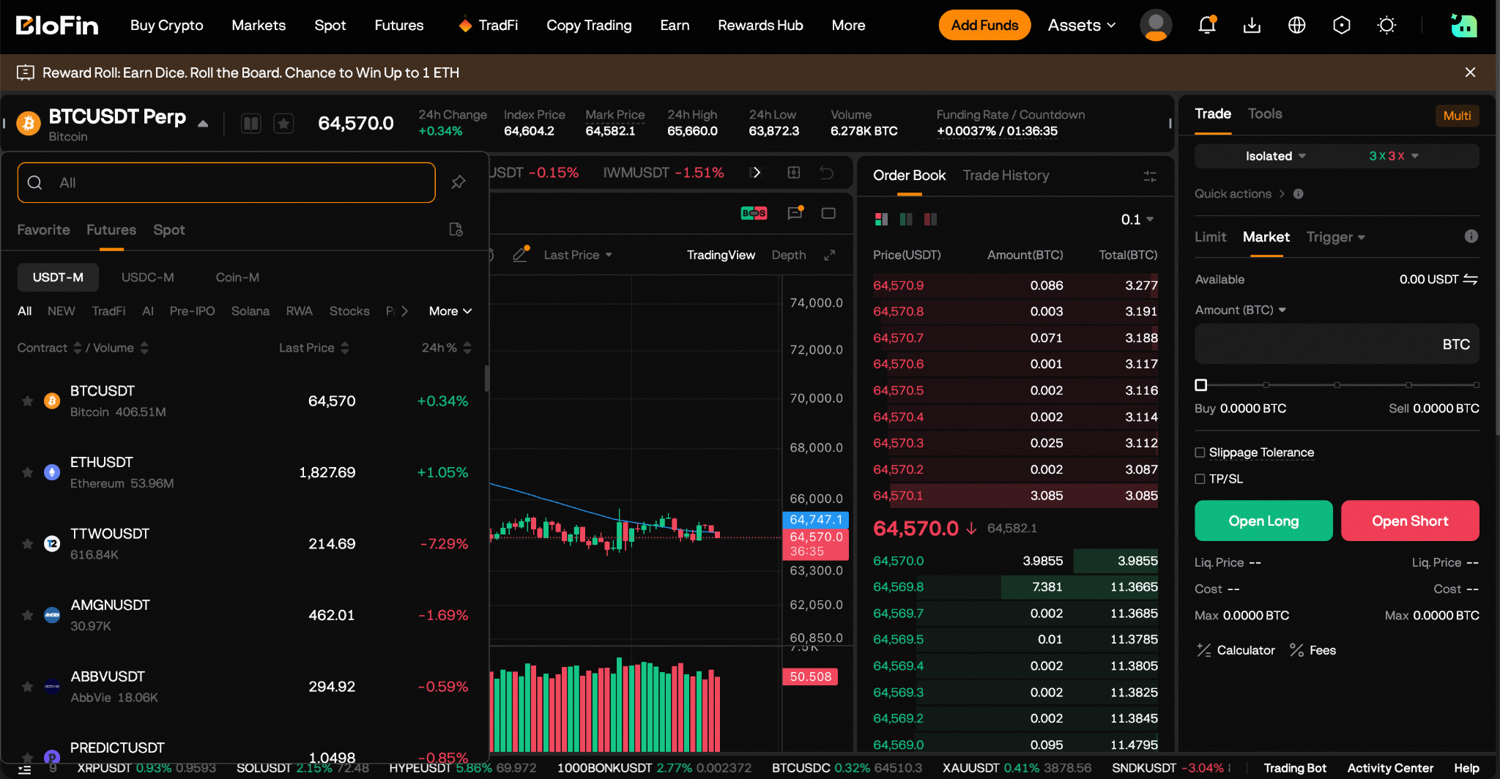
Step 3: Choose your margin mode: Cross or Isolated. This can be changed before you open a position.
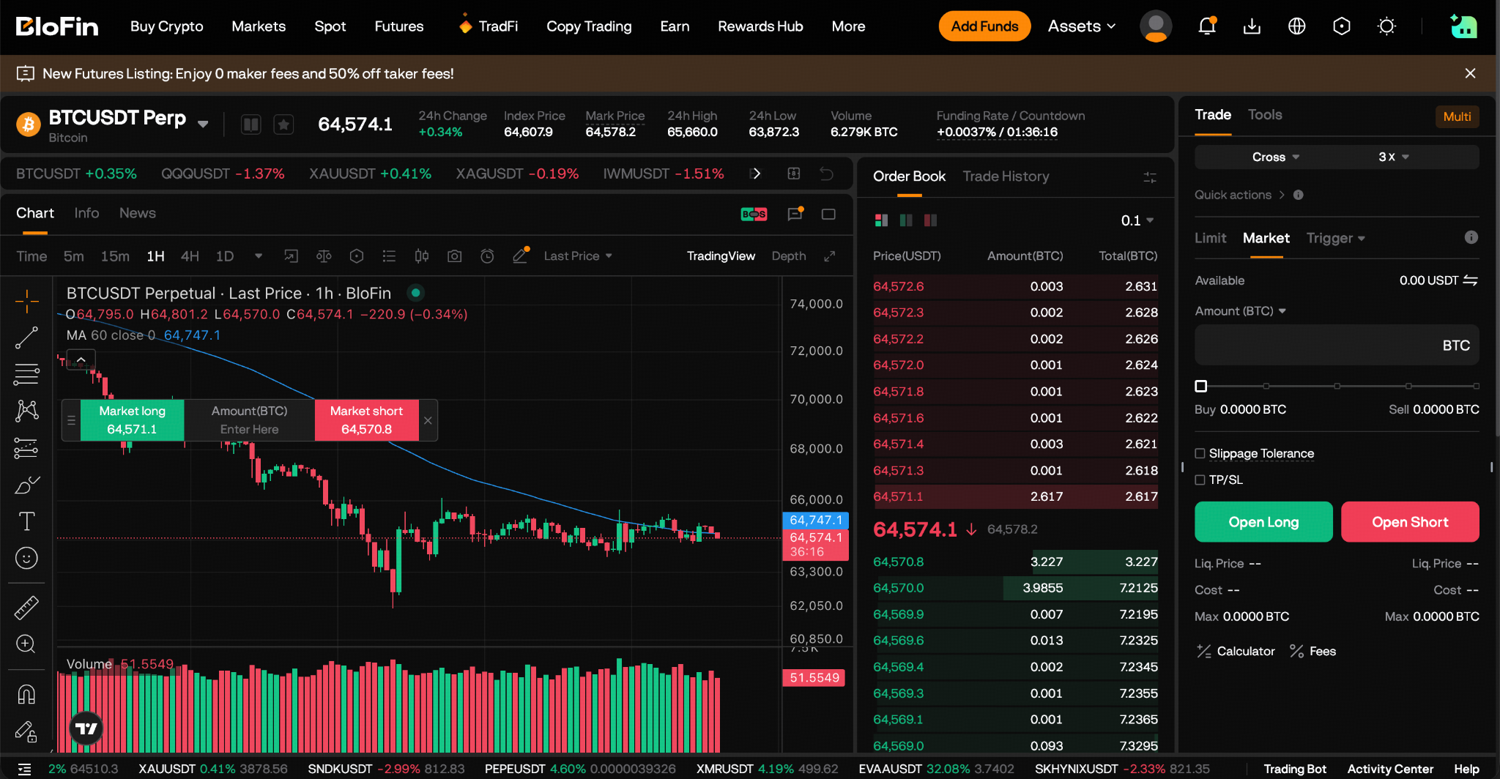
Step 4: Set your leverage using the leverage slider or by typing the multiplier directly.
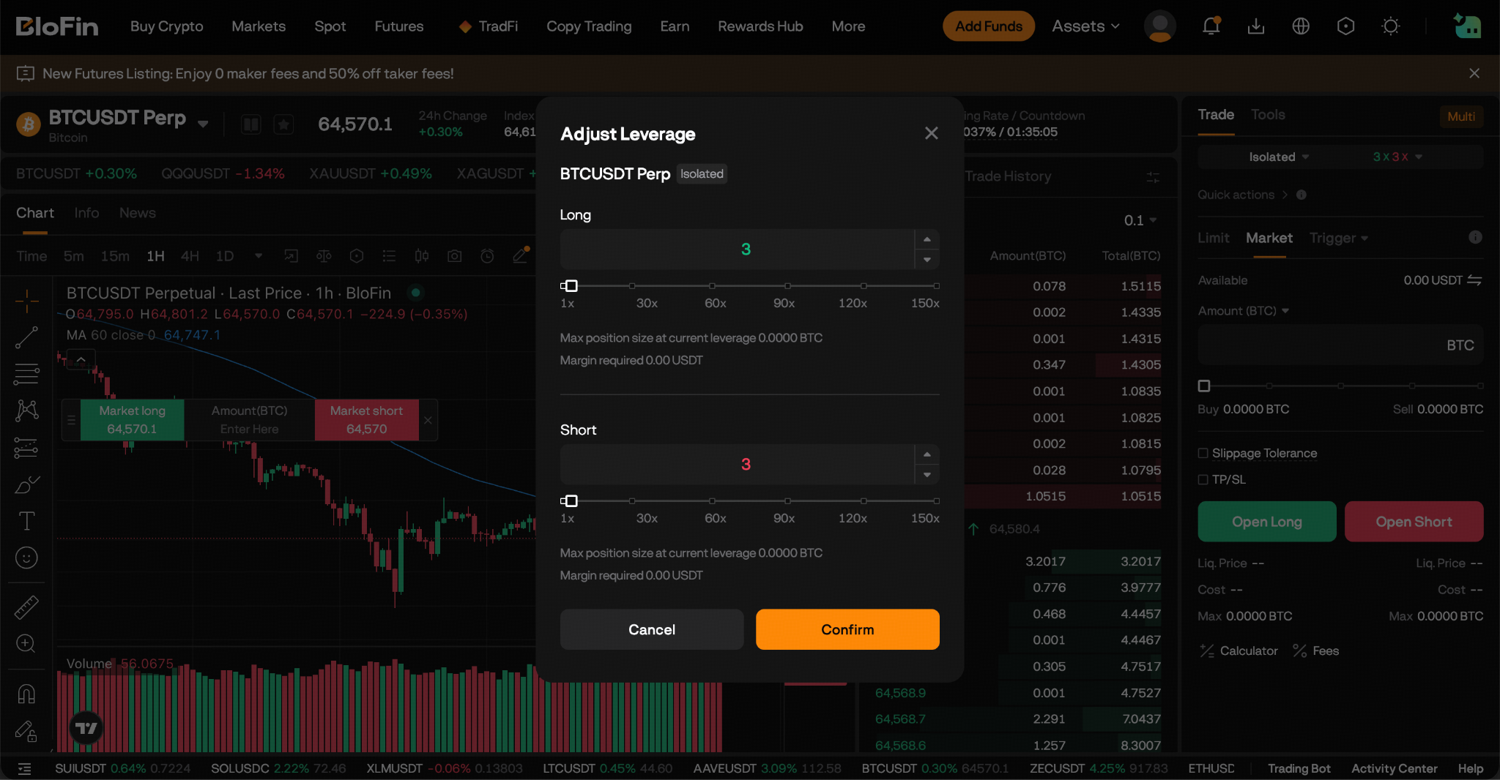
Step 5: Choose your order type: Limit or Market (or Trigger for a conditional entry).
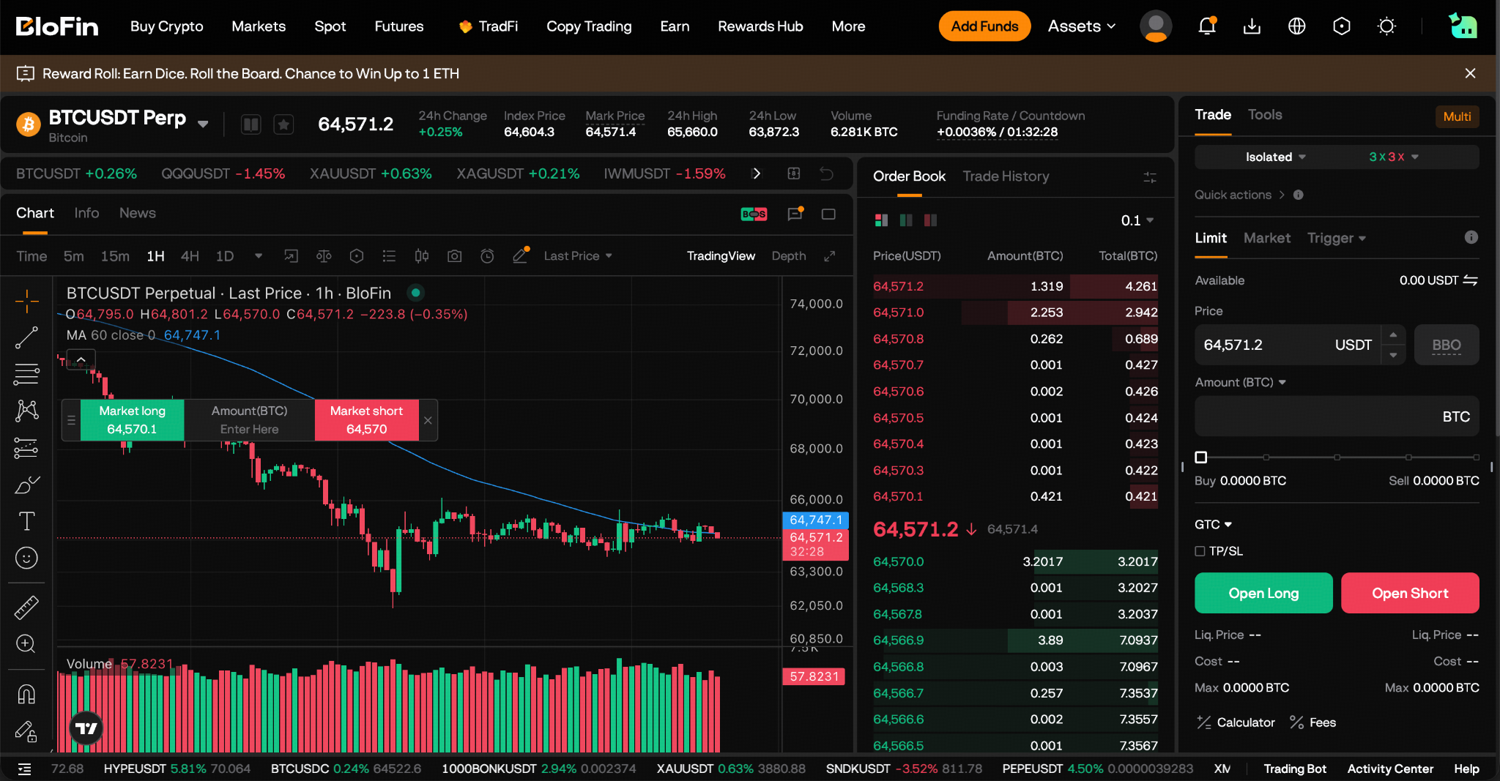
Step 6: Select Buy/Long to open a long position when you expect prices to rise, or Sell/Short to open a short position when you expect prices to fall.
Step 7: Enter the Price (for limit orders) and the size of your position in Amount.
Step 8: Click Buy/Long or Sell/Short to submit. Review the confirmation and confirm.
Before you click in Step 8, check two figures under the order form: the Cost in USDT, which is the margin the order will use, and the Liq. Price, which is where the position would be liquidated. If the liquidation price sits closer to the current price than you'd like, lower the leverage or the size before you submit.
How to set a stop-loss on your first trade
To set a stop-loss on your first BloFin trade, tick TP/SL on the order panel as you place the order, or open the Positions tab afterward and add a take-profit and stop-loss to the open position. A stop-loss closes the trade automatically if the price moves against you to the level you chose.
On futures, BloFin offers two kinds. An Entire Position TP/SL closes the whole position, and a position can carry only one at a time; when it carries a take-profit and a stop-loss together, whichever triggers first cancels its partner. A Partial Position TP/SL closes only the amount you enter, and you can place several at different prices to take profit in stages.
Each trigger price also has a dropdown for the price BloFin watches, the last traded price or the mark price. Choosing mark price ties the stop to the figure BloFin uses for liquidation, which makes a one-second spike in a thin book less likely to trip it. Keep the Investor.gov definition in mind as well: once the stop price is hit, the stop turns into a market order (source: Investor.gov, Types of Orders), so in a fast fall the exit can fill below your stop. FINRA makes the same point: in a fast market, the price you actually get could be markedly different from the stop price you set (source: FINRA, Stop Orders: Factors to Consider During Volatile Markets).
What does a first trade cost on BloFin?
A first trade on BloFin costs a trading fee on each fill. Spot pays 0.1% whichever order type you use, while futures charge 0.02% on a maker order resting on the book or 0.06% on a taker order that trades immediately. A futures position held through a funding time also pays or receives a funding fee.
On the 500 USDT position from the leverage example, a market order to open costs 0.30 USDT (500 × 0.06%), and closing it with another market order costs about the same again. Opening with a resting limit order costs 0.10 USDT instead. These are BloFin's regular rates, and they fall as your 30-day volume or balance grows.
Funding is a payment between traders holding opposite sides of a perpetual contract, and it doesn't go to BloFin. The BTCUSDT Perpetual settles funding once every eight hours. To work out a payment, multiply what the position is worth by the funding rate; while that rate sits above zero, longs pay it to shorts. Close before a settlement and that period's funding never touches you.
Before your first futures order, open the BTCUSDT Perpetual page to see the current funding rate and the countdown in its header. Then check the regular trading rates on BloFin's fee schedule.
How to check your orders and positions after a trade
After a trade on BloFin, the tabs at the bottom of the trading page show where things stand. Open Orders lists limit and trigger orders still waiting, Positions shows each open futures position, and Order History records every order with its fill price and fee.
Positions shows your entry price, the estimated liquidation price, your unrealized profit or loss and the margin in use, so it's the first place to look after a futures order fills. Open Orders is where you cancel or change a limit order that hasn't filled. A limit order can also fill in pieces when there isn't enough volume at your price, so a partly filled order stays in Open Orders until the rest fills or you cancel it. The bottom panel shows your most recent orders, and the Order Center under Assets holds the full list.
Read the fill price and the fee on every early trade. Checking whether your limit orders filled where you expected, and what the fees and funding came to, is the quickest way to see what each first trade actually cost.
How to close your first trade on BloFin
To close a spot trade on BloFin, you sell the coin you bought, using any order type. To close a futures position, open the Positions tab, click Close on the position, choose Limit or Market, enter the amount and confirm. You can also close part of a position and keep the rest open.
On futures, Close All in the Positions tab exits every open position at once with market orders. Reverse shuts your position and flips you into one of the same size facing the other way, with both legs at market. Both settle at whatever prices the order book offers at that moment, as the BloFin close-a-trade guide shows for each exit method.
Good first-trade habits on BloFin
Good first-trade habits on BloFin come down to checking a few settings before you submit. The slips to watch for are funds in the wrong account, a market order on a thin pair, leverage set too high and a futures position left open with no stop-loss. Each one has a simple habit that prevents it.
Mistake | What goes wrong | Habit that prevents it |
|---|---|---|
Funds in the Funding Account | The order panel shows no available balance | Transfer USDT to the Spot or futures account first |
Market order on a thin pair | The fill lands well away from the last price | Use a limit order outside the busiest pairs |
Leverage set too high | A small move takes a large share of your margin | Start low and check Liq. Price before you submit |
No stop-loss on a futures position | The position runs toward liquidation while you're away | Tick TP/SL when you place the order |
Holding through funding without checking | Funding payments add up on a long hold | Check the funding rate and countdown first |
Skipping the fill price | Your position size or entry isn't what you planned | Read Order History after every trade |
The CFTC's advice on crypto trading sums up all of these habits: only speculate with money you can afford to lose (source: CFTC, Understand the Risks of Virtual Currency Trading).
How to practice your first trade with demo funds
You can practice your first trade on BloFin with demo trading, which runs on virtual funds with the same order panel as the live markets. Demo spot trading hands you 5,000 USDT along with 1 BTC and 5 ETH, and demo futures trading hands you 5,000 USDT, so you can run through every step before using your own money.
A run in BloFin demo trading is the place to try the settings behind first-trade losses. Set a limit order and watch it wait, open a 5x position to see where the liquidation price sits, and attach a stop-loss and let it trigger.
Nervous about placing your first trade while prices are falling? Demo trading gives you virtual funds, so a mistake on your first order costs you no real money. To get started, you'll need to first create a BloFin account, then switch to demo trading from the Futures menu and try the BTC/USDT or ETH/USDT Spot pages or the BTCUSDT and ETHUSDT Perpetual pages.

Frequently asked questions
What is the smallest trade you can place on BloFin?
Each pair on BloFin has its own minimum order size. On the BTCUSDT Perpetual, the smallest order is 0.1 contract, and each contract is worth 0.001 BTC, so the minimum is 0.0001 BTC. That lets a first futures trade use a very small amount of margin.
Can you hold a long and a short on the same pair at once on BloFin?
Only in hedge mode. In BloFin's standard one-way mode, you hold at most one position per trading pair. To run a long and a short side by side, you switch to hedge mode under Settings, then Position Mode, on the futures trading panel, as the BloFin multi-position guide explains. A single position per pair is simpler to follow on a first trade.
Do all spot pairs on BloFin pay the same trading fee?
Spot fees on BloFin depend on the token. The regular spot rate is 0.1% per fill, and tokens BloFin classes as high-risk, usually ones with lower liquidity or bigger price swings, pay 0.2%, as the BloFin fee structure guide lists. Check the fee schedule before you trade a less common token.
Why didn't my limit order fill?
A limit order trades only at your price or a better one, so it stays in Open Orders for as long as the market stays away from your level. It can also fill partly when there isn't enough volume at your price. FINRA describes the trade-off: a limit order that executes gets your price or better, but there's a chance it never executes at all (source: FINRA, Order Types). Cancel it to free the funds. If you still want the trade, place a new order with a price closer to the market.
What does Reduce-only mean on BloFin futures?
Reduce-only is a box on the futures order panel that lets an order make a position smaller or close it, never start one or grow it. It applies in one-way mode only: in hedge mode BloFin ignores the box, and an opposite order opens a second position. To exit in either mode, use Close in the Positions tab.
Researched and written by the BloFin Academy editorial team with AI-assisted drafting. All facts independently verified. Primary sources include BloFin's trading pages, fee schedule and academy guides, the US Securities and Exchange Commission's Investor.gov, the Financial Industry Regulatory Authority (FINRA), the US Commodity Futures Trading Commission and The Block, current as of November 16, 2026.
Nothing in this article constitutes financial advice, and nothing in it is a recommendation to buy, sell or trade any crypto asset. Crypto prices can fall quickly, a market order can fill at a worse price than expected, and a leveraged futures position can lose all the margin behind it. BloFin services are not available in restricted locations, including the United States. Do your own research and consider your risk tolerance before you trade on BloFin.