
Crypto markets never close, so a trade you open in the afternoon can be tested in the middle of the night while you are asleep. A sharp move can undo a week of gains in a few minutes, and on a leveraged position it can carry the price to your liquidation level before an alert on your phone has even been read.
Closing a trade by hand only works when you are at the screen and ready to act. The losses that do the most damage usually start as small trades that were left open while the price kept running, because nobody was there to decide when enough was enough.
A stop-loss makes that decision ahead of time. You choose the price at which the trade has gone wrong, and when the market reaches it, the exchange sends the order that closes your position, whether or not you are watching.
BloFin gives you several ways to set one. On futures you can attach a stop-loss to the order that opens your trade or add one to a position that is already open. You can also let a trailing stop follow the price, or switch on Guaranteed SL on three of the largest pairs. On the spot market, you can attach a TP/SL to a limit buy, or place a TP/SL or trigger order to protect coins you already hold.
What is a stop-loss on BloFin?
A stop-loss on BloFin is a conditional order that closes all or part of a position once the price reaches a trigger level you set in advance. Most of the time you set it as a TP/SL, a take-profit and stop-loss order that you can use together or on its own. On futures you can also use a trailing stop. When the trigger is reached, BloFin sends a market or limit order, depending on how you set it up.
Each tool suits a different moment in a trade, and it helps to know which one you are reaching for before you open the order panel.
Tool | Where you set it | What it is best for |
|---|---|---|
TP/SL when opening | The TP/SL box on the futures order panel | Protecting a trade from the moment it opens |
TP/SL on an open position | The TP/SL button on the Positions tab | Adding, moving or splitting a stop after entry |
Guaranteed SL | The TP/SL window, on eligible pairs | Exiting at your exact stop price in a violent move |
Trailing stop | Trigger menu, then Trailing Stop, on futures | Locking in profit while a trend keeps running |
Spot TP/SL or trigger order | The TP/SL box on a spot Limit buy, or the Trigger menu on spot | Protecting coins as you buy them, or coins you already hold |
Setting the order is the mechanical half of the work. The level itself should sit where your trade idea is proven wrong, with enough room for the normal swings of the coin you are trading, and where to place a stop-loss covers how to find that level.
How to set a stop-loss when you open a futures position
The safest way to protect a futures trade is to set the stop-loss on the same order that opens it. You tick TP/SL on the order panel, enter your stop-loss price and confirm. The stop is in place as soon as the order opens your position, so the trade never runs unprotected while you go looking for the right tab. It works with both Limit and Market orders.
Step 1: Open Futures and choose your contract, for example the BTCUSDT Perpetual.
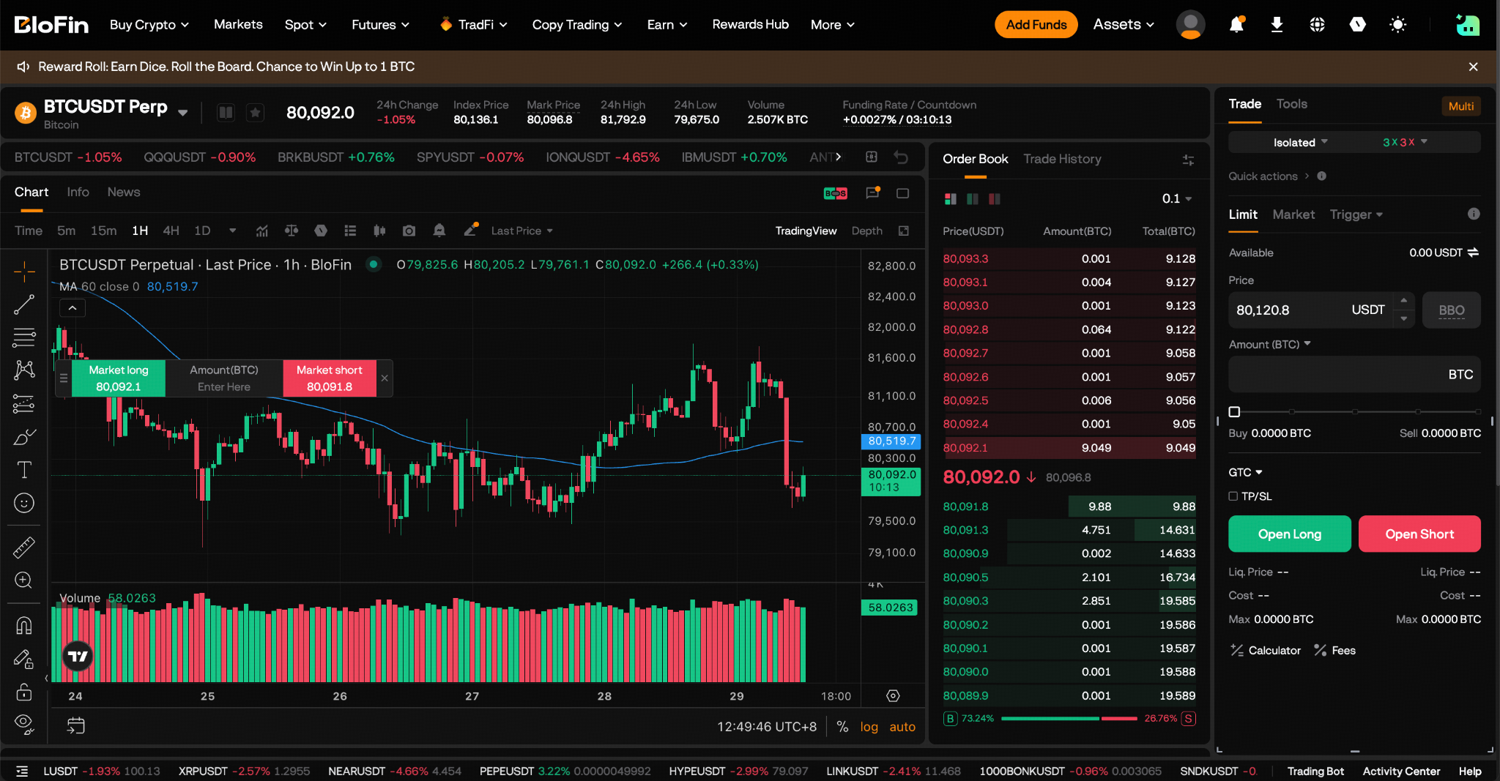
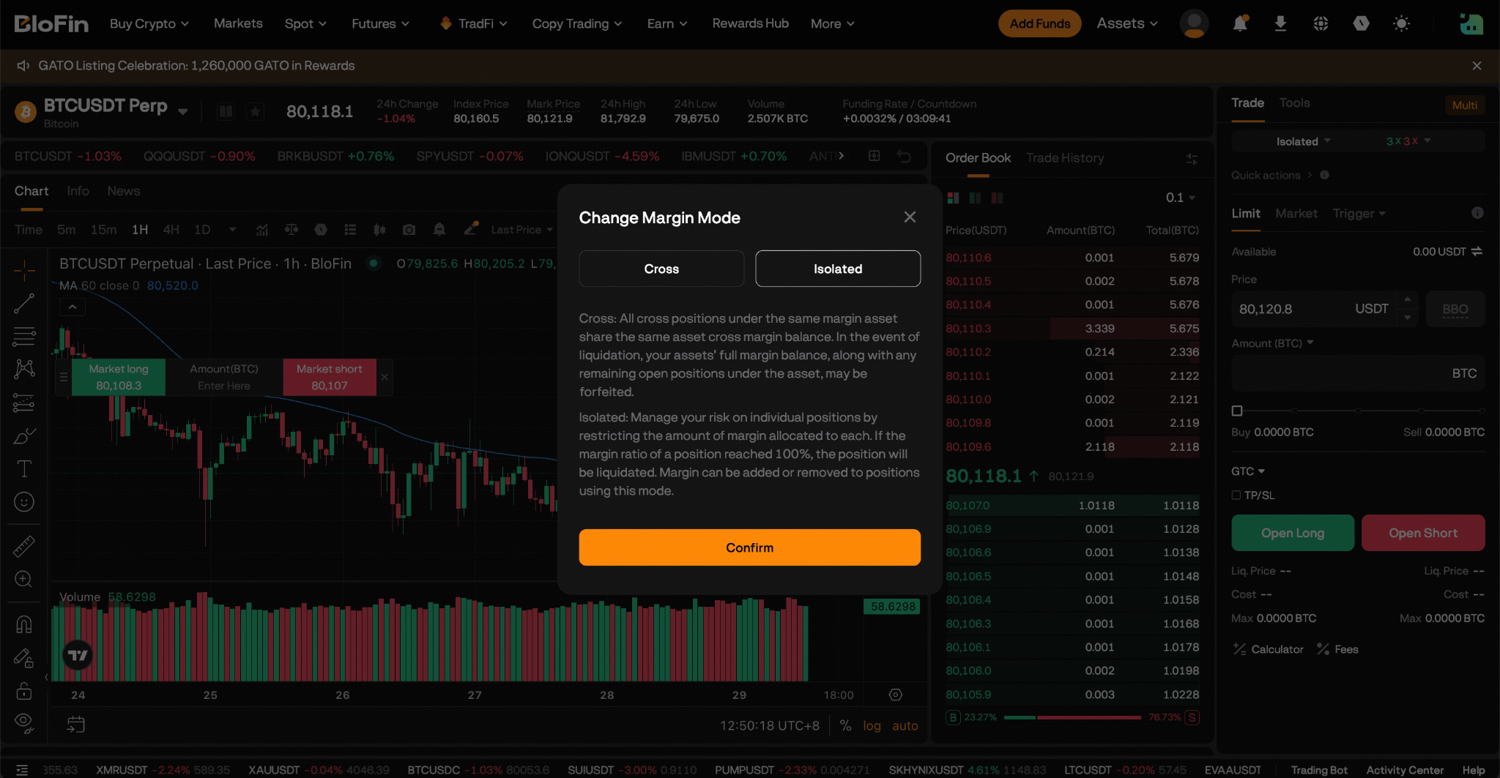
Step 2: At the top of the order panel, choose Cross or Isolated margin and set your leverage.
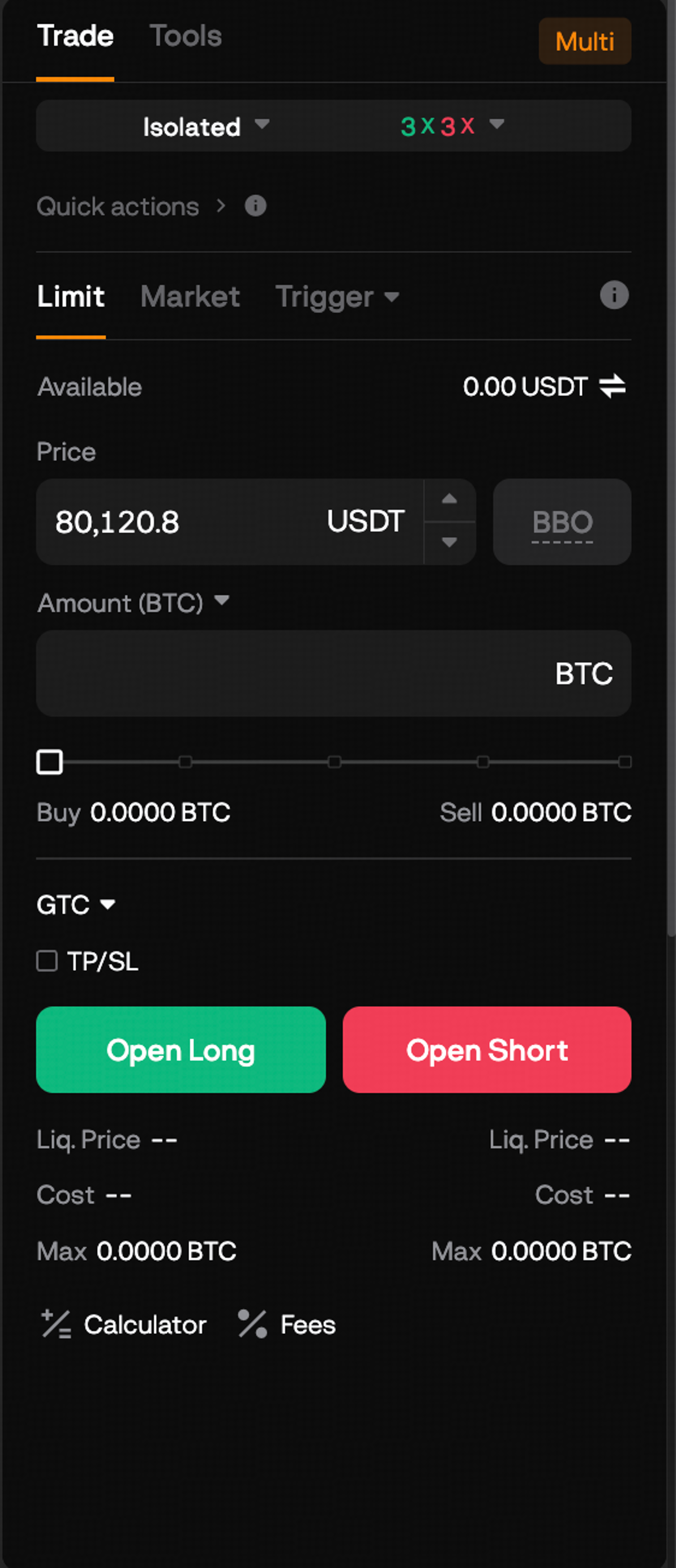
Step 3: Select Limit or Market and enter the amount. For a limit order, enter your entry price as well.
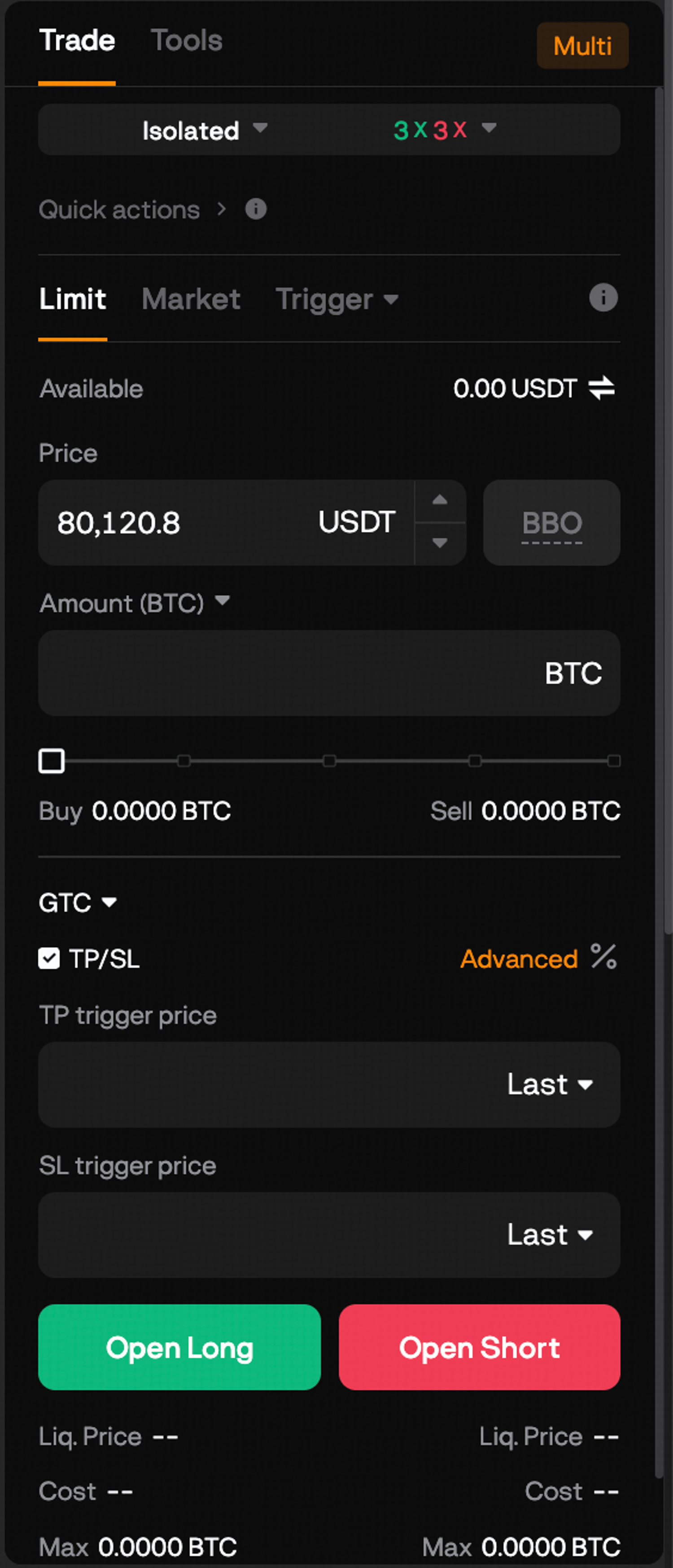
Step 4: Tick TP/SL below the amount and enter your stop-loss price. For a long position it sits below your entry, and for a short it sits above. Add a take-profit price on the other side if you want one. Each price box has a dropdown set to Last, which you can switch to Mark or Index to change the price that triggers the order. Set this way, both fill as market orders when they trigger (source: BloFin Help Center, TP/SL).
Step 5: For more control, open Advanced. The TP/SL window that opens lets you change three things before you confirm:
How you enter the trigger. Type the stop-loss price, or put a percentage in the Change % box beside it.
How it fills. Tick Limit beside the stop-loss to send a limit order at a price you choose, instead of a market order.
Guaranteed SL. On BTCUSDT, ETHUSDT and SOLUSDT, a Guaranteed SL switch appears at the bottom of the window.
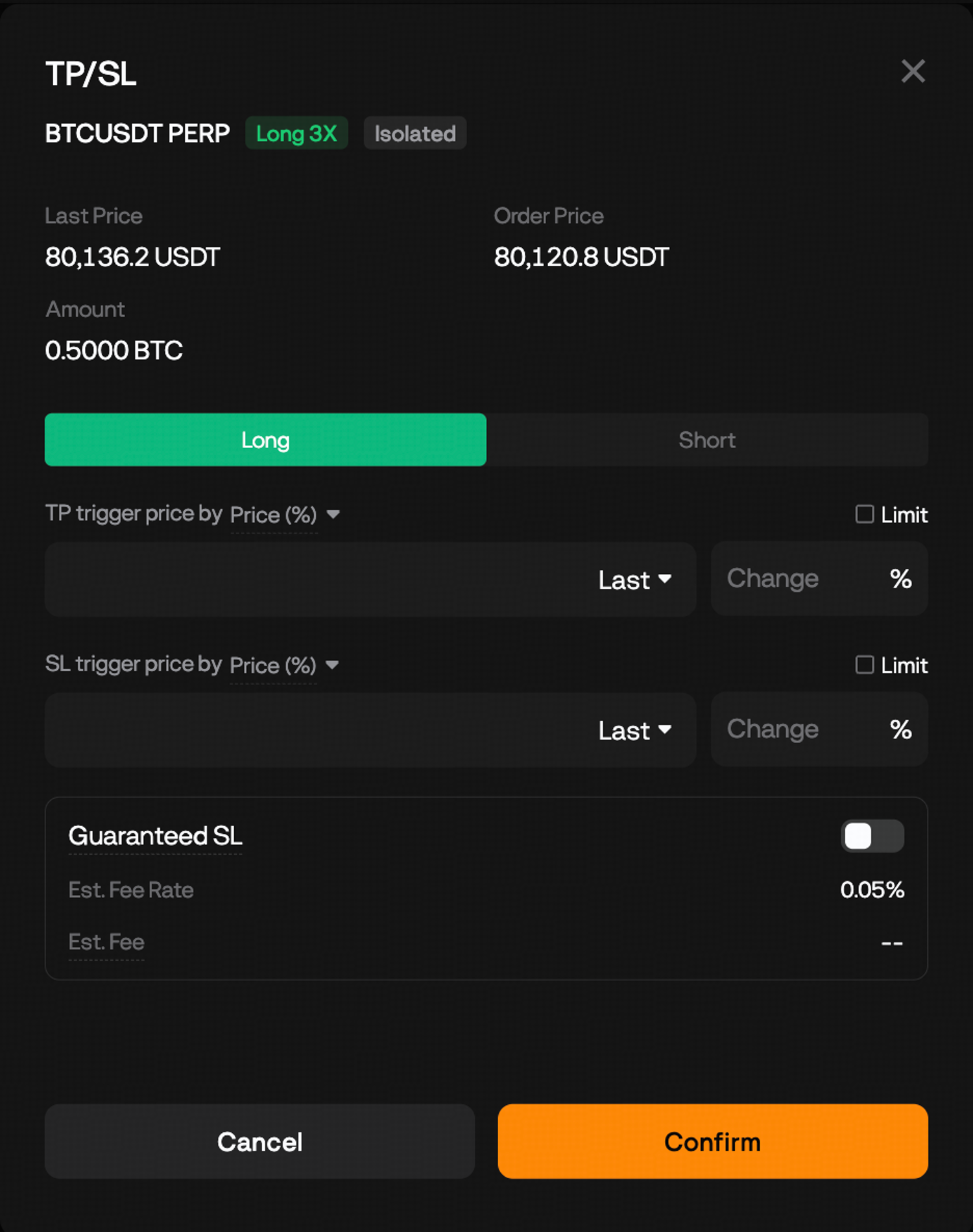
Click Confirm to save the settings.
Step 6: Click Buy to open a long or Sell to open a short. The stop-loss is attached to the position the order opens.
Take a long BTCUSDT trade of 0.5 BTC at 3x leverage, with fees left out. The loss at your stop depends on the position size and the distance to the stop, never on the leverage, which only changes how much margin you put up.
Loss at the stop = position size × (entry price − stop-loss price).
Item | Figure |
|---|---|
Entry price | 80,000 USDT |
Position size | 0.5 BTC, worth 40,000 USDT |
Margin at 3x leverage | About 13,333 USDT |
Stop-loss price (2% below entry) | 78,400 USDT |
Loss if the stop fills at 78,400 | 800 USDT, about 6% of the margin |
Take-profit price (5% above entry) | 84,000 USDT |
Profit if the take-profit fills at 84,000 | 2,000 USDT |
A market stop can fill a little below 78,400 in a sharp drop. That gap between the price you set and the price you get is called slippage, so treat 800 USDT as the planned loss and expect the real one to be slightly larger when prices are moving quickly.
How to add a stop-loss to an open futures position
If you opened a trade without a stop, you can add a TP/SL to the position itself from the Positions tab below the chart. You choose whether it covers the whole position or only part of it, which lets you take some profit at one level and protect the rest with a stop at another.
Step 1: Open the Positions tab, find the position and click TP/SL.
Step 2: Choose Entire Position or Partial Position.
Step 3: Enter your stop-loss trigger price and, if you want one, a take-profit trigger price. To fill as a limit order, tick Limit and enter the order price. In Partial Position mode, enter the amount the stop should close as well.
Step 4: Click Confirm.
The two modes behave differently once they are set. A position can carry only one Entire Position TP/SL at a time, and if it holds both a take-profit and a stop-loss, the moment one triggers the other is canceled (source: BloFin Help Center, TP/SL). You can place several Partial Position orders at different prices, which is how you scale out, closing a trade in pieces instead of all at once.
On the 0.5 BTC long, for example, you could close 0.25 BTC at 84,000 USDT and move the stop on the other half up to your entry price. That is a breakeven stop: the rest of the trade should close near your entry price, although a market stop can still fill below entry in a fast market and fees still apply.
A stop-loss that has not triggered yet can be modified or canceled (source: BloFin Help Center, Guaranteed SL). If you do cancel one, set its replacement straight away, because a position with no stop is most exposed overnight and around big news.
Market or limit execution for a stop-loss
A BloFin stop-loss fills as a market order unless you tick Limit. A market stop closes your position at the best price available once it triggers, which can be worse than your stop price when the market is moving fast. A limit stop never fills worse than the order price you set, but if the price jumps past that level, it may not fill at all and your position stays open.
On any exchange, a stop that becomes a market order is certain to execute but not at a certain price, while a stop-limit order can be skipped entirely when the price gaps through the limit (source: Investopedia). On BloFin, a limit stop that triggers but does not fill stays on your open orders like any other limit order (source: BloFin Help Center, TP/SL).
If you do use a limit stop, leave a gap between the trigger and the order price. In the same BTC long, a trigger at 78,400 USDT with an order price of 78,000 USDT gives the order about 0.5% of room to fill on the way down. With the trigger and order price set to the same number, a single fast candle can leave the order sitting unfilled above the market while your loss keeps growing.
For most traders, and for almost any leveraged position, market execution is the better default, because a stop exists to get you out, and an unfilled stop leaves you in. The guide to how market, limit and stop orders differ sets those trade-offs side by side.
Last price or mark price as the trigger
The dropdown beside each trigger price decides which price BloFin watches for your stop. Last, the default, is the price of the most recent trade on BloFin. Index is an average of spot prices from several major exchanges. Mark is a fair-value price built on that index, so it moves more smoothly than the last trade, and it is the price BloFin uses for liquidation.
The difference matters most in thin or volatile markets, where one large order can spike the last price for a few seconds. On the chart, that spike leaves a wick, the thin line on a candle that marks a price touched only briefly. A stop that triggers on last price can be hit by that spike even though the wider market never got there. A stop that triggers on mark price follows the same price that drives your liquidation, so a brief wick is less likely to knock it out. BloFin's guide to mark price and last price shows how each one is calculated.
You can see the last and mark prices side by side at the top of the BTCUSDT Perpetual page before you choose.
Guaranteed stop-loss on BTCUSDT, ETHUSDT and SOLUSDT
Guaranteed SL is a paid BloFin feature that closes your position at exactly your stop-loss price once it triggers, with no slippage, even in extreme volatility. It is available on the BTCUSDT, ETHUSDT and SOLUSDT perpetuals, on the website and in the app, and you switch it on in the TP/SL window when you set or edit a stop-loss.
The fee is charged only when the guaranteed stop actually executes, so a stop that never triggers, or one you cancel, costs nothing. The TP/SL window shows the estimated fee rate before you confirm, which reads 0.05% on BTCUSDT, and the Est. Fee line beside it shows the amount you would pay.
Back to the 0.5 BTC long with its stop at 78,400 USDT. If bitcoin drops through the stop so quickly that a regular market stop fills at 77,600 USDT, the loss is 1,200 USDT instead of the planned 800 USDT. With Guaranteed SL on, the position closes at 78,400 and the loss is 800 USDT plus the fee shown under Est. Fee.
Two limits come with the guarantee. Each Guaranteed SL order has a maximum size, and an order above it cannot use the feature. And it does not override liquidation, so if your position reaches its liquidation price before the stop triggers, the normal liquidation process runs (source: BloFin Help Center, Guaranteed SL). Until it triggers, you can still change the stop price or cancel it.
How to set a trailing stop on BloFin futures
A trailing stop moves your exit up behind the price as a trade goes your way. You set a percentage, and the stop sits that far below the best price reached since the order became active (above it, on a short). When the price pulls back by that percentage, BloFin sends a market order to close (source: BloFin Help Center, Trailing Stop).
Step 1: On the futures order panel, open the Trigger menu and choose Trailing Stop.
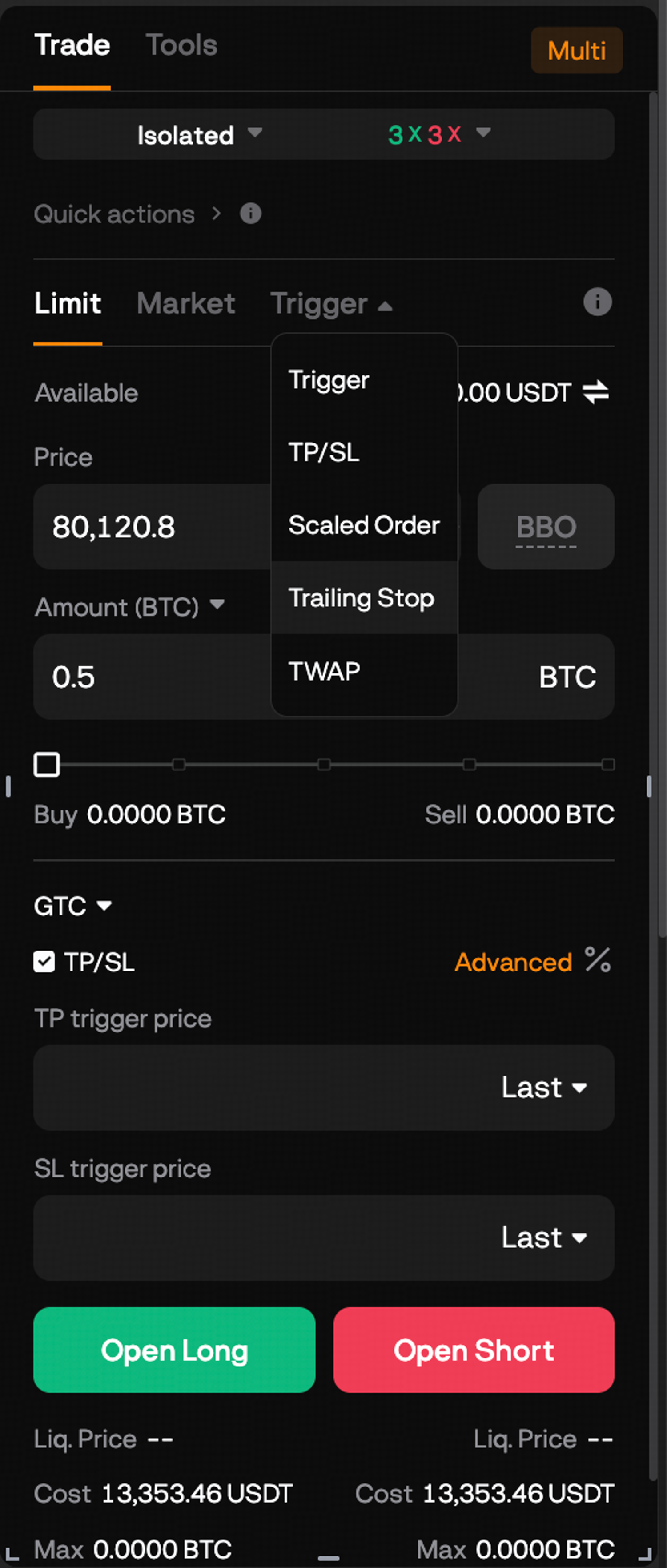
Step 2: Enter the amount, then set Variance (%), the pullback that triggers the order.
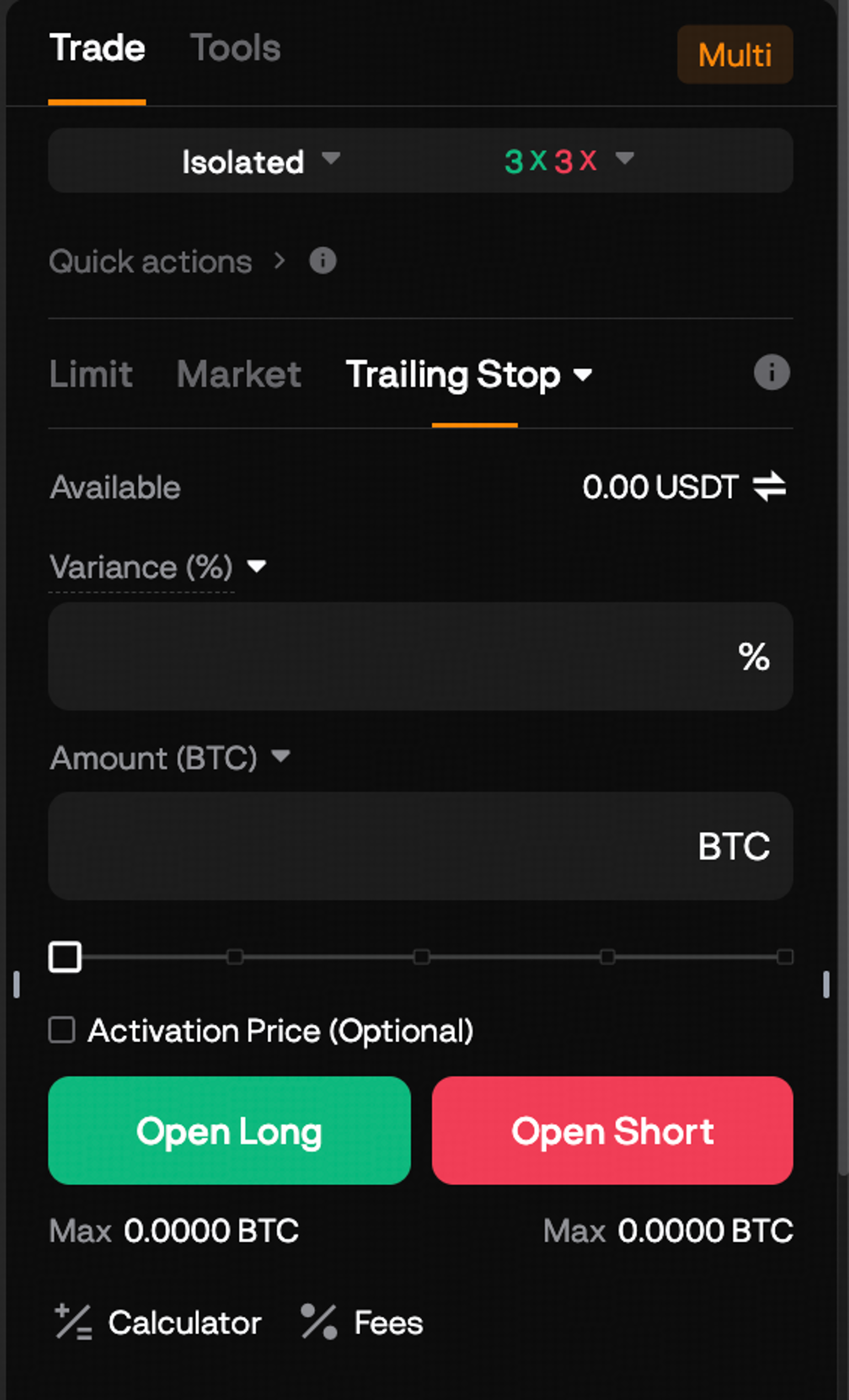
Step 3: If you want the trailing stop to start following the price only after the trade has moved in your favor, tick Activation Price and enter that price. Without one, it starts tracking straight away.
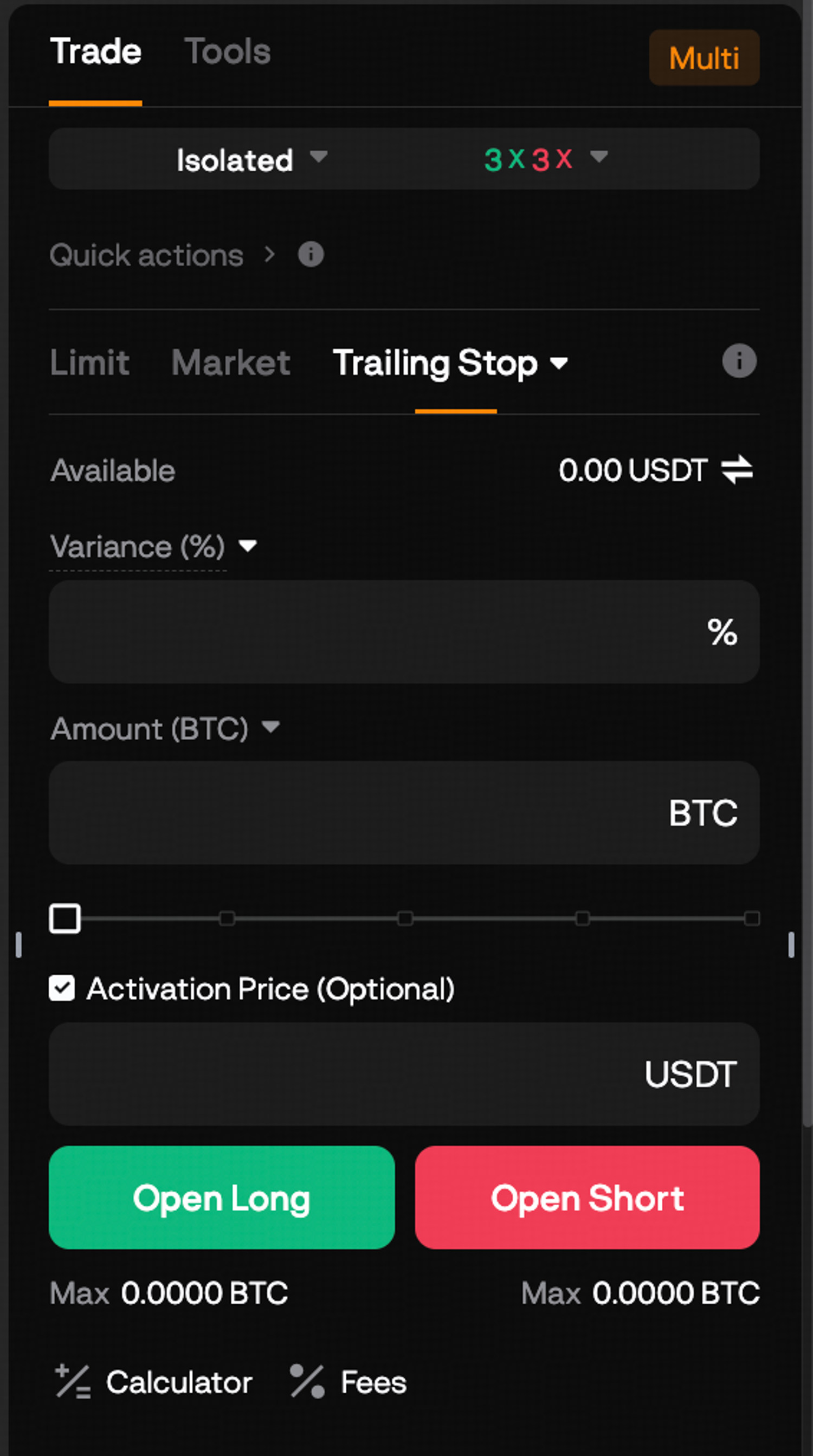
Step 4: Place the order on the side that closes your trade. Sell for a long position, or Buy for a short, with the amount matching the size you want to close.
Say you are long BTC from 80,000 USDT and set a trailing stop with a variance of 3% and an activation price of 84,000 USDT. Nothing happens until the price reaches 84,000. If it then climbs to 88,000, the stop sits 3% below that high, at 85,360 USDT, and a drop to 85,360 closes the position with a market order. A smaller dip to 86,240, which is 2% below the high, leaves the trade running.
The percentage is the decision that matters. Set it tighter than the coin's ordinary pullbacks and normal noise will close good trades early, which is the most common way trailing stops disappoint. Trailing stop strategy shows how to size the distance from recent volatility.
How to set a stop-loss on BloFin spot
On the spot market, a stop-loss is a sell order that waits until the price falls to your trigger level, then sells your coins with a market or limit order. You can attach one to a Limit buy, so the coins are covered from the moment the order fills, or set one on coins you already hold with the TP/SL order type or a plain Trigger order. The order types on the spot panel are covered in the guide to placing your first trade on BloFin. Trailing stops and Guaranteed SL are available on futures only.
Set a stop-loss when you buy
Step 1: Open Spot and choose your pair, for example BTC/USDT Spot.
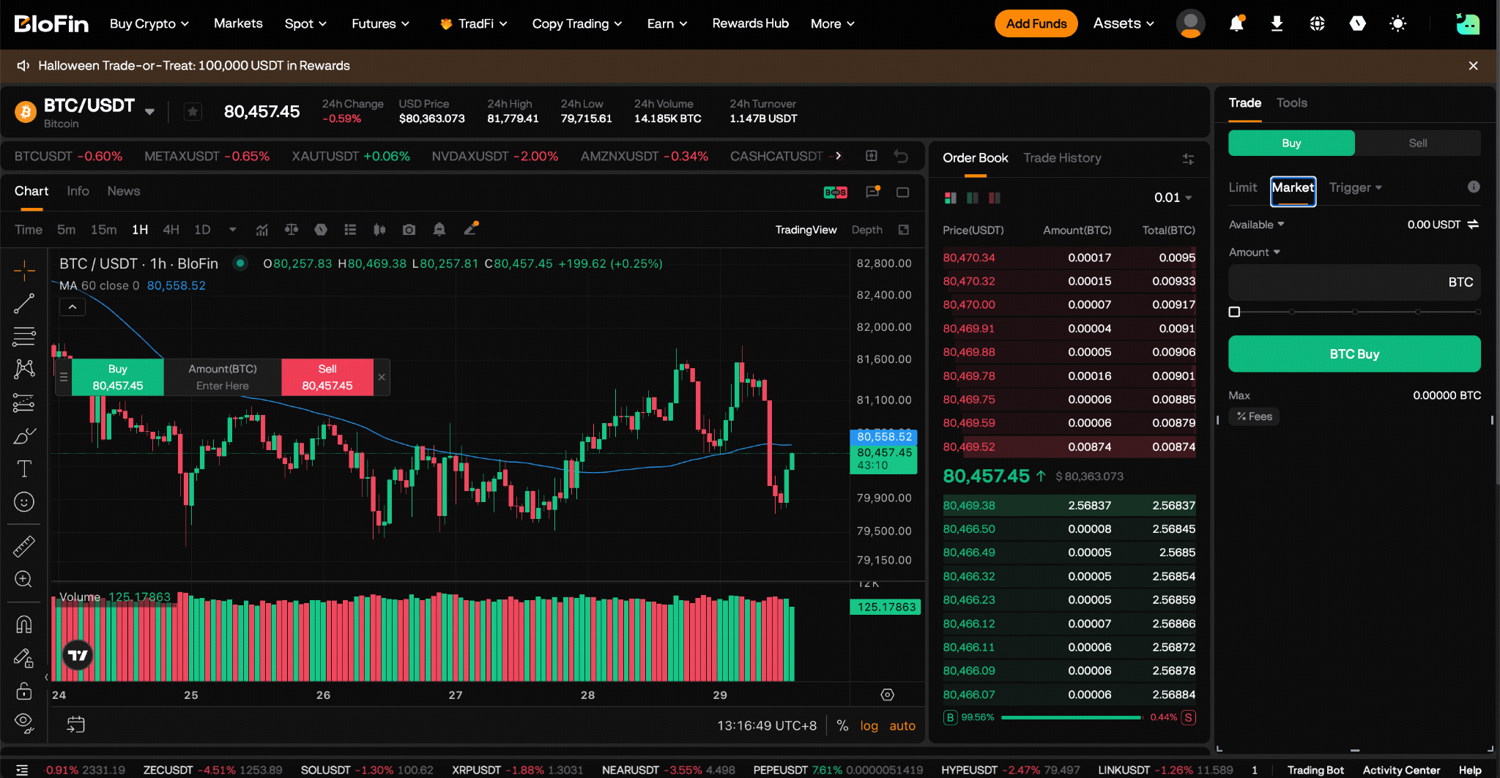
Step 2: Select Buy and Limit, then enter your buy price and the amount.
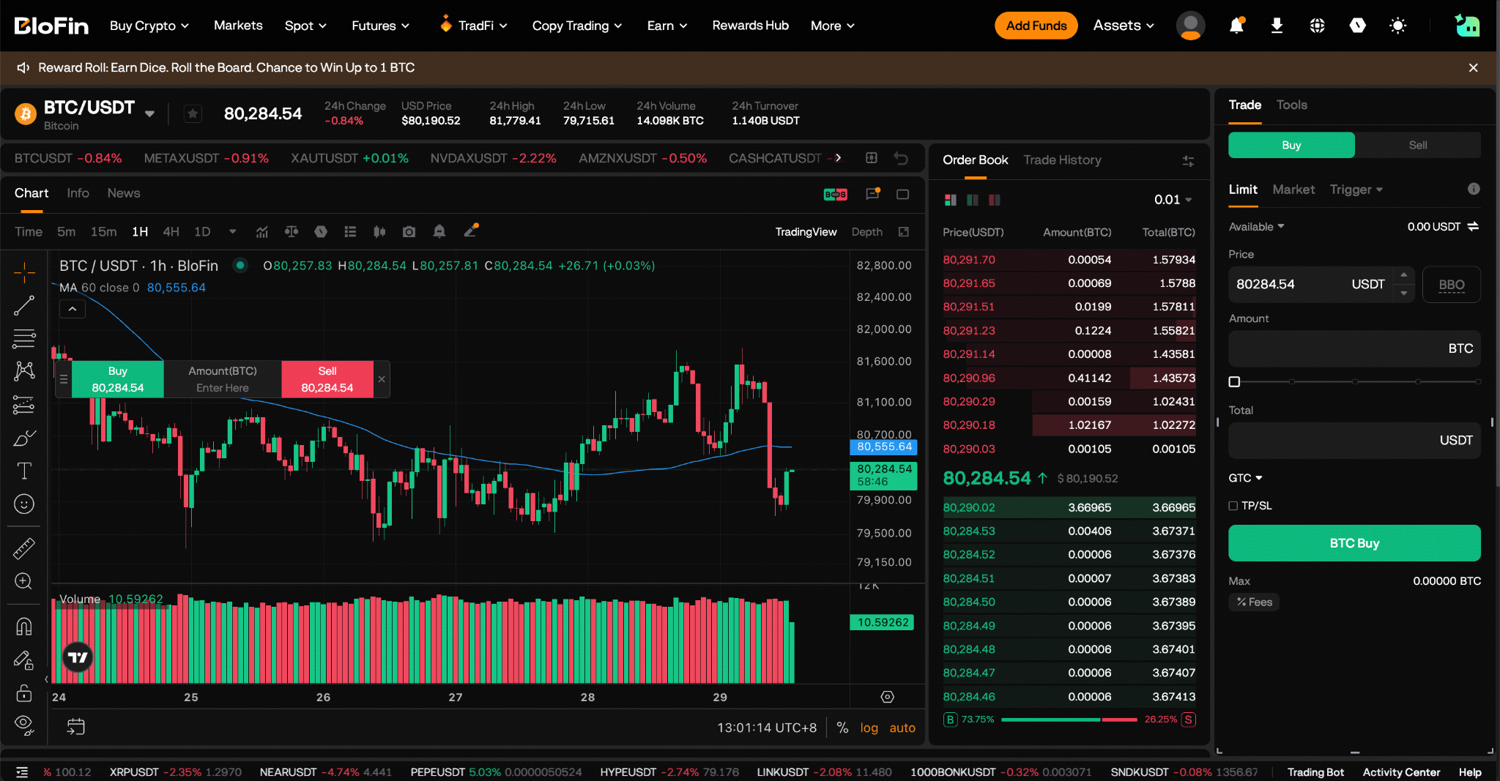
Step 3: Tick TP/SL and enter your stop-loss price below your buy price. Add a take-profit price above it if you want one.
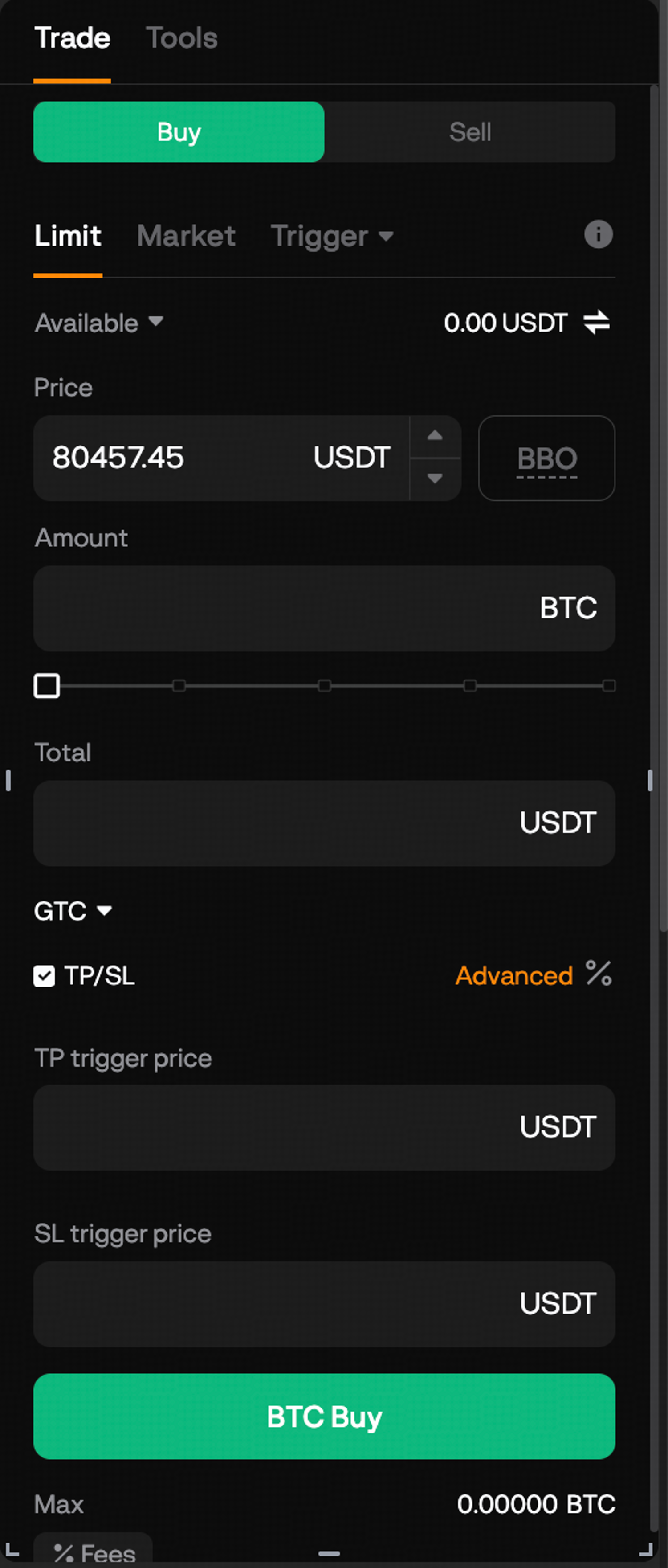
Step 4: Click Buy to place the order. Once the buy fills, the stop protects the coins it bought.
Set a stop-loss on coins you already hold
Step 1: On the same pair, select Sell, open the Trigger menu and choose TP/SL.
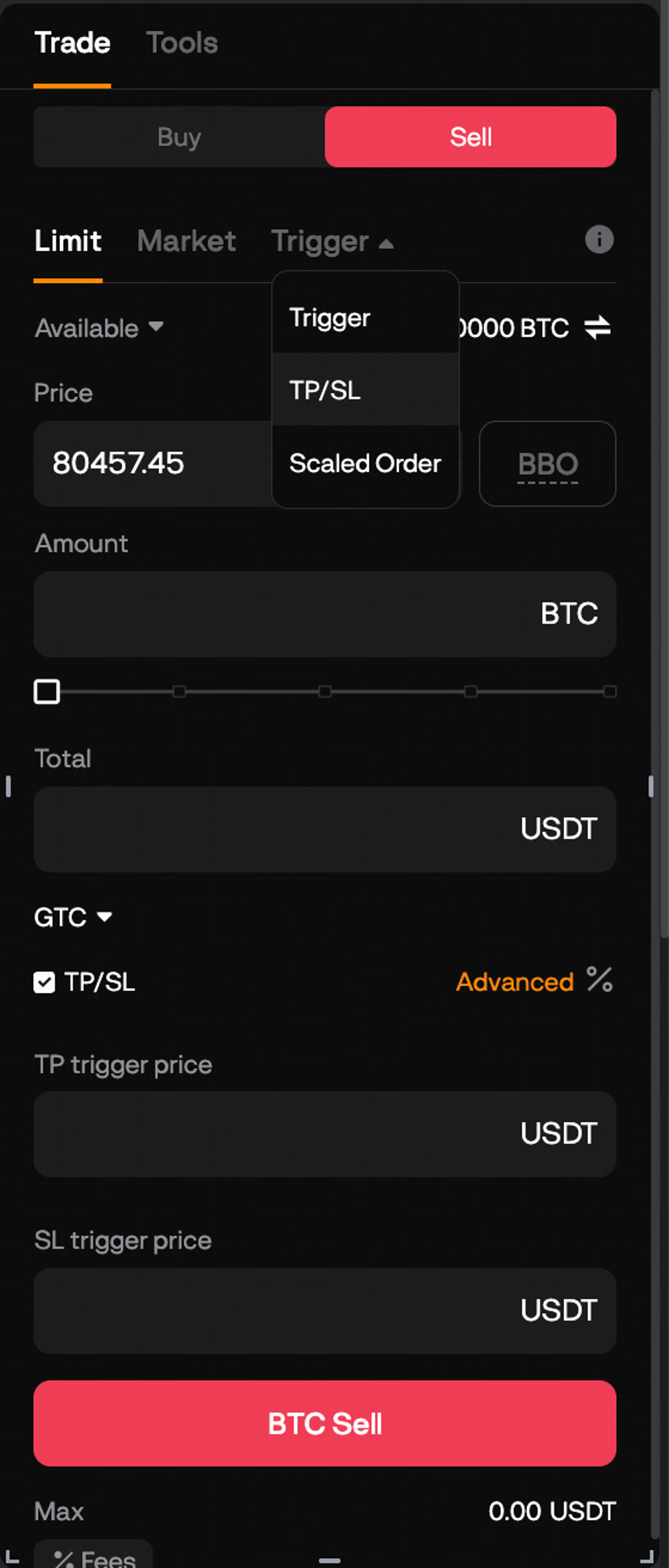
Step 2: Enter the SL trigger price below the current price. For the SL order price, keep Market to sell at the best available price, or enter a limit price. The same form has TP trigger price and TP order price fields for a take-profit above the market.
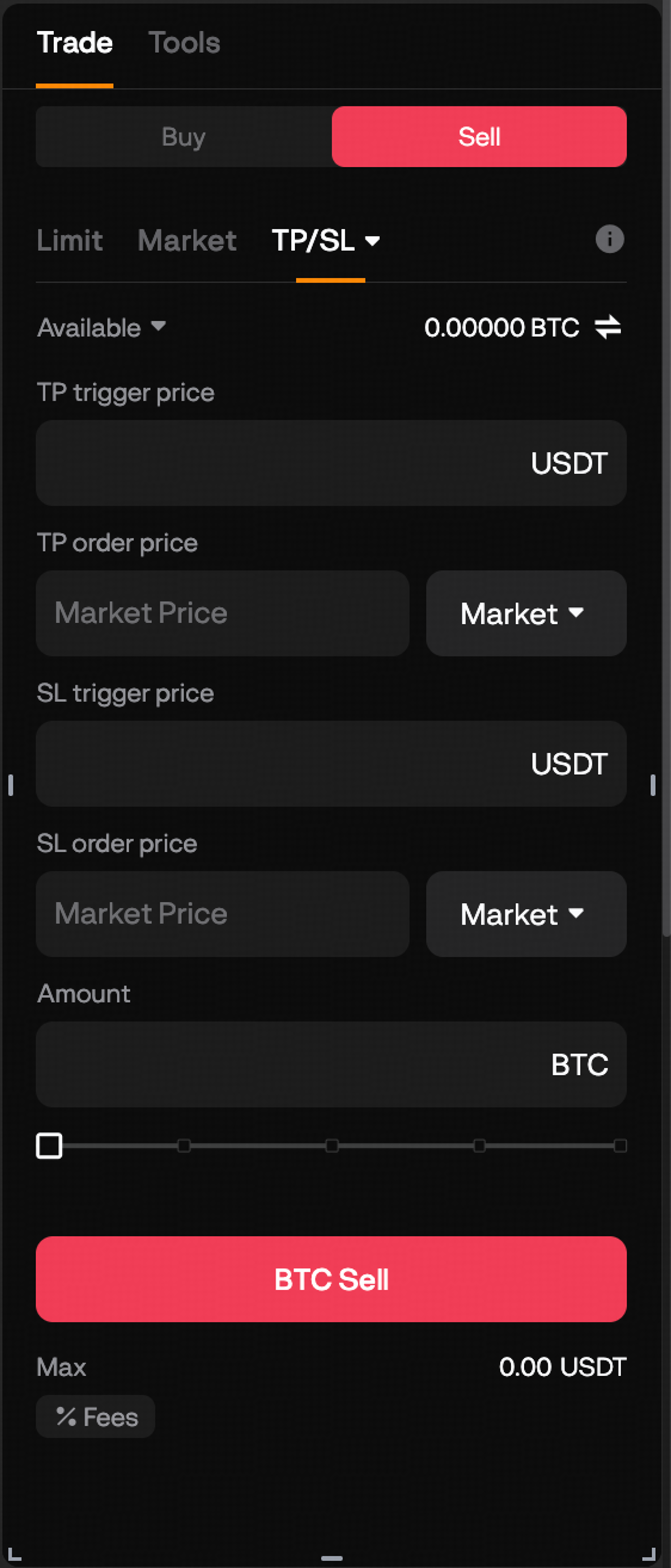
Step 3: Enter the Amount of the coin to protect and place the order. It waits under Open Orders until the price reaches your trigger.
Because spot has no leverage, a spot stop protects you from a deep drawdown, a large fall from the price you paid, rather than from liquidation. Spot has no trailing stop, so one way to lock in profit as the price rises is to cancel the stop and place a new one at a higher level.
Risks to know before you rely on a stop-loss
Most stops work as planned, but a stop-loss is an order, and an order can be rejected or left unfilled. A triggered order can fail because of price limits, position limits, insufficient margin or a contract that is temporarily halted. A limit stop can also trigger and still go unfilled, and in very violent markets an order may fail to execute at all.
Liquidation is the other risk, and it is the one that catches leveraged traders. Liquidation runs on the mark price, so if your stop sits very close to your liquidation price, a sudden drop or a last-price trigger that lags the mark price can let the liquidation happen first. Keep a clear distance between the two, and if you cannot fit a sensible stop before liquidation, lower your leverage. Leverage and liquidation shows how to find your liquidation price before you trade.
On futures, the Trigger and Trailing Stop order panels have no Reduce-only box, so those orders stand apart from your position. If the position has already been closed some other way, a stop order that fires can open a new position in the opposite direction, so cancel any stop left behind when you close a trade by hand (source: BloFin Help Center, TP/SL). To attach a stop to a specific position instead, use the TP/SL button on the Positions tab.
How to check that your stop-loss is in place
A stop only protects you if it was actually placed, so check it straight after you confirm. A futures TP/SL shows against the position on the Positions tab, and pending orders, including spot stops and futures trailing stops, wait under Open Orders. If it is missing from both, it was never placed, so set it again before you step away.
From there, a stop needs very little attention: it runs on BloFin's side whether you are online or not, which is the point of setting one. Before your next trade, the pre-trade checklist helps you settle the size, the stop and the target before you click, and how to close a trade on BloFin covers the manual exits for when you want out early.
Looking to trade BTC, ETH or SOL? To get started, you'll need to first create a BloFin account, fund your account with cryptocurrency, and navigate to the BTC/USDT Spot trading page, BTCUSDT Perpetual page, ETHUSDT Perpetual page or SOLUSDT Perpetual page.
Frequently asked questions
How far from my entry should I set a stop-loss?
Set it at the price where your reason for the trade stops being true, far enough away that the coin's ordinary swings will not reach it. Then size the position so that a stop at that level costs only what you planned to lose. Recent volatility, such as the size of the coin's typical daily range, is a good guide to how much room the stop needs.
Can I add a stop-loss to a market order on BloFin futures?
Yes. The TP/SL box sits on both the Market and Limit order forms, so you can attach a stop-loss to a market entry before you place it, and it takes effect as soon as the order opens your position. You can also add one later from the Positions tab.
Can I change a stop-loss after I set it?
Yes, as long as it has not triggered. A stop-loss on a futures position can be modified or canceled before it fires, including one with Guaranteed SL switched on. On spot, canceling the order and placing a new one at the new level does the same job. Keep a stop in place while you adjust it.
What happens to my take-profit when my stop-loss triggers?
On an Entire Position TP/SL that holds both a take-profit and a stop-loss, the first one to trigger cancels the other, so the position is closed once. If you want part of a trade to stay open after one exit, use separate Partial Position orders, which each close only their own amount.
Is a stop-loss on BloFin guaranteed to fill at my price?
A regular stop-loss fills as a market order by default, so it executes but can fill below your stop when the price is moving fast, and a limit stop can miss entirely if the price gaps past it. Guaranteed SL, available on BTCUSDT, ETHUSDT and SOLUSDT, closes at your exact stop price for a fee charged only when it executes.
Should my stop-loss trigger on last price or mark price?
For a leveraged futures position, mark price is usually the better trigger. It is smoother than last price and is the price BloFin uses for liquidation, so a mark-price stop is harder to set off with a short-lived spike and stays in step with your liquidation risk. Last price, the default, reacts to every trade on BloFin.
Researched and written by the BloFin Academy editorial team with AI-assisted drafting. All facts independently verified. Sources include BloFin Help Center articles on take-profit and stop-loss, trailing stops, Guaranteed SL, BloFin's futures and spot trading pages and Investopedia, current as of October 29, 2026.
Nothing in this article constitutes financial advice. A stop-loss limits a loss only if it triggers and fills. A market stop can close well below its trigger in a fast market, a limit stop can stay unfilled while the price keeps falling, and on a leveraged position liquidation can arrive before either. Guaranteed SL removes slippage on three pairs but adds a fee and does not prevent liquidation. Order types, supported pairs and fees are set by BloFin and can change, so check the order panel before you rely on any setting. Do your own research and consider your risk tolerance before you trade on BloFin.