
Active futures traders rarely have a single view on a market. You might be holding a long-term position on BTC built over several weeks while also looking to add a shorter-term entry on a dip. Or you're running a swing trade at 3x leverage alongside a higher-conviction breakout trade at 10x. Both ideas are valid, both are on the same pair, and you want to track them, manage them, and exit them independently.
In standard futures mode, that's not possible. Any new order in the same direction on the same pair merges into your existing position, blending entry prices, margin, and exit levels into one combined figure. Two distinct trade ideas become one undifferentiated position.
BloFin's Multi-Position feature changes this. It lets you open several independent positions on the same trading pair simultaneously, each with its own entry price, leverage, margin, TP/SL, and PnL. This guide covers how it works, what it requires, and the situations where it makes a practical difference to how you trade.
What is BloFin Multi-Position?
Multi-Position is a futures account feature that lets you open several independent positions on the same trading pair in the same direction simultaneously. Each position maintains its own margin, PnL, leverage setting, and TP/SL orders. They don't merge. They don't net against each other. They're tracked and managed separately.
This matters because, in standard futures mode, opening an additional position in the same direction on the same pair simply increases the size of your existing position. There's no way to hold distinct entries with different risk parameters on the same instrument at the same time. Multi-Position breaks that constraint.
To be clear, Multi-Position is about holding multiple independent positions in the same direction on the same pair, not about holding a long and a short simultaneously. That's handled by hedge mode, which is a prerequisite for Multi-Position but a separate concept.
Multi-Position vs standard futures mode
In standard (one-way) mode, you hold at most one position per trading pair. Opening a new order adds to that position. Your average entry price blends across all fills. Your TP/SL applies to the full position. When you close, you close out of a single position regardless of how many separate orders built it.
In Multi-Position mode, each position is a discrete unit:
Standard Mode | Multi-Position Mode | |
Positions per pair | One per direction | Multiple per pair per direction |
Entry prices | Averaged across fills | Each position tracks its own |
Margin | Shared per position | Separate per position |
Leverage | One setting per position | Configurable per position |
TP/SL | One set of orders | Independent per position |
PnL | Single figure | Per position |
Adding to a position | Increases existing | Targets a specific position |
Closing | Closes the one position | Closes the specific position chosen |
The practical consequence is that trades with different rationales, time horizons, or risk parameters can exist on the same pair at the same time without interfering with each other.
Requirements
Multi-Position has specific prerequisites. All of the following must be in place before you can enable it:
Account mode: You must be in Futures Mode or Spot and Futures Mode (UTA). Multi-Position is not available in Spot-only mode.
Margin mode: Single-currency margin mode only. Multi-Currency Margin Mode does not support Multi-Position.
Position mode: Hedge mode must be enabled. One-way mode does not support Multi-Position.
No open positions or unfilled orders: You cannot switch to Multi-Position mode if you currently have any open positions or pending orders. Close all positions and cancel all orders before enabling it.
To enable: navigate to the futures trading panel, open Settings, select Position Mode, switch to Hedge Mode, then enable Multi-Position from the same settings panel.
What Multi-Position does not support
Multi-Position is a dedicated manual trading feature. The following are not supported while Multi-Position is active:
Copy trading (as a lead trader or follower)
Trading bots (Grid Bot, DCA Bot, Signal Bot, and others)
Multi-Currency Margin Mode
One-way position mode
Scaled Orders and TWAP sub-orders are supported, but they belong to the same position that initiated them. If you start a TWAP order within a position, all its sub-orders are attributed to that position, not spread across separate ones.
Position limits
The number of independent positions you can hold per trading pair is determined by your account tier. Higher tier accounts have higher position limits. Check your account level for the specific limit that applies to you. For most users starting out with the feature, the limit is sufficient for the practical strategies described in this guide.
Why use Multi-Position?
The clearest way to understand when Multi-Position matters is through specific situations where standard mode falls short.
Staggered entries with separate exit plans
You believe BTC will rise, but you're uncertain about the exact timing. You open a small long at $60,000 as an initial position. The market dips to $58,000 and you open a second long, seeing it as a better entry. A week later, you open a third at $62,000 as momentum builds.
In standard mode, all three entries blend into one position with an averaged entry price. You can only set one TP/SL. In other words, you can only close the blended position.
In Multi-Position mode, however, each entry is tracked separately. The $60,000 position might be sized for a medium-term hold with a target at $72,000. The $58,000 position might be a more aggressive addition with a tighter TP at $64,000. The $62,000 entry might be a breakout trade with its own stop below the breakout level. Each position lives and dies on its own terms.
Isolating strategies on the same instrument
Some traders run more than one strategy at a time on the same pair. For example: a swing trade on the daily timeframe and a scalp on the 15-minute chart, both on BTCUSDT. In standard mode, these can't coexist. Any new order on BTC adds to the existing position, mixing the two strategies' sizing, entry prices, and exit levels into a single unmanageable position.
Multi-Position keeps them separate. The swing trade position has its own margin, leverage, and wide TP/SL. The scalp position has its own margin, tighter leverage, and short-dated stop. Closing the scalp doesn't affect the swing trade. The PnL for each is tracked independently.
Different leverage settings for different risk levels
You can't run two positions on the same pair at different leverage levels in standard mode, but Multi-Position lets you. A core longer-term position might run at 3x with a wide stop. A higher-conviction shorter-term add might run at 10x with a tighter stop. Both are open simultaneously and both are managed independently. If the 10x position gets stopped out, the 3x position continues.
Tracking separate trade ideas independently
When positions merge into a single blended entry, it becomes difficult to know whether any individual trade idea was correct. A good idea and a bad idea that happen to be on the same pair produce one muddled result. Multi-Position separates them, which makes post-trade analysis more meaningful. You can see exactly which entry, which sizing decision, and which exit plan produced which outcome.
How adding to a position works
In Multi-Position mode, the Add to Position function targets a specific position. When you place an additional order, you choose which of your open positions it belongs to. That order increases the size of the selected position and adjusts its average entry price accordingly, but doesn't affect any of your other open positions on the same pair.
If you want a genuinely separate position rather than adding to an existing one, you open a new position rather than adding to an existing one. The distinction is explicit. You decide, for each order, whether it's a new independent position or an addition to an existing one.
Managing risk across multiple positions
Running multiple independent positions on the same pair introduces some risk dynamics that are worth understanding before you start.
Concentrated exposure in one direction
Three independent long positions on BTC are still three long positions on BTC. Multi-Position doesn't diversify risk across assets. If BTC drops sharply, all three positions lose simultaneously. The fact that they're tracked separately doesn't reduce the directional exposure. Total notional value across all open positions in the same direction is your actual market exposure.
Margin efficiency
Each position holds its own allocated margin in isolated mode. Three separate positions require three separate margin allocations. This is more capital-intensive than a single position of equivalent total size, because there's no margin sharing between them. Be aware of how much total margin is committed across all open positions.
Independent liquidation
In isolated margin mode, each position has its own liquidation price. One position can reach its liquidation threshold while the others remain healthy. Liquidating one position does not affect the margin of the others. This is a key safety property of isolated mode in Multi-Position: the worst outcome for any single position is capped at that position's margin.
Cross margin and Multi-Position
If you're using cross margin rather than isolated margin, all positions share the same pool. A large adverse move that draws down the shared balance can affect the health of multiple positions simultaneously. This is one reason many traders prefer isolated margin specifically when running multiple independent positions: it contains the damage from any single bad trade.
TP/SL discipline per position
Each position has its own TP/SL. It's worth setting these explicitly for every position you open rather than relying on manual exits. With multiple open positions on the same pair, manual management becomes harder to track. Independent automated exits reduce the chance of a losing position running too long while attention is elsewhere.
How to use BloFin Multi-Position
Before you can use BloFin Multi-Position, you’ll need to first create a BloFin account and fund it with cryptocurrency. If you require any assistance in registration, you may refer to our sign up guide before proceeding with the steps below to use Multi-Position.
Turning on Multi-Position
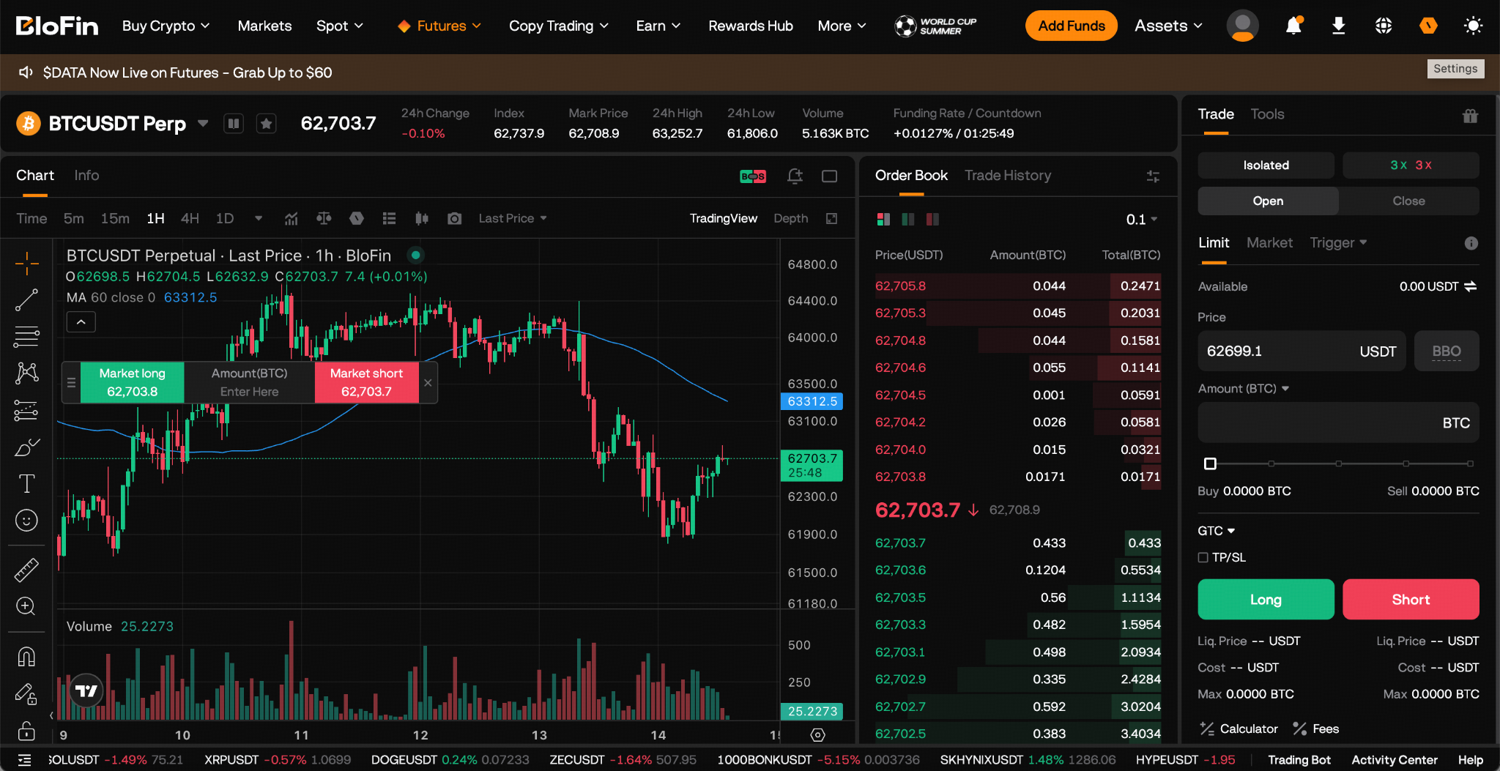
Step 1: Log in to your BloFin account and hover your cursor over the Futures tab. Then, click USDT-M Futures.

Step 2: Click on the Settings icon in the top right corner of the page.
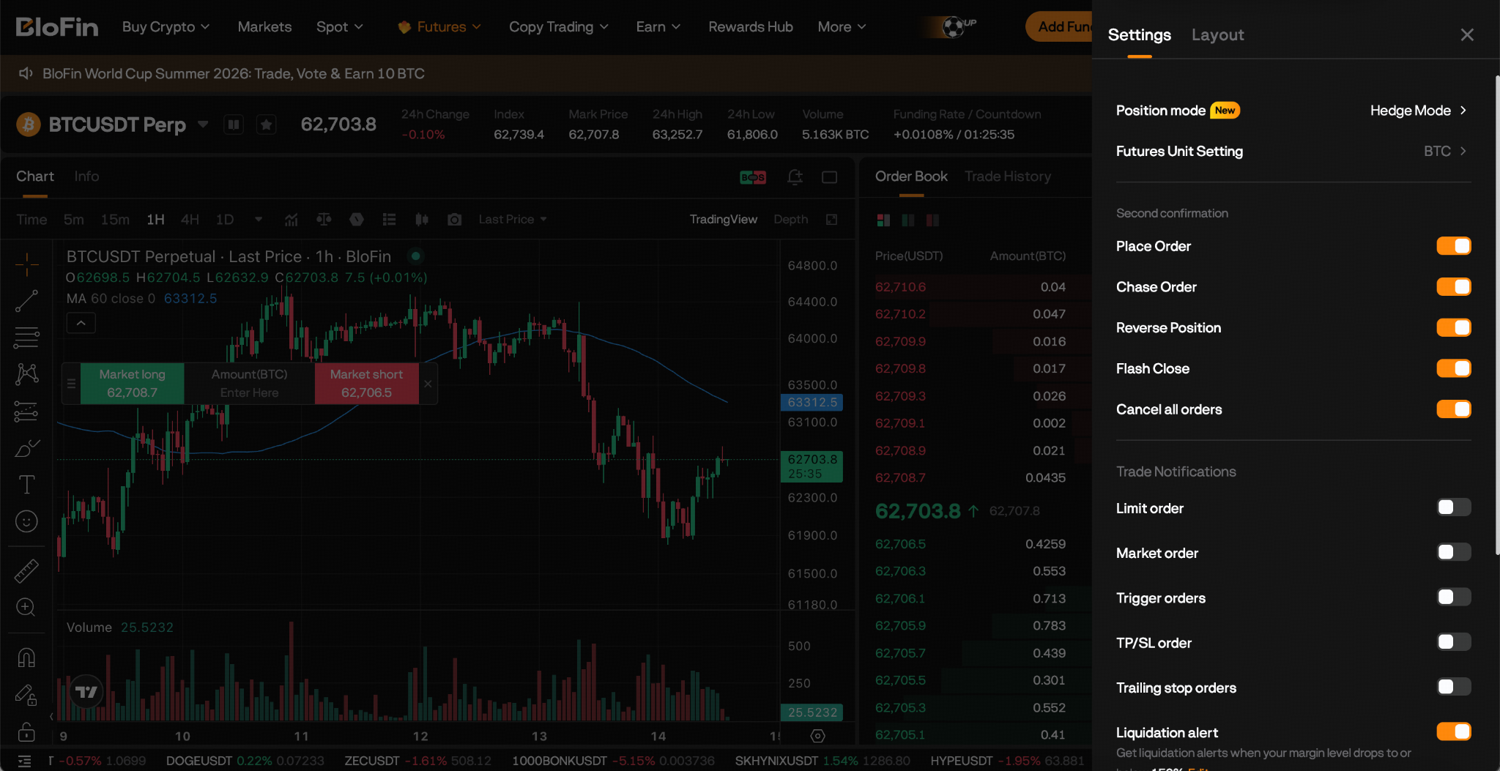
Step 3: Click on Position Mode.
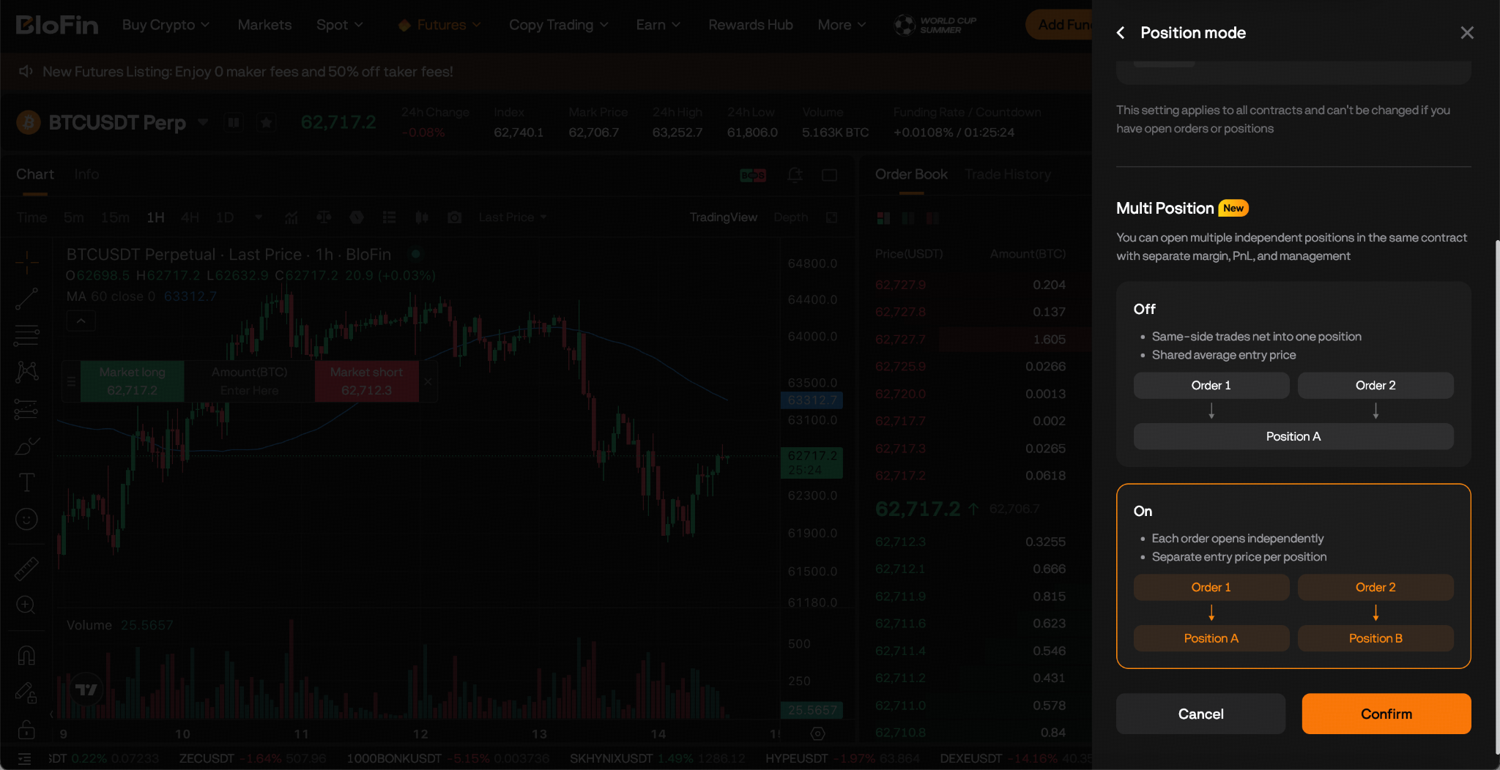
Step 4: Ensure that you’re on Hedge Mode, then scroll down and enable Multi-Position. Click Confirm to save your settings.
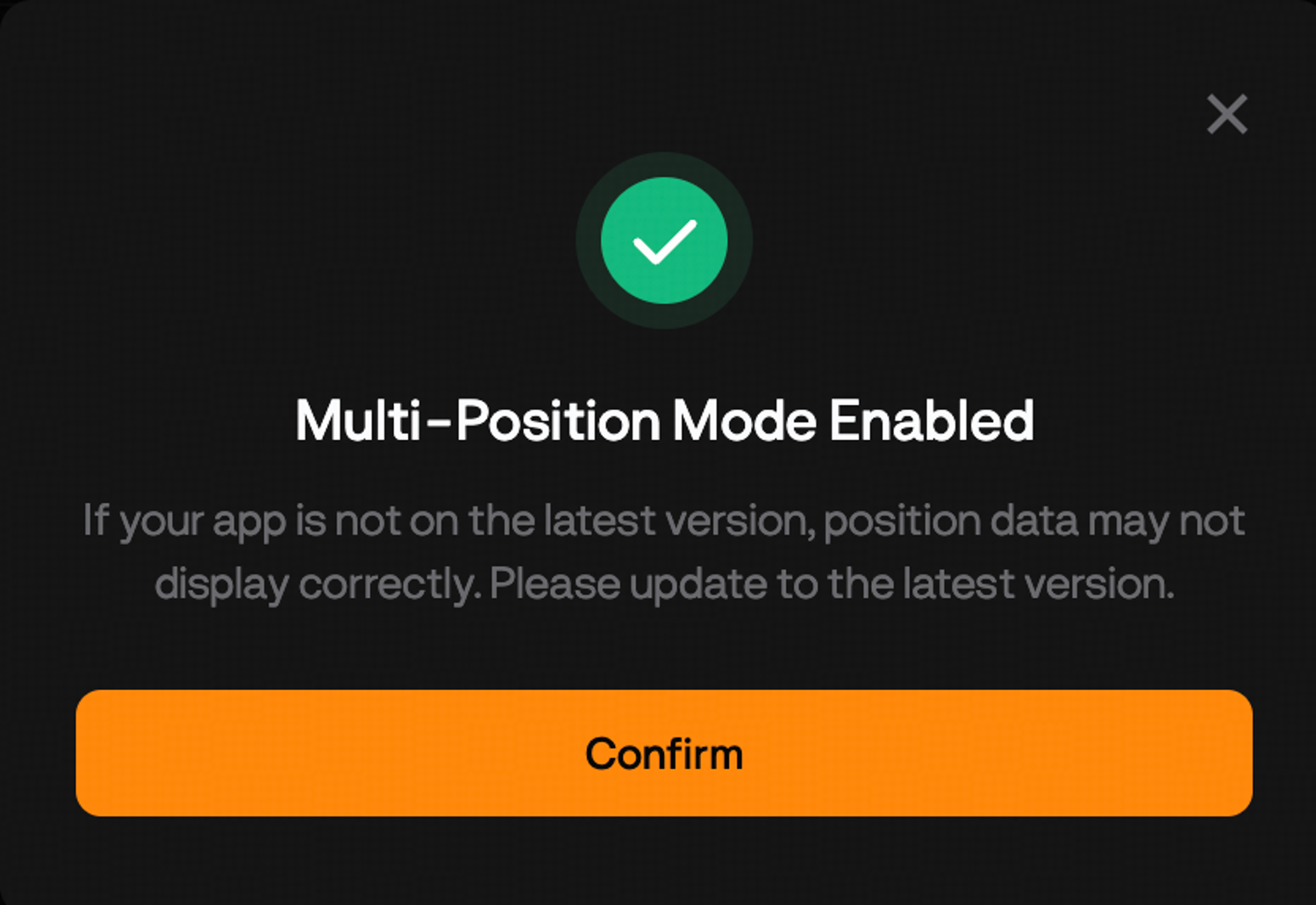
Congratulations, you’ve successfully enabled Multi-Position!
Opening a new independent position
Step 1: On your chosen trading pair, set your leverage, margin mode, and order type in the order panel on the right side of the Futures trading page.
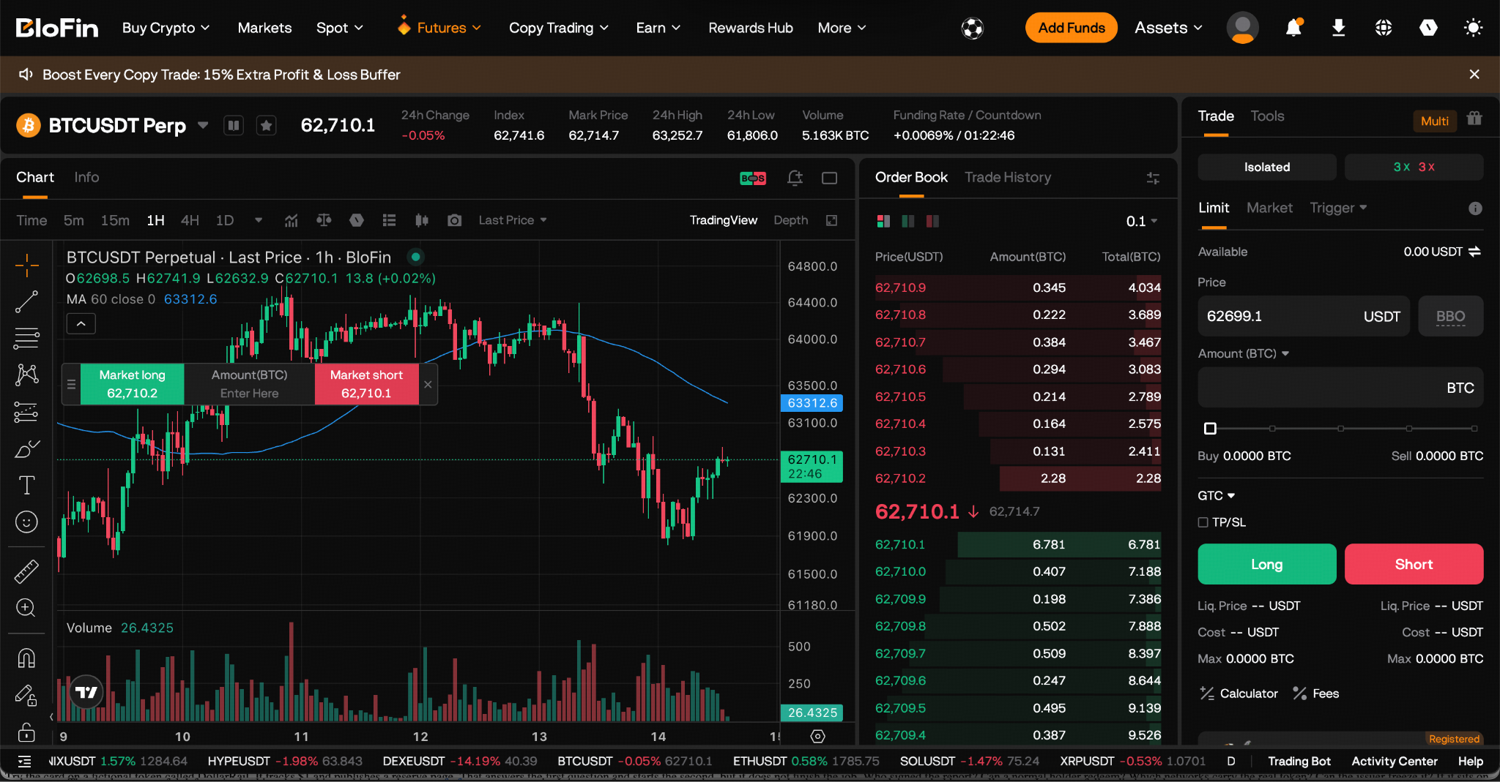
Step 2: Place the order as a new position (not an add to an existing position).
Step 3: Once open, set your TP/SL directly on that position.
Step 4: Repeat for each additional independent position.
Adding to a specific existing position
Step 1: On the Futures trading page, scroll down to view your positions under the Positions tab. Select the position you want to add to from your open positions list.
Step 2: Place the additional order targeting that position.
Step 3: The position's size and average entry price will be updated. TP/SL on that position is not automatically adjusted, so update it if needed.
Closing a specific position
Step 1: On the Futures trading page, scroll down to view your positions under the Positions tab. Select the target position from your open positions list.
Step 2: Close it fully or partially as needed. Other open positions on the same pair are unaffected.
Switching between Multi-Position and standard mode
You can switch back from Multi-Position mode, but the same condition applies: you must have no open positions and no unfilled orders before you can change the mode. Close all active positions and cancel all pending orders first, then change the mode in settings.
Switching doesn't happen mid-trade. Plan the mode switch as an intentional transition between trading sessions, not an in-flight adjustment.
Ready to get started?
Multi-Position is available on BloFin's Futures trading platform. Create a BloFin account or log in, head to your futures settings, enable Hedge Mode, and turn on Multi-Position to start running independent positions on the same pair.
Frequently asked questions
Can I use Multi-Position and copy trading at the same time?
No. Multi-Position mode and copy trading are incompatible. If you want to use copy trading, you'll need to switch back to standard mode. Switch requires closing all positions and canceling all orders first.
Does Multi-Position work in both hedge mode long and short directions?
Yes. You can hold multiple independent long positions on a pair, multiple independent short positions, or both simultaneously. Each is tracked and managed separately regardless of direction.
Do TWAP or Scaled orders create separate positions?
No. Sub-orders from a TWAP or Scaled order are attributed to the same parent position that initiated them. They build into that one position rather than creating new independent positions. If you want a TWAP order and a separate independent position on the same pair, you'd run the TWAP as part of one position and open the other independently.
What happens to my open positions if I try to switch modes?
You can't switch modes if you have open positions. The system will not allow the mode change until all positions are closed and all orders are canceled. This is a hard requirement, not a warning you can override.
Is Multi-Position available with Multi-Currency Margin Mode?
No. Multi-Position requires single-currency margin mode. If your account is in Multi-Currency Margin Mode, you'll need to switch to single-currency margin before enabling Multi-Position.
How do I know which position is which?
Each position in your positions list is displayed separately with its own entry price, size, unrealized PnL, and liquidation price. You can identify them by their entry time, entry price, and size. For clarity, it helps to open positions in deliberate sequence and to set TP/SL immediately after opening each one, so the exit levels serve as a record of the original intent.
If one position is liquidated, does it affect my other positions?
In isolated margin mode, no. Each position has its own margin, and liquidation of one doesn't draw from the margin of others. In cross margin mode, all positions share the same available balance, so a margin event affecting one position does affect the shared pool and can influence the health of others.
Can I add to a specific position if I have multiple open?
Yes. When placing an order in Multi-Position mode, you specify which position the order belongs to. Choosing Add to Existing Position and selecting the target position updates only that position's size and average entry price.
Disclaimer: This content is for educational purposes only and does not constitute financial, investment, legal, or tax advice. Crypto assets are highly volatile and carry significant risk of loss. Always verify local regulations and consult a qualified professional before making financial decisions.