
Bitcoin fell more than 6% in the week to Sunday, November 22, 2026, and hit a new low for the year on Saturday, November 21 (source: FXStreet, November 23, 2026). That came on top of six straight weekly losses worth more than 24% in all. Over the week, more than $500 million of bitcoin positions were liquidated, most of them longs (source: FXStreet, November 20, 2026).
A week like that is harder for a trader whose positions other people copy. Every losing trade lands in the copiers' accounts as well, sized to their money. The drawdown also goes on a public record, and the next person thinking of copying reads it before deciding.
On BloFin, a trader in that position is a lead trader. You open your strategy to followers through Copy Trading and earn a share of the profit they make. Applying takes a few minutes, but the settings that protect your copiers, and your record, are worth learning first.
What is a BloFin lead trader?
A BloFin lead trader is a trader whose spot or futures trades are copied automatically into other users' accounts through BloFin's copy trading service. You trade from a separate Copy Trading Account, and each copier's account mirrors your positions according to their own settings. In return, you earn a share you set, up to 20%, of your copiers' net profit.
The people who follow you are called copiers on BloFin. They decide how much to invest and, unless you lock the settings, which leverage and stops to use. You keep trading the way you already do, and the copy trading service handles the copying. What changes is that every position you open under the Copy Trading tab is held by other people too, so your results are public and your losses are shared.
Who should become a lead trader on BloFin?
Leading suits a trader who already trades actively, has a settled approach and is happy to have their results on public view. Copiers check your return on investment (ROI), drawdown, win rate and leverage before they follow. They also need regular positions to copy, so a trader who places a handful of trades a year gives them little.
You don't need to be a professional, but your account has to meet BloFin's minimum identity-verification (KYC) level before you can apply. BloFin looks for traders who are active in the market, with their own market insight and a well-established strategy. It also wants a strong record and the ability to adjust that strategy as more copiers join.
Think about the exposure before you apply. A strategy that sits through long losing spells, or relies on very high leverage, shows that openly on your profile. Copiers who joined in a good month may leave after a bad one.
How to apply to become a lead trader on BloFin
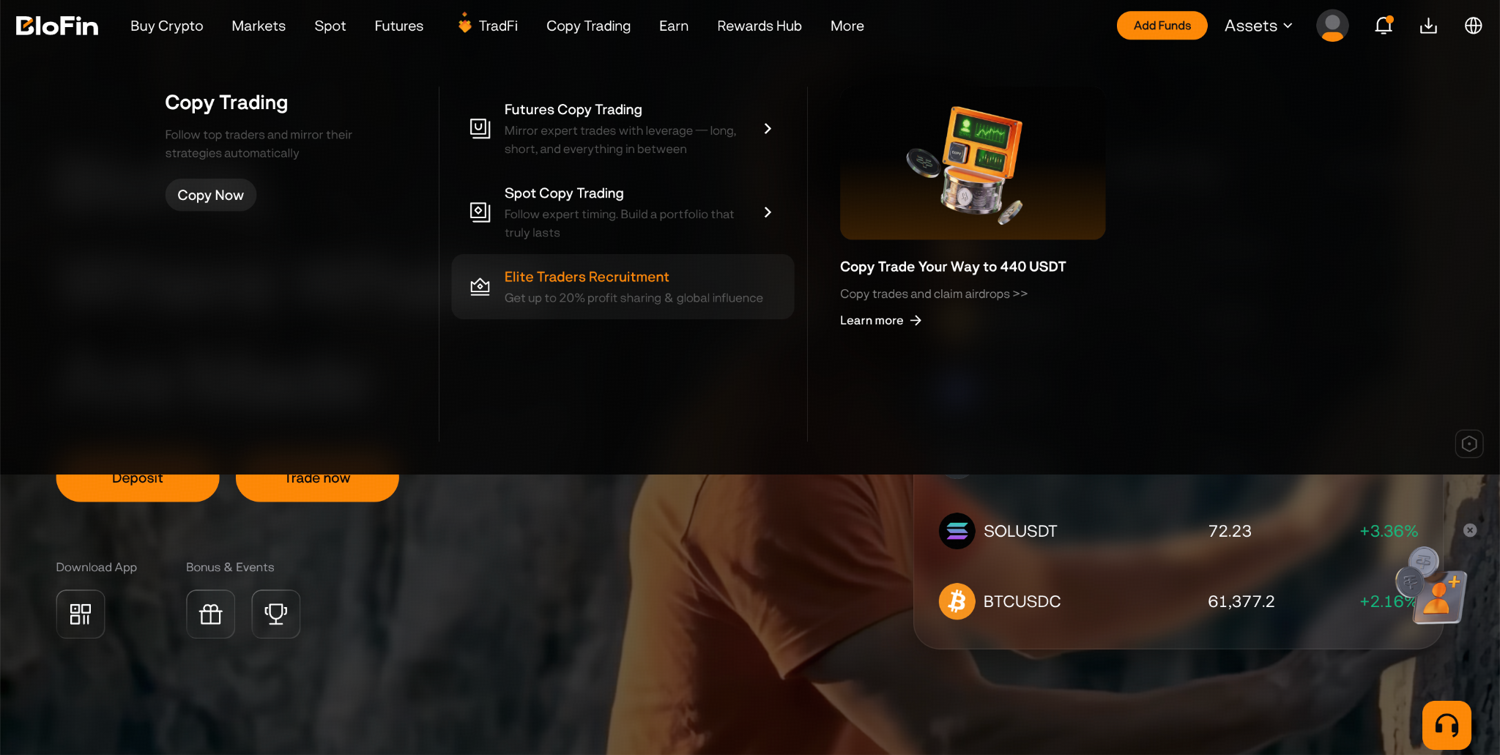
To apply, open the BloFin website's Copy Trading menu and select Elite Traders Recruitment. Fill in the application, choose whether to lead futures, spot or both, and accept the User Service Agreement. The form takes about three minutes, and your lead trader profile goes live once BloFin approves it.
Step 1: Log in to your BloFin account and hover your cursor over the Copy Trading tab in the navigation bar. Then, select Elite Traders Recruitment.
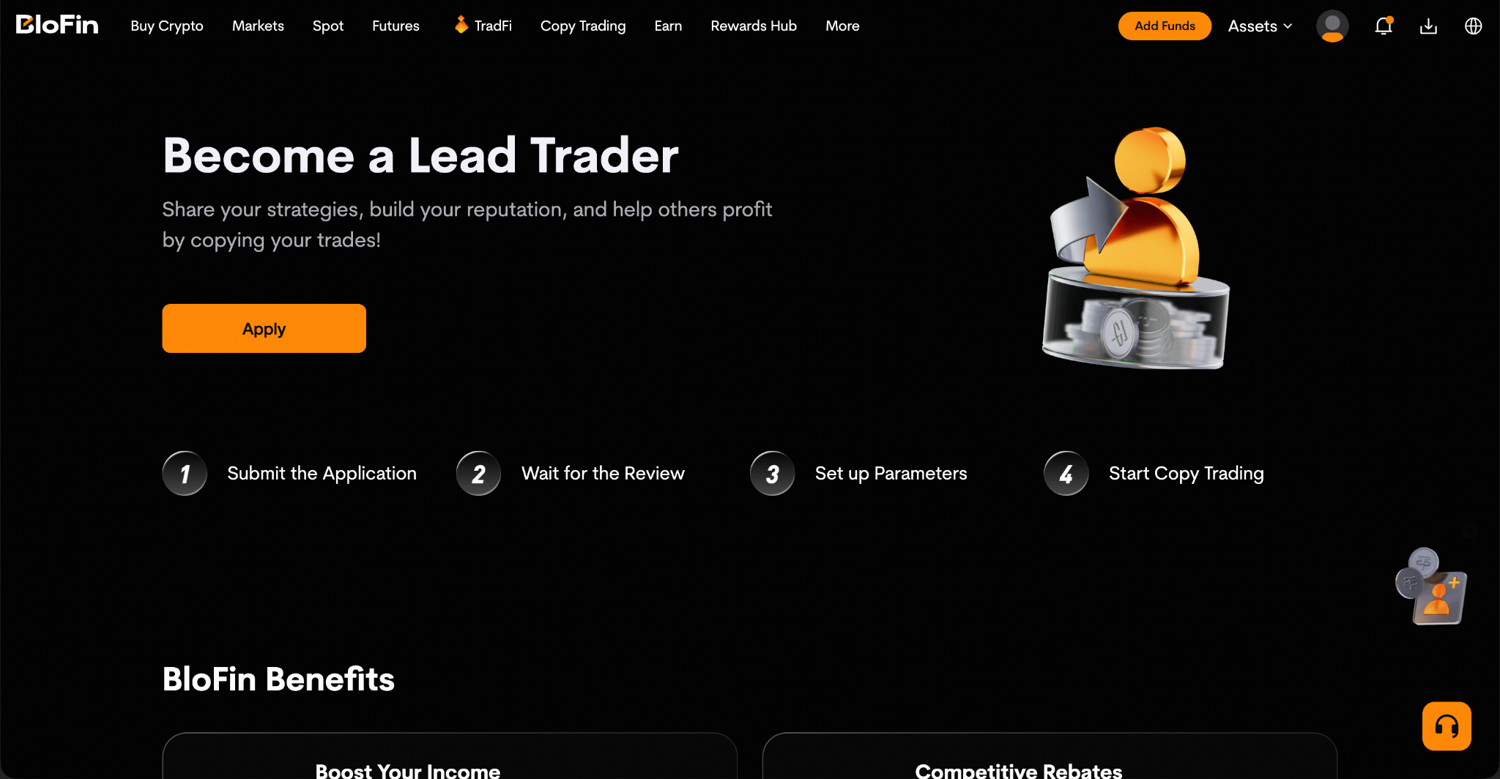
Step 2: Click Apply.
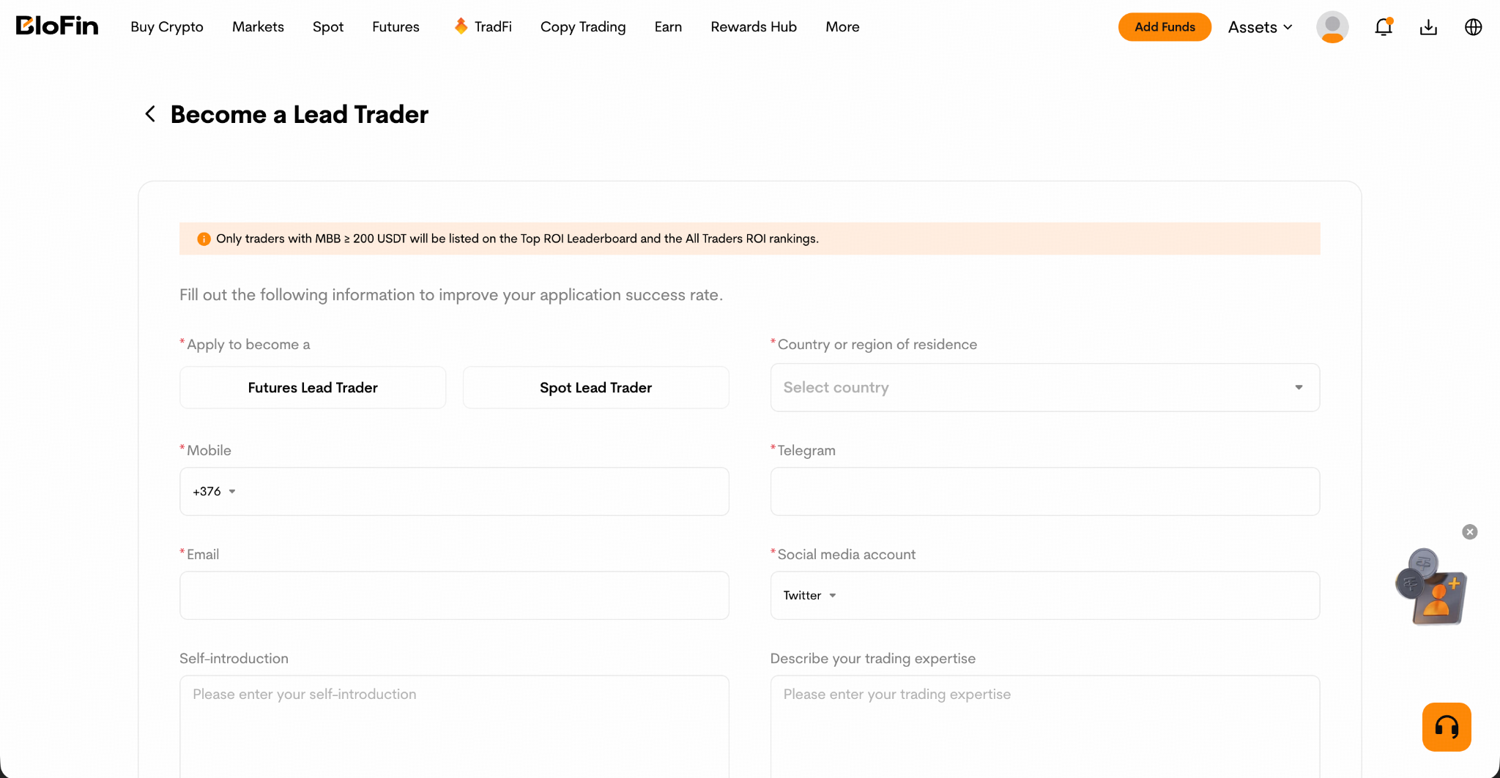
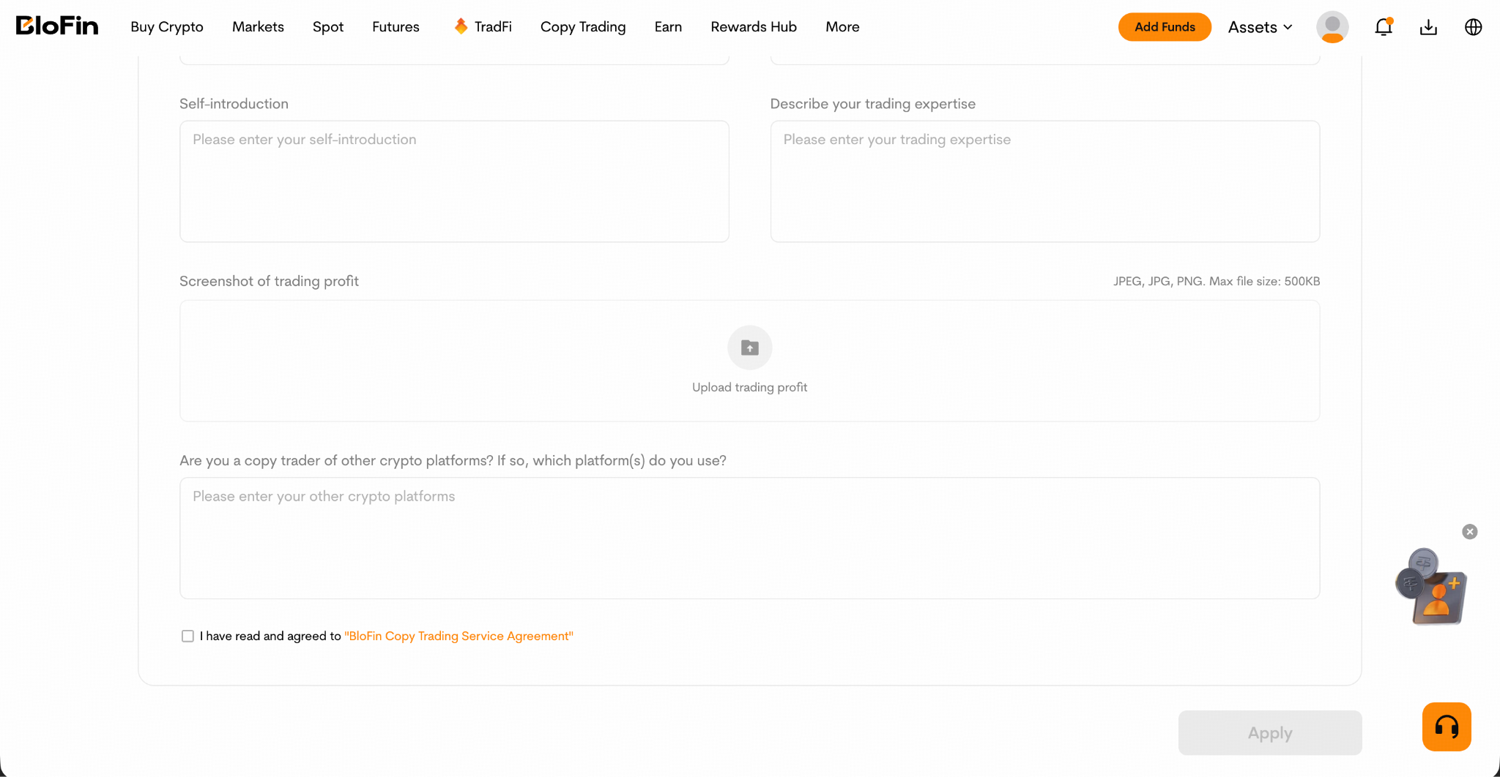
Step 3: Fill in the required information and select whether you want to be a Futures or Spot Lead Trader. You may also select both. Read the User Service Agreement, check the agreement box, and click Apply to submit.
Step 4: Once approved, your lead trader status becomes active and your profile becomes visible in Copy Trading. Strong performance can earn you a spot on the Leaderboard.
Send the form once. If BloFin has already received your application, the page tells you not to submit another one.
Coin-margined lead trading has its own route. To lead coin-margined futures, you open a new main account and apply on the web by submitting a ticket to Customer Support, because an existing lead trader account can't be used. The Coin-M lead trader guide explains what changes when your record is counted in coins.
How to fund your lead trading account
Lead trades run from a dedicated Copy Trading Account, so you move assets into it before you open your first lead position. Transfers can come from your Funding Account, Spot Account or Futures Account. The balance in the Copy Trading Account is kept for copy trading only, apart from the rest of your money.
To take money out, you first transfer it back to your Funding Account, and every transfer is recorded in your Transfer History. Your own balance also counts toward your assets under management (AUM). That is the combined value of your money and your copiers' money, and copiers see it on your profile.
How to place lead trades on BloFin
A lead trade is an ordinary spot or futures order placed under the Copy Trading tab instead of the Standard one. On futures, you switch tabs on the trading page itself. On spot, you open My Lead Trades from the Spot Copy Trading page, and your copiers' accounts follow each order you place there.
For futures lead trading:
Step 1: On the Futures trading page, switch the tab at the top right from Standard to Copy Trading.
Step 2: Place your futures order as usual. Trades placed under the Copy Trading tab become your lead trades.
For spot lead trading:
Step 1: Go to Copy Trading, select the Spot tab, then go to My Lead Trades and click Open Positions.
Step 2: The Spot Copy Trading interface mirrors the standard Spot Trading layout. Search for your trading pair, enter your order details, and make sure you're placing the order under the Copy Trading tab.
How partial closes reach your copiers
When you close part of a position, your copiers close the same share of theirs. Say you hold 1 BTC and close 0.2 BTC, leaving 0.8 BTC open. A copier holding 0.5 BTC through you then closes 0.1 BTC and keeps 0.4 BTC. If an order is smaller than the pair's minimum order amount, BloFin executes it for neither you nor your copiers.
Partly filled limit orders need more care. Copiers can't follow an order that has only filled in part, so BloFin asks you to confirm before you cancel one. Canceling a partial fill can leave your position and your copiers' positions out of line.
How profit sharing works for BloFin lead traders
Profit sharing pays you a percentage of each copier's net profit over your sharing period, from the closed trades and bots they copy from you. You set the rate, which is 10% by default and at most 20%, and choose whether you're paid daily, weekly or monthly. A copier who ends the period with a net loss pays you nothing.
Profit Sharing Ratio
The Profit Sharing Ratio is the percentage of a copier's profit that goes to you. You can change it once a month, and the new ratio applies from the next sharing period. It only takes effect if you have no partly closed trades at the end of the current period, so finish those first. A higher ratio pays you more from each profitable copier, but it also leaves each copier less of their own profit.
Profit Sharing Period
The Profit Sharing Period sets how often your share is credited. Daily credits it every day at 12AM UTC, Weekly every Monday at 12AM UTC, and Monthly at 12AM UTC on the first day of each month. You can edit the period once a month. After a change, you receive everything pending on the following day, and payments follow the new schedule from then on.
Where your profit share is paid
Realized Profit Sharing on your dashboard is the share that has been settled and paid out. BloFin describes it as distributed to your Funding Account. Unrealized Profit Sharing is the amount held back but still waiting to settle, and it can fall before then, for example when a copier's later losses mean part of it is refunded. The Credit Account setting chooses where settled shares go. You can change it once a day, and the change applies straight away.
How your profit share is calculated
A copier's net profit and loss (P&L) on a position is its profit minus the opening and closing fees. A position that made 50 USDT and paid 5 USDT to open and 10 USDT to close counts as 35 USDT. BloFin works that figure out every day and offsets profits against losses inside the sharing period. It also holds back part of each profitable day's profit in advance.
At settlement, BloFin reconciles the whole period. You receive your percentage of the copier's net profit, and anything held back beyond that goes back to the copier. Take a copier whose positions made 150 USDT of net profit over a weekly period, with your ratio at 10%. You receive 150 × 10% = 15 USDT. If 50 USDT had been held back from that copier during the week, the other 35 USDT is refunded to them.
A contract settles only once it has no open positions. If a copier still holds a bitcoin position at the end of the period, the profit or loss on that contract carries into the next one. A position you keep open for several weeks pays its share only after you close it.
Fees come off before your share is worked out, so in a losing week they add to what your copiers lose. A copier's position on the BTCUSDT Perpetual, for example, pays a standard trading fee to open and another to close, at the rates on BloFin's fee schedule. A strategy that trades very often therefore costs your copiers more in a bad week and leaves less net profit to share in a good one.
How to set up your lead trader profile
Your lead trader profile is what copiers read before they follow you, and its settings decide who is allowed to follow. Start with your bio and notifications. Then choose between open copying, invitees only or a whitelist, and decide whether your profile should appear in public search.
Bio takes up to 250 characters. Say plainly what you trade, how long you usually hold and how much leverage you use. That helps you attract copiers whose expectations match your style.
Trade Notifications send alerts for limit order fills, take-profit and stop-loss (TP/SL) triggers and liquidation warnings in your copy trading account.
Copiers are told to ask what the person they follow gets out of it. The Financial Industry Regulatory Authority (FINRA), which oversees US brokerage firms, advises anyone following investors online to ask what that person might gain from promoting something (source: FINRA, Following the Crowd). For a lead trader, the answer is the profit share. A bio that is honest about your style builds more trust than a boast.
Who can copy your trades
Copiers Limit sets who may copy you. With No Limit, anyone can copy your trades. With Direct User Only, copying is limited to your direct invitees, and a third option limits it to users under the same first-tier affiliate as you.
The Copier Whitelist lets only users on your list become new copiers. Switching it on leaves existing copiers where they are, and you can still remove any of them from the Current Copiers list. The whitelist has no effect while Direct User Only is on. In that case, invite people through an invitation link and turn on Invitees Only in that link's settings.
You create invitation links under Invitations in your User Center. Each link carries its own title, link code, expiry time and maximum number of invitees. Auto Whitelist adds everyone who accepts one to your whitelist. Private mode keeps your profile out of public search, so copiers can follow you only through your exclusive link.
Each lead trader can take up to 200 copiers, and your card on the copy trading page shows how many of those places are filled.
How to use SyncMaster on BloFin
SyncMaster lets you set the copy settings for copiers who use Smart Copy, and its Forced Sync option makes those settings binding. With Forced Sync on, copiers can't change the leverage, margin mode or TP/SL you set. With Forced Sync off, which is the default, your settings are only recommendations that each copier can change.
It matters most when your results depend on those settings. A strategy that works at 3x leverage with a stop on every order becomes a different strategy for a copier who runs it at 20x with no stop. The US Commodity Futures Trading Commission (CFTC) warns that leverage amplifies the underlying risk, and that a trader can end up losing more than they put in (source: CFTC, Understand the Risks of Virtual Currency Trading). Locking the settings keeps your copiers' results closer to your own record.
To switch SyncMaster on, you need no open positions, and it works with Smart Copy only. You can set:
Minimum Investment for copiers, from 100 USDT to 100,000 USDT. Copiers can't copy you with less.
Margin mode, with three choices: copy your own, isolated or cross.
Leverage, which copies your own leverage.
TP/SL per order, based on a price percentage or a PnL percentage.
On the web, open Copy Trading, then My Copy Trading, Settings and Copy Settings. In the app, open Copy Trading, then My Lead Trades, tap the settings icon and choose SyncMaster.
A separate Margin Sync setting copies your margin adjustments to your copiers. Margin you add to keep a position away from its liquidation price is then added on their side as well.
How to set an account stop-loss as a lead trader
Account Stop-Loss closes every open position in your USDT-M futures lead trading account at market once the account's loss reaches a target you set. Your copiers' matching positions close along with yours. BloFin added it on October 23, 2026, and it stays off until you switch it on.
The loss is measured from your account equity at the moment you confirm the setting. It counts realized and unrealized profit and loss and funding fees, while deposits and withdrawals are left out. To switch it on, your lead trading account needs more than 50 USDT of equity and no open positions. Once it's running, you can adjust the target loss even with positions open.
When it triggers, your copying relationships stay in place, so copiers keep following your next trades. You can switch the stop-loss on again afterwards. Turning it off clears both the target and the starting equity it measured from. It covers futures lead trading accounts only and leaves trading bots out.
The exit price is a market price. Investor.gov explains that when the stop price is hit, a stop order is filled as a market order, so in a fast-moving market the fill can land some way from that price (source: Investor.gov, Stop Order, FINRA, Stop Orders).
BloFin gives the same warning: in a volatile market, slippage can push the actual loss past the target. A stop-loss on each position still limits single trades, while the account stop limits a run of them.
How copiers judge your performance as a lead trader
Copiers judge a lead trader on ROI, maximum drawdown, risk-adjusted ratios, win rate and AUM, and on the tags BloFin assigns from recent trading. The way you trade through a sharp week stays on your profile for as long as that week falls inside the period a copier is viewing.
ROI is your return measured against the most capital you put to work.
Maximum Drawdown (MDD) measures the deepest drop your account has taken from a high to the low that followed, and a week like the one to November 22 can set a new one. The guide to handling drawdowns shows how to tell an ordinary losing spell from a strategy that has stopped working.
Sharpe Ratio sets your return against how much it swings, so a Sharpe ratio rewards steady gains over the same gains reached through big ups and downs. The Sortino Ratio looks only at your losing swings, so sharp losses pull it down while big upward swings don't count against you.
Calmar Ratio compares your ROI with your maximum drawdown.
Win Rate is your share of profitable closed positions. Nine winners out of ten still add up to a loss when the tenth trade gives back more than the nine made together.
Tags sit on top of those figures. Top ROI and Top Profit go to the strongest performers over 30 days, Low Risk to the traders with the lowest drawdown, and Rising Star to new traders with strong recent results. High Leverage marks an average of more than 20x over 30 days and Low Leverage one under 10x. High and Low Frequency show how often you trade compared with other lead traders.
Copiers also measure you against their own risk tolerance. Investor.gov describes it as how much of an investment someone is able and willing to lose in return for the chance of bigger gains (source: Investor.gov, Risk Tolerance). Crypto tests that tolerance hard, since FINRA describes crypto assets as risky and often extremely volatile (source: FINRA, Crypto Assets: Risks). Being clear about your leverage and holding style helps you attract copiers whose tolerance fits the way you trade.
How to manage copiers in the Lead Trader User Center
The Lead Trader User Center, under My Copy Trading, is where you run your lead trading day to day. It shows your total assets, AUM and realized and unrealized profit sharing. It also lists your current copiers and lets you manage open positions, look back over past lead trades and create invitation links.
Current Copiers lists everyone following you, with their equity, profit-sharing ratio and how long they've been copying. You can search it by user ID (UID).
The positions view shows your open lead positions by order or by contract. Viewing by contract merges orders in the same direction into one position, which gives a cleaner picture of your overall exposure. From there you can set or change TP/SL and close positions by hand. Position History lists your completed lead trades by contract, with entry and closing prices, P&L and the number of copiers who took part.
How to grow your copier base on BloFin
Copiers find lead traders through BloFin's copy trading lists, including Daily Picks, the Leaderboard and the Top Copiers' PnL ranking. They also arrive through links that lead traders share themselves. A steady record gets you seen on the lists, while sharing your profile brings in people who already know how you trade.
BloFin's ROI lists have an entry rule. Since July 31, 2026, a lead trader needs at least 200 USDT on a balance measure BloFin calls MBB to be listed on the Top ROI Leaderboard and the All Traders ROI rankings.
To share your profile, go to Copy Trading, then My Lead Trades, and click My Profile. From there you can share your profile link or create a shareable image with the sharing icon. Custom invitation links come from the Invitations section of your User Center. Lead traders who grow their influence may also earn up to 50% commission on the trading fees of new invitees.
Worried that one bad week could hurt your copiers as much as your record? On BloFin, SyncMaster with Forced Sync on fixes the leverage, margin mode and TP/SL your Smart Copy copiers use. An Account Stop-Loss closes your futures lead positions, and your copiers' matching ones, at market when your account's loss reaches the target you set. To get started, you'll need to first create a BloFin account, fund your account with cryptocurrency, and go to the Futures Copy Trading page.

Frequently asked questions
Do I need to stop copying other traders before I apply to be a lead trader?
Yes. BloFin asks you to close your copied position or stop copying your current lead trader before you apply to become one yourself, and the application shows a warning while a copy is still running. When you stop copying, BloFin moves the assets in your Copy Trading Account back to your Funding Account automatically. You can then move them back in to fund your lead trades.
Is there a cap on how much a BloFin lead trader can earn?
You can earn up to 20% of your copiers' profits, credited directly to you with no cap. The 20% is a ceiling on the rate, while the amount has none. What you earn grows with the number of copiers, the money they invest and the net profit your trades make for them.
Can people see my trades on BloFin before they copy me?
Yes, unless you hide them. People thinking of copying can look at a lead trader's open positions and trade history first. BloFin has a setting that limits your trades and asset details to the people already copying you, and anyone else then sees a note that you have hidden your trading info from non-copiers. Hiding your trades can make new copiers more cautious, since they can't check how you trade before they commit money.
Can I trade normally and run a lead trader account at the same time?
Yes. Your Copy Trading Account is separate from your regular trading accounts, so manual trades in your Futures or Spot Account aren't copied and don't affect your lead trading activity. Only orders you place under the Copy Trading tab become lead trades, which makes it worth checking the tab before every order.
Can I remove a copier on BloFin?
Yes. Open Current Copiers in your Lead Trader User Center, find the copier, searching by UID if you need to, and confirm the removal. BloFin limits how many copiers you can remove each day and shows how many removal slots you have left. To stop a removed copier from joining again, turn on the Copier Whitelist and leave them off your list.
Written by the BloFin Academy editorial team. Nothing in this article constitutes financial advice, and nothing in it promises copiers or income to a lead trader. Your losing trades are copied into every copier's account, profit sharing is paid only on copiers' net profit, and an Account Stop-Loss can close positions beyond its target when the market moves fast. BloFin services are not available in restricted locations, including the United States. Past performance does not indicate future results.