
BloFin is a crypto exchange offering futures, spot trading, copy trading, automated bots, and earn products. Before you can access any of it, you'll need to create an account.
The good news is it only takes a few minutes. This guide covers the full sign-up process on both web and mobile, what to do right after registration to secure your account, and how to claim your welcome bonus as a new user.
What you'll need
Before you start, have one of the following ready:
A valid email address, or
A phone number, or
A Google account, or
An Apple ID
Any one of these works as your login method.
How to create a BloFin account on web
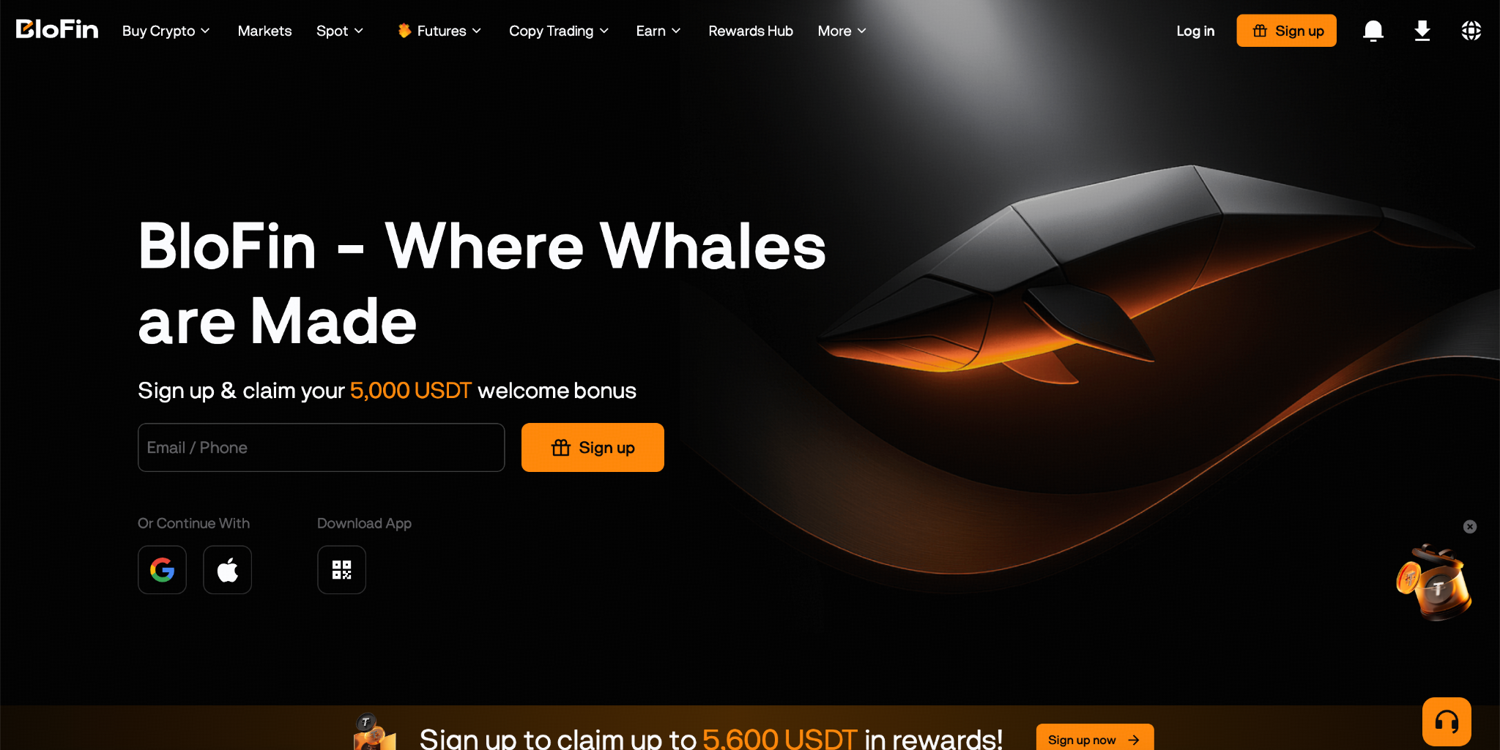
Step 1: Go to the official BloFin webpage and click Sign up in the top right corner.
Step 2: You may choose to register with your email address or phone number. Simply enter your details and create a password. If you have a referral code, you can input it under the Referral code (optional) field.
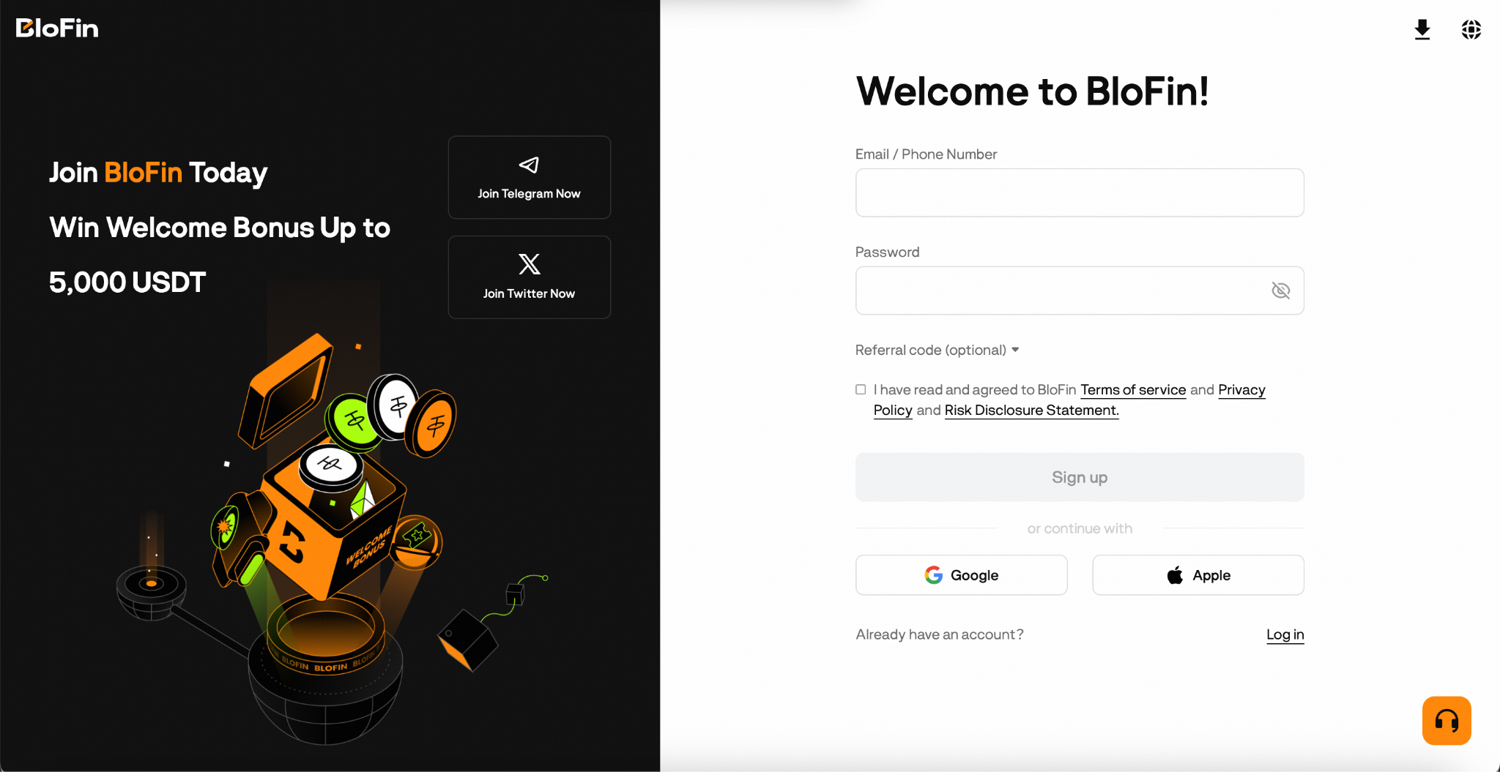
Step 3: Check the box to confirm you have read and agreed to BloFin's Terms of Use and Privacy Notice, then click Sign up.
Step 4: A six-digit verification code will be sent to the email address or phone number you provided. You have five minutes to enter it. Once you do, click Confirm.
Congratulations, your BloFin account has been created!
Alternatively, you can sign up using your Google account or Apple ID by selecting the relevant option on the sign-up page. This skips the password step and links your BloFin account to your existing login.
How to create a BloFin account on mobile
Step 1: Download the BloFin app from the Apple App Store (iOS) or Google Play Store (Android).
Step 2: Open the app and tap Sign up / Log in.
Step 3: On the account creation screen, enter your email address or phone number and create a password. You can also enter a referral code if you have one.
Step 4: Read and agree to the Terms of Use and Privacy Policy and tap Sign up.
Step 5: Enter the six-digit verification code sent to your email or phone within five minutes and tap Confirm.
Congratulations, you can now begin your crypto journey with BloFin!
Password requirements
BloFin passwords must be between 8 and 32 characters and include a mix of uppercase letters, lowercase letters, numbers, and symbols. Avoid using the same password you use on other platforms. Using a unique password for your BloFin account is one of the simplest ways to protect it.
What to do right after signing up
Creating the account is the first step. Before you deposit anything, take a few minutes to lock down your account security.
Set up Google Authenticator (2FA). This is the most important thing you can do. It adds a second layer to every login and withdrawal so that a compromised password alone isn't enough to access your account. Full setup guide: BloFin Account Security: How to Protect Your Funds as a User
Set your anti-phishing code. A short personal code that appears in every official BloFin email, making fake phishing emails immediately identifiable. Takes two minutes to set up in Account & Security settings.
Complete identity verification (KYC). KYC is required to access full withdrawal limits and certain features on BloFin. The sooner you complete it, the less friction you'll have when you're ready to trade.
Start exploring BloFin
Once your account is secure and verified, the full platform is open to you. Here's what you can do on BloFin:
Fund your account: deposit crypto or buy it directly on the platform to get started. For a step-by-step guide, you can check out our article on making a deposit.
Trade futures: access over 539 perpetual contract pairs with leverage up to 150x
Trade spot: buy and sell crypto at real-time market prices with direct asset ownership
Copy trading: follow and automatically mirror the trades of experienced traders on the platform
Automate with bots: run Grid, DCA, Signal, or TWAP strategies without watching the market manually
Earn on idle assets: put unused crypto to work through Simple Earn, RWUSD, or Dual Investment
Explore the full breakdown of every product in BloFin Features Explained. Terms and Conditions shall apply.
Your welcome bonus
As a new user, you are eligible for up to 5,000 USDT in welcome rewards. Complete a set of tasks in the first few days after registration and you'll unlock Mystery Boxes containing Futures Bonuses, vouchers, tokens, and more. There is also a deposit and trading challenge within 14 days of signing up that gives you the chance to earn up to 5,000 USDT in Futures Bonus rewards.
One thing to know: Futures Bonuses work as trading margin, not withdrawable cash. They offset futures trading fees and can cover up to 50% of losses, giving you a cushion while you get familiar with the platform.
Terms and Conditions shall apply.
Frequently asked questions
Can I sign up with a phone number instead of an email?
Yes. BloFin lets you register with either an email address or a phone number. You can also use your Google account or Apple ID to sign up without creating a separate password.
Can I have more than one BloFin account?
BloFin allows users to create sub-accounts under a main account, which is useful for separating trading strategies. However, each individual is only permitted one main account. Creating multiple main accounts is against BloFin's Terms of Use.
What should I do if I don't receive the verification code?
Check your spam or junk folder if you registered with an email. If using a phone number, make sure the country code is correct. If the code still hasn't arrived after a few minutes, you can request a new one from the verification screen.
Disclaimer: This content is for educational purposes only and does not constitute financial, investment, legal, or tax advice. Crypto assets are highly volatile and carry significant risk of loss. Always verify local regulations and consult a qualified professional before making financial decisions. For more information, refer to BloFin Terms of Use.