
Copy trading on BloFin isn't just for people who want to follow others. If you're already trading actively and generating consistent results, you can open your strategy to followers and earn a share of the profits your copiers generate. Being a lead trader doesn't require you to change how you trade. It just means other traders can automatically mirror your positions, and you get compensated when those trades are profitable.
This guide covers how to apply, what to set up before you start, how profit sharing works, and the tools available to help you manage your following effectively.
Who should consider becoming a lead trader
Becoming a lead trader works best for traders who already have an established trading approach, generate consistent activity, and are comfortable with transparency around their performance. Your ROI, drawdown history, win rate, leverage usage, and other metrics are all visible to potential copiers. That level of exposure is a feature for traders with strong track records, but it's worth thinking through before applying.
You don't need to be a professional trader. BloFin's copy trading is open to any verified account. What matters more is whether you're trading actively enough to provide copiers with regular positions to follow, and whether your strategy is coherent enough that others can reasonably decide to follow it.
How to apply to become a lead trader
The application process takes around three minutes.
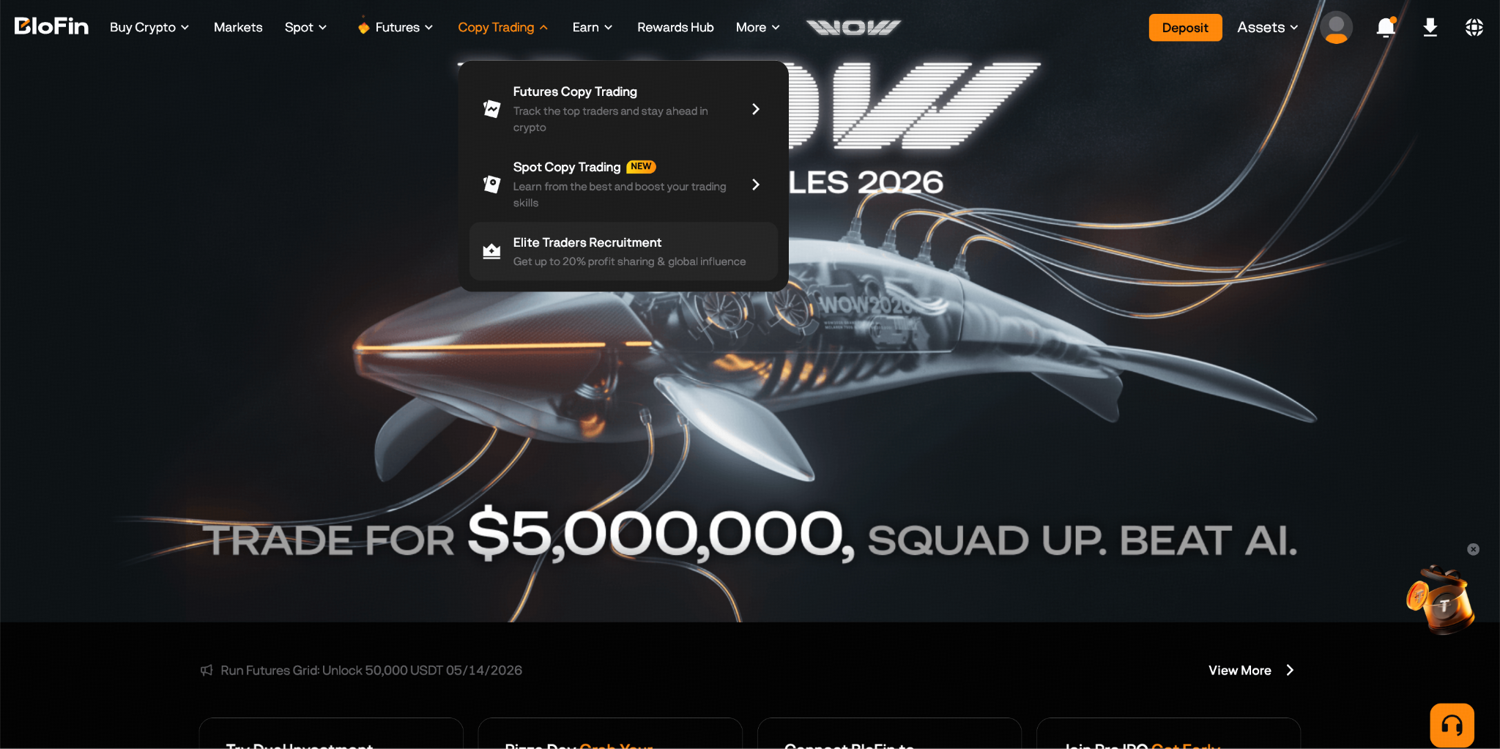
Step 1: Log in to your BloFin account and hover your cursor over the Copy Trading tab in the navigation bar. Then, select Elite Traders Recruitment.
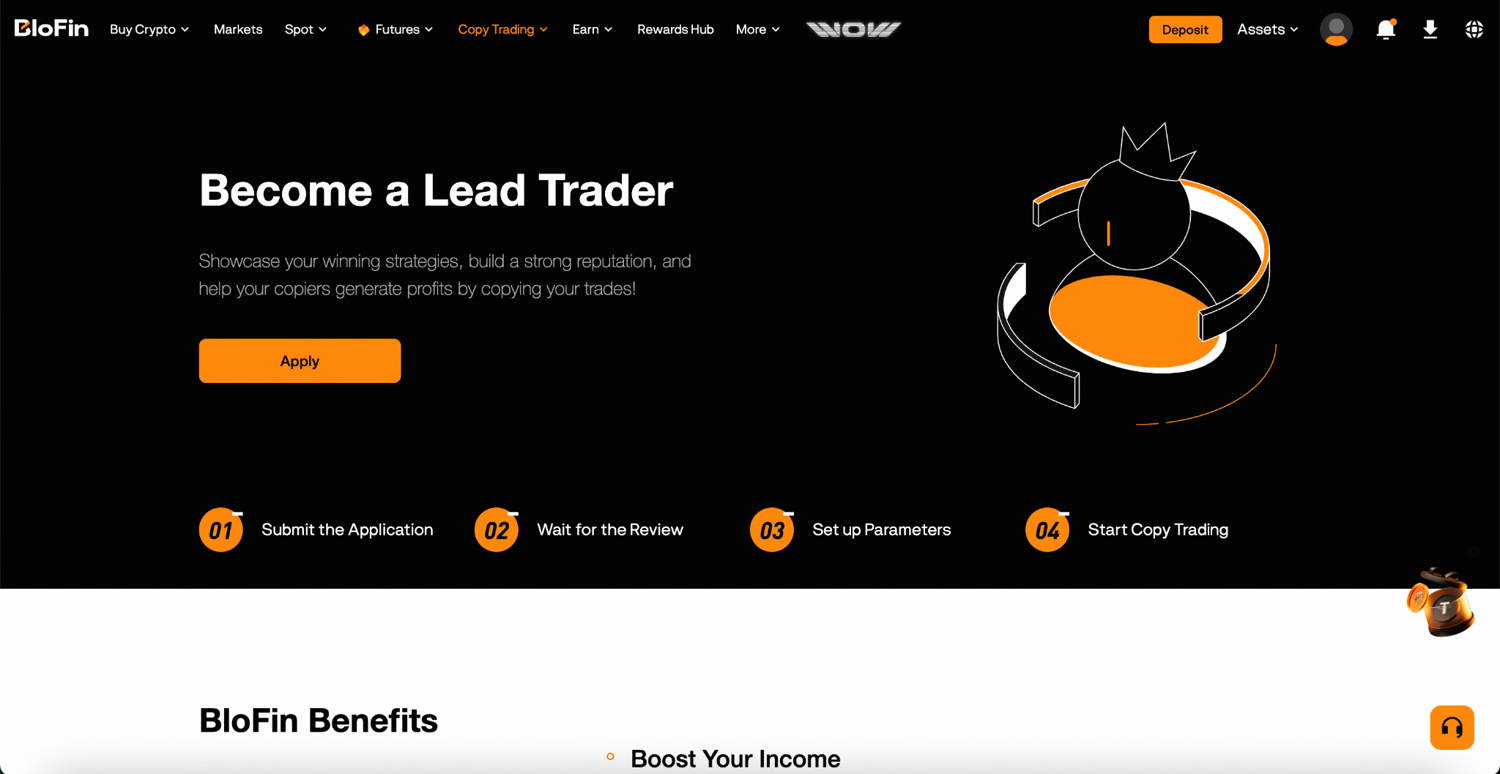
Step 2: Click Apply.
Step 3: Fill in the required information and select whether you want to be a Futures or Spot Lead Trader. You may also select both. Read the User Service Agreement, check the agreement box, and click Apply to submit.
Step 4: Once approved, your lead trader status becomes active and your profile becomes visible in Copy Trading. Strong performance can earn you a spot on the Leaderboard.
Funding your copy trading account
Before you can start placing lead trades, you need to transfer assets into your dedicated Copy Trading Account. Funds can be transferred from your Funding Account, Spot Account, or Futures Account. Without assets in the Copy Trading Account, you cannot open positions.
Assets in your copy trading account are isolated for copy trading use only. To withdraw, you first need to transfer them back to your Funding Account. All transfer activity is recorded in your Transfer History.
Placing lead trades
For Futures lead trading:
Step 1: On the Futures trading page, switch the tab at the top right from Standard to Copy Trading.
Step 2: Place your futures order as usual. Trades placed under the Copy Trading tab become your lead trades.
For Spot lead trading:
Step 1: Navigate to Copy Trading, select the Spot tab, then go to My Lead Trades and click Open Positions.
Step 2: The Spot Copy Trading interface mirrors the standard Spot Trading layout. Search for your trading pair, enter your order details, and make sure you're placing the order under the Copy Trading tab.
How profit sharing works
You can earn up to 20% of the net profits your copiers generate from following your trades. Lead traders earn a share of copiers’ net profits. The default profit-sharing rate is 10%.
The settlement cycle runs Monday 0:00 UTC to Sunday 23:59:59 UTC, with profit sharing distributed to your Copy Trading Account every Monday at 3:00 AM UTC.
Here's how the calculation works in practice. Each day, the system calculates your copiers' net P&L (position profit minus opening and closing fees) and deducts up to 20% of any daily profits as an advance. At settlement on Monday, the system reconciles the actual net profit for the full week. If your copiers ended the week with a net profit, you receive up to 20% of that total, depending on the profit sharing percentage you’ve set. Any advance deductions that exceeded the final percentage gets refunded back to the copier's account.
Critically, profits are only settled for a contract once all positions in that contract are closed. If a copier still has open positions in BTCUSDT, for example, the P&L from that contract carries forward to the next settlement period.
A worked example: If copier Ann's positions generate net profits of 150 USDT over a settlement week, you receive 15 USDT (150 × 10%), assuming a 10% profit sharing. If Ann had 50 USDT in advance deductions taken during the week, 15 USDT goes to you and 35 USDT is refunded to Ann.
You can track your realized and unrealized profit sharing from the Lead Trader User Center under My Copy Trading.
Your Lead Trader User Center
Your User Center gives you a complete view of your copy trading operation.
Account overview shows your total assets in the copy trading account, your AUM (your own investment plus all copiers' combined investment), total realized profit sharing earned, and unrealized profit sharing that's been deducted from copiers but not yet distributed.
Current Copiers lets you see everyone following you, with their equity, profit sharing ratio, and how long they've been copying. You can accommodate up to 200 copiers.
Position view shows your active positions either by individual order or by contract. Viewing by contract merges multiple orders in the same direction into a single position, which is cleaner for understanding your overall exposure. You can set or modify TP/SL and manually close positions from this section.
Position History shows your completed lead trades listed by contract, including entry price, closing price, P&L, and the number of copiers who participated.
Invitations lets you create customized invitation links for your copy trading with specific titles, link codes, expiry times, and maximum invitee caps. You can also enable Auto Whitelist to automatically add accepting invitees to your whitelist, or Invitees Only to restrict your copy trading to people you've personally invited.
Setting up your profile
Your profile is what potential copiers see before deciding to follow you. A few settings worth configuring carefully:
Profit Sharing Percentage defaults to 10%.
Bio accepts up to 250 characters. A clear, honest description of your trading approach helps attract copiers whose expectations align with your style, which reduces the friction of people stopping after one bad week.
Private Mode hides your profile from public search. Copiers can only reach you through your exclusive URL. Useful if you want to limit your following to specific communities or networks.
Trade Notifications lets you configure alerts for limit order fills, TP/SL triggers, and liquidation warnings in the copy trading account.
SyncMaster: Enforcing consistency across your copiers
SyncMaster (Forced Sync) lets you lock your trading parameters so that all copiers follow your strategy with the exact same settings. When enabled, copiers cannot modify leverage, margin mode, or TP/SL settings. They are fully aligned with whatever you configure.
This is useful if your strategy depends on specific risk parameters. A copier using different leverage or no stop-loss could have a significantly different experience from your own, which creates inconsistency between your track record and what your copiers actually get.
To enable SyncMaster, ensure you have no open positions first. It only works with Smart Copy Mode. You can set:
Minimum investment for copiers (100 USDT to 50,000 USDT)
Margin mode (copy your mode, isolated, or cross)
Leverage (copy trader's leverage)
TP/SL per order (based on price percentage or PnL percentage)
SyncMaster is available in Copy Trading settings on both web and app. On web: Copy Trading > My Copy Trading > Settings > Copy Settings. On app: Copy Trading > My Lead Trades > Settings icon > SyncMaster.
How your performance is measured
Copiers evaluate you on a range of metrics before deciding to follow. Understanding what each one represents helps you present your strategy honestly and attract the right type of follower.
ROI measures profitability relative to the maximum capital you've deployed. A high ROI means strong returns on the capital base.
Maximum Drawdown (MDD) is the largest peak-to-trough loss in your account. Lower is better for risk-conscious copiers.
Sharpe Ratio measures returns relative to volatility. A higher Sharpe Ratio means better risk-adjusted returns.
Calmar Ratio compares your ROI to your maximum drawdown. Higher indicates stronger returns relative to your worst loss period.
Sortino Ratio focuses on downside risk specifically. It rewards consistent upside without penalizing normal positive volatility.
Win Rate is your percentage of profitable closed positions. Note that a high win rate doesn't automatically mean high profitability. A 90% win rate with large losses on the 10% can still be a losing strategy overall.
AUM shows your own investment plus all copiers' combined assets, indicating the scale of capital following your trades.
You may also receive trader tags based on recent activity. Top ROI and Top Profit tags appear for the highest performers over 30 days. Low Risk is assigned to traders with the lowest drawdown. Rising Star highlights new traders with strong recent performance. High/Low Frequency and High/Low Leverage tags indicate your trading style relative to other lead traders.
Growing your follower base
Your profile appears on the Copy Trading leaderboard, where potential copiers filter by performance, risk level, and tags. Strong performance metrics will naturally surface your profile to relevant audiences.
Beyond organic discovery, you can share your profile directly by going to Copy Trading, My Lead Trades, and clicking My Profile. From there you can share your profile link or generate shareable images via the sharing icon. Custom invitation links with specific terms are available through the Invitations section of your User Center.
Ready to open your strategy to followers?
If you're already trading consistently and want to turn your activity into an additional income stream, applying as a lead trader takes a few minutes. Sign up for a BloFin account, head to the Copy Trading page on BloFin, select Elite Traders Recruitment, and submit your application to get started.
Frequently asked questions
Who can become a lead trader on BloFin?
Any verified BloFin user can apply to become a lead trader. There's no minimum track record required to apply, but your performance metrics will be visible to all potential copiers once your profile is active.
How much do I earn as a lead trader?
You receive up to 20% of the net profits generated by your copiers from following your trades. This is settled weekly every Monday at 3:00 AM UTC.
What happens if my copiers have a net loss for the week?
No profit sharing is distributed on net losses. The system offsets profit and loss amounts across the settlement period, so only actual net positive weeks trigger profit sharing.
Can I choose who follows me?
Yes. You can set your profile to Private mode, restricting access to your exclusive URL only. You can also use the Whitelist and Invitation Link features to control who can copy your trades.
What is SyncMaster and when should I use it?
SyncMaster locks your copy trading parameters (leverage, margin mode, TP/SL) so all copiers use your exact settings. Use it when your strategy's performance depends on specific risk parameters that shouldn't be altered by individual copiers.
Can I trade normally and run a lead trader account at the same time?
Yes. Your copy trading account is separate from your regular trading accounts. Manual trades in your Futures or Spot accounts don't affect your lead trading activity.
Disclaimer: This content is for educational purposes only and does not constitute financial, investment, legal, or tax advice. Crypto assets are highly volatile and carry significant risk of loss. Always verify local regulations and consult a qualified professional before making financial decisions.