Copy Trading Modes - Fixed Amount, and Fixed Ratio
July 15, 2026 at 06:25 AMWhat are the Copy Trading Modes on BloFin?
Fixed Amount Mode & Fixed Ratio Mode . Each mode gives you control over how much you want to invest and how closely you want to mirror the trader’s strategy.
Let’s break down what each mode does, how it works, and which one might be right for you.
Fixed Amount Mode
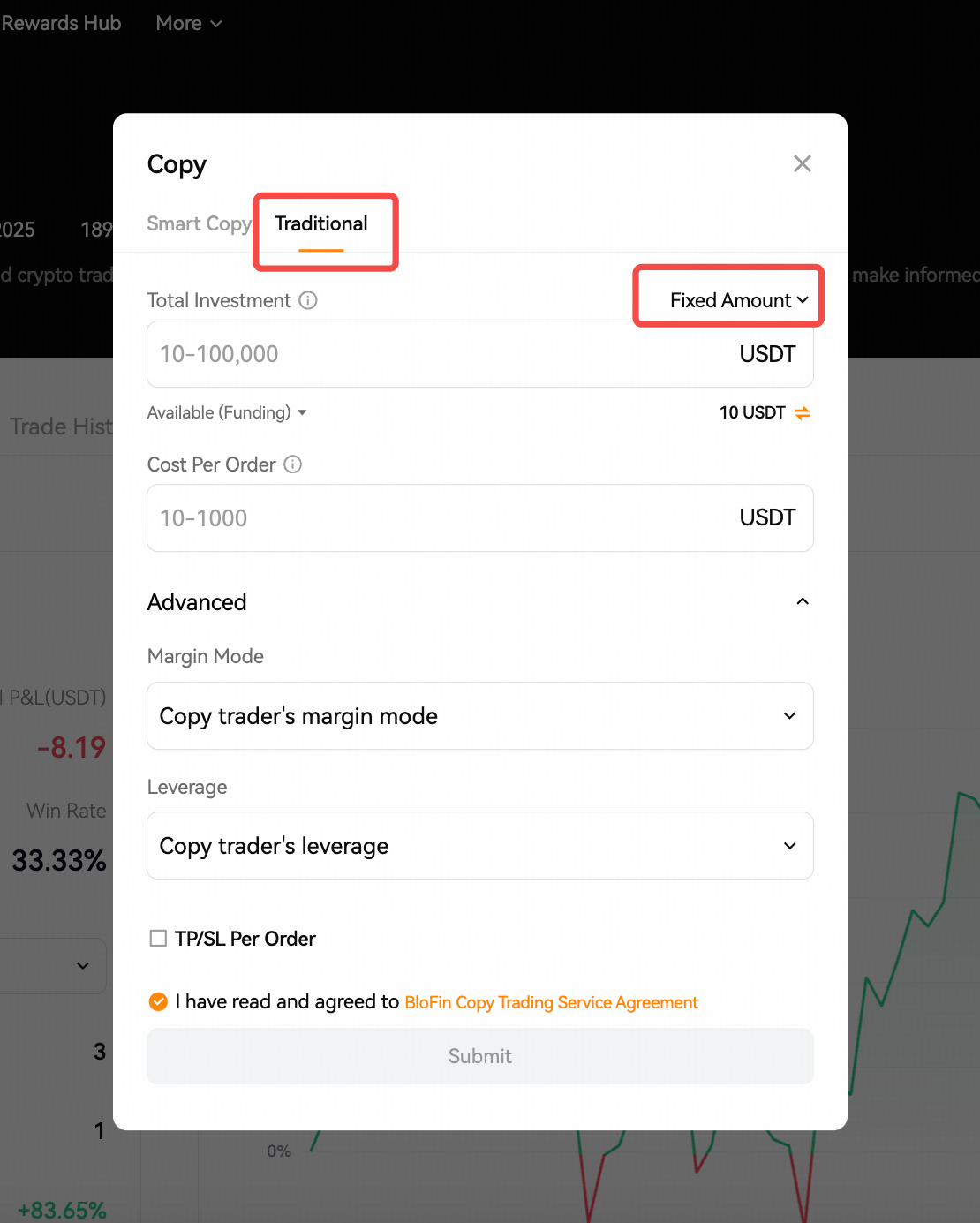
In Fixed Amount Mode, you choose a specific amount to invest per trade, regardless of how much the trader is trading. This means every time the trader opens a position, your copy trade will use the same fixed amount, no matter the size of trader's order.
Margin per order: each order will be opened at a fixed margin amount (cost per order).
What you can control:
1. Cost Per Order: You decide exactly how much to invest in each copied trade (e.g., $50 per trade).
2. Total Investment: Set a cap on how much you’re willing to invest in total for this trader. Once this limit is reached, no new trades will be copied.
3. Margin Mode: Choose how your margin is used:
Follow the trader’s margin mode
Use Cross Margin (margin is shared across all positions)
Use Isolated Margin (limits risk to individual trades)
4. Take Profit / Stop Loss (TP/SL): You can set limits to automatically close a trade when it reaches a profit target or loss limit — ideal for risk control.
5. Leverage: You can either copy the trader’s leverage or set your own fixed leverage.
Why choose this mode?
If you prefer to keep your investment amount consistent and want more control over risk per trade, Fixed Amount Mode is a simple and stable choice. It’s great for users who want predictability in how much they’re putting into each trade, especially if the trader uses large or inconsistent position sizes.
Fixed Ratio Mode
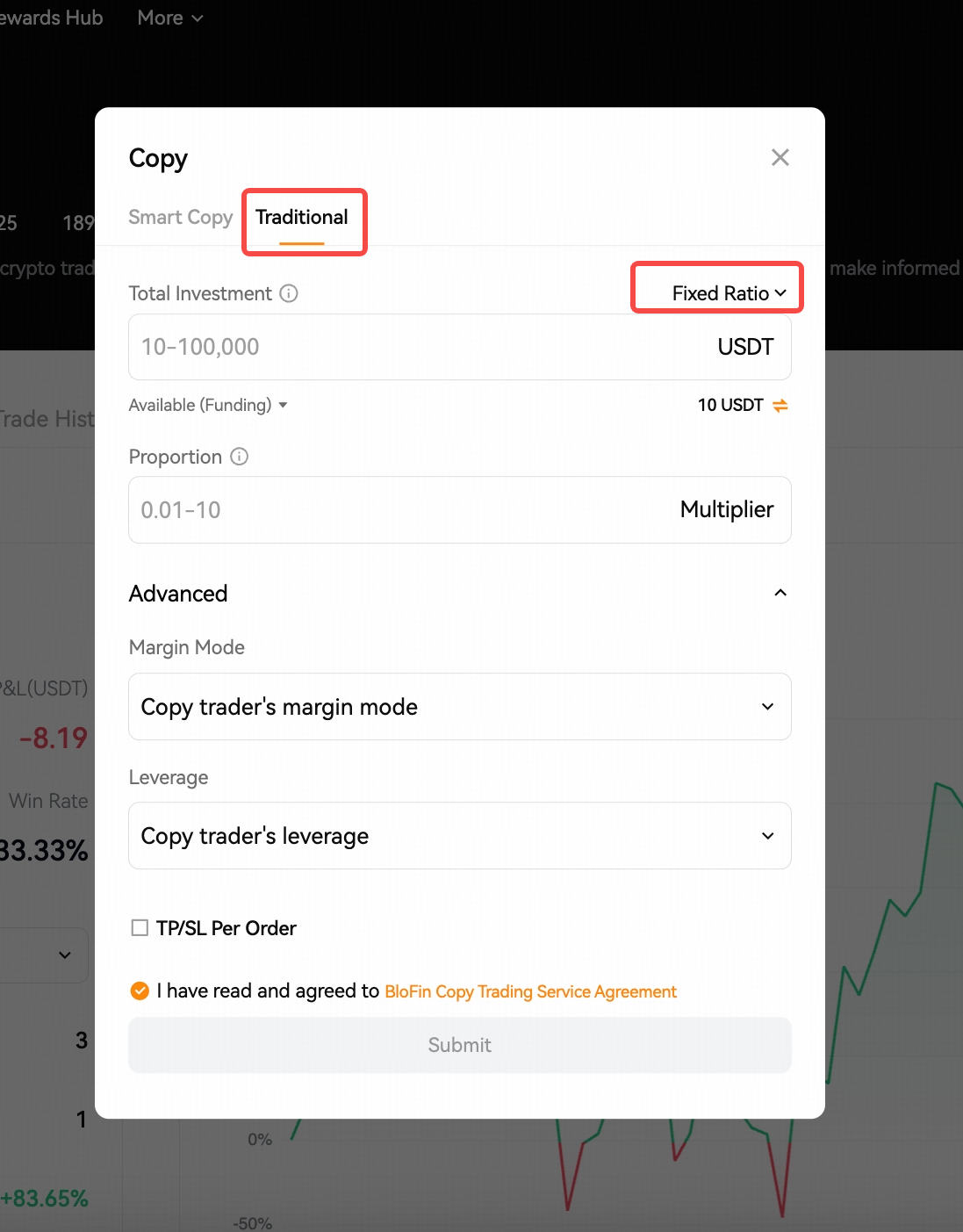
With Fixed Ratio Mode, your trades scale proportionally with the trader’s. Instead of investing the same amount every time, you set a multiplier that determines how your position size compares to the trader’s.
Margin per order = multiplier * trader's order value / your futures leverage
Example: your copy trading settings are as follow:
Total investment: 1,000 USDT
Proportion: 0.5
Leverage: 10x
If your trader opens a position with 0.1 BTC, the current market price of BTC is 95,000, in this case, the margin of your order is 0.5*0.1*95,000/10 = 475 USDT.
If trader's position size is 0.2 BTC, the margin would be 0.5*0.2*95,000/10 = 950 USDT
What you can control:
1. Total Investment: Set the overall amount you're willing to allocate to copy this trader.
2. Multiplier (Proportion Setting): Choose how big your trades should be compared to the trader’s. A 1x multiplier means you copy them 1:1. A 0.5x means your trades are half the size, and 2x means double the size.
3. Margin Mode: Same as Fixed Amount Mode—you can choose Cross Margin, Isolated Margin, or copy the trader’s.
4. TP/SL Settings: Optional, but you can set risk limits for each trade.
5. Leverage: Either copy the trader’s leverage or use your own fixed setting.
Why choose this mode?
Fixed Ratio Mode is ideal if you want your trades to mirror the trader’s strategy more closely. It’s more dynamic—your position sizes will grow or shrink depending on how much the trader is investing. This mode gives you the flexibility to scale your trades up or down based on how confident you are in the trader.