
Auto Breakeven FAQ
August 17, 2026 at 02:25 PMWhat is Auto Breakeven?
Auto Breakeven is a risk management feature that automatically moves your stop loss to the breakeven price once your target is reached, protecting your principal while letting your position run.
Why use Auto Breakeven?
❌ Without Auto Breakeven
- Manually calculate your cost price and adjust your stop loss after every profitable move
- Update your stop loss every time you add to or reduce a position
- Risk letting profits reverse into losses the moment you step away
- Prone to manual errors — such as forgetting to account for trading fees
✅ With Auto Breakeven
- Set it once — the system calculates and executes automatically
- Automatically recalculates whenever your position changes
- Your principal stays protected even when you're not watching
- All fees are factored in — no manual calculation required.
⚠️ When Auto Breakeven triggers, the position is closed via a market order. The actual fill price depends on market depth and slippage. This does not guarantee zero loss.
What does the Breakeven Price (BE Price) mean?
The breakeven price is the price at which your position's total PnL equals zero after all closing fees are deducted.
The system automatically factors in all position costs — including opening and closing fees and funding fees — and displays the calculated BE price in real time.
BloFin calculates this automatically in real time, factoring in opening and closing fees as well as funding fees.
As a general rule:
- For a long position, the BE price sits slightly above your entry price.
- For a short position, the BE price sits slightly below your entry price.
Example: You open a long 0.1 BTC position at 60,000 USDT and accumulate 5 USDT in fees → the BE price is calculated as ≈ 60,053 USDT. Your position needs to reach this price before closing to break even.
Always up to date: The BE price is automatically recalculated whenever you adjust your position size or when the funding rate changes. No manual input required.
How does Auto Breakeven work?
- Set up After opening a position, go to the TP/SL panel, select the Auto Breakeven tab, and configure the parameters for Auto Breakeven activation.
- Activation Once the market price reaches the configured parameters, the system automatically moves your stop loss to the BE price.
- What happens next
- ✅ The market continues in your favor — the BE line stays untriggered. Keep holding to capture further gains, or set a take profit to lock in profits early.
- 🛡️ The market reverses and hits the BE price — the system automatically closes your position, aiming to break even.
How do I enable Auto Breakeven?
Step 1. Open the trading page and scroll to the bottom of the Positions panel.
Step 2. Click Auto Breakeven.
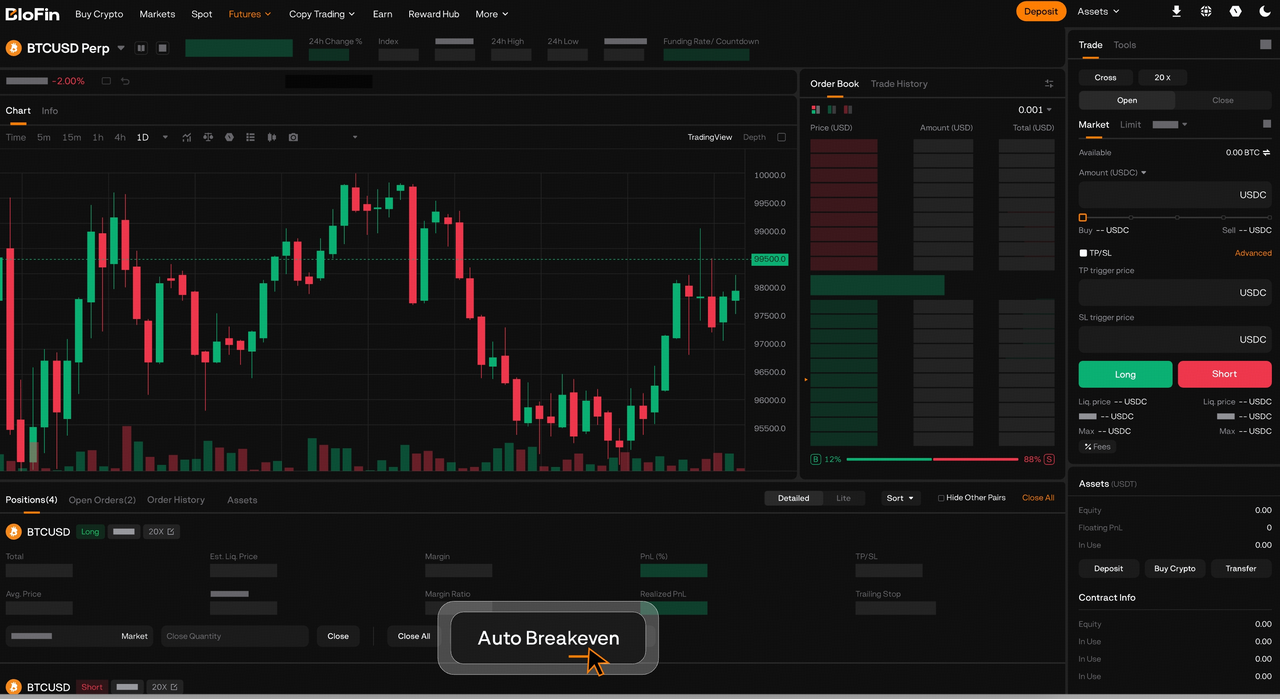
Step 3. Configure your parameters — set your activation parameters and adjust any other settings as needed.
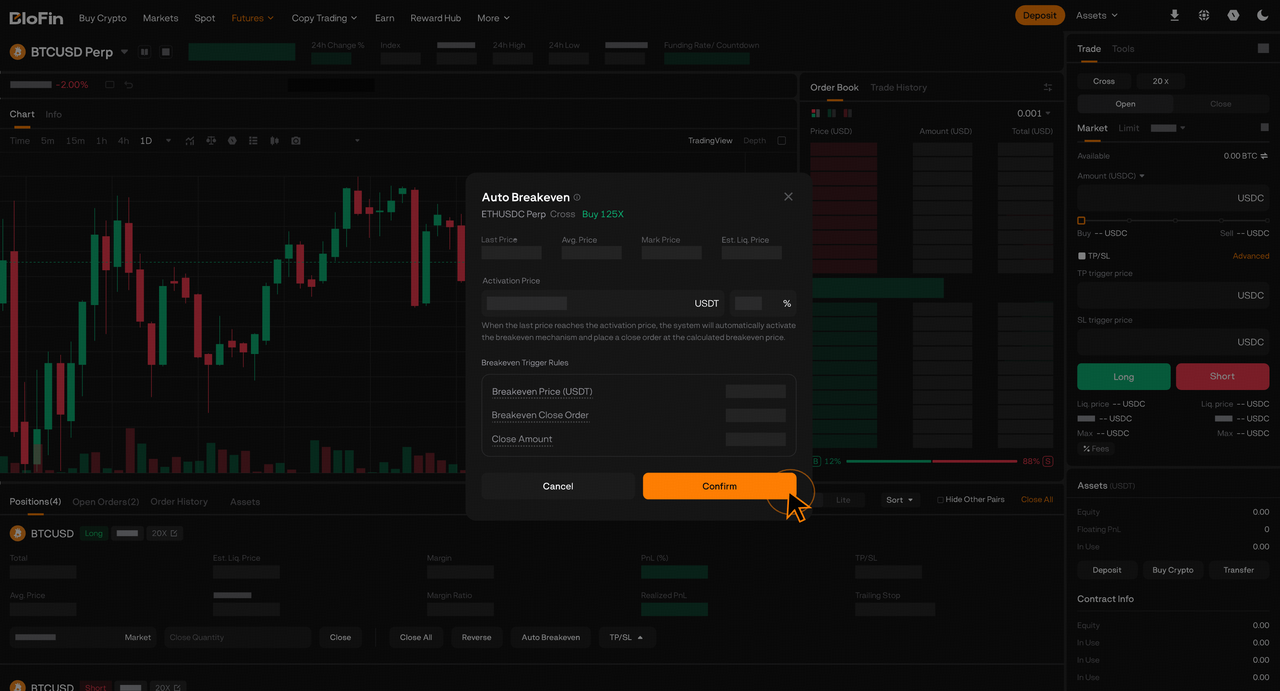
Step 4. Tap Confirm to save. You can return to modify your settings at any time after setup.
💡 If you need to protect only part of a position, use the regular TP/SL feature.
Things to note
- Slippage risk: When Auto Breakeven triggers, the position is closed via a market order. During periods of low liquidity or extreme market conditions, the actual fill price may deviate from the BE price, potentially resulting in a small loss. Auto Breakeven does not guarantee zero loss.
- Displayed BE price is an estimate: The BE price shown on the page updates dynamically as an estimate. The value calculated by the system at the moment of triggering is the one that applies.
- Liquidation cancels the strategy: If your position is liquidated, the Auto Breakeven strategy will be cancelled automatically.
- Set your activation price carefully: If the activation price is set too close to the current price or the BE price, normal market fluctuations may trigger it prematurely. Make sure to set it at an appropriate distance.
- Supported contracts: All Futures contracts.
Common questions
Q: I enabled Auto Breakeven, but it hasn't triggered yet. Is this normal?
A: Yes, completely normal. There are two possible reasons:
- The market hasn't reached your activation price yet — Auto Breakeven only activates once that level is hit.
- It has activated, but the market hasn't pulled back to your BE price yet. If the market is still moving in your favor, your position is still in profit and the breakeven order won't trigger until the market retraces.
Q: Do I need to reset Auto Breakeven after adding to my position?
A: No — the system automatically recalculates your BE price and updates the position size.
Q: Can I use Take Profit and Auto Breakeven at the same time?
A: Yes, they work independently and each triggers when its price is reached. For example, if your activation condition is set at +5% and Take Profit at +20%, Auto Breakeven activates at +5%. If the market continues rising to +20%, Take Profit triggers.
Q: Why is my BE price higher than my entry price (long) or lower than my entry price (short)?
A: Your BE price includes all trading costs — opening fees and any funding fees accumulated. The market needs to move past your entry price by enough to cover these costs before your position truly breaks even.