
Some stocks swing hard enough that people who mostly hold crypto start to follow them too. Watching a share price costs nothing, yet trading one usually means opening a brokerage account, sending it dollars and waiting for a market that shuts every evening and all weekend.
Palantir has been that kind of stock lately. On November 2, 2026, it reported third-quarter revenue of $2.3 billion, up 96% year over year (source: Palantir Q3 2026 results). The shares still fell 13.1% over the next three sessions, from a November 2 close of $178.34 to a November 5 close of $154.99, and then climbed back to $168.82 by the November 10 close (source: Nasdaq PLTR historical prices).
A perpetual futures contract lets you trade a move like that with stablecoins. It follows a price, has no expiry date and settles profit and loss in USDT, so you can go long or short from the same account that holds your crypto, with leverage if you want it.
For Palantir Technologies (PLTR), that contract is the PLTRUSDT Perpetual. Opening a trade takes a few clicks, and the parts that decide how it ends are the margin mode, the order type, the stop and what you do while the position is open.
How do you trade Palantir stock on BloFin?
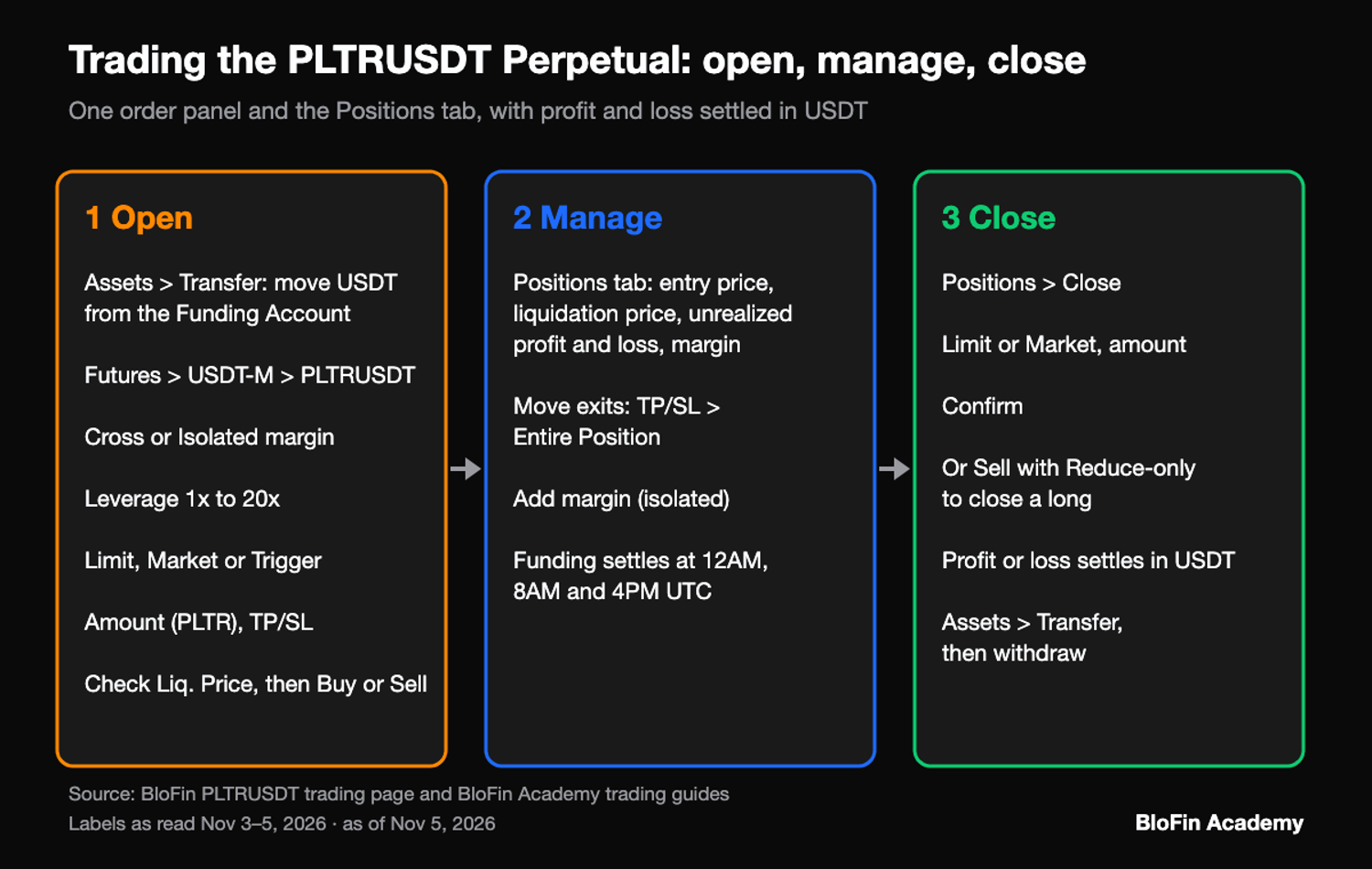
Trading Palantir stock on BloFin means buying or selling the PLTRUSDT Perpetual, a contract that follows Palantir's share price and settles in USDT. You move USDT into your futures account, open the PLTRUSDT order panel, choose a margin mode and a leverage level, send a Buy or Sell order, then manage and close the position from the Positions tab.
PLTRUSDT allows leverage of 1x up to 20x, and each contract is 0.01 PLTR, which is also the smallest order you can place (source: BloFin PLTR contract details, BloFin PLTRUSDT market data). Both are among the contract terms of the PLTR perpetual. A Buy opens a long, a position held until an offsetting sale (source: Nasdaq, Long), and a long profits as the price climbs. A Sell opens a short, closed later by an offsetting purchase (source: Nasdaq, Short), and a short profits as the price drops; shorting carries extra risks of its own, because a rising price has no ceiling.
You hold a contract and no shares. Under BloFin's notice, its stock futures carry no ownership of the company's shares, and no dividends, votes or other shareholder rights (source: BloFin, Updates to BloFin Stock Futures Trading). The notice adds that BloFin may allow only reduce-only orders, which close positions rather than open them, on its stock futures whenever Nasdaq's regular session is closed, weekends and US market holidays included.
An open position also meets funding, a small payment between longs and shorts that on the normal schedule is paid at 12AM, 8AM and 4PM UTC (7PM, 3AM and 11AM ET in winter), once every eight hours (source: BloFin PLTR contract details). If the rate is positive, longs pay shorts; below zero, the shorts pay.
Funding your BloFin futures account with USDT
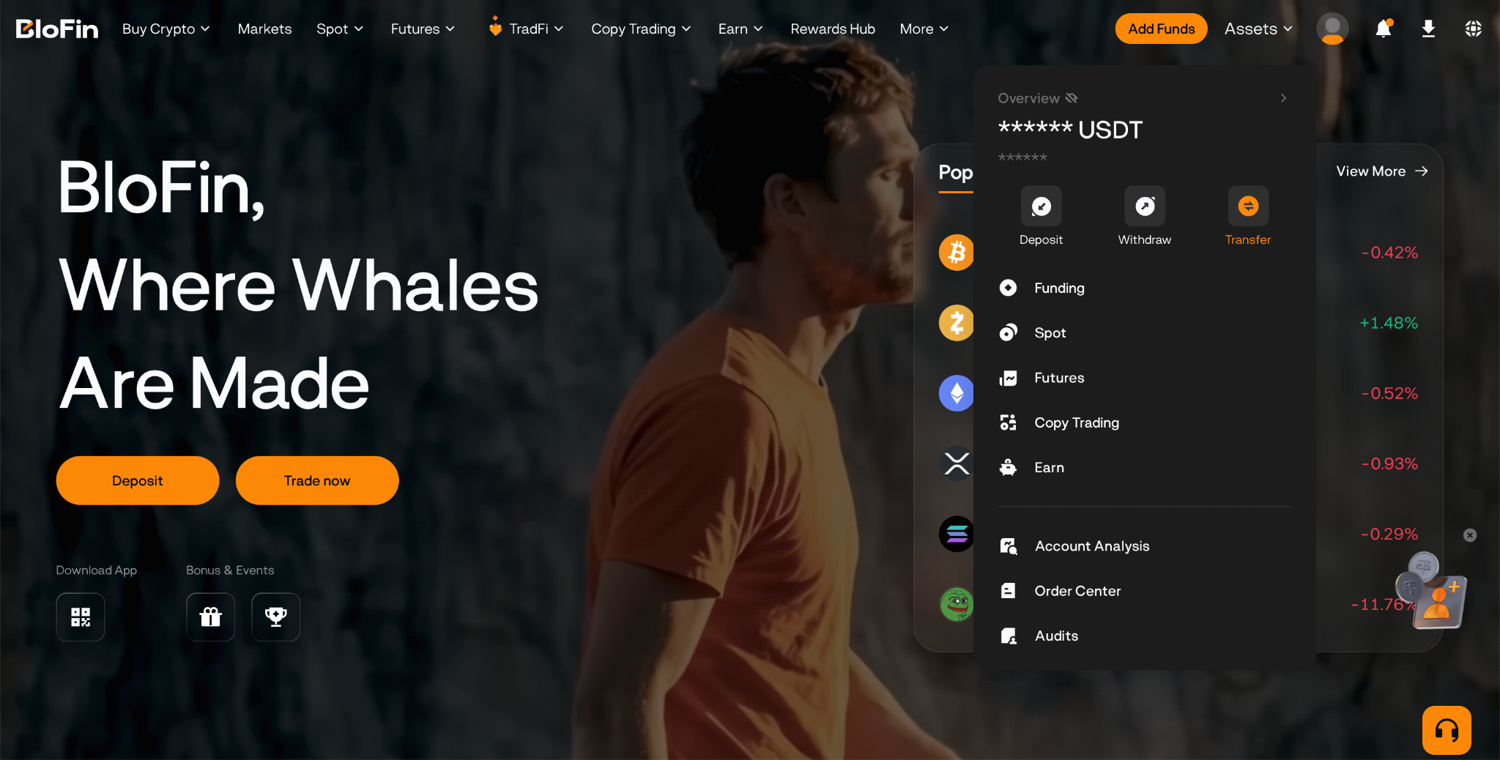
Funding a Palantir trade starts with crypto in your BloFin account. Deposits land in your Funding Account, and the PLTRUSDT Perpetual draws its margin from your futures account, so the USDT has to move across before the order panel can use it. BloFin makes that transfer instant and free.
Step 1: Deposit crypto into BloFin, which credits it to your Funding Account.
Step 2: Go to Assets, choose Transfer, and move the USDT you plan to trade with into your futures account.
Step 3: Open the PLTRUSDT order panel and check that your USDT now shows beside Available.
How much USDT you need depends on the size of the position and the leverage you choose.
Opening a Palantir trade on the PLTRUSDT order panel
Opening a Palantir trade on BloFin takes seven steps on one order panel: find PLTRUSDT, pick a margin mode, set the leverage, choose an order type, enter the size, add your exits, then confirm. Before you send anything, the panel also estimates where the position would be liquidated, which tells you how much room the trade has.
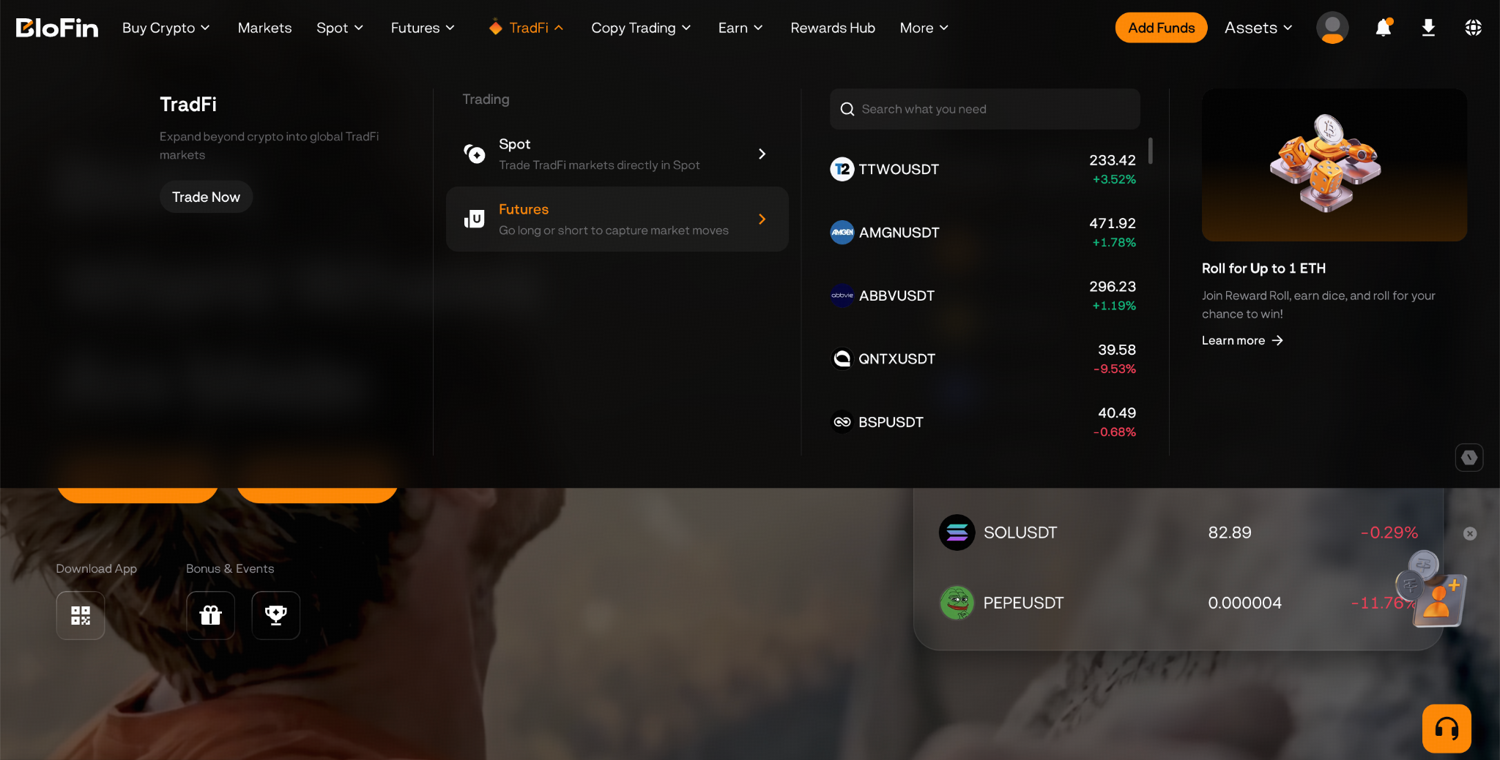
Step 1: Hover over the TradFi tab at the top of the BloFin homepage and select Futures. Then, click the trading pair in the top left corner and search for PLTRUSDT.
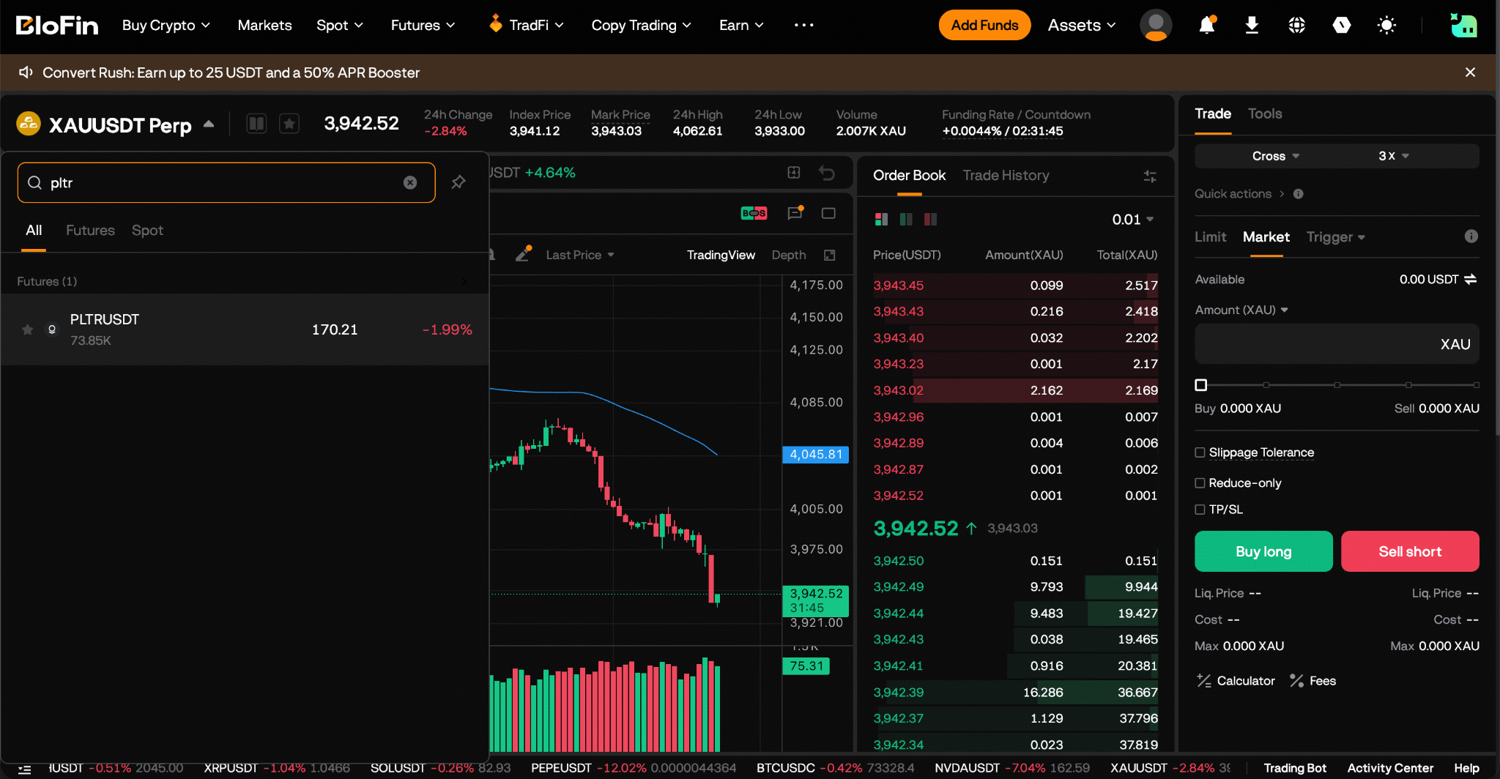
Step 2: Pick Cross or Isolated as the margin mode before you size the trade, because it decides how much of your balance the position can reach.
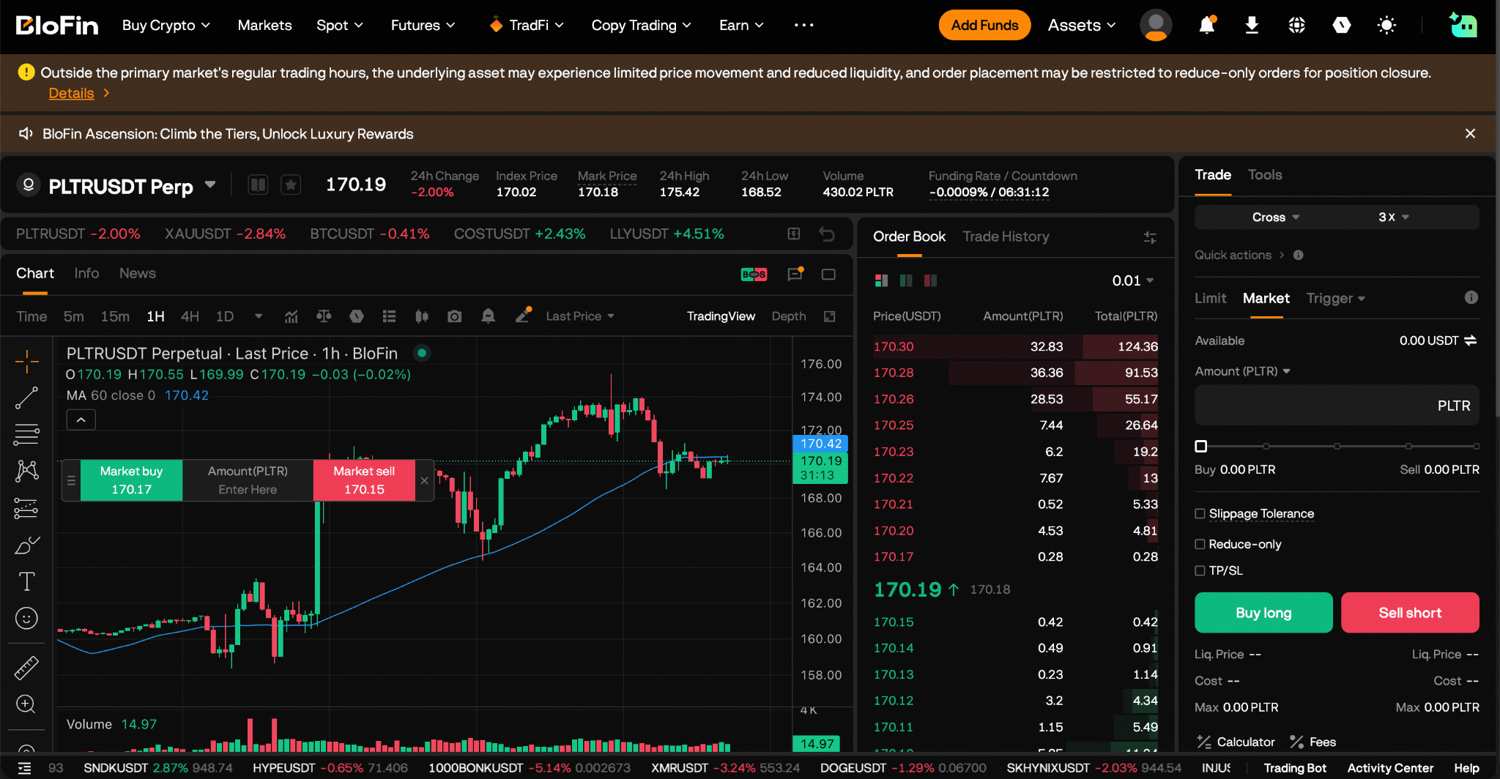
Step 3: Set the leverage by dragging the slider or typing the multiplier. For early trades, BloFin's guide to placing your first trade suggests staying between 2x and 5x.
Step 4: Choose Limit, Market or Trigger. A Trigger order waits for a price you set, then sends a market or limit order.
Step 5: For a Limit order, type your price into Price USDT. Then enter the size. If the size box shows Cost (USDT), switch its unit to PLTR to enter Amount (PLTR), where 1 PLTR equals 100 contracts.
Step 6: Leave Reduce-only unticked, since ticking it limits the order to shrinking a position you already hold. Tick TP/SL if you want to set your take-profit and stop-loss with the order.
Step 7: Note the Liq. Price figure, pick Buy (long) or Sell (short), and confirm the order once you have checked it.
A market order fills straight away and the position appears under Positions. A limit order that has not filled yet sits under Open Orders until the price reaches it or you cancel it. Beside the order panel, the PLTRUSDT trading page keeps the current mark price, the funding rate now applying and the time left until funding next settles in view.
Isolated or cross margin for a Palantir position
Isolated margin caps what a Palantir position can lose at the margin you give it, while cross margin lets your whole futures balance support all of your open positions. Isolated shows the worst case in USDT. Cross gives the trade more room before liquidation, but it can also take much more of your balance.
BloFin's guide to leverage and liquidation draws the same line.
Say you have 1,000 USDT in your futures account and buy 10 PLTR at 160.97 USDT at 5x. The position is worth 1,609.70 USDT, so isolated margin locks 321.94 USDT behind it and leaves 678.06 USDT free. BloFin's liquidation formula (source: BloFin, Liquidation Price Calculation) and its 2.50% maintenance rate for positions up to 700 PLTR (source: BloFin PLTRUSDT position tiers) place the estimated liquidation price near 132.16 USDT, a 17.9% fall. That figure assumes the liquidation fee matches the 0.0600% taker rate (source: BloFin fee schedule), because the formula page gives the fee no number.
With the same position on cross, the free 678.06 USDT also stands behind it. That pushes the liquidation price lower, but a deep fall can now take more than 321.94 USDT, up to the whole 1,000 USDT, and a second open position draws on the same balance. Whatever these estimates say, trust the Liq. Price your own panel shows. BloFin triggers liquidation from the mark price, its fair-value reference, so one unusual trade on its own does not trigger it.
Leverage makes a position rise or fall by a proportionally greater amount than a comparable holding bought outright (source: Nasdaq, Leverage), and it moves the estimate a long way. On the same isolated position, on the same assumptions, 10x puts it near 148.68 USDT, a 7.6% fall, and 2x near 82.60 USDT, a 48.7% fall.
Limit or market order on the PLTR perpetual
A limit order on PLTRUSDT trades only at your price or better, so it may never fill, while a market order fills at once at the best price available, with no promise of the exact price (source: Investor.gov, Types of Orders). On BloFin the choice also sets your fee, and very large orders have to use limits.
A limit order that waits in the order book pays the standard maker fee of 0.0200% when it fills, and a market order pays the taker fee of 0.0600% (source: BloFin fee schedule). Both are charged on the position's value, as BloFin's fee structure guide shows. On 10 PLTR at 172.38 USDT, that is about 0.34 USDT as a maker and 1.03 USDT as a taker, each time you open or close.
Size limits differ too. One market order can carry up to 600 PLTR, while one limit order can carry up to 6,000 PLTR (source: BloFin PLTR contract details). At 172.38 USDT, 600 PLTR is worth 103,428 USDT, so most trades never reach the cap, but a larger position goes in as several market orders or as limits. The first position tier runs to 700 PLTR at up to 20x, and BloFin's tier page says larger positions generally get lower maximum leverage and a higher maintenance rate (source: BloFin PLTRUSDT position tiers).
Limit prices also have to stay inside a band around the index price. BloFin caps a buy limit at roughly 3% over the index and holds a sell limit to roughly 3% under it. BloFin also adds the average premium of the previous two minutes, the gap between the contract and the index, so the band moves with it (source: BloFin PLTR contract details). BloFin's guide to market, limit and stop orders covers the order types in general.
Liquidity and slippage on the PLTR perpetual
Slippage is the gap between the cost you expect on a trade and the cost you actually pay, which usually comes from a change in price or spread and from commissions (source: Nasdaq, Slippage). On PLTRUSDT, one reading taken outside Nasdaq's hours put the highest bid just one tick under the lowest ask.
The spread is the difference between the highest price a buyer bids and the lowest price a seller asks (source: Nasdaq, Spread). At 4.26AM UTC (11.26PM ET on November 10), the best bid on PLTRUSDT was 172.60 USDT and the best ask 172.61 USDT (source: BloFin PLTRUSDT market data). Two minutes earlier, at 4.24AM UTC, the spread was 0.04 USDT. Four earlier readings, each taken while Nasdaq was closed between November 3 and November 10, ran from 0.03 to about 0.09 USDT (source: BloFin PLTRUSDT market data).
Depth tells you what a bigger order would cost. In that 4.26AM UTC snapshot, the five best asks held 24.2 PLTR. A 10 PLTR market buy would therefore have filled at an average of about 172.65 USDT, roughly 0.37 USDT more in total than 10 PLTR at the best ask. The 50 best asks held 1,702.5 PLTR up to 173.16 USDT, so even a 600 PLTR market buy, the largest one order allows, would have filled within 0.32% of the best ask at that moment (source: BloFin PLTRUSDT market data).
That snapshot is one reading at one moment, and the book changes all the time. A banner on the PLTRUSDT trading page warns that thinner trading and smaller price moves in the underlying stock are possible once its home market closes.
Nasdaq describes a liquid market as one where you can buy and sell with little price disturbance (source: Nasdaq, Liquidity). BloFin's guides to the order book and to slippage in crypto show how to read depth before a large order.
Setting a stop-loss and take-profit on a Palantir trade
A stop-loss on a Palantir long closes it if the price drops to your chosen level, and a take-profit closes it at your target, with both reversed on a short. Once its price is hit, a stop turns into a market order (source: Investor.gov, Types of Orders), so it caps a loss without fixing the exit price.
Step 1: Tick TP/SL on the order panel and enter a take-profit price above your entry and a stop-loss price below it for a long.
Step 2: Pick the price that triggers each order. The box starts on Last, and the dropdown beside it switches to Mark or Index.
Step 3: Leave both as market fills, or open Advanced to set a limit fill on a stop-loss on BloFin.
Step 4: For a trade you opened without exits, or exits you want to change, use TP/SL in the Positions tab and pick Entire Position.
The loss at a stop depends on the size and the distance to it, and leverage does not change that sum. A stop 5% under a 160.97 USDT entry sits at 152.92 USDT, so on 10 PLTR it plans a loss of about 80.50 USDT plus fees at any leverage. Leverage decides whether the stop is reached before liquidation. At 10x, on the same assumptions, the liquidation estimate of 148.68 USDT sits under that stop, while at 20x it is about 156.94 USDT, above the stop, so the position would be liquidated before the stop could fire.
Managing an open Palantir position
Managing an open Palantir position means watching four figures in the Positions tab: your entry price, the estimated liquidation price, unrealized profit and loss, and the margin behind the trade. From there you can move your exits, add margin to an isolated position, add to the trade or close part of it.
Step 1: Open the Positions tab and find your PLTRUSDT position. After every sharp move, compare the mark price with the estimated liquidation price, because the distance between them is the room the trade still has.
Step 2: Move your exits through TP/SL on that position as the trade develops. Raising a stop on a winning long locks in part of the gain, and widening a stop on a losing one only raises the loss you accept.
Step 3: To give an isolated position more room, add margin to it while it is open. On the 10 PLTR long at 160.97 USDT and 5x, adding 160.97 USDT takes the margin to 482.91 USDT. On the same assumptions, the liquidation estimate moves from about 132.16 to 115.64 USDT, so the price could fall 28.2% before liquidation, against 17.9% before. The same step can give a position more room before a Palantir report, which lands after the Nasdaq close.
Step 4: To add to the trade, send another Buy of the size you want; to cut it, close part of it through Close.
A position's margin ratio is the margin left in it, profit or loss included, as a share of the maintenance margin and fee it must cover. Once that ratio falls to 100%, BloFin starts to reduce or liquidate the position (source: BloFin, Liquidation Price Calculation), so a margin ratio drifting toward that level is the signal to act. Funding keeps settling while you decide, and a rate that favored you at one settlement can turn against you at the next (source: BloFin PLTRUSDT funding history).
Closing a Palantir trade and counting the profit
Closing a Palantir trade on BloFin means selling back a long or buying back a short, and the quickest route is the Close button on the position, as BloFin's guide to closing a trade shows. The result lands in USDT: the price change times your size in PLTR, less both fees, adjusted for funding paid or received.
Step 1: Find your PLTRUSDT position under Positions and press Close.
Step 2: Select Limit or Market, and fill in how much to close and, for a limit, at what price.
Step 3: Click Confirm. Close works in either of BloFin's position modes. In One-way mode, a Sell order of the same size on the order panel, with Reduce-only ticked, also closes a long; in Hedge mode BloFin ignores Reduce-only, so use Close.
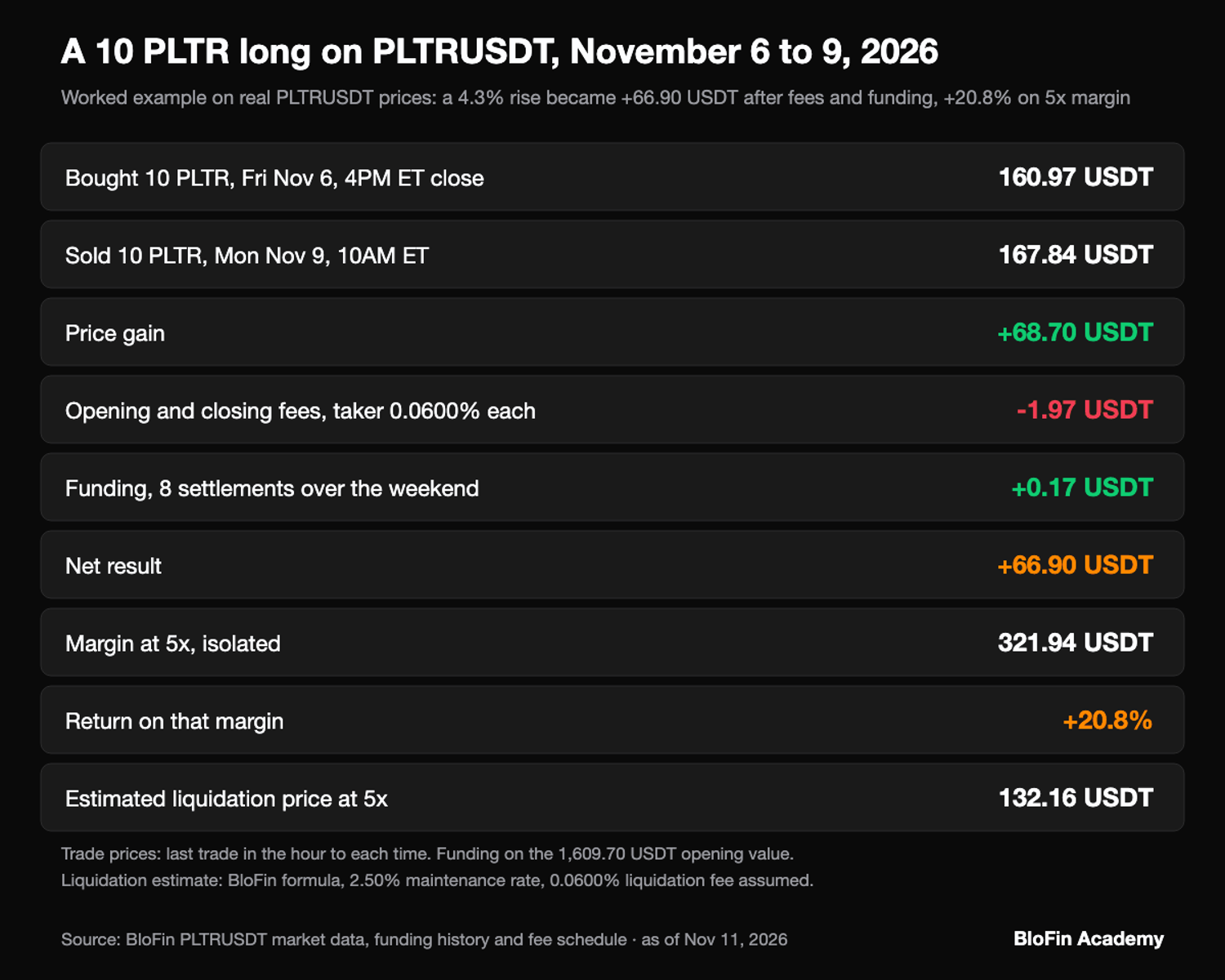
Here is a worked long trade on real prices from November 2026. Say you bought 10 PLTR at 160.97 USDT, the last trade in the hour ending at Friday's 4PM ET close (9PM UTC) on November 6, 2026. You then sold at 167.84 USDT at 10AM ET (3PM UTC) on Monday, November 9, half an hour into the session (source: BloFin PLTRUSDT market data). Both orders were market orders, and the position sat through eight funding settlements over the weekend.
Line on a 10 PLTR long, Nov 6 to Nov 9, 2026 | Amount (USDT) |
|---|---|
Price gain, 160.97 to 167.84 | +68.70 |
Opening fee, taker 0.0600% | −0.97 |
Closing fee, taker 0.0600% | −1.01 |
Funding over eight settlements, net received | +0.17 |
Net result | +66.90 |
Net result on 321.94 USDT of margin at 5x | +20.8% |
The eight rates from 12AM UTC on November 7 to 8AM UTC on November 9 summed to −0.0106%, so the long collected funding rather than paying it, calculated on the position's opening value of 1,609.70 USDT (source: BloFin PLTRUSDT funding history). Limit orders at both ends would have cut the fees to about 0.32 and 0.34 USDT. The trade's lowest weekend price was 158.37 USDT, which on trade prices would have used up about 8.1% of the 5x margin before the rise.
Closed profit stays in your futures account as USDT. To take it off BloFin, move it back with Transfer under Assets, then follow BloFin's withdrawal guide.
Pair trading Palantir against another stock on BloFin
A pair trade buys one stock and short sells a related one, so the result depends on how the two move against each other more than on the market's direction (source: CFI, Pairs Trading). On BloFin both legs can be perpetuals in the same futures account, such as a PLTRUSDT long against a short in another software stock.
BloFin lists perpetuals on other technology stocks too, among them Nvidia, Oracle, Microsoft, ServiceNow, IBM, CrowdStrike and Snowflake, whose SNOWUSDT Perpetual is the short leg in the worked pair (source: BloFin market data). SNOWUSDT is listed under Stocks as well, so BloFin's stock futures hours notice applies to both legs. SNOWUSDT allows up to 25x and PLTRUSDT up to 20x (source: BloFin SNOWUSDT contract details, BloFin PLTR contract details).
The two legs are sized in USDT so that each carries the same weight. At 5.58AM UTC on November 10, 2026, PLTRUSDT last traded at 170.17 USDT and Snowflake's perpetual at 293.47 USDT (source: BloFin market data). For about 1,000 USDT a side, that gives a long of 5.87 PLTR worth 998.90 USDT and a short of 3.40 SNOW worth 997.80 USDT, since each Snowflake contract is 0.01 SNOW (source: BloFin SNOWUSDT contract details).
If the two prices move like this | Long 5.87 PLTR plus short 3.40 SNOW (USDT) |
|---|---|
Both fall 5% | −0.05 |
Palantir falls 5%, Snowflake falls 8% | +29.88 |
Palantir rises 3%, Snowflake rises 6% | −29.90 |
A pair costs more to run than one trade. Opening and closing both legs at the taker rate costs about 2.40 USDT, and each leg pays or receives its own funding. On isolated margin each leg also has its own liquidation price, so one can be closed by force while the other stays open. On cross margin the two legs share one balance, which keeps them together and puts the whole balance behind both.
What to check before a leveraged Palantir trade
Before a leveraged Palantir trade, check four things: your size against the next report, your plan for the weekend, the size of each market order and the price your stop watches. Palantir is a stock with report nights and closed sessions, and PLTRUSDT's own record has a dated example of each risk.
Your size against the next report. Palantir reports after the Nasdaq close. In the first hour after Nasdaq closed on November 2, 2026, when the results came out, the contract's mark price ranged from 173.14 to 187.89 USDT, against 178.63 USDT at the 4PM ET close (9PM UTC) (source: BloFin PLTRUSDT market data). A 20x long from that close had an estimated liquidation price of about 174.16 USDT (BloFin's formula, 2.50% maintenance rate, assuming a 0.0600% liquidation fee), which the low passed inside that hour.
Your plan for the weekend. The contract keeps trading after Friday's close, so its price can move before Monday's open. Over the ordinary weekends from February to November 2026, the largest move from Friday's close to Monday's pre-open price was 3.4%. That was June 26 to 29, from 113.10 to 116.97 USDT (source: BloFin PLTRUSDT market data).
The size of each market order. Anything over 600 PLTR has to be split or sent as a limit, and a market order in a thin book fills further from the best price.
The price your stop watches. A stop set on Last can fire on one brief trade, while liquidation follows the mark, so choose the trigger on purpose.
Looking to trade Palantir? To get started, you'll need to first create a BloFin account, fund your account with cryptocurrency, and go to the PLTRUSDT Perpetual trading page.

Frequently asked questions
Which stocks can you pair with Palantir on BloFin?
Any of BloFin's other stock perpetuals can be the second leg, and the software and chip names among them include Nvidia, Oracle, Snowflake, Microsoft, ServiceNow, IBM and CrowdStrike (source: BloFin market data). All settle in USDT in the same futures account, and each has its own leverage cap, so size each leg in USDT.
Do you pay funding if you close a Palantir trade before the next settlement?
You pay or receive funding only on a position that is open when a settlement happens. BloFin's funding page says a position closed before the charge owes nothing, and that the fee works out as position value times the funding rate (source: BloFin, Introduction to Futures Funding Rates). On the normal schedule, a trade opened and closed between 8AM and 4PM UTC (3AM and 11AM ET in winter) therefore carries no funding at all.
What happens when BloFin liquidates a Palantir position?
Once the mark price reaches your liquidation price, BloFin may reduce part of the position or close all of it. From that point you cannot add or reduce margin or place orders on that position (source: BloFin, Forced Liquidation Rules). On isolated margin you lose the margin assigned to it; on cross, the loss can reach your wider futures balance.
How do you take partial profit on a Palantir trade?
Close only part of the position. In Positions, click Close and enter a smaller amount, and whatever you leave keeps the margin and leverage it had. You can also set a take-profit on part of it through TP/SL and Partial Position, so 3 PLTR of the position close at your target while the other 7 keep running.
Why is your closed profit on a Palantir trade different from the Positions tab?
The Positions tab works out unrealized profit and loss from the mark price, while the result you lock in comes from the price your closing order fills at, the last traded price (source: BloFin, Understanding Index Price, Mark Price and Last Price). On a 10 PLTR position, each 0.10 USDT between the mark and your fill moves the result by 1 USDT.
Researched and written by the BloFin Academy editorial team with AI-assisted drafting. All facts independently verified. Primary sources include Palantir's third-quarter 2026 results release on SEC EDGAR, Nasdaq's daily price table for Palantir, Investor.gov on order types, Nasdaq's glossary and CFI on pairs trading. BloFin facts come from its stock futures notice, contract, position tier, funding and fee pages, its help pages on liquidation and funding, and its own PLTRUSDT and SNOWUSDT market data, current as of November 11, 2026.
Nothing in this article constitutes financial advice, and nothing in it is a recommendation to buy, sell or hold Palantir in any form. A leveraged PLTRUSDT position can lose its whole margin in one move: in the hour after the November 2, 2026 report the contract's mark fell 3.1% below the close, past the estimated liquidation price of a 20x long, assuming a 0.0600% liquidation fee. Stops can fill past their price, opening orders may be restricted outside US market hours, and funding can turn against you at any settlement. Past performance does not indicate future results. Do your own research and consider your risk tolerance before you trade on BloFin.