
Buying a share of a large US company has usually meant three things: a broker account in your own name, money sent in from a bank, and an order that waits for the New York market to open. Each step exists because a share is a record that a broker and a registrar keep for you, and each one takes time to set up.
If your savings already sit in stablecoins, that route means running a second financial life next to the first. You move money out of crypto, change it into dollars, wait for the transfer to clear, and then wait again for the opening bell, while the balance you already hold sits in a different app.
Tokenized shares shorten that path. A firm holds the real shares with a custodian and issues tokens whose price follows them, so a crypto exchange can list the token against a stablecoin. You pay with the balance you already have, you can buy a small fraction of one share, and the token lands in the same account as your other coins.
Meta Platforms shares are available in this form too, and on BloFin the Meta token trades as the METAX/USDT Spot pair. Beside it sits the METAUSDT Perpetual, a futures contract on Meta's price. Buying the token is an ordinary spot order paid in USDT, and the whole purchase runs from a USDT deposit to that one order.
How do you buy tokenized Meta (METAX) on BloFin?
To buy tokenized Meta (METAX) on BloFin, deposit USDT, move it to your Spot account, open the METAX/USDT pair and place a market or limit order. At 11.13AM UTC on Monday, October 12, 2026, one METAX traded at 732.92 USDT, and the smallest order BloFin accepts is 0.006 METAX, about 4.40 USDT, worked out.
The order itself is the quick part. Most of the time goes into the steps before it. You get USDT onto BloFin on the right network, move it from the Funding account where deposits land into the Spot account that pays for trades, and accept the xStocks notice the first time the pair opens. After that, a METAX order works like any other spot order, and you can buy a fraction of a token as easily as a whole one.
The token tracks the price of Meta's share, and its value in USDT rises and falls with Meta's stock. A share is priced in the hundreds of dollars, so most first orders buy a part of one token, and the panel accepts sizes down to a thousandth of a METAX above that 0.006 minimum.
BloFin offers METAX only to people who can confirm that they are not US or UK persons and are not in a restricted location, along with a few further points about who the purchase is for. What tokenized Meta (METAX) is sets out each of those confirmations and what the token gives a holder, and it is worth reading before you deposit anything.
Four ways to buy Meta stock with crypto or cash
You can buy Meta four ways: a whole share through a US broker, a fraction of a share through a broker, a position on the METAUSDT Perpetual, or METAX on BloFin's spot market. Meta's share closed at $718.67 on Friday, October 9, 2026, so a whole share costs more than most first purchases (source: Stock Analysis).
The four differ most in how you pay, how small you can start and when your order can fill. Broker apps let you buy in dollar amounts as well as whole shares. Fidelity, for example, accepts fractional orders worth $1 or more, but fills dollar-based and fractional orders only during normal market hours (source: Fidelity). On BloFin, the xStocks pairs that include METAX/USDT stay open 24 hours a day from Monday to Friday (source: BloFin xStocks risk disclosure).
Route | Smallest purchase | When the order can fill | What you pay with | Cost of holding |
|---|---|---|---|---|
Whole share at a broker | one share, $718.67 at the October 9 close | Nasdaq's sessions | dollars from a bank | none |
Fractional share at a broker | $1 at Fidelity | Nasdaq's regular session | dollars from a bank | none |
METAX/USDT Spot on BloFin | 0.006 METAX, about 4.40 USDT | 24 hours a day on weekdays | USDT | none from BloFin |
METAUSDT Perpetual on BloFin | 0.01 META | new positions during Nasdaq's regular session; outside it, trading may be limited to orders that reduce a position (source: BloFin stock futures notice) | USDT, as margin | funding every eight hours |
Say you have 50 USDT and want a stake in Meta. Through a broker, you would first sell the USDT for dollars and send them in, and the order would then wait for Nasdaq's regular session. On BloFin the same 50 USDT buys about 0.068 METAX at the 733.44 USDT best ask from the October 12 reading, at any hour of a weekday.
The perpetual is a different kind of purchase. It follows Meta's price with leverage from 1x to 20x, settles funding every eight hours and accepts orders from 0.01 META (source: BloFin META contract details), while giving you no token to hold or withdraw. METAX or the META perpetual weighs the two by holding period and direction.
Funding your BloFin account with USDT
To fund a METAX purchase, deposit USDT to BloFin and then transfer it from your Funding account to your Spot account. Every deposit lands in Funding first, and BloFin charges no fee to deposit or to move money between your own accounts, although the network you send on charges its own small fee.
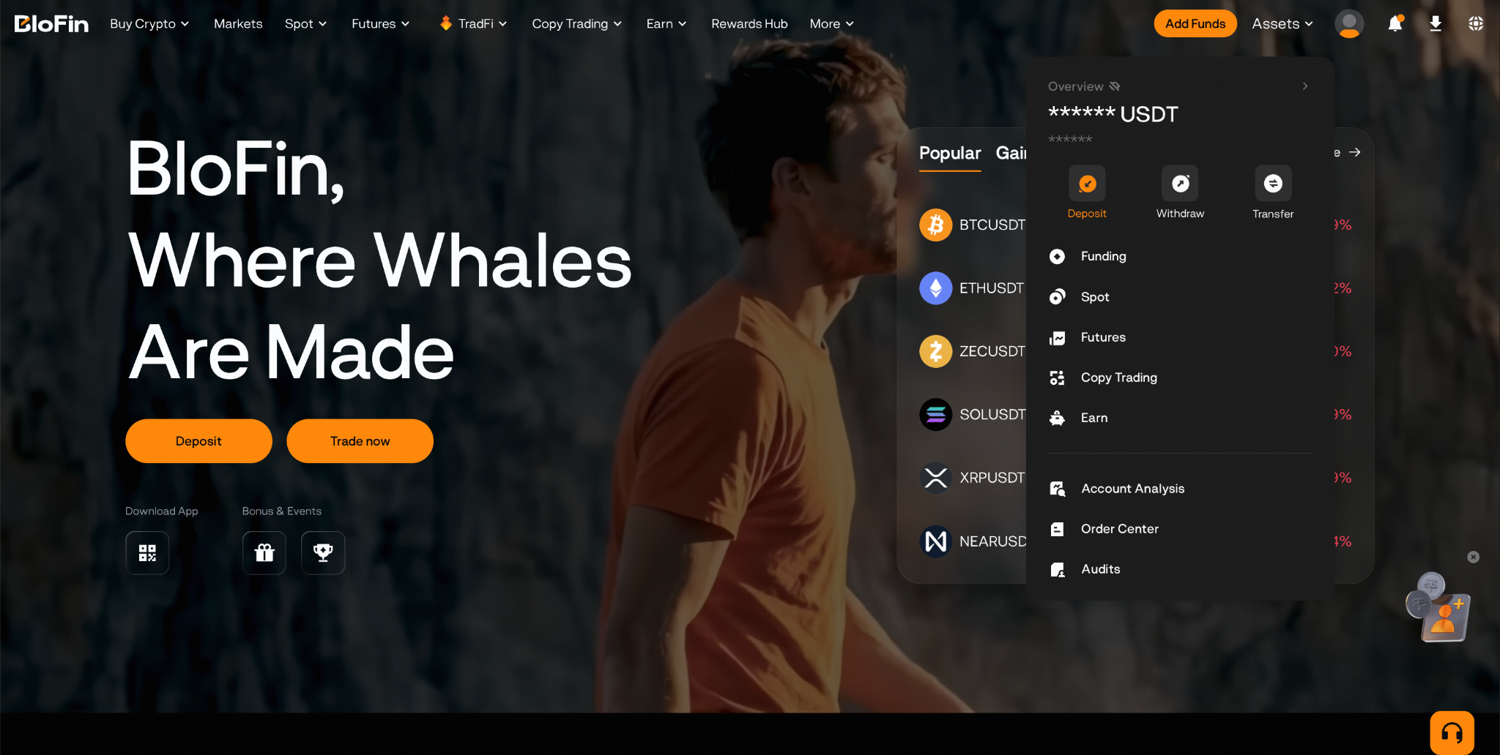
Step 1: Log in to BloFin, hover your cursor over the Assets tab and click Deposit.
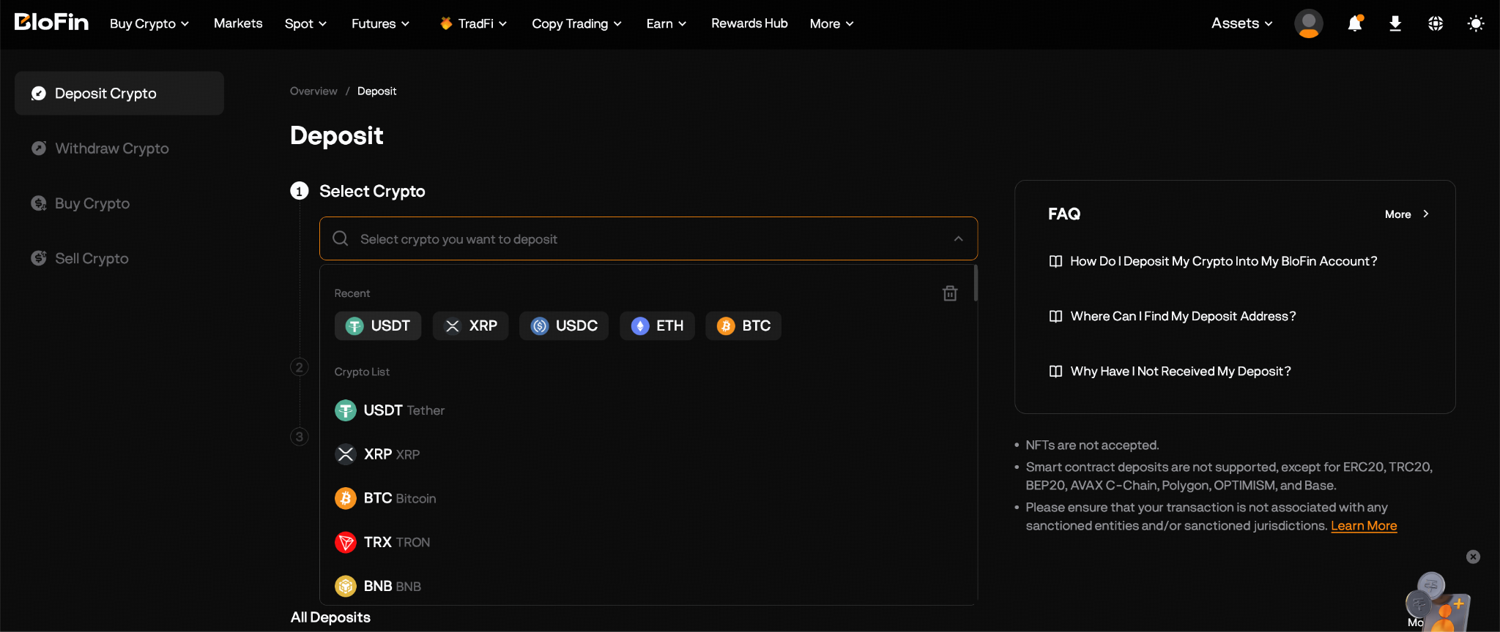
Step 2: Search for USDT and select it, then choose the deposit network your sending wallet uses, such as TRC20, ERC20, BEP20 or Solana.
Step 3: Copy the deposit address, or scan the code shown beside it, then paste it into the wallet or exchange you are sending from, pick the same network there and confirm the transfer.
Step 4: Once the blockchain confirms the transfer, the USDT appears in your Funding Account. Go to Assets, select Transfer, and move the USDT to your Spot Account.
The network is where most deposit mistakes happen. Say the exchange you are sending from offers USDT on Tron, the TRC20 network, and you pick ERC20 on BloFin: the coins travel on a different chain from the address you copied, and recovering them may be impossible. Each asset also has a minimum deposit, and a transfer below it is never credited, so check the minimum on the deposit screen and send a small test amount first whenever an address is new to you.
If you hold no crypto yet, the Buy Crypto page sells USDT for a card, Apple Pay, Google Pay or a SEPA bank transfer, and buying crypto on BloFin walks through that route. Either way, the spot fee is taken from the asset you receive, so a METAX purchase pays its fee in METAX and a sale pays it in USDT.
Opening the METAX/USDT pair
METAX trades on BloFin's spot market as the METAX/USDT pair, labeled "Meta tokenized stock (xStock)" on its trading page. The first time you open it, BloFin shows an xStocks notice that you read and accept before you can trade, and from then on the pair opens straight to the chart, the order book and the order panel.
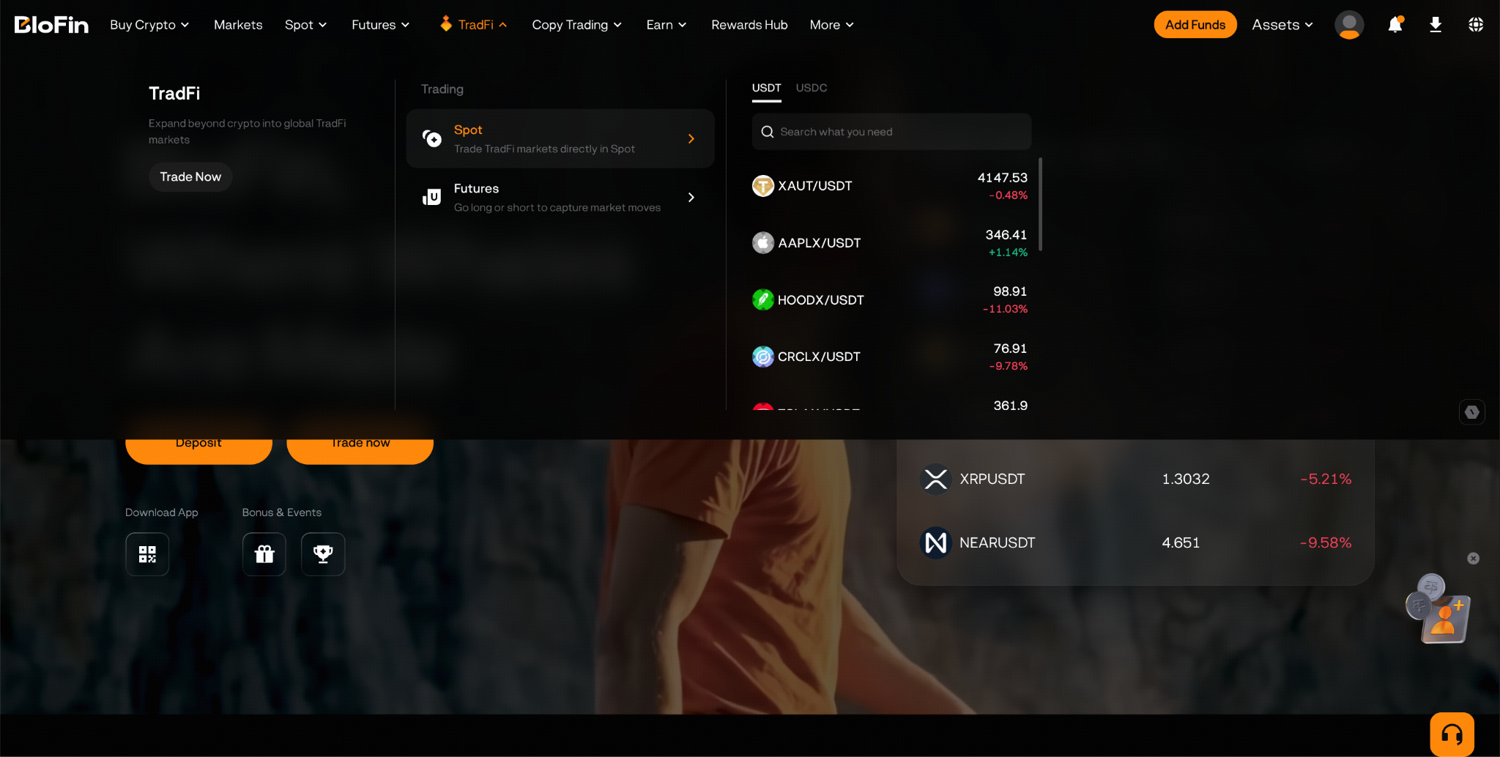
Step 1: Log in to your BloFin account and hover your cursor over the TradFi tab. Then, click Spot.
Step 2: Click the pair name at the top left of the trading page to open the pair list, and type METAX in the search box.
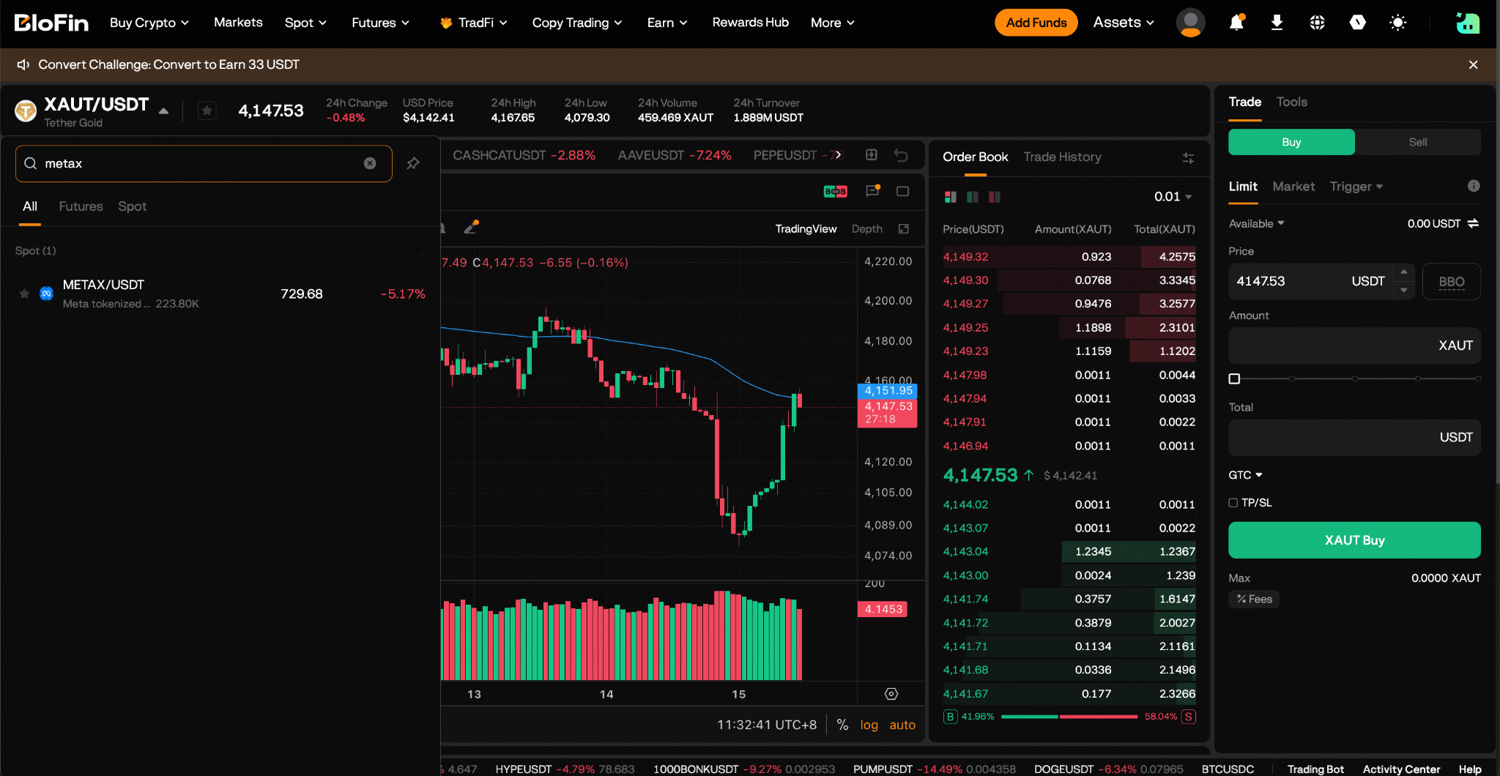
Step 3: Select METAX/USDT from the results. The star beside the pair name adds it to your Favorites, so it is easy to find next time.
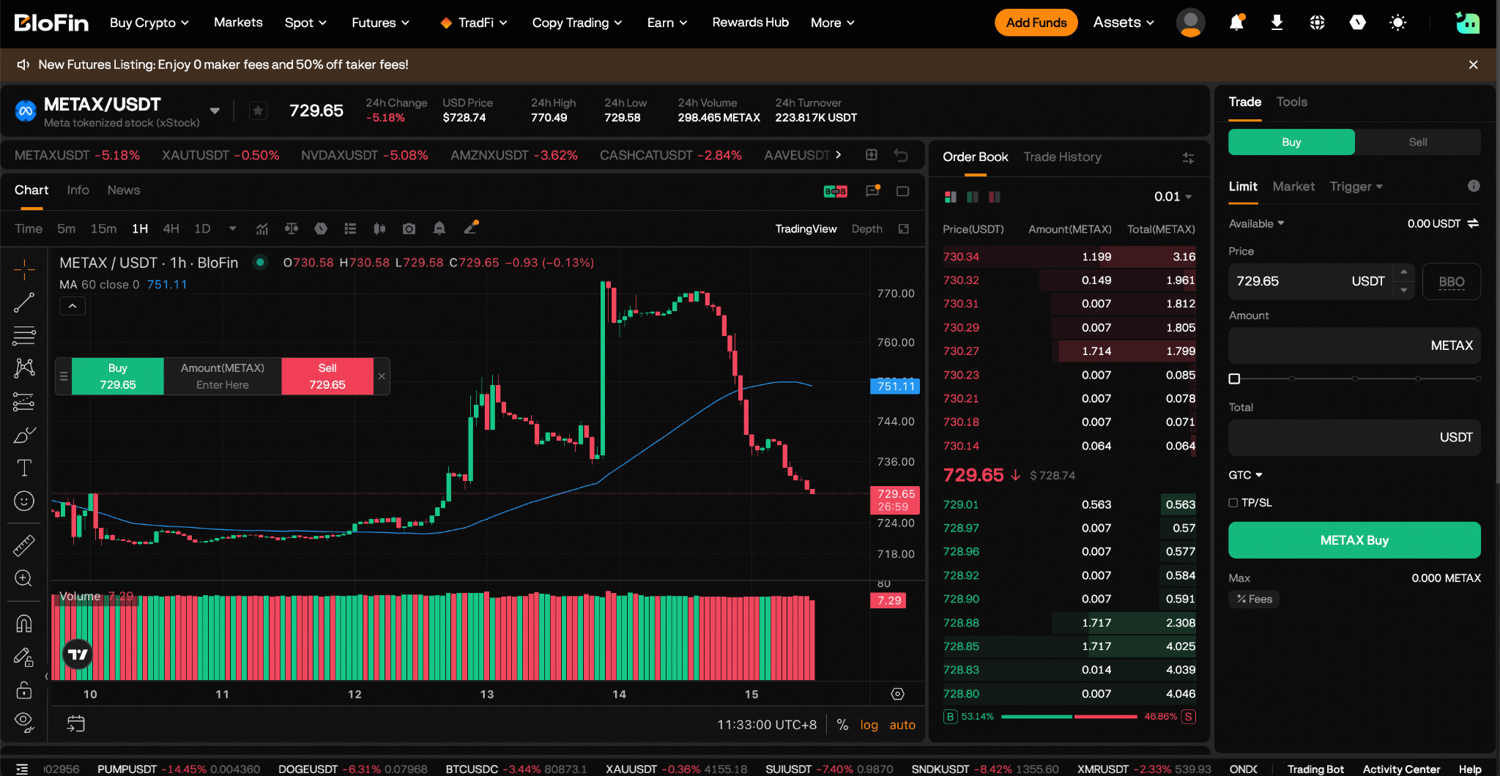
The page shows a candlestick chart of the METAX price and the Order Book, which lists the asks that sellers post and the bids that buyers post. Next to them are the market's recent fills under Trade History and the order panel with its Buy and Sell sides. You can watch the live price and the book on the METAX/USDT Spot page before you deposit anything, which is a useful way to learn how the token moves during a normal week.
Placing a market or limit order for METAX
A market order buys METAX at once at the best price sellers are asking, while a limit order waits at a price you set and fills only if the market reaches it. Both pay the METAX/USDT Spot fee of 0.2000% of the trade's value.
BloFin sizes METAX orders in steps of 0.001 METAX and prices them in steps of 0.01 USDT. You can enter an order's size two ways: Amount is the number of METAX you want, and Total is the USDT you want to spend, with the panel working out the other figure for you.
Limit suits most first orders on a tokenized stock, because you choose the price and the order rests in the book until a seller meets it. Market fills straight away against the cheapest asks, which is quick but can cost more when only a few tokens rest at each price. Trigger waits until METAX trades at a price you pick and then sends the order attached to it. Market, limit and stop orders compares the three in more depth, and your first trade on BloFin shows the same panel on a crypto pair.
Step 1: On the order panel of METAX/USDT, select the Buy tab.
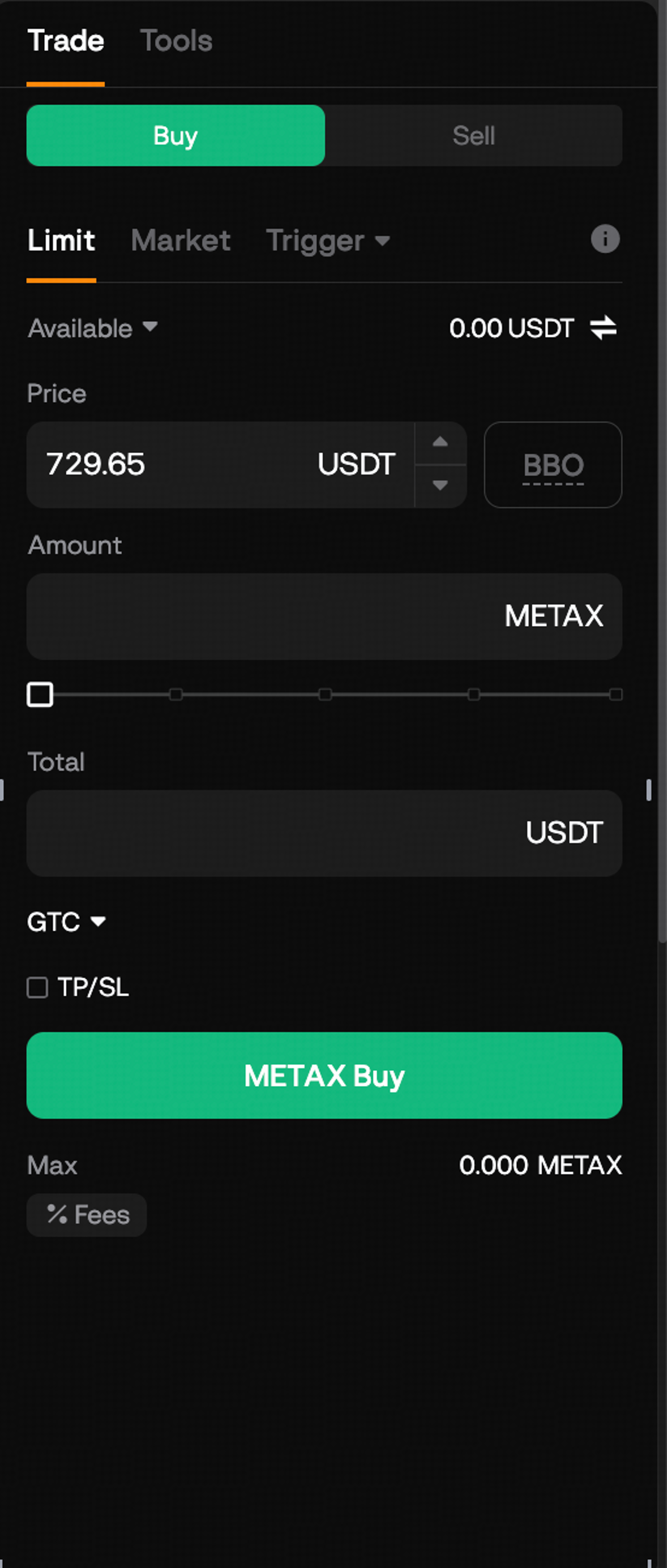
Step 2: Choose Market, keep the size field on Amount, and enter your preferred amount.
Step 3: Check the estimated cost, then press the METAX Buy button at the foot of the panel to send the order.
The fee depends on the pair and on your account level. A maker order is a limit order that rests in the book before it fills, and a taker order fills against one that is already resting. METAX/USDT is one of the tokenized-stock pairs on BloFin's list of high-risk spot symbols, where maker and taker orders both pay 0.2000%, double the 0.1000% Regular rate on most spot pairs. The saving from a limit order on METAX therefore comes from the price you get, since the fee is the same either way. On most spot pairs, fees fall as your 30-day trading volume or your account balance grows, and BloFin's fee structure sets out what each level costs and how to reach it.
Checking the fill and your METAX balance
After a METAX order fills, it moves from Open Orders to Order History, and the tokens appear in your Spot account under Assets. A limit order that has filled only in part stays in Open Orders with the rest still waiting, so these three tabs under the chart tell you exactly where every order stands.
Step 1: Under the chart, open Open Orders to see any limit order still waiting, with its price and how much of it has filled.
Step 2: Open Order History to see your filled and canceled orders, with the average price each one got.
Step 3: Open Assets to see your METAX balance next to the USDT you have left.
The balance you see is the token itself, held for you in your BloFin account. BloFin charges nothing while it sits there, and its USDT value moves with Meta's share price from the moment the order fills, so the figure under Assets changes through the day even when you do nothing.
What to check before you confirm an order
Before you confirm a METAX order, check three things: the gap between the best bid and the best ask, how many tokens wait at those prices, and whether Nasdaq is trading the share. All three could be read at 11.13AM UTC on October 12, 2026, when the gap was 1.07 USDT, about 0.15% of the price.
That reading came from a Monday morning before the US open, and it shows how the token behaves while the share is not in its regular session. Meta closed at $718.67 on Friday and was quoted at $730.00 in Nasdaq's pre-market session at 7.04AM ET on Monday (source: Stock Analysis). METAX stood at 732.92 USDT, about 2.0% above Friday's close and 0.4% above the pre-market quote, worked out. With no regular-session price to follow, buyers and sellers set the token's price from the weekend's news and early trading, and METAX trading hours against Nasdaq lays out each window.
Size matters as much as price. Only 0.679 METAX, worth about 498 USDT, sat at the best ask in that reading, and the next three asks held 0.007 METAX each, so a market order much larger than 498 USDT would fill across several prices. Over the previous 24 hours, 361.083 METAX changed hands on the pair. METAX liquidity and slippage measures how far orders of different sizes move the price, and a limit order caps what you pay whatever the book holds.
Read the order back before you press the button. Check that you chose Buy and the order type you meant, and that the size sits in Amount or Total as you intended. For a limit order, also check that the price is close to where METAX is trading. On a limit buy, a price typed a digit too high fills straight away against the asks, at a worse price than you planned.
Buying METAX around the Muse rally and Meta's Q3 report
Meta's share has swung widely since the company launched Muse, a personal AI agent, on September 8, 2026 (source: Meta). It closed at $613.48 that day, rose 26.75% to $777.59 by September 24 and fell 7.58% from there to $718.67 by October 9 (source: Yahoo Finance). Moves of that size make the price you pay matter more.
Muse handles tasks such as sending an email or booking travel, and it checks with its user before sensitive actions like making a purchase. It is rolling out in the US, in its own app and directly in WhatsApp (source: Meta). Meta's shares were up 5.41% in early trading the next day (source: Forbes Australia).
For a METAX buyer, a month like that changes the order more than the steps. A wide daily range makes a market order's fill harder to predict, so a limit order at a price you have chosen keeps control of the entry. Splitting a larger purchase into several smaller limit orders on different days also stops one day's price from setting your whole cost, which matters more when the share has moved a quarter in a few weeks.
The next scheduled event is Meta's third-quarter report, which Meta will release after the US market closes on Wednesday, October 21, 2026 (source: Meta third-quarter 2026 date notice) (source: Stock Analysis). Because the report lands outside Nasdaq's regular session, METAX can move on it before the share trades again. A limit order left resting overnight could then fill at a price that looked fair before the numbers and looks poor after them. Reviewing or canceling resting orders before the release keeps that decision in your hands.
Selling METAX back to USDT
Selling METAX is the same order in reverse: select Sell on the METAX/USDT panel, choose market or limit, enter the METAX amount or the USDT total, and confirm. The USDT lands in your Spot account, where you can trade it again, transfer it to Funding or move it off BloFin.
Step 1: Open METAX/USDT and select the Sell tab on the order panel.
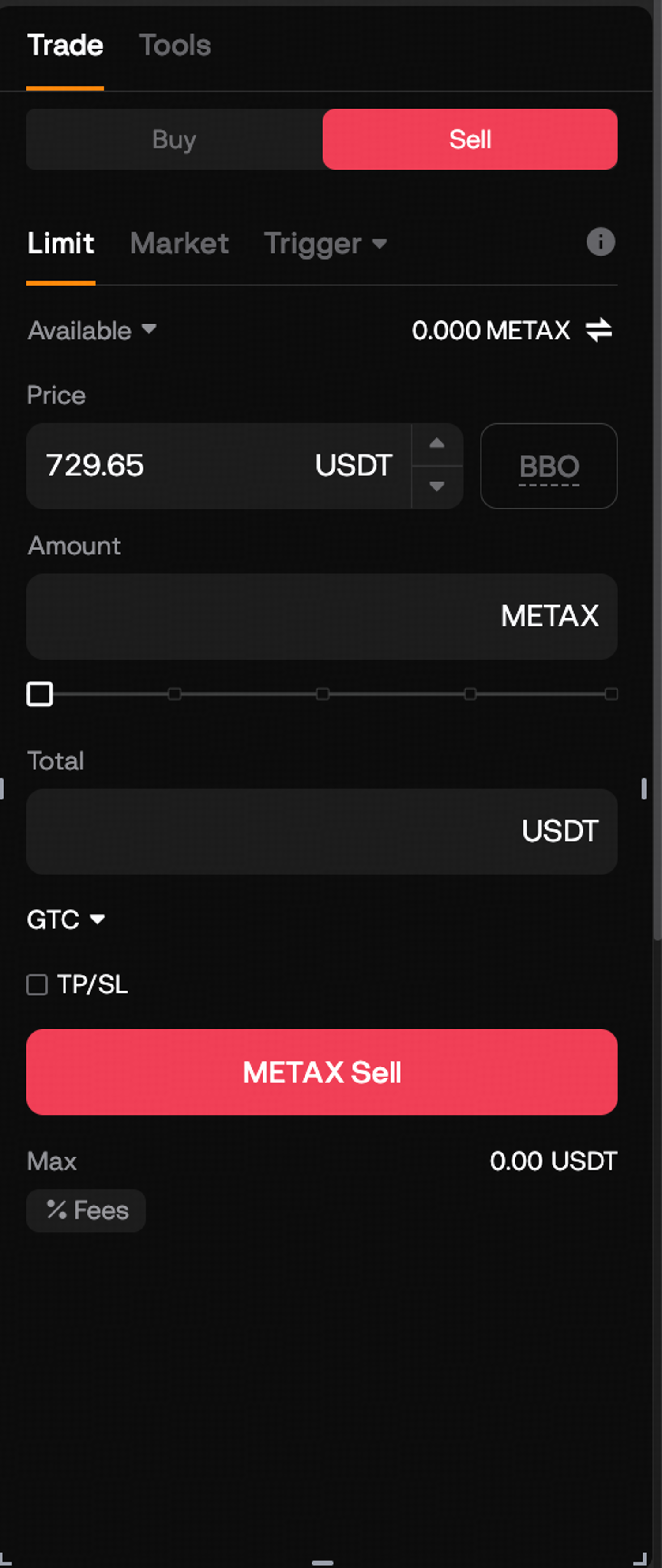
Step 2: Choose Market to sell at the best bid now, or Limit to set your own Price.
Step 3: Enter the METAX to sell under Amount, or the USDT you want back under Total, check the estimate, and send the order.
To take the USDT off the exchange, transfer it back from Spot to Funding under Assets first, then withdraw it as you would any other coin. The token itself can also leave BloFin for a wallet you control, and withdrawing METAX to your own wallet covers the networks and what your wallet will show.
Looking to buy tokenized Meta? To get started, you'll need to first create a BloFin account, fund your account with cryptocurrency, and go to the METAX/USDT Spot trading page or the METAUSDT Perpetual trading page.
Frequently asked questions
Can you buy METAX with a bank card?
A card buys USDT first, and the USDT then buys METAX on the spot pair. BloFin's Buy Crypto page takes card and bank payments through outside payment firms such as Alchemy and Simplex. Crypto bought this way carries a security hold before it can be withdrawn, though you can trade it straight away, so a card-funded METAX purchase can go through on the same day.
What is the largest METAX order you can place at once?
One order on METAX/USDT can be at most 86 METAX, and the cap is the same for market and limit orders. At the 733.44 USDT best ask from the October 12, 2026 reading, 86 METAX came to about 63,076 USDT, worked out. A bigger purchase has to go in as several orders, and spreading them out also gives the order book time to refill between them.
Can you set a stop-loss on a METAX spot order?
The spot order panel carries take-profit and stop-loss (TP/SL) fields and a Trigger order type, so you can set a price at which BloFin sends a sell order for METAX you hold. A stop-loss starts an order at your price, and in a fast move the fill can land below it. How stop-loss orders work on BloFin shows how to set one and what to expect from the fill.
What happens if a METAX limit order only partly fills?
The part that filled is yours at once and shows under Assets, while the rest stays in Open Orders at your price, marked as partially filled. You can wait for the rest, change its price or cancel it, and the filled part stays in your balance whichever you choose. Partial fills explains why thin order books produce them more often.
What does the BBO button do on the spot order panel?
BBO stands for best bid or offer. On BloFin's spot order panel, the BBO button swaps the price field for a choice of four settings. Queue 1 and Queue 5 price a limit order at the best or fifth-best price on your own side of the book. Counterparty 1 and Counterparty 5 use the best or fifth-best price on the other side. On a buy, Queue 1 joins the best bid and waits, while Counterparty 1 meets the best ask and usually fills at once. Check which one is selected before you send a METAX order, because the spread between the two can be wide.
Researched and written by the BloFin Academy editorial team with AI-assisted drafting. All facts independently verified. Primary sources include Stock Analysis and Yahoo Finance for Meta's share prices, Meta's announcement and Forbes Australia on the Muse launch, Meta's third-quarter date notice, and Fidelity's fractional-share rules. BloFin first-party sources are the METAX/USDT Spot page and order book, fee schedule, xStocks risk disclosure, META contract details and deposit guide, current as of October 2026.
Nothing in this article constitutes financial advice, and nothing in it is a recommendation to buy, sell or hold METAX or Meta in any form. METAX moves with Meta's share price, so a purchase can lose value quickly, as the fall from late September showed. Its order book is thin next to Nasdaq's, and outside Nasdaq's regular session a market order can fill well away from the share's last price. USDT sent on the wrong network may be lost for good. Past performance does not indicate future results. Do your own research and consider your risk tolerance before you trade on BloFin.