
Trading a large company's shares used to start with a brokerage account, a bank transfer and a few days of waiting for the money to clear. A trade itself takes seconds, so most of the effort goes into the setup around it: where the money sits, how much of it is at risk and how the position will end.
That setup is the part beginners skip. A person holding stablecoins can find the order button in a minute. Placing a trade before deciding the size, the stop and the exit is how a normal day's swing turns into a loss nobody planned for.
A perpetual futures contract keeps the whole process inside a crypto exchange. It follows a share's price, has no expiry date and is margined in a stablecoin, so you can deposit crypto, open a position in either direction and close it again without touching a bank or owning a share.
On BloFin, Microsoft trades as the MSFTUSDT Perpetual, a contract that uses USDT for both margin and settlement. Every Microsoft trade there runs the same course, from the deposit that funds it to the order that closes it, and its size is best set by how far Microsoft's price usually moves in a day.
How do you trade Microsoft stock on BloFin?
To trade Microsoft stock on BloFin, deposit crypto, move USDT into your Futures Account and open the MSFTUSDT Perpetual. Choose isolated margin and a leverage from 1x to 20x, enter a size from 0.01 MSFT, add a stop-loss, then press the buy button to go long or the sell button to go short (source: BloFin MSFTUSDT contract details).
Profit on a long = (exit price − entry price) × size in MSFT − trading fees ± funding.
A short reverses the first bracket, so it gains when Microsoft falls. The contract tracks the share's price only: it carries no ownership, voting rights or dividends (source: BloFin stock futures notice). BloFin's explainer on the MSFT perpetual on BloFin shows how the contract is built, from its index price to its margin tiers.
Funding your BloFin futures account
Funding a BloFin futures account takes two moves. You deposit crypto, which arrives in your Funding Account, and then transfer USDT from there to your Futures Account, which is the only balance the MSFTUSDT order panel can draw on. The transfer between your own accounts is instant and free.
Step 1: Deposit crypto to BloFin from a wallet or another exchange, choosing the same network on both sides. BloFin's deposit guide walks through the address and the network choice, and every deposit lands in your Funding Account first.
Step 2: Go to Assets, select Transfer and move USDT out of the Funding Account and into the Futures Account. The MSFTUSDT Perpetual takes margin only in USDT, so USDT is the coin to move (source: BloFin MSFTUSDT contract details).

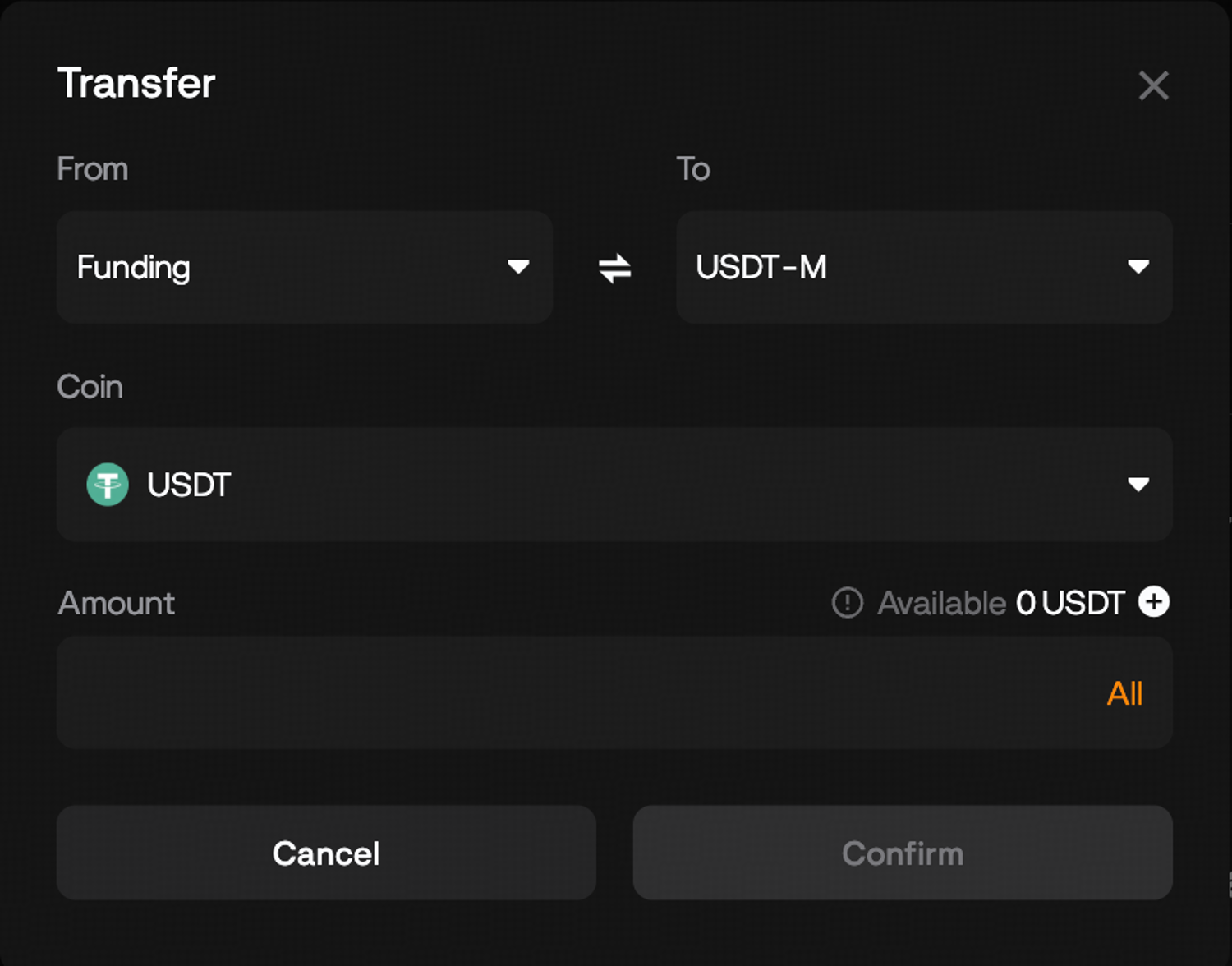
Keep a little more USDT in the Futures Account than the margin you plan to use. Fees are paid from that balance, and in cross margin a losing position can use the rest of it.
Opening a Microsoft trade on the MSFTUSDT order panel
Opening a Microsoft trade on BloFin takes nine steps on the MSFTUSDT order panel, from finding the market to pressing Buy or Sell. Before anything is sent, the panel displays the order's margin and its estimated liquidation price, so the numbers that decide the risk are on screen first.
Step 1: Hover over the TradFi tab and choose Futures, then search for MSFT and select MSFTUSDT.
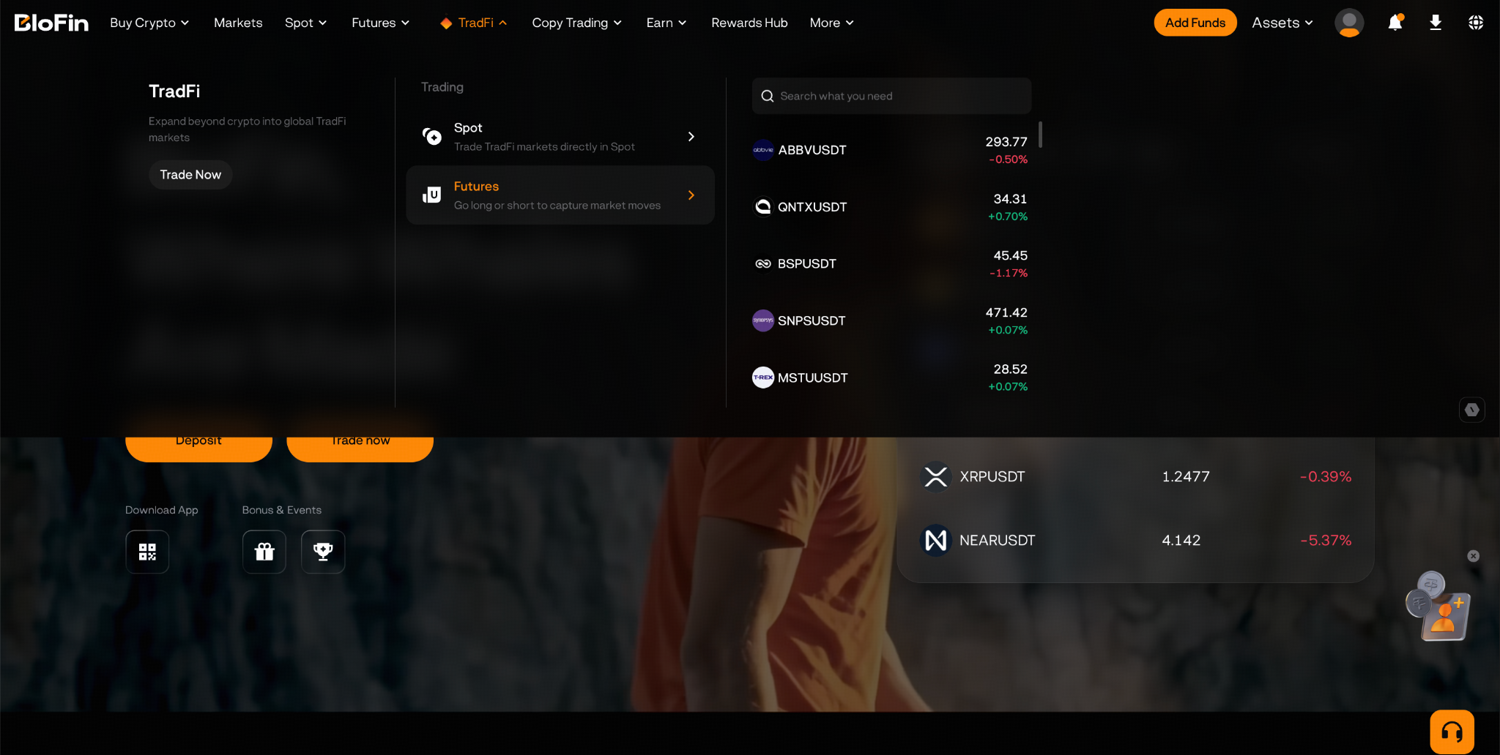
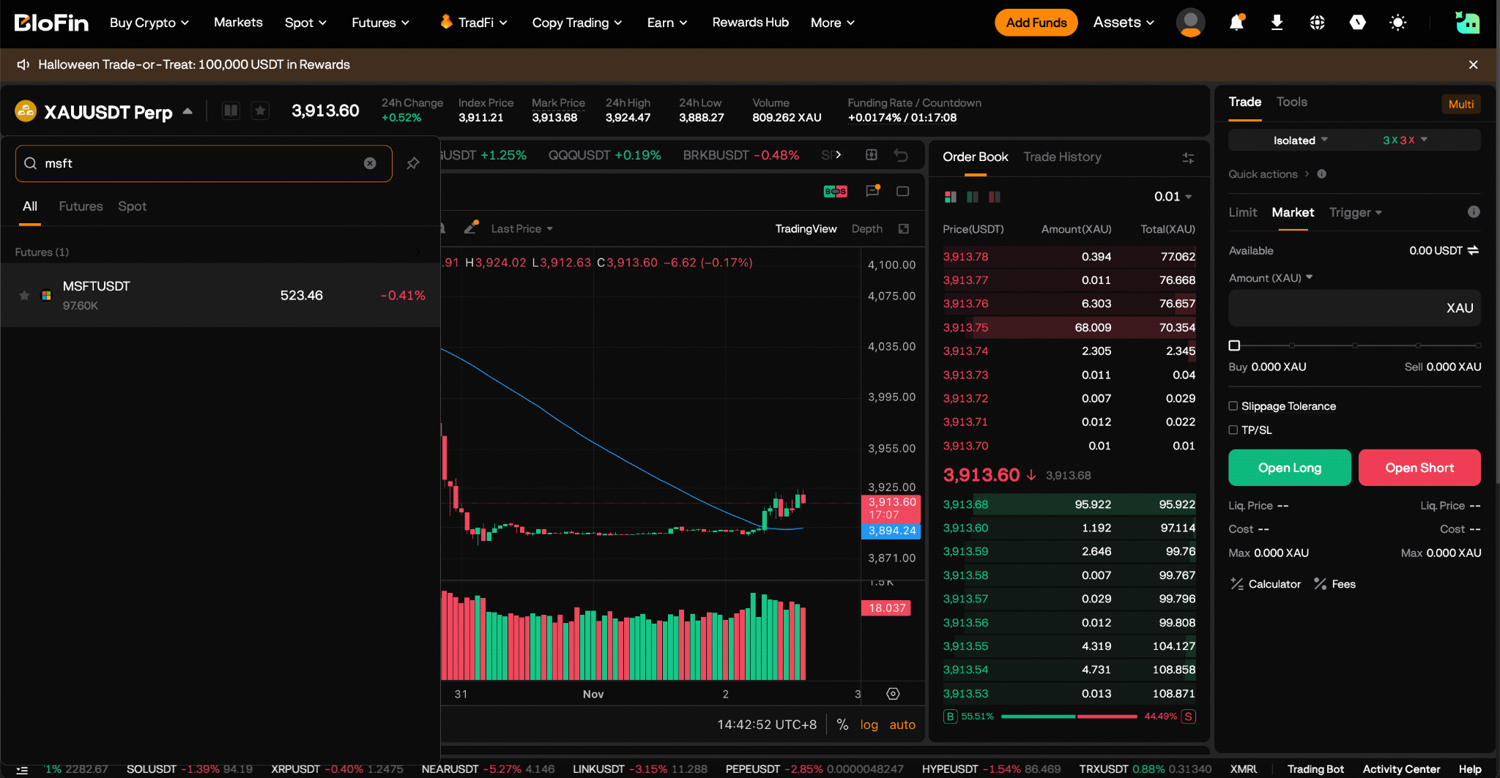
Step 2: Check the time. New positions can be opened while Nasdaq's weekday session runs, 9.30AM to 4PM ET (source: Nasdaq, trading hours). American clocks go back an hour when daylight saving time finishes on November 1, 2026 (source: NIST, daylight saving time). From Monday, November 2 the session is 2.30PM to 9PM UTC, and during US daylight saving time it is 1.30PM to 8PM UTC. Outside those hours BloFin may accept only reduce-only orders (source: BloFin stock futures notice), and the full calendar is in the article on MSFT perpetual trading hours.
Step 3: The order panel opens on Cross margin. Click it and switch to Isolated, so the trade can lose only the margin you put behind it.
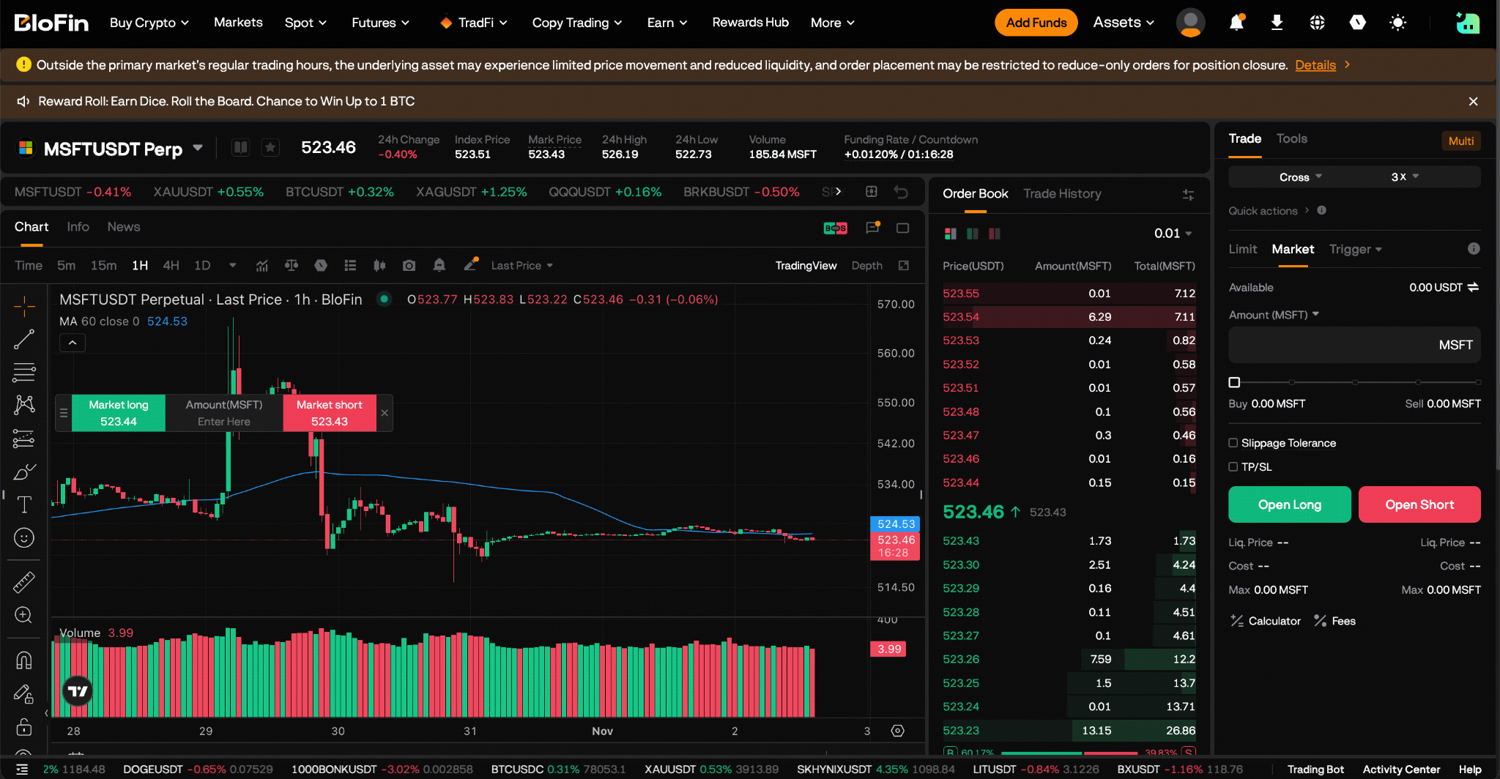
Step 4: Click the leverage figure beside it, which may show 3X, and set a leverage from 1x to 20x. The lower you set it, the more margin the order locks and the more room the trade has before liquidation.
Step 5: Choose Limit, Market or Trigger as the order type.
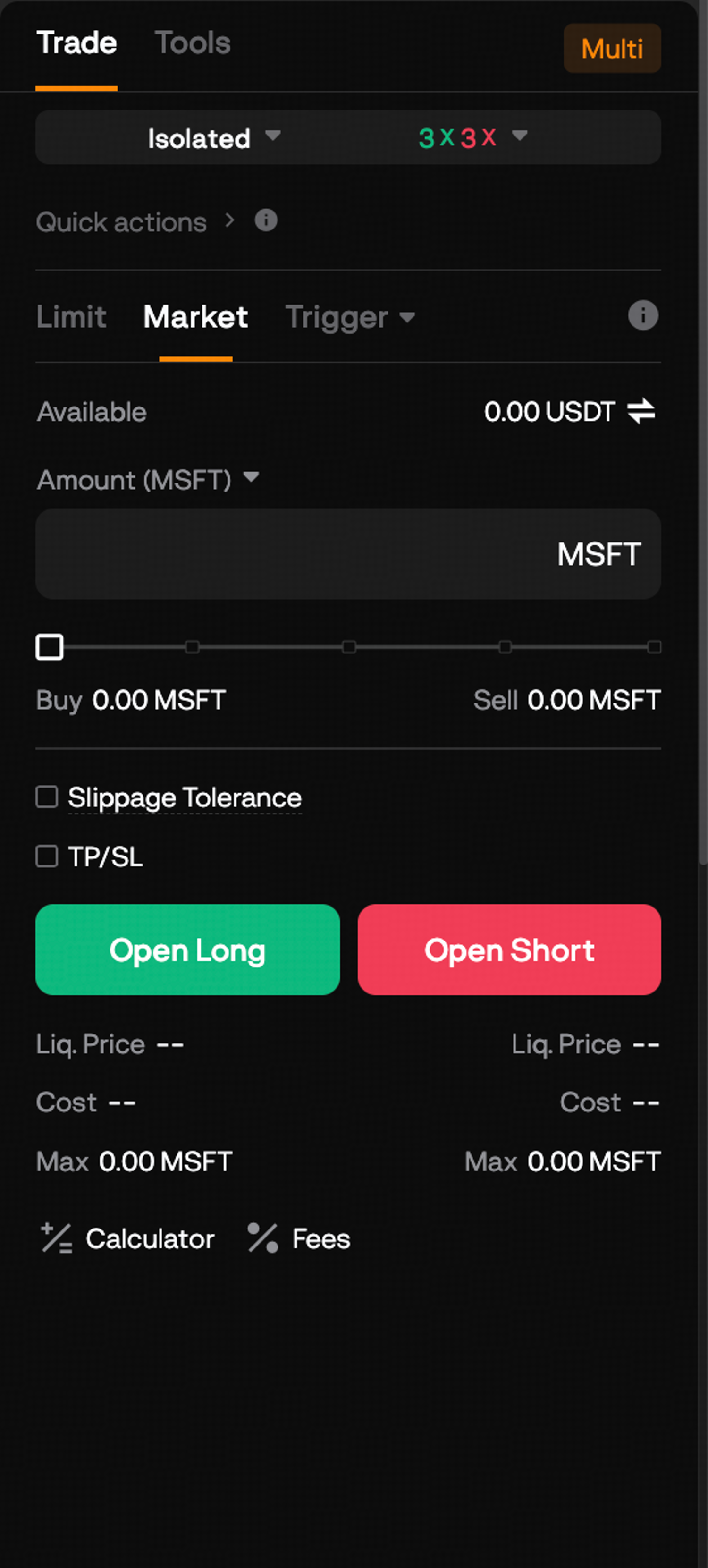
Step 6: For a limit order, type your price in the Price field, or tap BBO to use the best bid or offer. Type the size in Amount (MSFT); at 0.01 MSFT a contract, 0.5 MSFT equals 50 contracts.
Step 7: On a limit or market order, leave Reduce-only unticked for a new position, and tick the take-profit (TP) and stop-loss (SL) box, TP/SL, to set both exits with the order.
Step 8: Under the two order buttons, read Liq. Price and Cost. Cost is what the order will take from your balance as margin, and the liquidation price is where BloFin would close the position.
Step 9: Press Buy to open a long, or press Sell to open a short position, then review the confirmation and confirm, as BloFin's guide to your first futures trade shows. Your new position is listed under Positions, showing the average entry, the size in MSFT, the margin and the estimated liquidation price.
A short uses the same panel with the other button, and the walkthrough on shorting Microsoft on BloFin covers the risks particular to that side, such as a rally on a report night.
Limit, market and trigger orders on MSFTUSDT
A limit order trades at the price you name or a better one, and it can sit unfilled in the order book. A market order, by contrast, is guaranteed to go through but its fill price is not (source: Investor.gov, types of orders). On MSFTUSDT a market order takes whatever price the book offers straight away, up to 200 MSFT per order, while a limit order can carry up to 2,000 MSFT. Every order must also be priced within about 3% of the index price (source: BloFin MSFTUSDT contract details).
The choice also sets the fee. An order that waits in the book and is filled later counts as a maker order and pays 0.02% of the position's value; one that fills on arrival counts as a taker order and pays 0.06%. Every market order is a taker order, and both rates appear in BloFin's guide to closing a trade. A limit price set past the current market fills at once and pays the taker rate too.
A trigger order stays dormant until Microsoft's price touches the level you chose, then sends the order. It suits an entry you want only after a move, such as buying Microsoft once it climbs back above a recent high. The comparison of market, limit and stop orders sets out the order types side by side.
The MSFTUSDT Perpetual page puts the order panel next to the chart, with the current funding rate and a timer to the next payment, so you can try each field before committing any margin.
Reading the liquidation price on a Microsoft trade
The liquidation price on a Microsoft trade is the mark price at which BloFin closes the position because its margin can no longer cover the maintenance margin plus the closing fee. On an isolated long it sits below your entry, and the higher the leverage, the closer it comes. The order panel shows it as Liq. Price.
BloFin values open positions on the mark price, a reference built from the index, so a single large trade at an odd price does not liquidate you on its own. On MSFTUSDT, a position of 200 MSFT or less carries a maintenance margin rate of 2.50% (source: BloFin MSFTUSDT position tiers). BloFin publishes the formula for an isolated position (source: BloFin liquidation price FAQ).
Liquidation price of an isolated long = (MSFT amount × entry price − margin) ÷ (MSFT amount × (1 − maintenance rate − closing fee)).
Take a 0.5 MSFT long at 530 USDT, a round figure close to Microsoft's $530.14 close on October 29, 2026 (source: Nasdaq, MSFT historical prices). The position is worth 265 USDT. With 0.06%, the taker rate, standing in for the closing fee, the formula produces these estimates.
Leverage | Margin (USDT) | Estimated liquidation price (USDT) | Fall that liquidates |
|---|---|---|---|
2x | 132.50 | 271.96 | 48.7% |
3x | 88.33 | 362.62 | 31.6% |
5x | 53.00 | 435.14 | 17.9% |
10x | 26.50 | 489.53 | 7.6% |
20x | 13.25 | 516.73 | 2.5% |
Inside that first tier only the leverage sets the percentage, so the same 2.5% applies to any 20x long of up to 200 MSFT. A 1x long's estimated liquidation price works out at zero, because its margin covers the whole position. BloFin's explainer on leverage and liquidation sets out the general rules behind these prices, including why cross margin moves them.
In cross margin the same long can draw on every available balance in the Futures Account, so its liquidation price sits further away, but a deep fall can take much more than the margin you meant to risk. For a first trade, isolated margin keeps the worst case equal to the Cost figure you read before confirming.
Those leverage levels sit far beyond what a stockbroker offers on shares. Under the Federal Reserve's Regulation T, a US margin account can borrow up to 50% of a share purchase, about 2x, and FINRA's maintenance requirement is at least 25% of the shares' value (source: Investor.gov, understanding margin accounts). At 20x the MSFTUSDT Perpetual asks for 5% margin, which is why its liquidation price sits so close.
Sizing a first Microsoft trade to a typical day
Size a first Microsoft trade from how far the price usually moves in a day. Over the 60 sessions to October 29, 2026, Microsoft's close moved a median 0.9% from the day before, and the gap between each day's high and low was a median 1.84% of the close (source: Nasdaq, MSFT historical prices).
Those two figures turn into a plan. A stop placed closer than a normal day's range is likely to be hit by ordinary noise, so a stop about 2% from the entry sits just outside the median range. Eight of those 60 sessions still closed more than 2% from the day before, and the largest move was a 3.66% rise on September 25, 2026 (source: Stock Analysis, MSFT price history).
Size in MSFT = the USDT you accept losing at the stop ÷ (entry price × stop distance).
Say you accept a loss of about 5 USDT if the stop fires. A 2% stop on a 530 USDT entry is 10.60 USDT per MSFT, and 5.30 USDT divided by 10.60 gives 0.5 MSFT, or 50 contracts. The stop goes at 519.40 USDT, and the price loss there is 5.30 USDT. Add the taker fee on the way in and out, about 0.16 USDT each time, and the full loss is about 5.61 USDT.
A take-profit 3% above the entry, at 545.90 USDT, would gain 7.95 USDT before fees and about 7.63 USDT after both taker fees. Neither figure depends on leverage, because leverage changes only the margin, never the size of the position.
Leverage then has one task: keep the liquidation price well beyond the stop. At 5x the 0.5 MSFT long locks 53.00 USDT and liquidates near 435.14 USDT, far below the 519.40 stop. At 20x it locks 13.25 USDT, but liquidation sits near 516.73 USDT, less than 3 USDT below the stop, so a sudden drop could reach both almost at once. That is why position sizing on the MSFT perpetual starts from the stop and the loss you accept, and only then picks the leverage.
A report night shows why the margin of safety matters. After the Nasdaq close on October 28, 2026, Microsoft reported revenue of $92.3 billion, up 19%, for July to September 2026, which Microsoft counts as the opening quarter of fiscal 2027 (source: Microsoft Q1 FY2027 results). On October 29 the share's range was 4.1% of its close, more than twice the median day, and its low of $519.56 was 2.2% below the October 28 close of $531.01 (source: Nasdaq, MSFT historical prices).
On those share prices, a 20x long bought at the October 28 close had an estimated liquidation price near 517.71, less than 2 USDT under the day's low. The perpetual's own mark price is what counts on BloFin, and it does not move in step with Nasdaq to the cent, so treat the comparison as a measure of room, not a record of a liquidation. How traders handle those nights is covered in the guide to trading Microsoft around earnings.
Setting a stop-loss and take-profit on a Microsoft trade
On a Microsoft long the stop-loss goes below your entry and the take-profit above it; on a short they swap sides. You can attach both with TP/SL when you place the order, or add them to an open position from the Positions tab, for the whole position or part of it.
Step 1: On the order panel, tick TP/SL and enter a take-profit trigger above your entry and a stop-loss trigger below it, such as 545.90 and 519.40 USDT on the 530 USDT long.
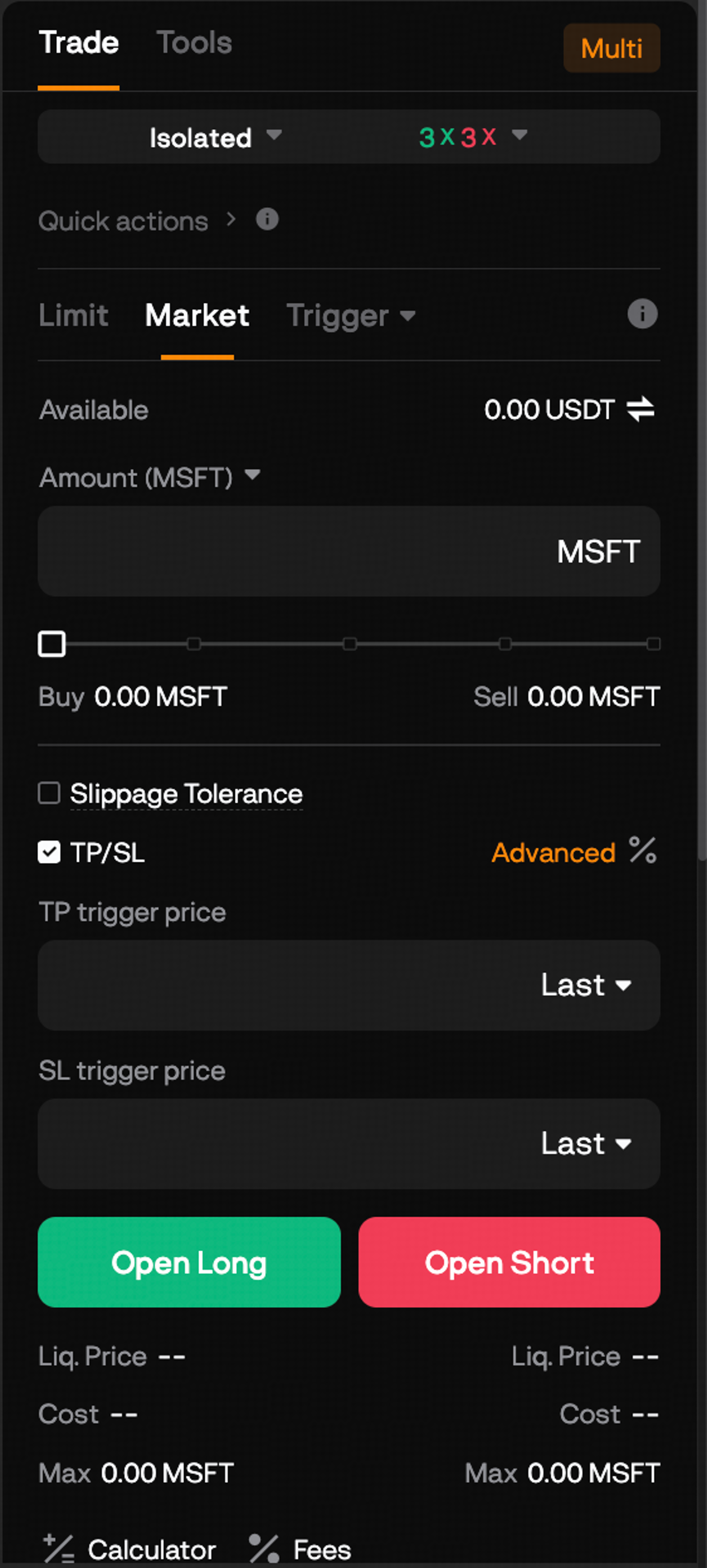
Step 2: Each trigger price has a dropdown that starts on Last; switch it to Mark if you want the stop to watch the mark price, or to Index. BloFin's stop-loss guide gives the reason to pick Mark: liquidation runs on the mark price too. A short spike in the last trade, the kind that leaves a wick on the chart, is less able to set off a mark-price stop. A mark-price stop set above the liquidation price therefore fires first. To change how the stop fills, open Advanced: ticking Limit beside the stop-loss sends a limit order instead of a market one, but a limit stop may not fill if the price jumps past it. Click Confirm to save the settings before you place the order.
Step 3: For a position that is already open, go to Positions, click TP/SL next to it and choose Entire Position or Partial Position. To exit with a limit order at a fixed price, tick Limit; then click Confirm.
Once its trigger is reached, a stop works like a market order (source: Investor.gov, types of orders), so it fills at the next available price, which in a fast fall can be lower than the trigger. That is the reason the stop needs room above the liquidation price, and the reason high leverage and a tight stop make a poor pair.
Moving the stop is allowed at any time. Raising it under a rising price locks in part of the gain, while lowering it to avoid being stopped out turns a planned loss into a larger, unplanned one.
Managing an open Microsoft position
An open Microsoft position changes in three ways while it runs. It pays or collects funding every eight hours, you can add to it only in set hours, and Microsoft's price can jump while Nasdaq is shut. Check the Positions tab daily for the mark price, margin and estimated liquidation price.
Funding changes hands between long and short holders on an eight-hour cycle, with settlements at 12AM, 8AM and 4PM UTC (source: BloFin MSFTUSDT contract details). As BloFin's guide to crypto funding rates explains, a positive rate means a long pays and a negative one means a long gets paid, with each amount equal to the position's value multiplied by the rate. On the 0.5 MSFT long worth 265 USDT, a rate of +0.0120% costs about 0.03 USDT. Over the 100 settlements from September 25 to October 28, 2026, 59 rates were positive (source: BloFin MSFTUSDT funding history). The article on the MSFT perpetual funding rate explains how the rate is set.
Hours matter for the exits as well as the entry. While Nasdaq is closed, the stock futures notice lets BloFin limit trading to reduce-only orders (source: BloFin stock futures notice). Such an order makes a position smaller or ends it and never adds to it, so the way out stays open even when the way in is closed. The stock market's holidays apply too: Nasdaq shuts for Thanksgiving on November 26 and for Christmas on December 25, 2026, with 1PM ET (6PM UTC) early finishes the day after Thanksgiving and on Christmas Eve (source: Nasdaq, holiday schedule).
The contract keeps a price while Nasdaq is shut, and the banner on the MSFTUSDT trade page warns that outside regular hours the underlying may see limited price movement and thinner liquidity. News released after the 4PM ET close, 9PM UTC from November 2, can still move the price before the next open. The study of overnight and weekend gap risk measures how far it has moved in those hours.
Closing a Microsoft trade
Closing a Microsoft trade means taking the opposite side for the same size: selling to close a long or buying to close a short. Use Close on the Positions tab, at a limit price or at market, for all or part of the position, and the result settles in USDT in your Futures Account.
Step 1: In the Positions tab beneath the chart, locate your MSFTUSDT position.
Step 2: Press Close, then pick Limit for an exit at a price you set, or Market for an immediate exit.
Step 3: Enter the amount in MSFT, plus the price for a limit close, and press Confirm. A partial close leaves the rest open with its original margin and leverage, according to the same BloFin guide to closing a trade.
Step 4: Look through Open Orders and cancel any leftover take-profit, stop-loss or limit order you no longer want. The finished trade moves to Position History.
Say you close half of the 0.5 MSFT long with a sell of 0.25 MSFT at 540 USDT. That banks 2.50 USDT before fees, and the other 0.25 MSFT stays open at the 530 entry with its own stop. Close All shuts every futures position you hold with market orders at once, quick but blunt, since it also ends trades you wanted to keep. Reverse closes the position and opens one the same size in the other direction, or a smaller one if your available balance cannot cover it, both at market.
A sell order placed by hand to close a long should have Reduce-only ticked. Then a typing slip in the amount can only shrink the long, never flip it into a short. Once the position has gone from Positions, the USDT can stay in the Futures Account for the next trade or move back to the Funding Account with Transfer.
Copy trading Microsoft on BloFin
Copy trading Microsoft on BloFin means following a lead trader whose futures orders are repeated in your own account, in proportion to the amount you allocate. MSFTUSDT is one of the perpetuals BloFin makes available for copying, so a lead trader's Microsoft trades can come through to you, with their losses as well as their gains.
It suits a reader who wants Microsoft exposure but would rather not place and manage each order, and BloFin's Copy Trading page lists the lead traders to choose from.
BloFin's copy trading explainer covers how the model works, and BloFin's guide for copiers sets out the same five steps.
Step 1: Hover over Copy Trading in the top menu and select Futures Copy Trading.

Step 2: Browse the All Traders or Leaderboard list, then click Copy on a lead trader's card to open their performance page.
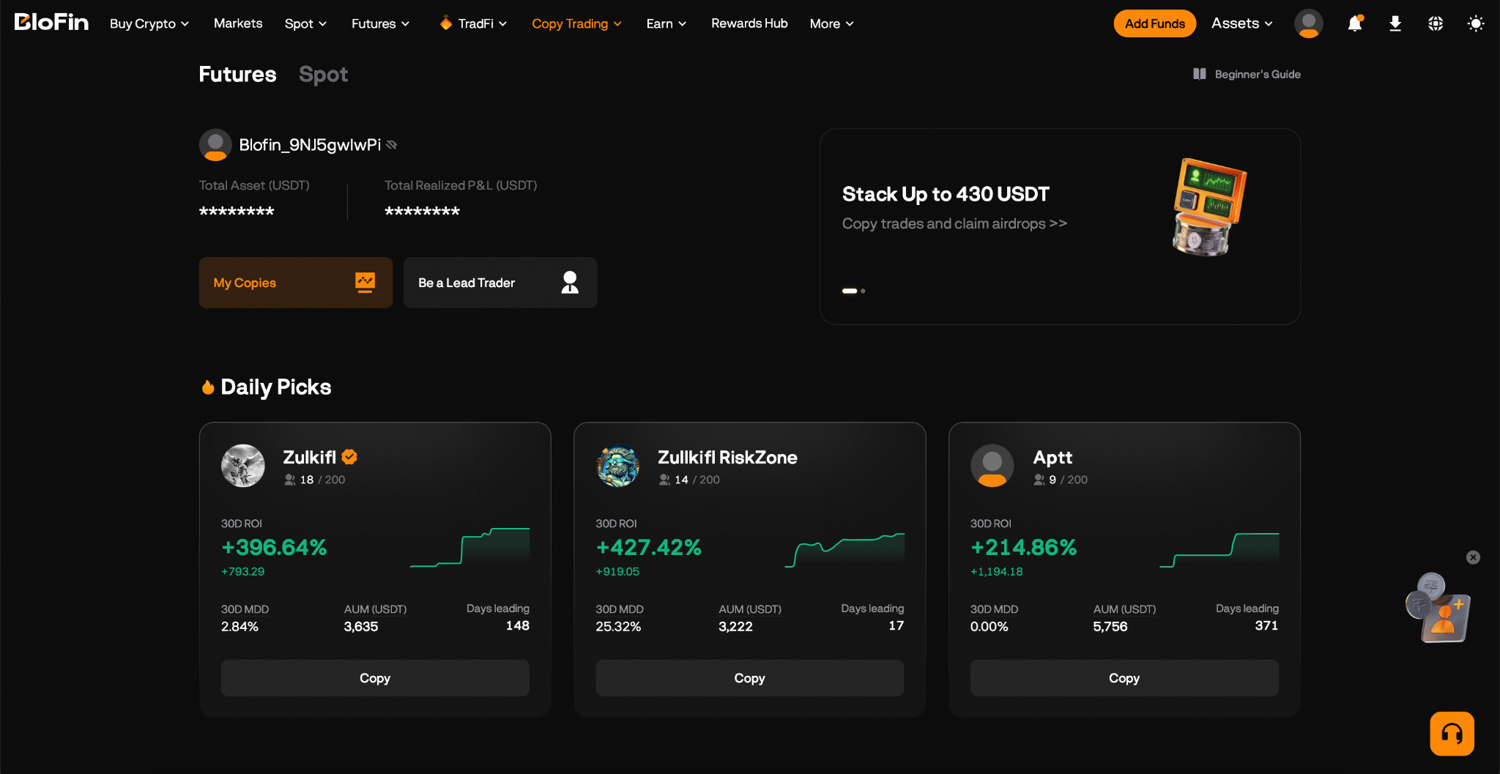
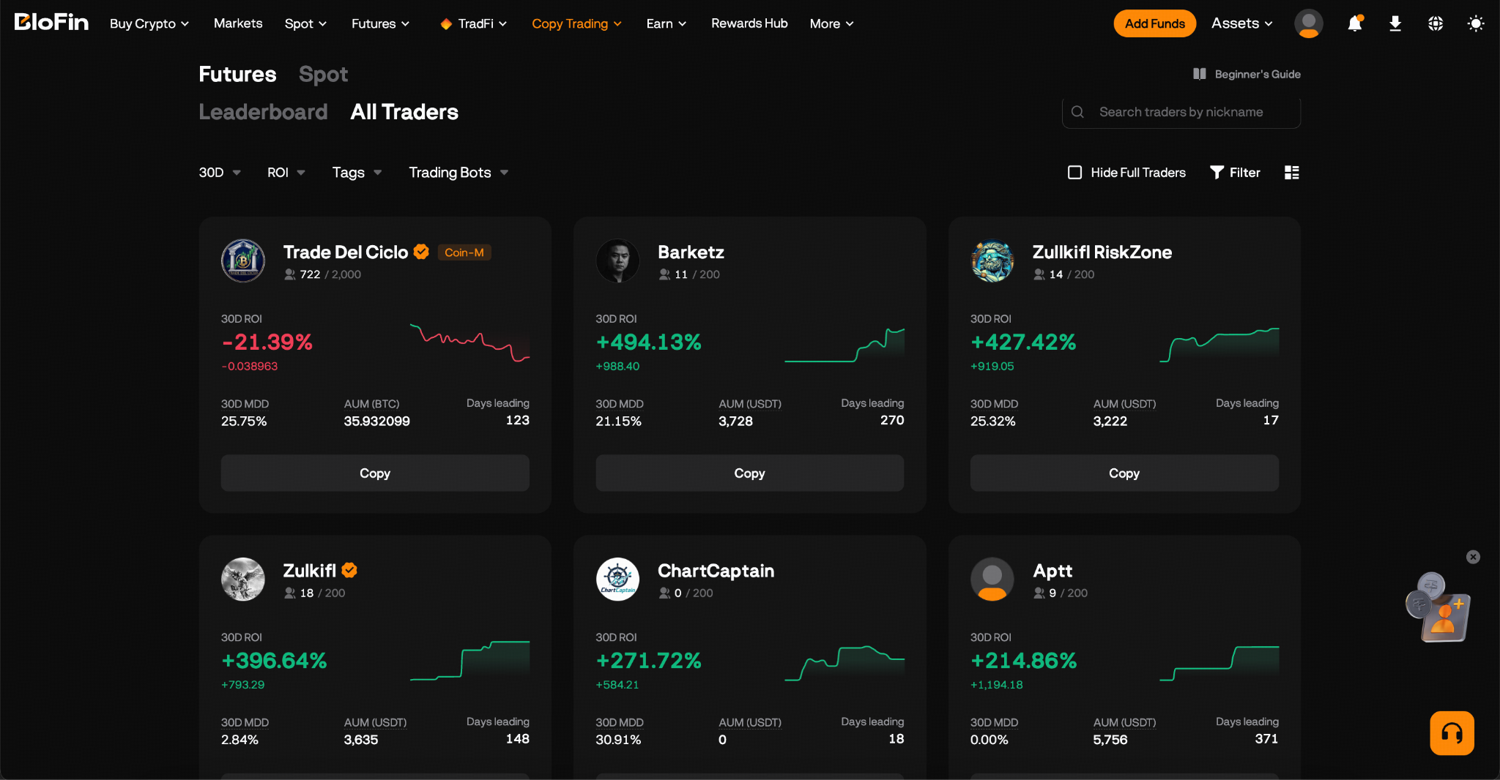
Step 3: On that page, open Current Positions and Trade History and look for MSFTUSDT. You follow a person, so you copy every pair they trade, and a trader with no Microsoft history may never give you a Microsoft position.
Step 4: Click Copy, enter the amount you want to invest, choose USDT Perpetual Trades as the item to copy and decide whether to switch on Copy Stop Loss. Leaving Copy Immediately off means you join only the trades the leader opens from now on, at prices close to theirs.
Step 5: Read and agree to the BloFin Copy Trading Service Agreement, then click Submit.
The minimum allocation is 100 USDT, and BloFin can move it from your Funding, Spot or Futures Account into a separate Copy Trading Account in the same step, so copied positions never mix with trades you place yourself. You can also set your own take-profit and stop-loss on copied positions, and they close at your levels even while the leader stays in.
The leader's past returns describe trades already made, and your entry prices can differ slightly from theirs. Reading their maximum drawdown, the worst fall their account has suffered, says more about the risk you are taking on than the headline return does.
Looking to trade Microsoft on BloFin? To get started, you'll need to first create a BloFin account, fund your account with cryptocurrency, and go to the MSFTUSDT Perpetual trading page.
Frequently asked questions
How small can a Microsoft trade on BloFin be?
The smallest Microsoft trade on BloFin is one contract, 0.01 MSFT (source: BloFin MSFTUSDT contract details). With the perpetual near 530 USDT, that is a position worth about 5.30 USDT. At 20x that position locks about 0.27 USDT of margin, at 1x all 5.30 USDT, and the taker fee each way comes to less than a cent.
Do you own Microsoft shares when you trade the MSFTUSDT Perpetual?
You own a contract that follows Microsoft's price, with no shares behind your position. BloFin's notice says its stock futures give no right to dividends, interest, voting or other shareholder rights (source: BloFin stock futures notice). Microsoft declared a $0.98 dividend per share in September, which reaches people who held shares on the November 19 record date when it is paid on December 10, 2026 (source: Microsoft dividend announcement). A position on the perpetual receives nothing and owes nothing.
Does it cost anything to cancel a Microsoft limit order on BloFin?
Canceling a Microsoft limit order before it fills costs nothing, because BloFin charges its trading fee only on orders that fill. BloFin's guide to closing a trade lists the rates. On the 0.5 MSFT long worth 265 USDT, a fill as a maker at 0.02% costs about 0.05 USDT, and a fill as a taker at 0.06% costs about 0.16 USDT.
How much Microsoft can 100 USDT trade on BloFin?
With the perpetual near 530 USDT, 100 USDT of margin covers 18 contracts (0.18 MSFT) at 1x, 94 contracts (0.94 MSFT) at 5x, 188 contracts (1.88 MSFT) at 10x and 377 contracts (3.77 MSFT) at 20x. Because fees are taken from that same 100 USDT, the true size is a little smaller, and every step up in leverage moves the liquidation price closer.
Does a take-profit on BloFin fill at the exact price you set?
Like the stop-loss, a take-profit set with the order turns into a market order at its trigger, according to BloFin's stop-loss guide. In a fast market it can therefore fill a little away from the trigger price. For a fixed exit price, add the take-profit from the Positions tab with Limit ticked: it then waits at your price, but it may not fill if Microsoft turns back before reaching it.
Researched and written by the BloFin Academy editorial team with AI-assisted drafting. All facts independently verified. Primary sources include BloFin's MSFTUSDT contract details, position tiers, funding history and order panel, its stock futures notice and liquidation price FAQ, and its Academy guides to deposits, first futures trades, stop-losses, closing a trade and copy trading. They also include Microsoft's results release for the first quarter of fiscal 2027 and Nasdaq's MSFT price history, current as of October 30, 2026.
Nothing in this article constitutes financial advice, and nothing in it is a recommendation to buy, sell or hold Microsoft in any form. A leveraged Microsoft position can be liquidated by an ordinary move: at 20x, a fall of about 2.5% from a long's entry reaches the estimated liquidation price, and Microsoft's price swung 4.1% from high to low in the session after its October 2026 report. A stop-loss can fill beyond its trigger when the price jumps, funding is charged or paid every eight hours, and outside US market hours BloFin may accept only orders that reduce a position. Past performance does not indicate future results. Do your own research and consider your risk tolerance before you trade on BloFin.